
Roshan Alefba
БесплатноНе проверенA self-hostable MCP server that exposes Roshan AI's Alefba OCR service as tools, enabling document reading, page extraction, status polling, and export to PDF/W

Описание
A self-hostable MCP server that exposes Roshan AI's Alefba OCR service as tools, enabling document reading, page extraction, status polling, and export to PDF/Word/Excel for Persian, Arabic, and English text.
README


roshan-alefba-mcp
A self-hostable Model Context Protocol server for Roshan AI's OCR service Alefba (الفبا).
Unofficial, community-built. Wraps the public API documented at docs.roshan-ai.ir.
What is this?
Alefba (الفبا) is Roshan AI's high-accuracy OCR / document-understanding service for Persian (fa), Arabic (ar) and English (en). Give it an image or PDF and it returns the text split into pages, paragraphs and lines — each with its bounding box, direction and recognition confidence — and it can tell tables, images and text apart. It also exports the analyzed document as a searchable PDF, Word or Excel file.
This server exposes Alefba to any MCP client (Claude or otherwise) as a set of
first-class tools. Alefba is commonly self-hosted, and organizations often
run many independent instances (per data-center, tenant, or environment), so
named instances are a core concept here: every tool takes an optional instance
argument selecting which deployment to talk to.
Features
- All Alefba endpoints as tools, prefixed
alefba_(read, pages, status, download to PDF/Word/Excel, delete, callback). - URL input and local-file upload (multipart).
- Async OCR: queue with
wait=false, then poll withalefba_get_result. - Many named, self-hosted instances; pick per call via
instance. - Guardrails: http(s) URL validation, enum/number clamping, list-size limits, and token redaction — tokens are never logged or returned.
- Transports:
stdio(default),sse,streamable-http.
Install
Requires Python 3.10+.
git clone <this-repo>
cd roshan-alefba-mcp
python -m venv .venv && . .venv/bin/activate
pip install -e ".[dev]"      # runtime + test deps (omit [dev] for runtime only)
Run it:
python -m roshan_alefba_mcp --help
python -m roshan_alefba_mcp --transport stdio          # default
python -m roshan_alefba_mcp --transport streamable-http
Configuration
Configuration is read from environment variables. The simplest setup uses the
shorthand form, which synthesizes a single instance named default:
| Variable | Description | Default |
|---|---|---|
ROSHAN_ALEFBA_BASE_URL |
Base URL of the default Alefba instance | https://alefba.roshan-ai.ir |
ROSHAN_ALEFBA_TOKEN |
API token for the default instance (sent as Authorization: Token <token>) |
(none) |
For multiple instances, use the nested form (one base_url + token per
instance):
| Variable | Description |
|---|---|
ROSHAN_ALEFBA__INSTANCES__<NAME>__BASE_URL |
Base URL for instance <NAME> |
ROSHAN_ALEFBA__INSTANCES__<NAME>__TOKEN |
Token for instance <NAME> |
ROSHAN_ALEFBA__INSTANCES__<NAME>__VERIFY_SSL |
Verify TLS for <NAME> (default true) |
ROSHAN_ALEFBA__INSTANCES__<NAME>__TIMEOUT |
Request timeout in seconds (default 60) |
ROSHAN_ALEFBA__DEFAULT_INSTANCE |
Instance used when a call omits instance (default default) |
ROSHAN_ALEFBA__LOG_LEVEL |
Log level (default INFO) |
Example (two instances, default = dc1):
export ROSHAN_ALEFBA__INSTANCES__DC1__BASE_URL="https://alefba-dc1.example.ir"
export ROSHAN_ALEFBA__INSTANCES__DC1__TOKEN="token-1"
export ROSHAN_ALEFBA__INSTANCES__DC2__BASE_URL="https://alefba-dc2.example.ir"
export ROSHAN_ALEFBA__INSTANCES__DC2__TOKEN="token-2"
export ROSHAN_ALEFBA__DEFAULT_INSTANCE="dc1"
Call list_instances at any time to see configured instance names and base URLs
(never tokens).
Use with an MCP client
Add the server to your client config (example for stdio):
{
  "mcpServers": {
    "roshan-alefba": {
      "command": "python",
      "args": ["-m", "roshan_alefba_mcp", "--transport", "stdio"],
      "env": {
        "ROSHAN_ALEFBA_BASE_URL": "https://alefba.roshan-ai.ir",
        "ROSHAN_ALEFBA_TOKEN": "your-token"
      }
    }
  }
}
Tool reference
All tools accept an optional instance (except list_instances and
roshan_alefba_docs). OCR tools also share type (general | ID-card |
excel), fix_orientation, word_positions, wait, and priority (1–4).
| Tool | Endpoint | Purpose |
|---|---|---|
alefba_read_document |
POST /api/read_document/ |
Read (OCR) a document/image from a URL; sync (wait=true) or async (task_ids). |
alefba_read_document_upload |
POST /api/read_document/ (multipart) |
Upload a local file_path and read it. |
alefba_get_result |
POST /api/read_document/ |
Fetch/poll an async result by task_id. |
alefba_read_pages |
POST /api/read_pages/ |
Read specific pages given as URLs with @page=N. |
alefba_document_status |
POST /api/document_status/ |
Per-document progress (analyzed, processed_pages, all_pages). |
alefba_document_pages |
POST /api/document_pages/ |
List a document's page URLs. |
alefba_download_word |
POST /api/download_word/ |
Download as Word (.docx); optional save_path. |
alefba_download_excel |
POST /api/download_excel/ |
Download as Excel (.xlsx); requires type=excel; optional save_path. |
alefba_download_pdf |
POST /api/download_pdf/ |
Download as searchable PDF (quality 0–100, color); optional save_path. |
alefba_delete_document |
POST /api/delete_document/ |
Delete a document and its results. |
alefba_read_document_callback |
POST /api/read_document/ |
Process and receive the result via a webhook callback_url. |
healthcheck |
GET /api/healthcheck/ |
Check an instance is up and ready. |
list_instances |
(local) | List configured instance names + base URLs (no tokens). |
roshan_alefba_docs |
(local) | Documentation about Alefba and these tools. |
Download tools return the download URL and request payload by default; pass
save_pathto download the bytes and save them locally (the saved path is returned).boxvalues in OCR results are"left top width height"in pixels.
Architecture
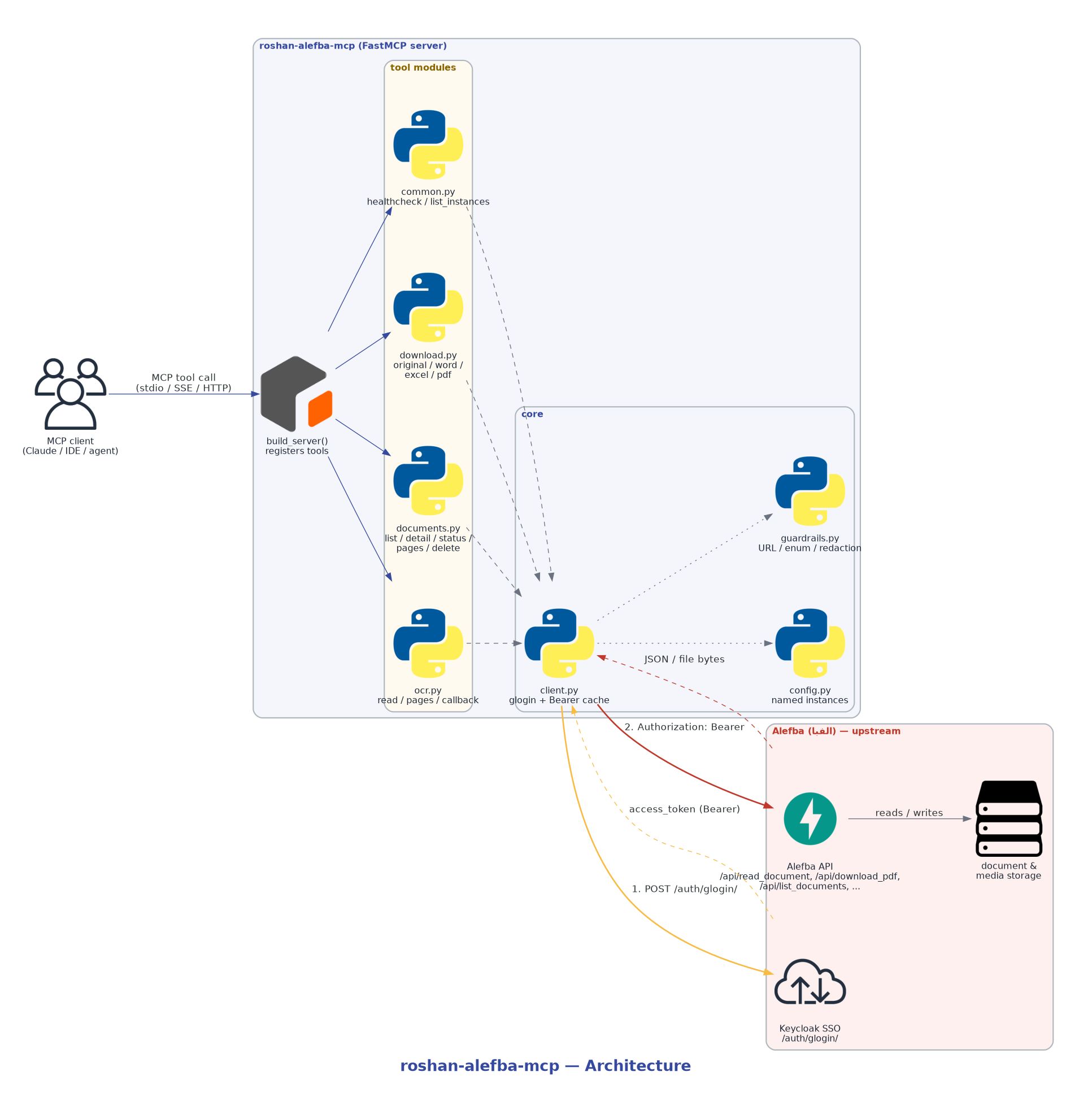
The MCP client calls tools registered by build_server(); the ocr, common
and docs tool modules validate input (guardrails.py), resolve the target
deployment (config.py) and talk to Alefba over an authenticated async HTTP
client (client.py).
Self-hosting & scaling
One process can route to many self-hosted Alefba deployments, selected per
call by instance:
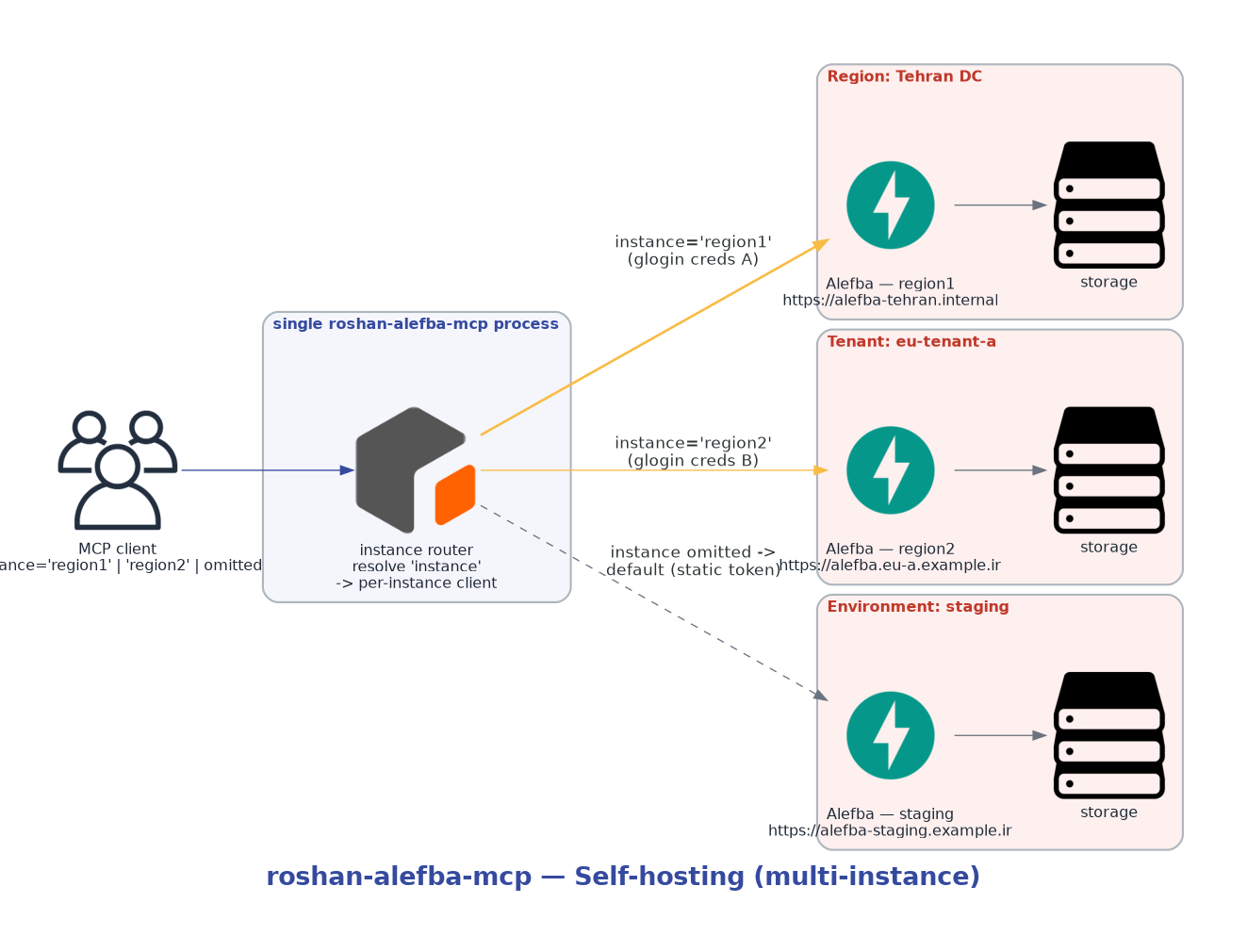
The server is stateless, so scale it horizontally (more replicas behind a load balancer, or enable the Helm/Kubernetes HPA). Each replica reads the same instance configuration.
Request flow (async OCR + PDF export)
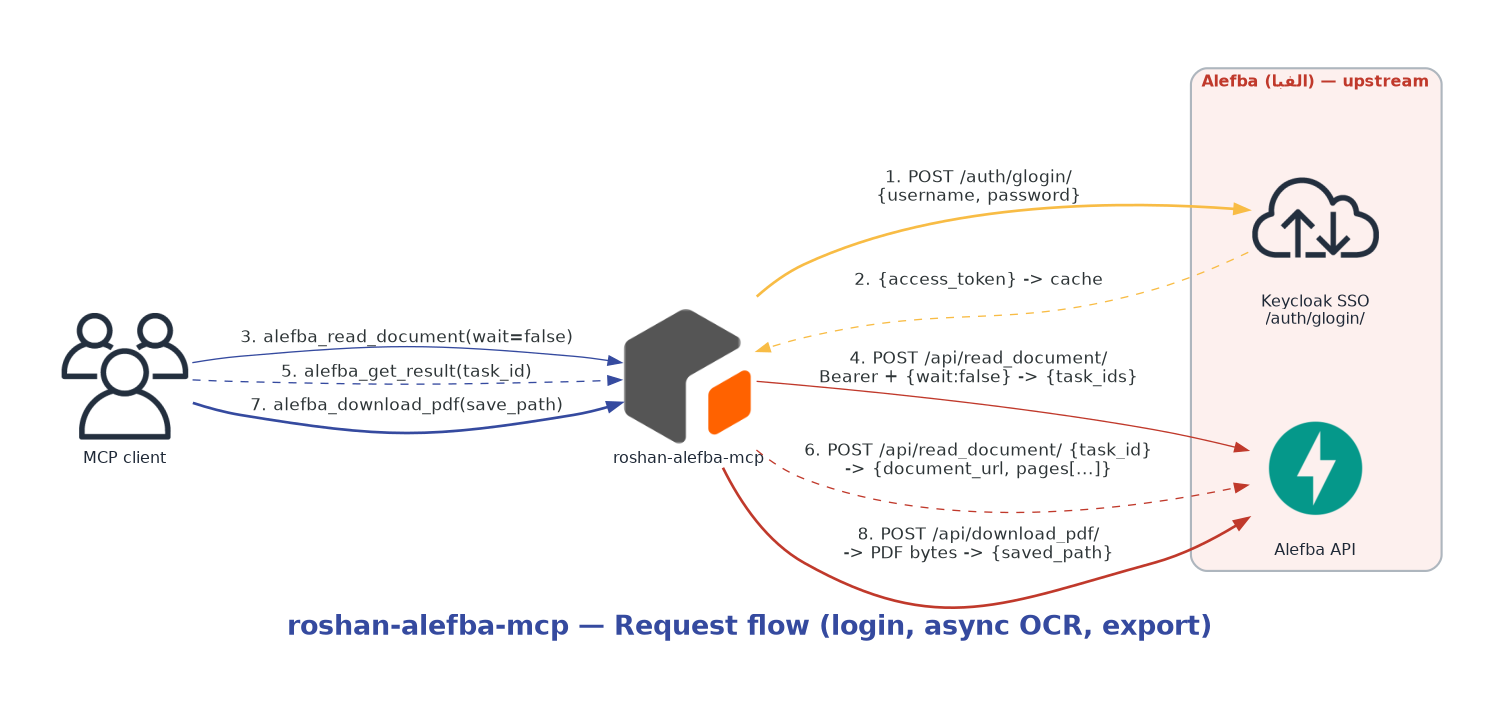
alefba_read_document(wait=false)queues the job; Alefba returns{state, task_ids}.- Poll
alefba_get_result(task_id)until the full{document_url, pages[...]}result is ready. alefba_download_pdf(document_url, save_path)exports a searchable PDF.
The diagrams above are generated with the diagrams library. Regenerate them with
python assets/diagrams/generate_diagrams.py(requirespip install diagramsand the Graphvizdotbinary).
Deployment
Manifests and modules live in deploy/:
- deploy/kubernetes/ — raw, kustomize-ready manifests.
- deploy/helm/roshan-alefba-mcp/ — Helm chart.
- deploy/terraform/ — Terraform (Kubernetes provider).
- Dockerfile + docker-compose.yml — container image and a two-instance compose example.
See deploy/README.md for details.
Testing
make test        # pytest, HTTP mocked with respx (live tests skipped)
make smoke       # offline: build server, list tools, assert invariants
python examples/inspect_server.py
Live tests against a real Alefba instance are skipped unless
ROSHAN_ALEFBA_LIVE=1 and credentials are set.
License
MIT. "Roshan", the Roshan logo, and "Alefba" are trademarks of their respective owner and are used only to identify the upstream service this tool integrates with.

Установка Roshan Alefba
У этого сервера нет опубликованного пакета — он собирается из исходников. Открой репозиторий и следуй инструкции в README.
▸ github.com/dwin-gharibi/roshan-alefba-mcpFAQ
Roshan Alefba MCP бесплатный?
Да, Roshan Alefba MCP бесплатный — установка в пару кликов через Unyly без оплаты.
Нужен ли API-ключ для Roshan Alefba?
Нет, Roshan Alefba работает без API-ключей и переменных окружения.
Roshan Alefba — hosted или self-hosted?
Доступен hosted-вариант: Unyly запускает сервер в облаке, локальная установка не обязательна.
Как установить Roshan Alefba в Claude Desktop, Claude Code или Cursor?
Открой Roshan Alefba на unyly.org, выбери вкладку своего клиента (Claude Desktop, Claude Code, Cursor) и нажми Install — конфиг сгенерируется автоматически, без правки JSON.
Похожие MCP
Fetch
Web content fetching and conversion for efficient LLM usage.
AWS KB Retrieval
Retrieval from AWS Knowledge Base using Bedrock Agent Runtime.
 автор: modelcontextprotocol
Spring AI MCP Server
Provides auto-configuration for setting up an MCP server in Spring Boot applications.
llm-analysis-assistant
A very streamlined mcp client that supports calling and monitoring stdio/sse/streamableHttp, and can also view request responses through the /logs page. It also
 автор: xuzexin-hz
Compare Roshan Alefba with
Не уверен что выбрать?
Найди свой стек за 60 секунд
Автор?
Embed-бейдж для README
Похожее
Все в категории ai