
Ruminer Browser Agent
БесплатноНе проверенSyncs AI conversations from multiple platforms to local Markdown files for your second brain, and provides browser automation tools via MCP for agentic workflow

Описание
Syncs AI conversations from multiple platforms to local Markdown files for your second brain, and provides browser automation tools via MCP for agentic workflows.
README
Sync your AI conversations from 5+ platforms into your second brain — quick search, agent-ready, yours forever.
- Continuously export conversations to local Markdown files across AI chat platforms: ChatGPT, Gemini, Claude, DeepSeek, and Grok.
- Your user credentials on these platforms stay secure in your own browser, never uploaded to cloud.
- Freely choose your AI agent backend: OpenClaw, Claude Code, or Codex.
- Make your agent understand you deeply via RAG from your local Markdown conversation archive.
- Seamlessly integrated into your Chrome browser with beautiful UI and powerful automation.
https://github.com/user-attachments/assets/fb49d045-3d43-49b6-b51a-3ee8ff9ed508
System Architecture
flowchart TB
    subgraph MCP_Clients[MCP Clients]
        Codex[Codex CLI]
        ClaudeCode[Claude Code]
        OpenClawPlugin[OpenClaw]
    end

    subgraph OpenClaw[OpenClaw Gateway]
        Gateway[ws://127.0.0.1:18789]
    end

    subgraph Ruminer[Ruminer Stack]
        NativeServer[Messaging Server]
        McpServer[MCP Server<br/>http://127.0.0.1:12306/mcp]
        Extension[Chrome Extension<br/>Service Worker]
        Sidepanel[Side Panel UI]
        Workflows[Ingestion Workflows]
    end

    subgraph Chrome[Chrome Browser Session]
        APIs[Chrome APIs<br/>tabs, read page, scrolling, click]
    end

    subgraph Memory[Local Memory]
        LocalMD[Markdown Files<br/>~/your-memory-dir/]
    end

    subgraph AIPlatforms[AI Chat Platforms]
        ChatPlatforms[ChatGPT, Gemini, Claude, DeepSeek, Grok]
    end

    MCP_Clients <-->|"Streamable HTTP"| McpServer
    APIs <-->|"Browser Tools"| McpServer
    LocalMD -->|"RAG Tools"| McpServer

    NativeServer <-->|"Native Messaging"| Extension
    Extension <--> APIs

    Sidepanel <-->|"Chat"| NativeServer
    NativeServer <-->|"WebSocket"| Gateway

    Workflows -->|"Write Markdown"| LocalMD
    LocalMD -->|"Memory Search"| Sidepanel

    AIPlatforms -->|"Conversation Data"| Workflows
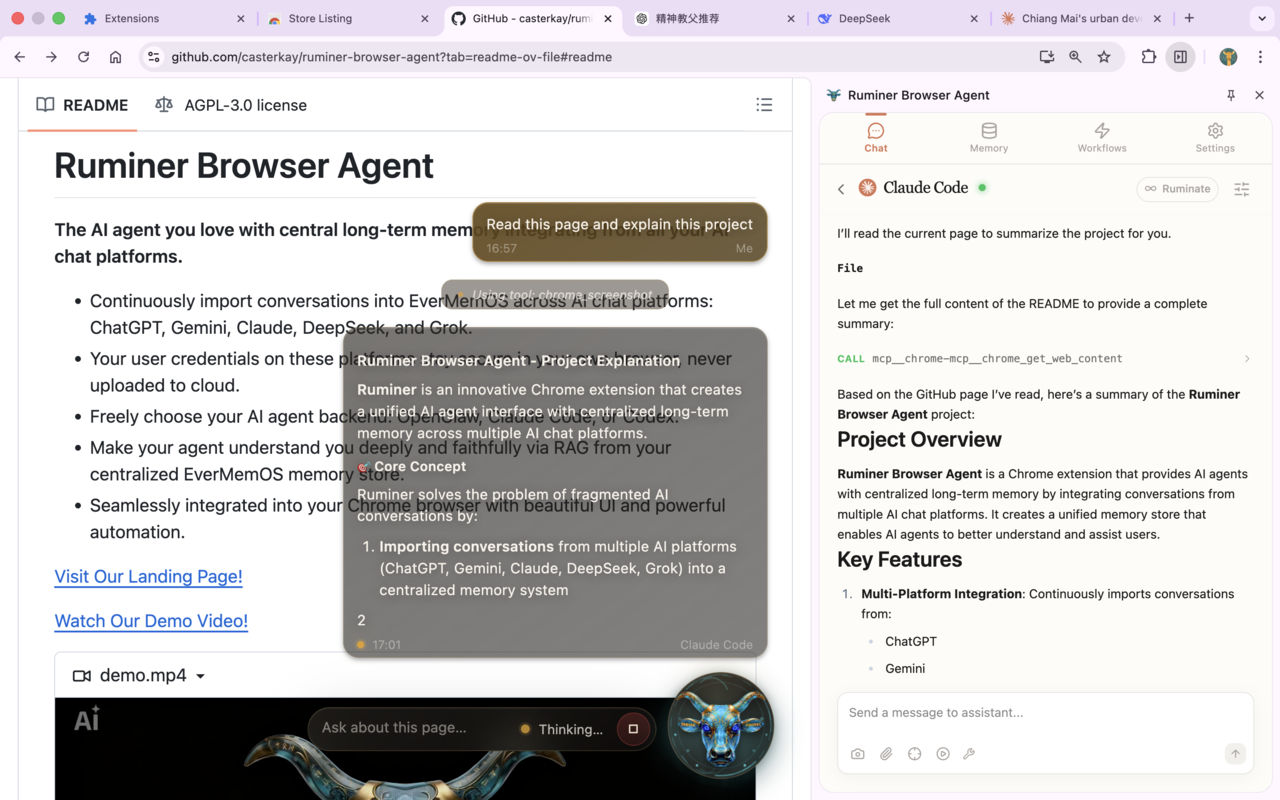
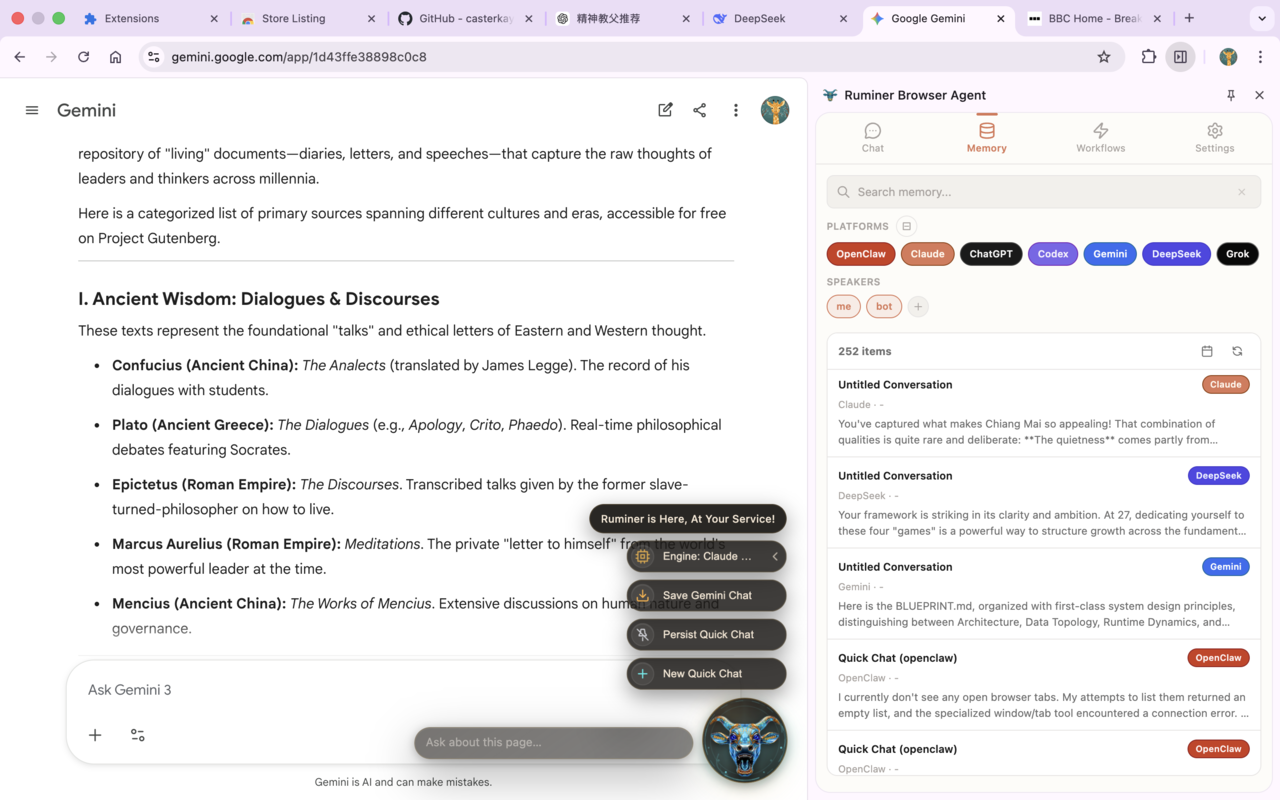
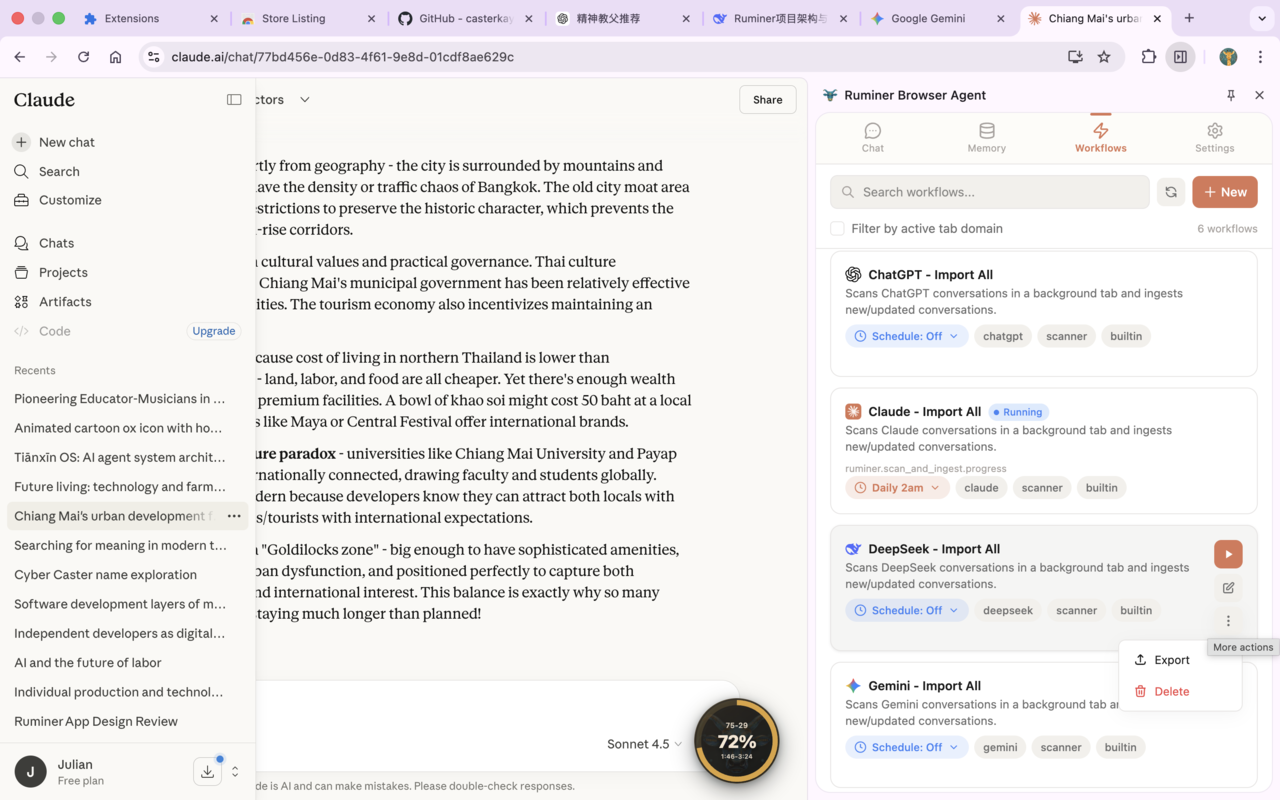
The Ruminer UI has three major pillars in one Chrome extension:
- Chat tab: communicate with your CLI agents via native server, providing MCP tools for browser operations and local RAG.
- You can toggle tool groups (Memory / Observe / Navigate / Interact / Execute / Workflow) in the message input box to control which ones the agent can use.
- Memory tab: browse/search/manage your local memory directory.
- Conversations are organized by AI chat platform and stored as plain Markdown files you own.
- Workflows tab: create, edit, and schedule automation workflows to export conversations to your local Markdown directory or accomplish other tasks in browser.
- Coming soon: agent-driven workflow development by autonomously interacting with the browser and editing the workflow graph!
Glossary
- OpenClaw Gateway: local control plane for chat + tool runtime (Ruminer sidepanel chat talks to it).
- MCP: Model Context Protocol; here it’s the standard interface your clients use to call browser tools.
- Local Markdown memory: plain
.mdfiles written to a directory you configure — compatible with Obsidian, Logseq, and any agent that can read files (OpenClaw, Hermes, GBrain, Claude Code, Codex).
Getting Started (local dev)
Prerequisites
- Node.js
>= 22.5.0 pnpm(seepackage.json)- Chrome/Chromium (MV3 + sidepanel enabled)
- Optional but recommended:
openclawCLI (for sidepanel chat + plugin routing)- A local Markdown directory path (for memory storage + RAG ingestion)
1) Quick setup
From the repo root, run:
pnpm install
pnpm -C app/chrome-extension build
Then open the extension Welcome page (it opens automatically on install) and run the one‑shot installer to set up Native Messaging + MCP clients:
curl -fsSL https://raw.githubusercontent.com/casterkay/ruminer-browser-agent/refs/heads/main/scripts/setup.sh | \
  bash -s -- --extension-id <your-extension-id>
This installer (best-effort):
- Installs
chrome-mcp-serverand registers the Native Messaging host (allowlisted to your extension ID) - Adds Ruminer MCP endpoint to Claude Code and Codex (
ruminer-chrome) - Installs + enables the OpenClaw plugin (
openclaw-mcp-plugin) and points it to Ruminer MCP URL
2) Load the extension
Chrome does not allow “Load unpacked” via script.
- Open
chrome://extensions - Enable Developer mode
- Click Load unpacked
- Select:
app/chrome-extension/.output/chrome-mv3
3) Configure the extension
In the Settings tab in Ruminer side panel:
- OpenClaw Gateway
- WS URL:
ws://127.0.0.1:18789 - Token: your Gateway token
- WS URL:
- Memory Directory
- Local path to your Markdown memory folder (e.g.
~/Documents/my-second-brain)
- Local path to your Markdown memory folder (e.g.
Hosted auth and billing URL
Workflow unlock now relies on the hosted Ruminer web app in landing-page for Better Auth + Stripe.
The extension opens that app for sign-in, checkout, and account management, then receives a browser-bound
access snapshot back through the background service worker.
- Set
WXT_PUBLIC_RUMINER_WEB_URLto your hosted web app origin when building or running the extension. VITE_RUMINER_WEB_URLis also accepted as a fallback alias if you already use that naming in local env files.- If neither env var is set, the extension defaults to
http://localhost:3000.
Local dev example:
cd landing-page
pnpm install
pnpm dev

cd ../app/chrome-extension
WXT_PUBLIC_RUMINER_WEB_URL=http://localhost:3000 pnpm dev
Verify It Works
- MCP tool check:
- Ask the agent to call a tool (e.g. "List the current tab titles in my browser") in CLI.
- Side panel chat:
- Open Ruminer side panel → Chat → send a message → see tool calls render inline
- Memory suggestions (requires memory directory configured):
- Type ≥ 3 characters in message input box → see debounced suggestions from your local Markdown files
- Workflows (requires memory directory configured):
- Open Workflows tab → run a built‑in workflow → re-run should not duplicate (ledger + stable IDs)
Developer Notes
This is a pnpm workspace with key packages:
app/chrome-extension: MV3 extension (Vue 3 + WXT + Tailwind)app/native-server: Fastify server + Native Messaging host + MCP transportpackages/shared: shared types + tool schemas
License
AGPL-3.0 (see LICENSE).
Установка Ruminer Browser Agent
У этого сервера нет опубликованного пакета — он собирается из исходников. Открой репозиторий и следуй инструкции в README.
▸ github.com/casterkay/ruminer-browser-agentFAQ
Ruminer Browser Agent MCP бесплатный?
Да, Ruminer Browser Agent MCP бесплатный — установка в пару кликов через Unyly без оплаты.
Нужен ли API-ключ для Ruminer Browser Agent?
Нет, Ruminer Browser Agent работает без API-ключей и переменных окружения.
Ruminer Browser Agent — hosted или self-hosted?
Self-hosted: сервер запускается локально на твоей машине командой из раздела установки.
Как установить Ruminer Browser Agent в Claude Desktop, Claude Code или Cursor?
Открой Ruminer Browser Agent на unyly.org, выбери вкладку своего клиента (Claude Desktop, Claude Code, Cursor) и нажми Install — конфиг сгенерируется автоматически, без правки JSON.
Похожие MCP
Playwright
Browser automation, scraping, screenshots
 автор: Microsoft
Puppeteer
Browser automation and web scraping.
 автор: modelcontextprotocol
opentabs-dev/opentabs
Plugin-based MCP server + Chrome extension that gives AI agents access to web applications through the user's authenticated browser session. 100+ plugins with a
 автор: opentabs-dev
robhunter/agentdeals
1,500+ developer infrastructure deals, free tiers, and startup programs across 54 categories. Search deals, compare vendors, plan stacks, and track pricing chan
 автор: robhunter
Compare Ruminer Browser Agent with
Не уверен что выбрать?
Найди свой стек за 60 секунд
Автор?
Embed-бейдж для README
Похожее
Все в категории browse