
RunCue
БесплатноНе проверенRunCue MCP enables coding agents to navigate, inspect, and verify iOS app UI using natural language tasks via WebDriverAgent. It provides tools for running UI f

Описание
RunCue MCP enables coding agents to navigate, inspect, and verify iOS app UI using natural language tasks via WebDriverAgent. It provides tools for running UI flows, checking UI state, listing devices, and diagnosing WDA setup.
README

RunCue
RunCue is a developer UI navigation tool for iOS apps. It uses natural-language tasks to navigate, type, inspect, and verify app UI through WebDriverAgent, with MCP tools designed to work alongside build tools such as XcodeBuildMCP.
RunCue is intentionally scoped: it does not build, install, or debug your app. Use XcodeBuildMCP or your normal Xcode workflow for build, launch, screenshots, and logs. Use RunCue when you need an agent to reach a specific UI state.
Demo
Click the screenshot to open the demo recording.

Features
- WDA-only iOS automation for simulators and physical devices.
- MCP tools for coding agents:
runcue_run,runcue_check,runcue_devices, andruncue_doctor. - View-tree-first observation with screenshot fallback for WebView, SwiftUI, custom UI, and sparse accessibility trees.
- Direct WDA text input through
/keys, avoiding paste-menu workarounds. - Planner, locator, executor, and verifier loop for more stable multi-step navigation.
Requirements
- macOS with Xcode installed.
- Node.js 20 or newer.
- A visible iOS Simulator or trusted physical iOS device.
- An OpenAI-compatible vision-language model (VLM) API key.
For physical devices, you also need:
- Device trust enabled.
- Developer Mode enabled.
- The device unlocked while running tasks.
- WebDriverAgent signing configured through
RUNCUE_WDA_TEAM_IDor RunCue config.
Install
npm install -g runcue
For local development from this repository:
npm install
npm run build
node dist/cli.js --help
Configure Models
RunCue needs a vision-language model, not a text-only LLM. The provider must be OpenAI-compatible and support image input for visual fallback, visual grounding, and screenshot checks.
Supported wire APIs:
chatusingchat.completionswith text andimage_urlcontent parts. This is the default.responsesusing the OpenAI Responses API withinput_textandinput_image.
The local config file is:
~/.runcue/config.json
RunCue uses built-in defaults when this file does not exist. The file is created when you run runcue config set ..., or you can create it manually.
Inspect the effective config:
runcue config list
Set the default provider:
runcue config set provider my-vl
Environment variable references such as ${MY_VL_API_KEY} are resolved at runtime. A minimal custom provider looks like this:
{
  "vlm": {
    "default": "my-vl",
    "providers": {
      "my-vl": {
        "baseUrl": "https://api.example.com/v1",
        "model": "your-vl-model",
        "apiKey": "${MY_VL_API_KEY}",
        "wireApi": "chat",
        "inputMode": "viewtree"
      }
    }
  }
}
Provider fields:
| Field | Required | Meaning |
|---|---|---|
baseUrl |
Yes | OpenAI-compatible API base URL. |
model |
Yes | VLM model name accepted by that provider. |
apiKey |
Yes | API key value or environment reference such as ${MY_VL_API_KEY}. |
wireApi |
No | chat or responses; defaults to chat. |
inputMode |
No | viewtree or screenshot; defaults to viewtree. Use screenshot only for providers/apps where visual-only operation is preferred. |
headers |
No | Extra HTTP headers to pass to the provider. |
RunCue ships with several built-in provider examples, including DashScope/Qwen VL. They are examples, not a requirement. For example:
export DASHSCOPE_API_KEY="your-dashscope-api-key"
runcue config set provider dashscope-vl-plus
Quick Start
List devices:
runcue devices
Check WDA readiness:
runcue doctor --device "iPhone 17 Pro Simulator" --platform ios-simulator
Run a navigation task:
runcue run "Open Maps, search for the nearest Walmart, and start navigation" \
  --device "iPhone 17 Pro Simulator" \
  --platform ios-simulator \
  --bundle-id com.apple.Maps \
  --fresh-app \
  --max-steps 10 \
  --timeout 120
For complex or non-standard app flows, include product-specific UI knowledge in the task or hints, for example:
runcue run "Open Maps, search for the nearest Walmart, and start navigation. In Apple Maps, if there is no normal Start Navigation button, tap the Route Steps item in the route card list to enter navigation." \
  --device "iPhone 17 Pro Simulator" \
  --platform ios-simulator \
  --bundle-id com.apple.Maps \
  --fresh-app
XcodeBuildMCP + RunCue Workflow
RunCue is designed to cooperate with XcodeBuildMCP instead of replacing it. XcodeBuildMCP owns build, install, launch, screenshots, logs, and Xcode project state. RunCue owns UI navigation and state checks on the same device.
Coding Agent
  |
  | 1. Build, install, and launch the app
  v
XcodeBuildMCP
  |
  | build_run_sim / launch_app_sim
  | returns simulator name or UDID
  v
iOS Simulator or Device
  |
  | 2. Navigate to the target UI state on that same device
  v
RunCue MCP / CLI
  |
  | observe -> plan -> locate -> execute -> verify
  | through WebDriverAgent
  v
Target App UI State
  |
  | 3. Capture final evidence when needed
  v
XcodeBuildMCP
  |
  | screenshot / logs / test output
  v
Coding Agent
Practical rules:
- Use XcodeBuildMCP first to prepare the app state.
- Pass the exact simulator name or UDID from that build/run flow to RunCue.
- Let RunCue perform UI actions while it is running.
- Use XcodeBuildMCP again after RunCue finishes for screenshots, logs, or build diagnostics.
MCP Usage
RunCue exposes an MCP server over stdio:
runcue mcp
Example Codex MCP configuration:
[mcp_servers.RunCue]
type = "stdio"
command = "runcue"
args = ["mcp"]
For a local checkout:
[mcp_servers.RunCue]
type = "stdio"
command = "node"
args = ["/absolute/path/to/RunCue/dist/cli.js", "mcp"]
MCP Tools
runcue_run: autonomously navigate a UI flow.runcue_check: inspect the current UI state with a question.runcue_devices: list iOS devices and simulators visible to Xcode.runcue_doctor: diagnose WDA setup and signing issues.
Architecture
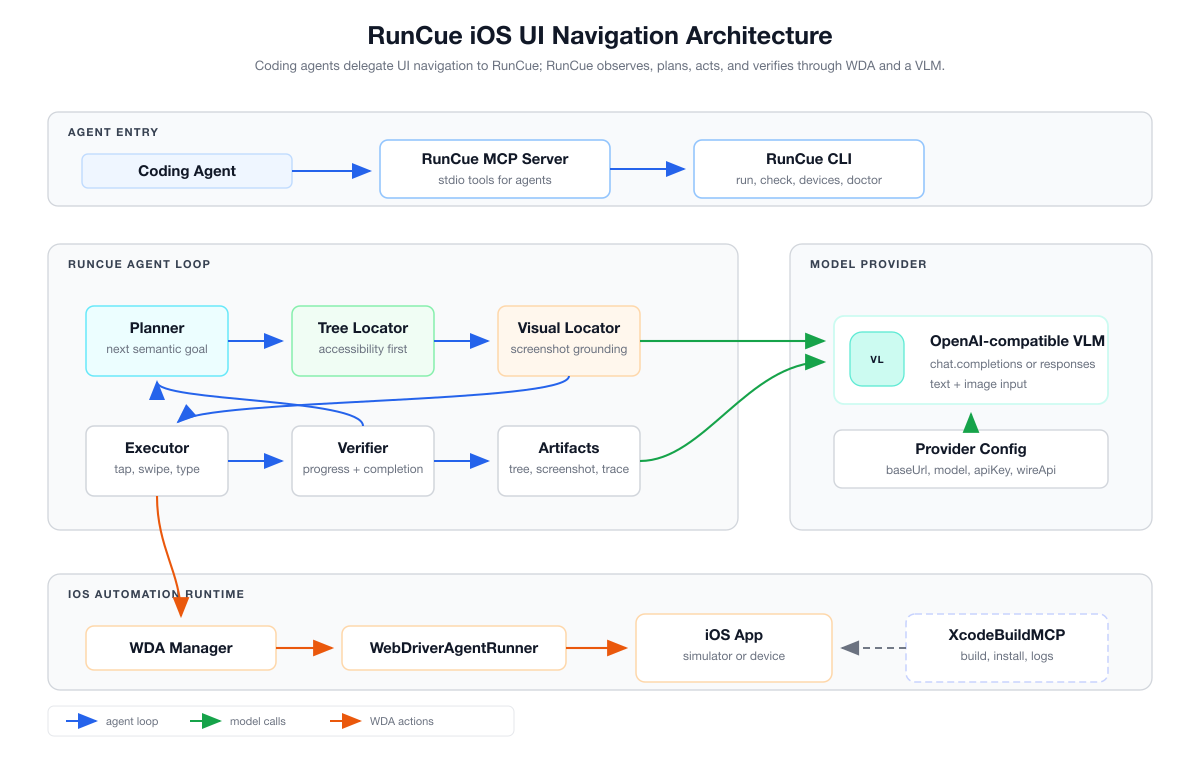
The current architecture is WDA-only:
Coding Agent
  -> RunCue MCP / CLI
  -> Agent loop: planner -> locator -> executor -> verifier
  -> WebDriverAgent HTTP API
  -> iOS Simulator or physical iOS device
See docs/architecture.md for the current architecture and docs/tech-solution-v2.md for the longer design record.
Documentation
Development
npm install
npm run build
npm test
npm_config_cache=/private/tmp/runcue-npm-cache npm pack --dry-run
Third-Party Code
RunCue vendors appium-webdriveragent so the CLI can bootstrap WDA without asking users to manually clone a separate project. See THIRD_PARTY_NOTICES.md.
License
RunCue is licensed under the MIT License. See LICENSE.
Установить RunCue в Claude Desktop, Claude Code, Cursor
unyly install runcueСтавит в Claude Desktop, Claude Code, Cursor и VS Code — сам разбирается с npx, uvx и сборкой из исходников.
Впервые? Поставь CLI: curl -fsSL https://unyly.org/install | sh
Или настроить вручную
Выполни в терминале:
claude mcp add runcue -- npx -y runcueFAQ
RunCue MCP бесплатный?
Да, RunCue MCP бесплатный — установка в пару кликов через Unyly без оплаты.
Нужен ли API-ключ для RunCue?
Нет, RunCue работает без API-ключей и переменных окружения.
RunCue — hosted или self-hosted?
Self-hosted: сервер запускается локально на твоей машине командой из раздела установки.
Как установить RunCue в Claude Desktop, Claude Code или Cursor?
Открой RunCue на unyly.org, выбери вкладку своего клиента (Claude Desktop, Claude Code, Cursor) и нажми Install — конфиг сгенерируется автоматически, без правки JSON.
Похожие MCP
LibreOffice Tools
Enables AI agents to read, write, and edit Office documents via LibreOffice with token-efficient design. Supports multiple formats including DOCX, XLSX, PPTX, a
 автор: passerbyflutter
dannote/figma-use
Full Figma control: create shapes, text, components, set styles, auto-layout, variables, export. 80+ tools.
 автор: dannote
Logo.dev
Search and retrieve company logos by brand or domain. Customize size, format, and theme to match your design needs. Accelerate design, prototyping, and content
 автор: NOVA-3951
PIX4Dmatic
Enables GUI automation for controlling PIX4Dmatic on Windows through MCP. Supports launching, focusing, capturing screenshots, sending hotkeys, clicking UI elem
 автор: jangjo123
Compare RunCue with
Не уверен что выбрать?
Найди свой стек за 60 секунд
Автор?
Embed-бейдж для README
Похожее
Все в категории design