
Sample Autonomous Business Insights With Ai Agent And Mcp Servers
БесплатноНе проверенSample Autonomous Business Insights With Ai Agent And Mcp Servers — Model Context Protocol server

Описание
Sample Autonomous Business Insights With Ai Agent And Mcp Servers — Model Context Protocol server
README
This repository contains the sample code for the AWS blog post: Generate Autonomous Business Insights with AI Agent and MCP Servers.
Overview
Important: This sample code is provided for demonstration and educational purposes only. It is not intended for production use without further review, testing, and hardening. Use this code as a reference implementation to understand the architecture patterns. Before deploying to production, conduct your own security review, implement proper error handling, and follow your organization's deployment practices.
This sample implements a working multi-agent system that transforms natural language questions into cross-system manufacturing insights. It uses Amazon Bedrock AgentCore, Strands Agents SDK, and the Model Context Protocol (MCP) to demonstrate how enterprises can close the gap between data and decisions through configuration, not custom platform engineering.
The problem: A plant manager needs to know which assembly lines need attention this week. The answer requires correlating data from IoT sensors, equipment maintenance logs, supply chain inventory, and production analytics — five disconnected systems that today require hours of manual stitching.
This solution: A single Strands Agent connects to four domain MCP servers. The LLM's reasoning loop autonomously decides which tools to call — no custom orchestrator needed. Users ask questions in natural language; the agent handles routing, access control, and synthesis.
Architecture
┌─────────────────────────────────────────────────────────────────────────────┐
│                  Autonomous BI Architecture — Amazon Bedrock AgentCore       │
│                         Users — natural language queries                     │
│  ┌──────────────────┐  ┌──────────────────┐  ┌──────────────────┐          │
│  │ Sarah—plant mgr  │  │ Raj—line supv    │  │ Priya—maint tech │          │
│  └────────┬─────────┘  └────────┬─────────┘  └────────┬─────────┘          │
└───────────┼──────────────────────┼──────────────────────┼───────────────────┘
            │                      │                      │
┌───────────▼──────────────────────▼──────────────────────▼───────────────────┐
│  Amazon Bedrock                                                             │
│  Natural language understanding · Intent classification · Response synthesis│
└─────────────────────────────────┬───────────────────────────────────────────┘
                                  │
┌─────────────────────────────────▼───────────────────────────────────────────┐
│  Amazon Bedrock AgentCore                                                   │
│  ┌───────────────────────────────────────────────────────────────────┐      │
│  │                         Agent                                     │      │
│  │   (single Strands Agent — LLM reasoning selects tools to call)    │      │
│  └───────────────────────────────┬───────────────────────────────────┘      │
│                                  │                                          │
│  ┌───────────────────────────────▼───────────────────────────────────┐      │
│  │                         Gateway                                   │      │
│  │        MCP router · 3-tier cache · Policy enforcement             │      │
│  └──────┬──────────────┬──────────────┬──────────────┬───────────────┘      │
│         │              │              │              │                       │
│  ┌─────────────┐ ┌──────────────┐ ┌───────────────┐ ┌─────────────┐       │
│  │  Runtime    │ │   Identity   │ │    Memory     │ │  Registry   │       │
│  │ Firecracker │ │ Okta, IAM,   │ │  Short-term + │ │  Discover,  │       │
│  │  microVMs   │ │  Cognito     │ │  Long-term    │ │   govern    │       │
│  └─────────────┘ └──────────────┘ └───────────────┘ └─────────────┘       │
│  ┌──────────────┐                                                           │
│  │    Policy    │                                                           │
│  │ Cedar, Authz │                                                           │
│  └──────────────┘                                                           │
└─────────┼──────────────┼──────────────┼──────────────┼──────────────────────┘
          │              │              │              │
          ▼              ▼              ▼              ▼  (Gateway → MCP servers)
┌─────────────────────────────────────────────────────────────────────────────┐
│  Semantic Layer — SageMaker Data Catalog                                    │
│  ┌──────────┐ ┌──────────┐ ┌──────────┐ ┌──────────┐ ┌──────────┐         │
│  │  Table   │ │  Column  │ │ Business │ │   Data   │ │  Source  │         │
│  │  Schemas │ │  Descrip.│ │ Glossary │ │  Lineage │ │ Mappings │         │
│  └──────────┘ └──────────┘ └──────────┘ └──────────┘ └──────────┘         │
└─────────────────────────────────┬───────────────────────────────────────────┘
                                  │
┌─────────────────────────────────▼───────────────────────────────────────────┐
│  Pre-built MCP server connectors — configuration, not code                  │
│  ┌──────────┐ ┌──────────┐ ┌──────────┐ ┌──────────┐ ┌──────────┐         │
│  │Equipment │ │   IoT    │ │  Supply  │ │Analytics │ │+ Custom  │         │
│  │MCP server│ │Telemetry │ │  Chain   │ │MCP server│ │ Low-code │         │
│  │          │ │MCP server│ │MCP server│ │          │ │          │         │
│  └──────────┘ └──────────┘ └──────────┘ └──────────┘ └──────────┘         │
└─────────────────────────────────┬───────────────────────────────────────────┘
                                  │
┌─────────────────────────────────▼───────────────────────────────────────────┐
│  Data Infrastructure                                                        │
│  ┌──────────┐ ┌──────────┐ ┌──────────┐ ┌──────────┐ ┌──────────┐         │
│  │SageMaker │ │  Amazon  │ │ Amazon   │ │  Amazon  │ │  Amazon  │         │
│  │Lakehouse │ │ Redshift │ │S3 Tables │ │OpenSearch│ │  Aurora  │         │
│  └──────────┘ └──────────┘ └──────────┘ └──────────┘ └──────────┘         │
└─────────────────────────────────────────────────────────────────────────────┘
Sequence Diagrams
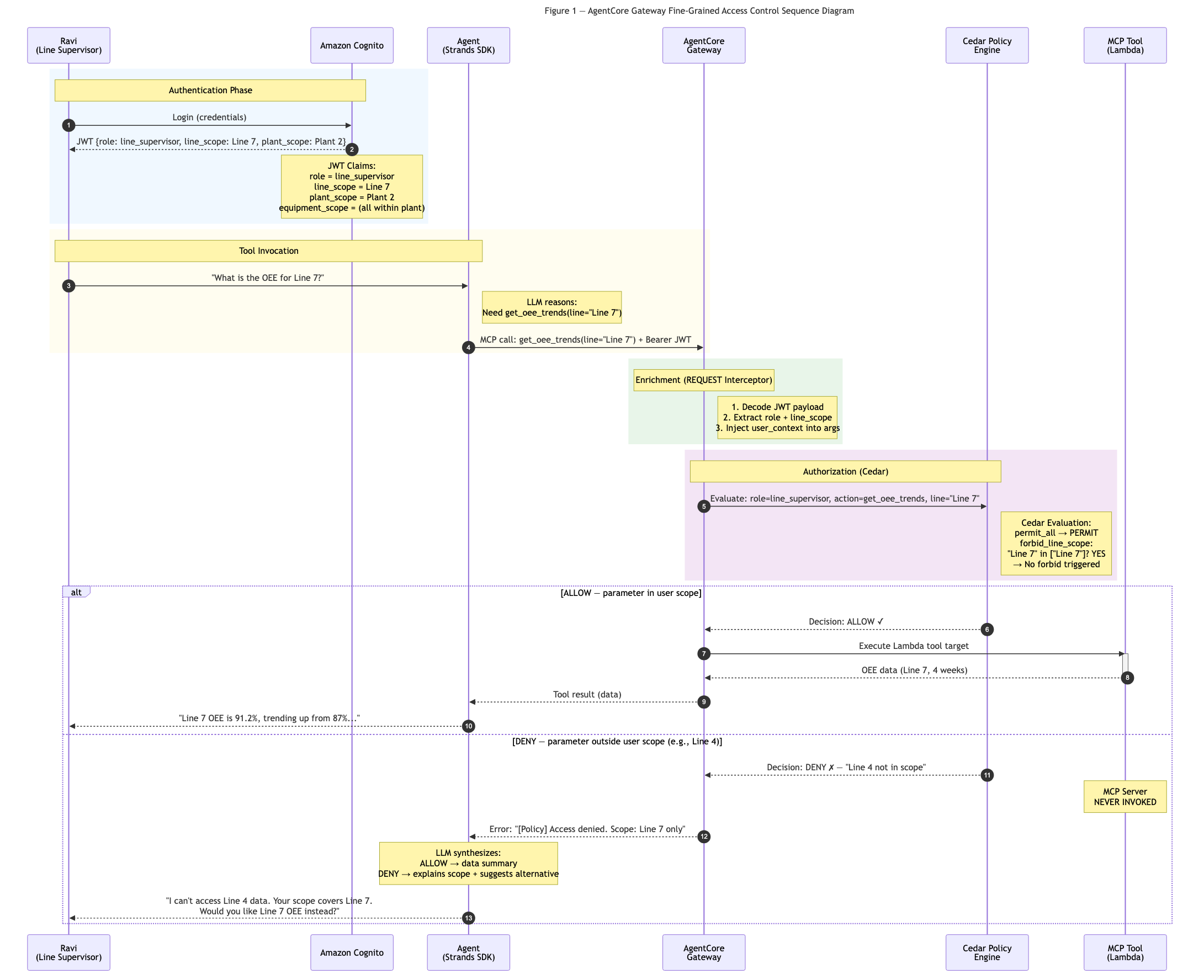
Access Control Flow — How the Gateway enforces Cedar policies before tool invocation:
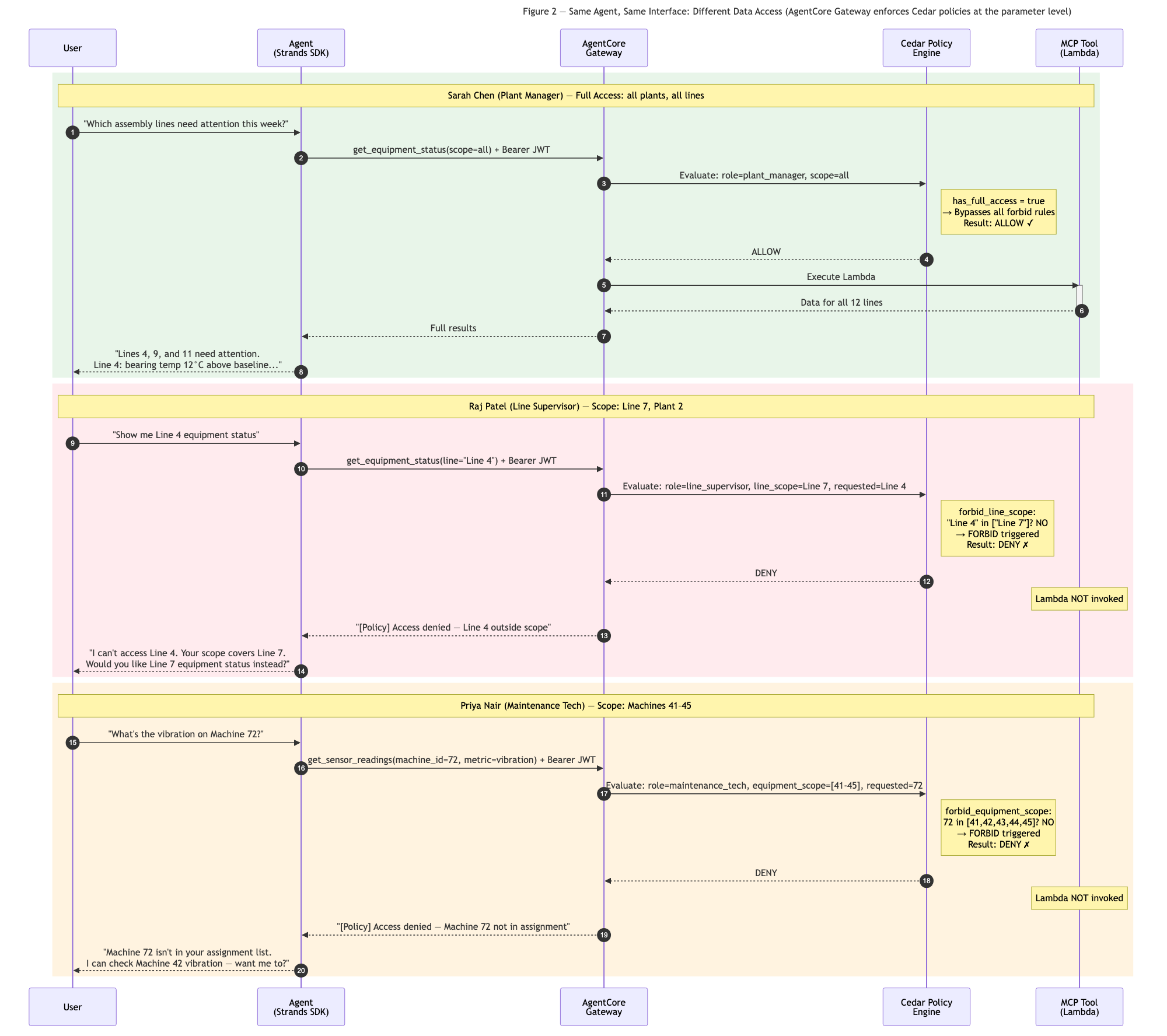
User Personas — Same question, different access scopes:
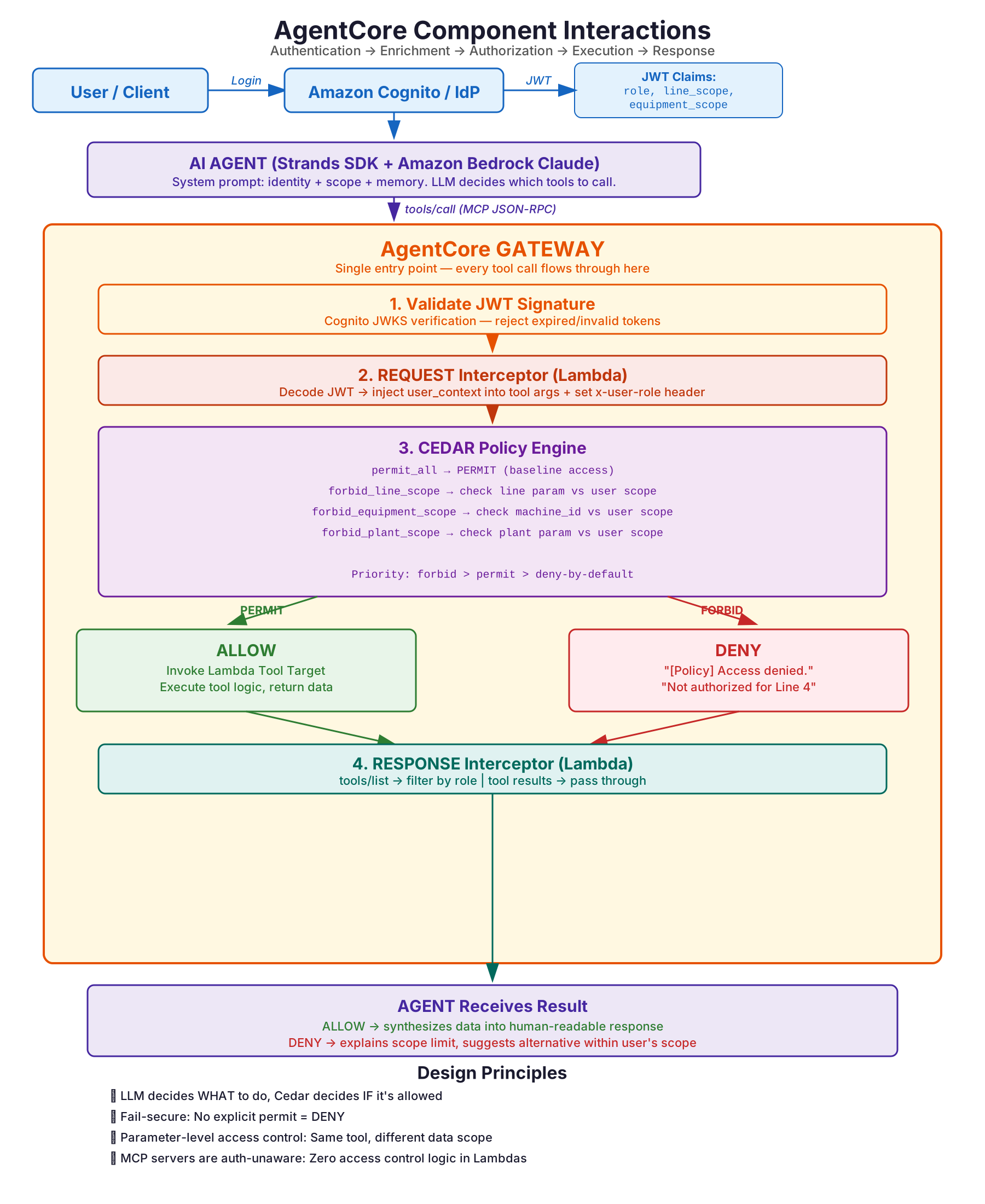
Component Interactions — Full request lifecycle through the AgentCore Gateway:
What This Sample Implements
| Layer | Implementation | Production Equivalent |
|---|---|---|
| Agent | Single Strands Agent with tools from all MCP servers |
Same, deployed on AgentCore Runtime |
| Semantic Layer | MCP server for data source discovery (glossary, lineage) | SageMaker Data Catalog |
| MCP Servers | 5 FastMCP servers (Semantic + 4 domain) via streamable HTTP | Pre-built AgentCore connectors |
| Gateway | AgentCore Gateway with Cedar policy enforcement (local simulation fallback for dev) | AgentCore Gateway with 3-tier cache |
| Identity | Role-based user models with scope attributes | Okta/Cognito via AgentCore Identity |
| Policy | Cedar-style allow/deny evaluation per tool call | AgentCore Policy (Cedar, formally verified) |
| Memory | In-memory session + cross-session store | AgentCore Memory (user/team/org namespaces) |
| Data — Equipment | Aurora PostgreSQL Serverless v2 (RDS Data API) | SAP S/4HANA via Zero-ETL → Aurora |
| Data — IoT | Amazon Timestream (time-series query API) | AWS IoT Core → MSK → Timestream |
| Data — Supply Chain | Amazon Redshift Serverless (Redshift Data API) | SAP MM → Zero-ETL → Redshift |
| Data — Analytics | Amazon Redshift Serverless (OEE aggregations) | Production ETL → Redshift |
| Data — Quality | Amazon OpenSearch Serverless (semantic search) | SAP QM → MSK → OpenSearch |
| Data — Config | Amazon S3 (JSON config, catalogs) | S3 Data Lake / S3 Tables |
| Ingestion | IoT Core rule → Timestream | Kepware → IoT Core → MSK → Lakehouse |
Prerequisites
All Modes (Required)
| Requirement | Details |
|---|---|
| Python | 3.10 or later |
| AWS account | Free tier eligible |
| Amazon Bedrock access | Enable model access for Anthropic Claude Sonnet in your region |
| AWS CLI | v2.x, configured with credentials (aws configure) |
| pip | 21.0 or later |
Additional for Live Data Mode
| Requirement | Details |
|---|---|
| CloudFormation deployment | deploy/cloudformation/template.yaml provisions Aurora, Timestream, Redshift, OpenSearch, S3 |
| IAM permissions | Permissions to create RDS clusters, Timestream databases, Redshift workgroups, OpenSearch collections, S3 buckets, Cognito user pools |
Additional for Pre-built MCP Mode
| Requirement | Details |
|---|---|
| uv | Install uv — the uvx command runs pre-built MCP servers |
| Docker (alternative) | 20.10+ if running pre-built servers via Docker instead of uvx |
Supported Regions
This sample works in any AWS region where Amazon Bedrock Claude Sonnet is available. The default region is us-east-1. For live data mode, all services (Aurora, Timestream, Redshift, OpenSearch Serverless) must be deployed in the same region.
Credential Verification
Before starting, confirm your AWS credentials are configured:
# Verify CLI access
aws sts get-caller-identity

# Verify Bedrock model access (should list Claude Sonnet)
aws bedrock list-foundation-models --query "modelSummaries[?contains(modelId, 'claude')].[modelId]" --output table
Deployment
Important: The
.envfile used in this sample is suitable for local development only. For production deployments, use AWS Secrets Manager to store sensitive credentials and reference them via IAM roles. Never commit.envfiles to version control.
Option 1: Local Demo with Web UI (Recommended)
Runs entirely on your machine with simulated data. Only requires Bedrock model access. Includes a Streamlit chat interface.
What you need: Python 3.10+, AWS CLI configured, Bedrock Claude Sonnet access.
# 1. Clone the repository
git clone https://github.com/aws-samples/sample-autonomous-business-insights-with-ai-agent-and-mcp-servers.git
cd sample-autonomous-business-insights-with-ai-agent-and-mcp-servers

# 2. Create and activate virtual environment
python3 -m venv .venv
source .venv/bin/activate  # On Windows: .venv\Scripts\activate

# 3. Install dependencies
pip install -r requirements.txt

# 4. Configure environment
cp .env.example .env
# Edit .env:
#   - Set AWS_REGION if not us-east-1
#   - SIMULATION_MODE=true  (already set in .env.example)
#   - DATA_MODE=simulated   (already set in .env.example)

# 5. Start MCP servers (keep this terminal running)
python -m src.servers.start_all

# 6. In a new terminal, launch the web UI
source .venv/bin/activate
streamlit run src/demo_ui.py
Open http://localhost:8501 in your browser. The UI provides:
- User persona selector (Sarah / Raj / Priya) with visible access scopes
- Chat interface with markdown-rendered responses
- Clickable sample queries per persona
- Live policy enforcement demonstration
Option 1b: CLI Mode
For terminal-only usage without the web UI:
# With MCP servers running in another terminal:
python -m src.main
Option 2: Live Data (Full AWS Infrastructure)
Deploy the complete data infrastructure — Aurora, Timestream, Redshift, OpenSearch, S3, IoT Core — and connect MCP servers to real AWS services.
What you need: Everything from Option 1, plus IAM permissions to create infrastructure resources.
# 1. Deploy all infrastructure (takes ~15 minutes)
aws cloudformation deploy \
  --template-file deploy/cloudformation/template.yaml \
  --stack-name manufacturing-insights-dev \
  --capabilities CAPABILITY_NAMED_IAM \
  --parameter-overrides Environment=dev DatabasePassword='<YOUR_SECURE_PASSWORD>'

# 2. Get stack outputs and configure .env
aws cloudformation describe-stacks \
  --stack-name manufacturing-insights-dev \
  --query "Stacks[0].Outputs" --output table

# 3. Copy outputs into your .env file:
#    AURORA_CLUSTER_ARN, AURORA_SECRET_ARN, TIMESTREAM_DATABASE,
#    REDSHIFT_WORKGROUP, OPENSEARCH_ENDPOINT, DATA_LAKE_BUCKET
#    Set:
#      SIMULATION_MODE=true   (still using local MCP servers)
#      DATA_MODE=live         (but now querying real AWS services)

# 4. Seed all data sources with sample manufacturing data
python deploy/seed_data.py

# 5. Start MCP servers and UI
python -m src.servers.start_all
streamlit run src/demo_ui.py
The CloudFormation stack provisions:
- Aurora PostgreSQL Serverless v2 — equipment registry, maintenance history
- Amazon Timestream — IoT sensor time-series (vibration, temperature, pressure)
- Amazon Redshift Serverless — supply chain inventory, OEE analytics
- Amazon OpenSearch Serverless — quality metrics with semantic search
- Amazon S3 — data lake (config, catalogs, raw data)
- AWS IoT Core rule — ingests MQTT sensor data into Timestream
- Amazon Cognito — user authentication with role attributes
- IAM roles — least-privilege execution permissions
Option 3: Amazon Bedrock AgentCore (Production)
Deploy with full isolation, serverless scaling, and governance. This is the default architecture (SIMULATION_MODE=false) — the agent connects to the AgentCore Gateway, which handles policy enforcement, tool routing, and data retrieval via Lambda targets.
What you need: Everything from Option 2, plus an AgentCore-enabled AWS account.
python deploy/agentcore_deploy.py --region us-east-1
In this mode, local MCP servers and data_provider.py are bypassed entirely. The Gateway routes tool calls to Lambda functions that query AWS services directly.
Usage
Understanding Operating Modes
This sample has two independent configuration axes that together determine its behavior:
1. SIMULATION_MODE — Where does the agent run?
| Value | Behavior | When to Use |
|---|---|---|
false (default) |
Agent connects to AgentCore Gateway. Policy enforcement, tool routing, and data retrieval happen server-side via Lambda targets. Local MCP servers are NOT used. | Production deployment with a deployed Gateway |
true |
Agent connects to local MCP servers with a local policy hook (gateway_hook.py). This is a development/demo simulation of what the Gateway does server-side. |
Local development, demos, testing without a Gateway |
2. DATA_MODE — Where does data come from? (SIMULATION_MODE=true only)
This setting is only relevant when SIMULATION_MODE=true (local MCP servers). When using the AgentCore Gateway, data retrieval is handled by Lambda targets regardless of this setting.
| Value | Behavior | AWS Services Required |
|---|---|---|
simulated (default) |
In-memory sample data from src/data/sample_data.py |
Only Amazon Bedrock |
live |
Real AWS service queries (Aurora, Timestream, Redshift, OpenSearch) | Full infrastructure stack |
Decision Matrix
┌─────────────────────────────────────────────────────────────────────┐
│ How should I configure this sample?                                  │
├─────────────────────────────────────────────────────────────────────┤
│                                                                      │
│  "I want to try it quickly"                                         │
│   → SIMULATION_MODE=true, DATA_MODE=simulated (the .env.example)    │
│   → Only need: Python + AWS credentials + Bedrock access            │
│                                                                      │
│  "I want real data but no Gateway"                                  │
│   → SIMULATION_MODE=true, DATA_MODE=live                            │
│   → Need: CloudFormation stack deployed + credentials in .env       │
│                                                                      │
│  "I want the full production architecture"                          │
│   → SIMULATION_MODE=false (DATA_MODE is ignored)                    │
│   → Need: Deployed AgentCore Gateway + Lambda targets               │
│                                                                      │
└─────────────────────────────────────────────────────────────────────┘
USE_PREBUILT_MCP — Pre-built vs Custom MCP Servers
When SIMULATION_MODE=true, you can additionally control which MCP server implementations to use:
| Mode | Environment Variables | What Happens |
|---|---|---|
| All Custom (default) | USE_PREBUILT_MCP=false |
All 5 MCP servers are custom FastMCP implementations running locally |
| Pre-built + Custom | USE_PREBUILT_MCP=true |
Uses awslabs.postgres-mcp-server and awslabs.redshift-mcp-server (via uvx) for Aurora/Redshift. Custom servers only for Timestream, OpenSearch, and Semantic Layer |
The pre-built mode demonstrates the blog's "configuration, not code" principle — you don't build MCP servers for services that already have one.
| Data Source | Pre-built AWS MCP Server | Custom MCP Server | When to Use Each |
|---|---|---|---|
| Aurora PostgreSQL | awslabs.postgres-mcp-server (via uvx) |
equipment_server.py |
Pre-built for production; custom for simulated mode |
| Amazon Redshift | awslabs.redshift-mcp-server (via uvx) |
supply_chain_server.py |
Pre-built for production; custom for simulated mode |
| Amazon Timestream | ❌ Not available | iot_telemetry_server.py |
Always custom (no pre-built option) |
| Amazon OpenSearch | ❌ Not available | analytics_server.py |
Always custom (no pre-built option) |
| Semantic Layer | N/A (domain-specific) | semantic_layer_server.py |
Always custom (business logic) |
In the Streamlit UI, use the Data Mode radio button in the sidebar to switch between modes without restarting.
User Personas
Select a user persona from the interactive menu and ask questions:
| User | Role | Scope | Sample Query |
|---|---|---|---|
| Sarah Chen | Plant Manager | All 12 lines | "Which assembly lines need attention this week?" |
| Raj Patel | Line Supervisor | Line 7 only | "What's the current status of Line 7?" |
| Priya Nair | Maintenance Technician | Machine 41–45 | "Has the vibration on Machine 42 gotten worse since last week?" |
What happens under the hood:
- Sarah's query → Agent calls IoT anomaly detection + OEE analytics + equipment status → severity-ranked response
- Raj asks about Line 4 → Gateway policy blocks the call (Line 4 is outside his scope) → Agent explains the restriction
- Priya's query → Memory surfaces last week's baseline (3.8 mm/s) → IoT tool returns current (4.5 mm/s) → Agent reports +18% increase
Project Structure
.
├── src/
│   ├── main.py                          # Interactive CLI entry point
│   ├── demo_ui.py                       # Streamlit web UI (chat interface)
│   ├── config.py                        # Environment configuration
│   ├── agent/
│   │   ├── agent.py                     # ManufacturingInsightsAgent — connects MCP servers,
│   │   │                                #   builds prompt, creates Strands Agent, processes queries
│   │   └── prompts.py                   # System prompt template with identity/memory injection
│   ├── servers/
│   │   ├── start_all.py                 # Launch all MCP servers locally
│   │   ├── equipment_server.py          # Tools: get_equipment_status, get_maintenance_history,
│   │   │                                #         get_shared_infrastructure
│   │   ├── iot_telemetry_server.py      # Tools: get_sensor_readings, detect_anomaly
│   │   ├── supply_chain_server.py       # Tools: check_parts_inventory, get_supplier_lead_times
│   │   ├── analytics_server.py          # Tools: get_oee_trends, get_quality_metrics
│   │   └── semantic_layer.py            # Data Catalog metadata for source discovery
│   ├── identity/
│   │   ├── models.py                    # UserIdentity dataclass + 3 demo personas
│   │   ├── policy.py                    # PolicyEngine — Cedar-style allow/deny evaluation
│   │   └── gateway_hook.py             # LOCAL SIMULATION ONLY — Strands BeforeToolCallEvent hook
│   │                                    #   approximates Gateway policy for dev (not used in production)
│   ├── memory/
│   │   └── manager.py                   # SessionMemory + MemoryManager (long-term + episodic)
│   ├── budget/
│   │   └── manager.py                   # BudgetManager (DynamoDB counters, limit checking, enforcement)
│   │   └── manager.py                   # SessionMemory (short-term) + MemoryManager (long-term + episodic)
│   └── data/
│       ├── sample_data.py               # Simulated factory data (default, no AWS needed)
│       ├── data_provider.py             # Routes between simulated/live based on DATA_MODE
│       │                                #   (only used in SIMULATION_MODE — see docstring)
│       ├── aurora_client.py             # Aurora PostgreSQL via RDS Data API (live mode)
│       ├── timestream_client.py         # Amazon Timestream queries (live mode)
│       ├── lakehouse_client.py          # Redshift Data API client (live mode)
│       ├── opensearch_client.py         # OpenSearch Serverless queries (live mode)
│       └── s3_client.py                 # S3 data lake access (live mode)
├── deploy/
│   ├── agentcore_deploy.py              # AgentCore production deployment script
│   ├── cloudformation/template.yaml     # Cognito + S3 + IAM + CloudWatch (CFN)
│   └── sql/create_tables.sql            # Redshift DDL for live data mode
├── tests/
│   ├── test_agent.py                    # Prompt construction & memory tests
│   ├── test_policy.py                   # Policy allow/deny per role and scope
│   ├── test_gateway_hook.py             # Hook blocks/allows tool calls correctly (simulation mode)
│   └── test_mcp_servers.py              # MCP tool logic & input validation
├── .github/
│   ├── ISSUE_TEMPLATE.md
│   └── PULL_REQUEST_TEMPLATE.md
├── requirements.txt                     # Pinned dependency versions
├── pyproject.toml                       # Project metadata & pytest config
├── .env.example                         # Environment variable template
├── .cfnlintrc                           # CloudFormation lint config
├── LICENSE                              # MIT-0
├── NOTICE                               # AWS Samples copyright notice
├── CONTRIBUTING.md
└── CODE_OF_CONDUCT.md
How It Works
1. Agent + MCP Servers
A single Strands Agent connects to 4 domain-specific MCP servers via streamable HTTP. The LLM autonomously decides which tools to call based on the user's question. (See src/agent/agent.py)
from mcp.client.streamable_http import streamablehttp_client
from strands import Agent
from strands.tools.mcp.mcp_client import MCPClient

# Connect to all MCP servers
mcp_clients = [MCPClient(lambda: streamablehttp_client(url)) for url in server_urls]

# Collect all tools from all servers into one flat list
all_tools = []
for client in mcp_clients:
    all_tools.extend(client.list_tools_sync())

# Create agent with identity-aware system prompt and policy hook
agent = Agent(system_prompt=prompt, tools=all_tools, hooks=[gateway_hook])

# Agent autonomously selects which tools to call
response = agent("Which assembly lines need attention this week?")
2. Gateway Policy Enforcement
In production, the AgentCore Gateway evaluates Cedar policies server-side before invoking Lambda tool targets. The agent never sees denied requests — the Gateway blocks them before the MCP server is contacted.
The enforcement flow:
Agent → Gateway → REQUEST Interceptor (JWT → user_context) → Cedar Policy Engine → Lambda Tool Target
Cedar policies are defined in deploy/agentcore/cedar_policies/*.cedar and deployed via deploy/agentcore/setup_policy.py. They use a deny-by-default model with explicit forbid rules:
// forbid_line_scope.cedar — Line supervisors denied access outside their scope
forbid(
    principal is AgentCore::OAuthUser,
    action in [
        AgentCore::Action::"EquipmentTarget___get_equipment_status",
        AgentCore::Action::"IoTTarget___detect_anomaly",
        AgentCore::Action::"AnalyticsTarget___get_oee_trends"
    ],
    resource == AgentCore::Gateway::"${GATEWAY_ARN}"
) when {
    context.input has line &&
    principal.hasTag("cognito:groups") &&
    principal.getTag("cognito:groups") like "*line_supervisors*" &&
    !(principal.getTag("custom:line_scope") like ("*" + context.input.line + "*"))
};
For local development (SIMULATION_MODE=true), a GatewayPolicyHook in src/identity/gateway_hook.py approximates this behavior using a Strands BeforeToolCallEvent hook. This is a development-only simulation — not the production architecture.
# Local simulation only (SIMULATION_MODE=true)
from strands.hooks import BeforeToolCallEvent, HookProvider, HookRegistry

class GatewayPolicyHook(HookProvider):
    """LOCAL SIMULATION of Gateway policy enforcement (dev only)."""

    def register_hooks(self, registry: HookRegistry, **kwargs):
        registry.add_callback(BeforeToolCallEvent, self._enforce_policy)

    def _enforce_policy(self, event: BeforeToolCallEvent):
        decision = self.policy_engine.evaluate(user, tool_name, params)
        if not decision.allowed:
            event.cancel_tool = f"[Policy - Local Simulation] {decision.reason}"
3. MCP Server with Dual-Mode Data Provider
Each MCP server delegates to a data provider that routes between simulated data (default) and live AWS queries. The data provider is only active in simulation mode — when using the AgentCore Gateway, Lambda targets handle data retrieval directly. (See src/data/data_provider.py)
from mcp.server import FastMCP
mcp = FastMCP("Equipment Status Server", port=8001)

@mcp.tool(description="Get equipment status for a line or machine")
def get_equipment_status(line: str | None = None, machine_id: int | None = None) -> str:
    # data_provider routes based on DATA_MODE env var:
    #   DATA_MODE=simulated → sample_data.py (in-memory, no AWS needed)
    #   DATA_MODE=live      → aurora_client.py → RDS Data API → Aurora PostgreSQL
    return data_provider.get_equipment_status(line=line, machine_id=machine_id)
4. Memory-Augmented Context
AgentCore Memory provides three memory constructs for natural conversations. (See src/memory/manager.py)
| Memory Type | Scope | Lifetime | Example |
|---|---|---|---|
| Short-term | Session | Destroyed on session end | Turn-by-turn context ("that" = Machine 42) |
| Long-term | User / Team / Org | TTL-based (90-365 days) | Baselines, preferences, thresholds |
| Episodic | User | TTL-based (90 days) | Timestamped events and past decisions |
from src.memory.manager import MemoryManager

memory = MemoryManager()

# Store an episodic event
memory.store(
    user_id="priya.nair",
    key="vibration_flagged",
    value="Machine 42 vibration at 4.5 mm/s — flagged for review",
    memory_type="episodic",
    tags=["machine_42", "vibration"],
    source_tool="get_sensor_readings",
    user_action="flagged_for_review",
)

# Recall timeline for a topic
timeline = memory.get_episodic_timeline(user_id="priya.nair", topic="machine 42", days=30)
# Returns: chronological events (3.8 → 4.1 → 4.5 mm/s progression)

# Recall by type
baselines = memory.recall("priya.nair", memory_types=["long_term"], tags=["baseline"])
Evaluations
The project includes 7 evaluation metrics using the Strands Evals SDK:
| Metric | What It Measures | Target | File |
|---|---|---|---|
| Tool Selection Accuracy | Agent calls the right MCP tools | > 90% | evals/eval_tool_use.py |
| Tool Parameter Accuracy | Correct parameters passed | > 95% | evals/eval_tool_use.py |
| Policy Denial Compliance | Zero data leakage on denied queries | 100% | evals/eval_policy.py |
| Faithfulness | Response grounded in tool outputs | > 0.90 | evals/eval_quality.py |
| Helpfulness | Actionable, useful responses | > 0.85 | evals/eval_quality.py |
| Trajectory Quality | Logical tool call ordering | > 0.85 | evals/eval_trajectory.py |
| Goal Success Rate | End-to-end user intent achieved | > 0.85 | evals/eval_trajectory.py |
# Run evaluations
python -m evals.eval_tool_use      # Tool selection + parameters
python -m evals.eval_policy        # Policy denial compliance
python -m evals.eval_quality       # Faithfulness + helpfulness
python -m evals.eval_trajectory    # Trajectory + goal success
Workshop
This repository includes an AWS Workshop Studio workshop covering all AgentCore components hands-on:
| Module | Topic | Duration |
|---|---|---|
| 1 | Introduction & Architecture | 10 min |
| 2 | Prerequisites & Setup | 10 min |
| 3 | MCP Servers | 25 min |
| 4 | Strands Agent | 20 min |
| 5 | AgentCore Runtime | 15 min |
| 6 | AgentCore Harness (cost caps, managed deployment) | 15 min |
| 7 | AgentCore Gateway (registration, caching, trade-offs) | 20 min |
| 8 | AgentCore Registry (discovery, versioning, governance) | 15 min |
| 9 | AgentCore Identity (Cognito, JWT, scopes) | 15 min |
| 10 | Cost Management (Cedar + DynamoDB + graduated enforcement) | 25 min |
| 11 | AgentCore Policy (Cedar, forbid/permit) | 25 min |
| 12 | AgentCore Memory (short-term, long-term, episodic) | 15 min |
| 13 | AgentCore Evaluations (7 metrics) | 20 min |
| 14 | AgentCore Observability (X-Ray, CloudWatch) | 15 min |
Workshop content is in workshop/ (Workshop Studio format: contentspec.yaml + content/ + static/).
Running Tests
# Install test dependencies
pip install pytest

# Run all tests (no AWS services required)
pytest tests/ -v
Tests validate:
- Policy enforcement (allow/deny per role and scope)
- Gateway hook (tool call cancellation)
- MCP tool logic (data retrieval, input validation)
- System prompt construction with memory context
Cost
This sample uses the following AWS services which may incur costs:
| Service | Purpose | Estimated Cost | Required? |
|---|---|---|---|
| Amazon Bedrock | LLM inference (Claude Sonnet) | ~$3/$15 per M input/output tokens | Yes (both modes) |
| Amazon Aurora Serverless v2 | Equipment & maintenance data | ~$0.12/ACU-hour (min 0.5 ACU) | Live mode only |
| Amazon Timestream | IoT sensor time-series | ~$0.50/M writes, $0.01/GB queried | Live mode only |
| Amazon Redshift Serverless | Supply chain & OEE analytics | ~$0.375/RPU-hour (min 8 RPU) | Live mode only |
| Amazon OpenSearch Serverless | Quality metrics & semantic search | ~$0.24/OCU-hour (min 2 OCU ≈ $350/mo) | Live mode only |
| Amazon S3 | Data lake, config, memory | ~$0.023/GB/month | Live mode only |
| Amazon Cognito | User authentication | Free tier (50K MAU) | Live mode only |
| AWS IoT Core | Sensor data ingestion rule | ~$1/M messages | Live mode only |
Simulated mode (SIMULATION_MODE=true, DATA_MODE=simulated — the recommended starting point) incurs only Amazon Bedrock inference costs. No other infrastructure is needed.
Live data mode (SIMULATION_MODE=true, DATA_MODE=live) provisions real AWS services. The OpenSearch Serverless minimum (2 OCU) is the largest fixed cost. All other services are pay-per-use and scale to zero when idle.
AgentCore Gateway mode (SIMULATION_MODE=false) adds AgentCore runtime costs on top of the data infrastructure. See AgentCore pricing for details.
Important: Remember to clean up resources after testing to avoid ongoing charges.
Cleanup
To avoid ongoing charges after testing:
# Delete the full CloudFormation stack (removes all provisioned resources)
aws cloudformation delete-stack --stack-name manufacturing-insights-dev

# Wait for deletion to complete
aws cloudformation wait stack-delete-complete --stack-name manufacturing-insights-dev
Note: S3 buckets must be empty before stack deletion. Empty them first:
aws s3 rm s3://amzn-s3-demo-manufacturing-datalake-<ACCOUNT_ID>-dev --recursive
aws s3 rm s3://amzn-s3-demo-agentcore-memory-<ACCOUNT_ID>-dev --recursive
Troubleshooting
| Symptom | Cause | Fix |
|---|---|---|
botocore.exceptions.NoCredentialsError |
AWS CLI not configured | Run aws configure or set AWS_ACCESS_KEY_ID/AWS_SECRET_ACCESS_KEY |
AccessDeniedException on Bedrock calls |
Model access not enabled | Go to Bedrock console → Model access → Enable Claude Sonnet |
WARNING: DATA_MODE=live but environment variables are missing |
Switched to live mode without setting credentials | Set AURORA_CLUSTER_ARN, TIMESTREAM_DATABASE, etc. in .env (see .env.example) |
| MCP servers won't start (port in use) | Previous run didn't shut down cleanly | Kill existing processes: `lsof -ti:8001 |
ModuleNotFoundError: No module named 'src' |
Running script from wrong directory | Run from project root: cd sample-autonomous-business-insights-with-ai-agent-and-mcp-servers |
uvx: command not found |
uv not installed (only needed for USE_PREBUILT_MCP=true) |
Install uv: pip install uv or see uv docs |
Related Resources
- Amazon Bedrock AgentCore documentation
- Strands Agents SDK
- Model Context Protocol specification
- Amazon Bedrock AgentCore starter toolkit
- Cedar authorization language
Security
See CONTRIBUTING for more information.
License
This library is licensed under the MIT-0 License. See the LICENSE file.
from github.com/aws-samples/sample-autonomous-business-insights-with-ai-agent-and-mcp-servers
Установка Sample Autonomous Business Insights With Ai Agent And Mcp Servers
У этого сервера нет опубликованного пакета — он собирается из исходников. Открой репозиторий и следуй инструкции в README.
▸ github.com/aws-samples/sample-autonomous-business-insights-with-ai-agent-and-mcp-serversFAQ
Sample Autonomous Business Insights With Ai Agent And Mcp Servers MCP бесплатный?
Да, Sample Autonomous Business Insights With Ai Agent And Mcp Servers MCP бесплатный — установка в пару кликов через Unyly без оплаты.
Нужен ли API-ключ для Sample Autonomous Business Insights With Ai Agent And Mcp Servers?
Нет, Sample Autonomous Business Insights With Ai Agent And Mcp Servers работает без API-ключей и переменных окружения.
Sample Autonomous Business Insights With Ai Agent And Mcp Servers — hosted или self-hosted?
Self-hosted: сервер запускается локально на твоей машине командой из раздела установки.
Как установить Sample Autonomous Business Insights With Ai Agent And Mcp Servers в Claude Desktop, Claude Code или Cursor?
Открой Sample Autonomous Business Insights With Ai Agent And Mcp Servers на unyly.org, выбери вкладку своего клиента (Claude Desktop, Claude Code, Cursor) и нажми Install — конфиг сгенерируется автоматически, без правки JSON.
Похожие MCP
Fetch
Web content fetching and conversion for efficient LLM usage.
AWS KB Retrieval
Retrieval from AWS Knowledge Base using Bedrock Agent Runtime.
 автор: modelcontextprotocol
Spring AI MCP Server
Provides auto-configuration for setting up an MCP server in Spring Boot applications.
llm-analysis-assistant
A very streamlined mcp client that supports calling and monitoring stdio/sse/streamableHttp, and can also view request responses through the /logs page. It also
 автор: xuzexin-hz
MCP-Agent
A simple, composable framework to build agents using Model Context Protocol by [LastMile AI](https://www.lastmileai.dev)
 автор: lastmile-ai
Spring AI MCP Client
Provides auto-configuration for MCP client functionality in Spring Boot applications.
mcp.natoma.ai
A Hosted MCP Platform to discover, install, manage and deploy MCP servers by [Natoma Labs](https://www.natoma.ai)
MCPHub
Website to list high quality MCP servers and reviews by real users. Also provide online chatbot for popular LLM models with MCP server support.
MCP Servers Rating and User Reviews
Website to rate MCP servers, write authentic user reviews, and [search engine for agent & mcp](http://www.deepnlp.org/search/agent)
mkinf
An Open Source registry of hosted MCP Servers to accelerate AI agent workflows.
Compare Sample Autonomous Business Insights With Ai Agent And Mcp Servers with
Не уверен что выбрать?
Найди свой стек за 60 секунд
Автор?
Embed-бейдж для README
Похожее
Все в категории ai