
Sample Ecs
БесплатноНе проверенThis sample demonstrates how to deploy an Agentic AI architecture using AWS Fargate for Amazon ECS with AWS CDK. The sample features an AI Service that connects

Описание
This sample demonstrates how to deploy an Agentic AI architecture using AWS Fargate for Amazon ECS with AWS CDK. The sample features an AI Service that connects to multiple Model Context Protocol (MCP) servers to perform various actions
README
The following sample demonstrates how to deploy an Agentic AI architecture using AWS Fargate for Amazon ECS. It uses AWS CDK to deploy the architecture components.
High Level Architecture
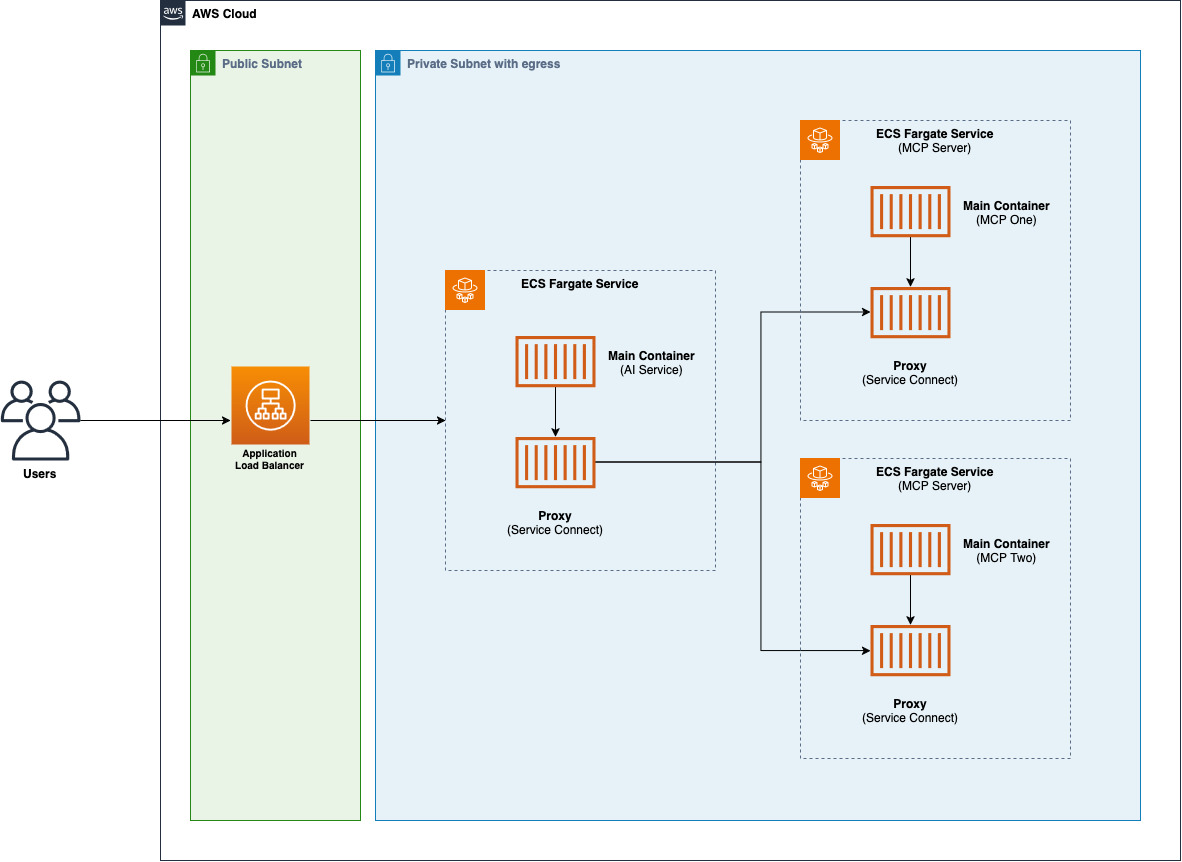
Details
The architecture consists of the following components:
- Application Load Balancer: takes incoming API calls and forwards them to the AI Service
- AI Service: Simple AI Agent that connects with two MCP servers to perform actions
- MCP Server one: Custom built MCP Server using the MCP Python SDK. In this example the MCP Server implements math tools
- MCP Server two: It hosts an existing MCP Server (AWS API MCP Server). For the sake of this example this MCP Server's role has been restricted to only be able to list AWS Buckets in your account
Service-to-service communication between AWS Fargate services is done using Service Connect. The AI Service leverages custom DNS names to connect to the MCP Servers available in this sample.
The sample also generates an AWS Secret to be used as the x-api-key header when calling the Application Load Balancer URLs.
Prerequisites
- Node.js installed in your local machine (version >= 20)
- Docker installed in your machine
- AWS CLI configured in your local machine
- Bedrock Model Access to Anthropic Claude Sonnet 4 configured in your account
Getting started
To deploy this sample in your account follow the instructions below:
# install dependencies
$ npm install
# login to the public ECR registry to allow download base images
$ aws ecr-public get-login-password --region us-east-1 | docker login --username AWS --password-stdin public.ecr.aws
# bootstrap your AWS environment (in case you haven't done it yet)
$ npm run cdk bootstrap
# deploy the CDK Stack into your account
$ npm run cdk deploy
Testing
Once the deployment is finalized in your account, you will have the following output from AWS CDK:
 ✅  EcsMcpServerSampleStack

✨  Deployment time: 362.32s

Outputs:
EcsMcpServerSampleStack.ALBLoadBalancerDNS6ED38D87 = [application-load-balancer-url]
EcsMcpServerSampleStack.AiServiceSecretARN2FB050DB = [secret-arn]
Before invoking the Application Load Balancer URL, you'll need to retrieve the secret value with the following command:
$ aws secretsmanager get-secret-value --secret-id [secret-arn]
# or use the following to directly get the value
$ aws secretsmanager get-secret-value --secret-id [secret-arn] --output json | jq -r '.SecretString'
Now that you have all the information, you can call the Application Load Balancer URL to test the agent:
curl --location 'http://[ALB-URL]/chat' \
--header 'x-api-key: [secret-value]' \
--header 'Content-Type: application/json' \
--data '{
    "prompt": "what'\''s the command to list AWS Buckets"
}'
{
  "answer": "The command to list AWS S3 buckets is:\n\n```bash\naws s3 ls\n```\n\nThis command will display all S3 buckets in your AWS account, showing:\n- Creation date and time\n- Bucket name\n\nAs you can see from the output, it lists all the buckets with their creation timestamps and names. The command works across all regions and shows buckets from your entire AWS account.\n"
}
or execute the AWS CLI command:
curl --location 'http://[ALB-URL]/chat' \
--header 'x-api-key: [secret-value]' \
--header 'Content-Type: application/json' \
--data '{
    "prompt": "list all my AWS Buckets"
}'
{
  "answer": "Here are all your S3 buckets: [omissis]"
}
or compute some math using the custom MCP Server:
curl --location 'http://[ALB-URL]/chat' \
--header 'x-api-key: [secret-value]' \
--header 'Content-Type: application/json' \
--data '{
    "prompt": "what'\''s 2+2"
}'
{
  "answer": "2 + 2 = **4**\n"
}
Security
See CONTRIBUTING for more information.
License
This library is licensed under the MIT-0 License. See the LICENSE file.
Установка Sample Ecs
У этого сервера нет опубликованного пакета — он собирается из исходников. Открой репозиторий и следуй инструкции в README.
▸ github.com/aws-samples/sample-ecs-mcp-serverFAQ
Sample Ecs MCP бесплатный?
Да, Sample Ecs MCP бесплатный — установка в пару кликов через Unyly без оплаты.
Нужен ли API-ключ для Sample Ecs?
Нет, Sample Ecs работает без API-ключей и переменных окружения.
Sample Ecs — hosted или self-hosted?
Self-hosted: сервер запускается локально на твоей машине командой из раздела установки.
Как установить Sample Ecs в Claude Desktop, Claude Code или Cursor?
Открой Sample Ecs на unyly.org, выбери вкладку своего клиента (Claude Desktop, Claude Code, Cursor) и нажми Install — конфиг сгенерируется автоматически, без правки JSON.
Похожие MCP
Opencode Omniroute Plugin
OpenCode plugin for the OmniRoute AI Gateway. Drives dynamic model discovery, /connect auth flow, and multi-instance OmniRoute providers via the official @openc
 автор: GitHub Actions
Roblox Studio
Enables AI coding tools to control Roblox Studio for workspace exploration, instance manipulation, and script management. It provides tools for playtesting, sce
 автор: paralov
Antigravity Drawio
MCP server that enables AI assistants to create, parse, render, and validate Draw.io diagrams programmatically.
 автор: S-SUJAN-S
Fetch
Web content fetching and conversion for efficient LLM usage.
AWS KB Retrieval
Retrieval from AWS Knowledge Base using Bedrock Agent Runtime.
 автор: modelcontextprotocol
Spring AI MCP Server
Provides auto-configuration for setting up an MCP server in Spring Boot applications.
llm-analysis-assistant
A very streamlined mcp client that supports calling and monitoring stdio/sse/streamableHttp, and can also view request responses through the /logs page. It also
 автор: xuzexin-hz
MCP-Agent
A simple, composable framework to build agents using Model Context Protocol by [LastMile AI](https://www.lastmileai.dev)
 автор: lastmile-ai
Spring AI MCP Client
Provides auto-configuration for MCP client functionality in Spring Boot applications.
mcp.natoma.ai
A Hosted MCP Platform to discover, install, manage and deploy MCP servers by [Natoma Labs](https://www.natoma.ai)
Compare Sample Ecs with
Не уверен что выбрать?
Найди свой стек за 60 секунд
Автор?
Embed-бейдж для README
Похожее
Все в категории ai