
Scaffold Mcp
БесплатноНе проверенMCP server for scaffolding applications with boilerplate templates

Описание
MCP server for scaffolding applications with boilerplate templates
README
npm version License: AGPL-3.0 Discord
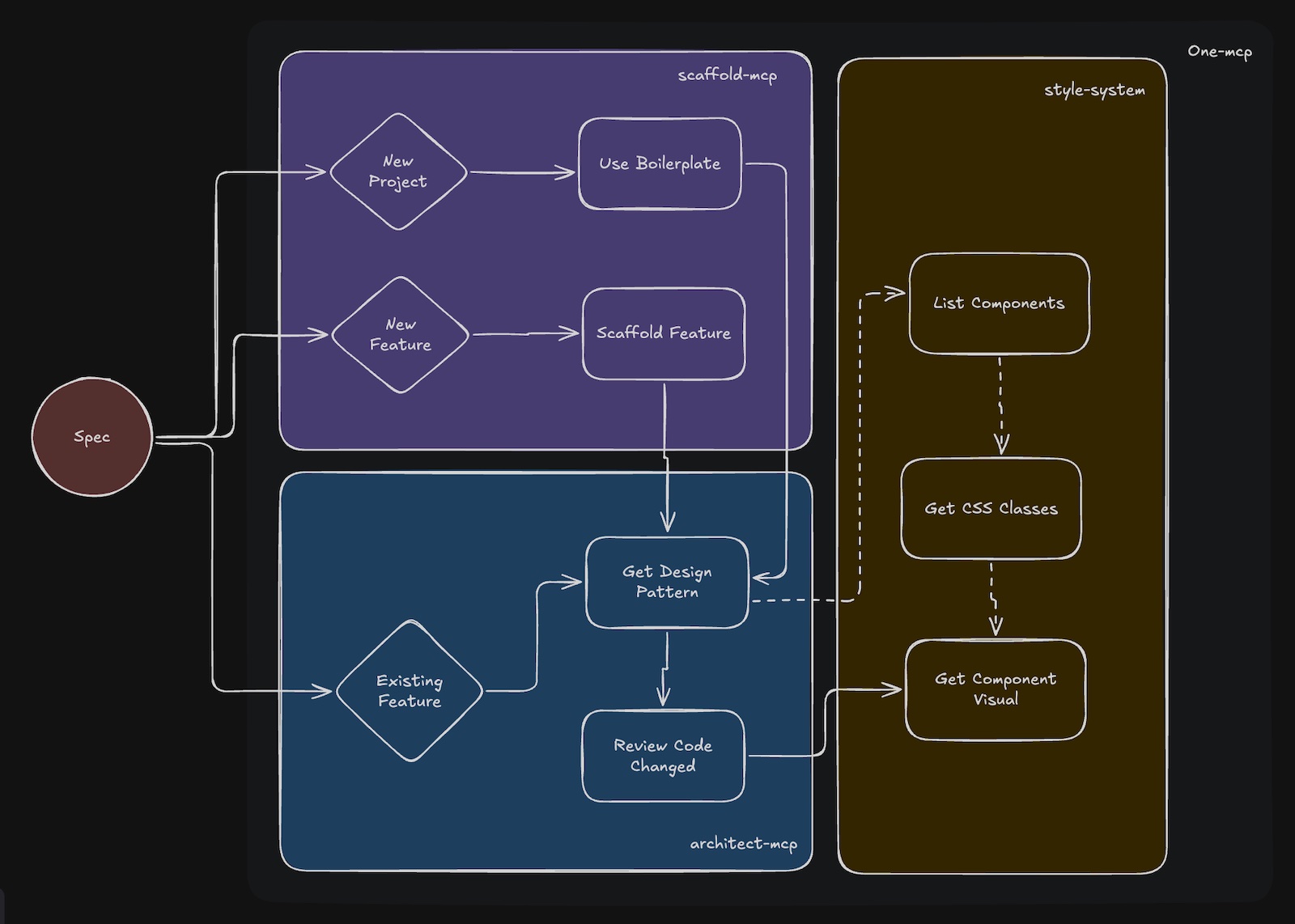
This repo provides:
- project and feature scaffolding via templates
- file-level design guidance before edits
- rule-based review after edits
- design-system discovery for frontend work
Why This Exists
As projects scale, conventions in docs like CLAUDE.md, AGENTS.md, and style guides become hard to keep concise and consistently applied by AI agents. This toolkit moves those conventions into reusable template configs (scaffold.yaml, architect.yaml, RULES.yaml) so agents can discover only the relevant guidance when needed.
Quick Start
Requirements:
- Node.js >= 18
- an MCP-compatible agent such as Claude Code, Cursor, or Gemini CLI
1. Initialize a Workspace
# Existing project
npx @agiflowai/aicode-toolkit init

# New project
npx @agiflowai/aicode-toolkit init --name my-app --project-type monolith
This creates templates/ and .toolkit/settings.yaml. Projects reference templates through sourceTemplate in project.json or .toolkit/settings.yaml.
2. Configure MCP
init can configure MCP automatically. For manual setup, add the servers you need to your agent config.
Example for Claude Code:
{
  "mcpServers": {
    "scaffold-mcp": {
      "command": "npx",
      "args": ["-y", "@agiflowai/scaffold-mcp", "mcp-serve", "--admin-enable"]
    },
    "architect-mcp": {
      "command": "npx",
      "args": [
        "-y", "@agiflowai/architect-mcp", "mcp-serve",
        "--admin-enable",
        "--design-pattern-tool", "codex",
        "--review-tool", "gemini-cli"
      ]
    },
    "style-system": {
      "command": "npx",
      "args": ["-y", "@agiflowai/style-system", "mcp-serve"]
    }
  }
}
Useful flags:
--admin-enable: enable admin/template-authoring tools--design-pattern-tool <tool>: use an LLM to filter design patterns--review-tool <tool>: use an LLM for review output
3. Verify
Ask the agent:
What boilerplates are available?
It should call list-boilerplates. If not, restart the agent.
Repo Layout
AI agent
  ├─ scaffold-mcp
  ├─ architect-mcp
  ├─ style-system
  └─ one-mcp
        ↓
     templates/
       ├─ scaffold.yaml
       ├─ architect.yaml
       └─ RULES.yaml
scaffold-mcp
Generates projects and feature boilerplate from templates.
Core tools:
list-boilerplatesuse-boilerplatelist-scaffolding-methodsuse-scaffold-method
Admin tools:
generate-boilerplategenerate-feature-scaffoldgenerate-boilerplate-file
architect-mcp
Provides file-specific patterns before edits and reviews changes against RULES.yaml.
Core tools:
get-file-design-patternreview-code-change
Admin tools:
add-design-patternadd-rule
style-system
Provides theme, CSS class, and component discovery tools.
Core tools:
list_themesget_css_classesget_component_visuallist_shared_componentslist_app_components
one-mcp
Provides progressive tool discovery to reduce MCP prompt overhead.
Typical Workflow
Create a Project
User: "Create a Next.js app called dashboard"

Agent:
1. list-boilerplates
2. use-boilerplate
3. Project is generated
Add a Feature
User: "Add a products API route"

Agent:
1. list-scaffolding-methods
2. use-scaffold-method
3. Feature files are generated
Edit a File Safely
User: "Add a products page"

Agent:
1. get-file-design-pattern
2. edit the file using the returned patterns and rules
3. review-code-change
4. fix any violations
Style a Component
User: "Style the button with our theme colors"

Agent:
1. get_css_classes
2. list_shared_components
3. update the component
4. get_component_visual
Template Structure
templates/
└── nextjs-15/
    ├── scaffold.yaml
    ├── architect.yaml
    ├── RULES.yaml
    └── boilerplate/
scaffold.yaml
Defines boilerplates and feature scaffolds.
boilerplates:
  - name: nextjs-15-app
    description: "Next.js 15 with App Router"
    targetFolder: apps
    includes:
      - boilerplate/**/*

features:
  - name: add-route
    description: "Add route with page and layout"
    variables_schema:
      name: { type: string, required: true }
    includes:
      - features/route/**/*
architect.yaml
Defines file-level patterns that should be shown before edits.
patterns:
  - name: server-component
    description: "Default for page components"
    file_patterns:
      - "**/app/**/page.tsx"
    description: |
      - Use async/await for data fetching
      - Keep components focused on rendering
      - Move business logic to server actions
RULES.yaml
Defines review rules. Rules can be inherited from a global templates/RULES.yaml.
version: '1.0'
template: typescript-lib
rules:
  - pattern: src/services/**/*.ts
    description: Service Layer Implementation Standards
    must_do:
      - rule: Create class-based services with single responsibility
        codeExample: |-
          export class DataProcessorService {
            async processData(input: string): Promise<ProcessedData> {
              // Implementation
            }
          }
      - rule: Use dependency injection for composability
    must_not_do:
      - rule: Create static-only utility classes - use functions
        codeExample: |-
          // ❌ BAD
          export class Utils {
            static format(s: string) {}
          }

          // ✅ GOOD
          export function format(s: string): string {}
Project Types
Monorepo
Each project references its template in project.json.
my-workspace/
├── apps/
│   └── web-app/
│       └── project.json
├── packages/
│   └── shared-lib/
│       └── project.json
└── templates/
Monolith
Monoliths use .toolkit/settings.yaml.
version: "1.0"
projectType: monolith
sourceTemplate: nextjs-15
Built-in Templates
Included templates:
| Template | Stack | Includes |
|---|---|---|
nextjs-drizzle |
Next.js 15, App Router | TypeScript, Tailwind 4, Drizzle, Storybook |
typescript-lib |
TypeScript Library | ESM/CJS, Vitest, TSDoc |
typescript-mcp-package |
MCP Server | Commander, MCP SDK |
Custom Templates
For template authoring, start from an existing repo or template and use the admin prompts:
/generate-boilerplate
/generate-feature-scaffold
For design/rule authoring, use:
add-design-patternadd-rule
Supported Agents
| Agent | Config Location | Status |
|---|---|---|
| Claude Code | .mcp.json |
Supported |
| Cursor | .cursor/mcp.json |
Supported |
| Gemini CLI | .gemini/settings.json |
Supported |
| Codex CLI | .codex/config.json |
Supported |
| GitHub Copilot | VS Code settings | Supported |
| Windsurf | - | Planned |
Packages
| Package | Description |
|---|---|
| @agiflowai/aicode-toolkit | CLI for init and config sync |
| @agiflowai/scaffold-mcp | Scaffolding server |
| @agiflowai/architect-mcp | Pattern and review server |
| @agiflowai/style-system | Design-system server |
| @agiflowai/one-mcp | MCP proxy for progressive discovery |
Contributing
See CONTRIBUTING.md.
License
Установить Scaffold Mcp в Claude Desktop, Claude Code, Cursor
unyly install scaffold-mcpСтавит в Claude Desktop, Claude Code, Cursor и VS Code — сам разбирается с npx, uvx и сборкой из исходников.
Впервые? Поставь CLI: curl -fsSL https://unyly.org/install | sh
Или настроить вручную
Выполни в терминале:
claude mcp add scaffold-mcp -- npx -y @agiflowai/scaffold-mcpFAQ
Scaffold Mcp MCP бесплатный?
Да, Scaffold Mcp MCP бесплатный — установка в пару кликов через Unyly без оплаты.
Нужен ли API-ключ для Scaffold Mcp?
Нет, Scaffold Mcp работает без API-ключей и переменных окружения.
Scaffold Mcp — hosted или self-hosted?
Self-hosted: сервер запускается локально на твоей машине командой из раздела установки.
Как установить Scaffold Mcp в Claude Desktop, Claude Code или Cursor?
Открой Scaffold Mcp на unyly.org, выбери вкладку своего клиента (Claude Desktop, Claude Code, Cursor) и нажми Install — конфиг сгенерируется автоматически, без правки JSON.
Похожие MCP
GitHub
PRs, issues, code search, CI status
 автор: GitHub
Filesystem
Secure file operations with configurable access controls.
Memory
Knowledge graph-based persistent memory system.
Template MCP Server
A CLI tool to create a new Model Context Protocol server project with TypeScript support, dual transport options, and an extensible structure
 автор: mcpdotdirect
Compare Scaffold Mcp with
Не уверен что выбрать?
Найди свой стек за 60 секунд
Автор?
Embed-бейдж для README
Похожее
Все в категории development