
SecureOps AI
БесплатноНе проверенLocal security auditing powered by LLMs via Model Context Protocol (MCP) — keep your codebase private, catch flaws locally.

Описание
Local security auditing powered by LLMs via Model Context Protocol (MCP) — keep your codebase private, catch flaws locally.
README
Local security auditing powered by LLMs via Model Context Protocol (MCP) — keep your codebase private, catch flaws locally.
No source code leaves your machine. The MCP server runs regex + AST + filename scans locally, and the LLM orchestrates the audit through secure, sandboxed tools.
Quick Start
# Setup
git clone <repo-url>
cd secureops-mcp
python -m venv venv
.\venv\Scripts\Activate.ps1
pip install -r requirements.txt

# Start the MCP server
python server.py
That's it. The server listens on stdio (default MCP transport). Now connect any MCP-compatible client.
Connecting to an MCP Client
Option A: Claude Desktop
Edit your claude_desktop_config.json:
{
  "mcpServers": {
    "secureops": {
      "command": "python",
      "args": ["E:/CODE/secureops-mcp/server.py"],
      "env": {}
    }
  }
}
Restart Claude. The SecureOps AI tools appear in the MCP tool list.
Option B: VS Code (MCP Extension)
Install the "MCP Client" or "Continue" extension, then add to settings:
{
  "mcp.servers": {
    "secureops": {
      "command": "python",
      "args": ["E:/CODE/secureops-mcp/server.py"]
    }
  }
}
Option C: MCP Inspector (Testing)
mcp dev server.py
Opens a web UI where you can test each tool interactively.
Option D: Any MCP SDK Client
from mcp import ClientSession, StdioServerParameters

async with ClientSession(StdioServerParameters(
    command="python", args=["server.py"]
)) as session:
    tools = await session.list_tools()
    result = await session.call_tool("run_local_security_audit", {
        "target_dir": "./target_project"
    })
Using the Tools — Full Walkthrough
Here's what a real audit session looks like (from an actual run against target_project/):
Step 1: Scan directory structure
The LLM requests a file tree — no content is sent:
⚙ scan_directory_structure(target_dir="target_project")
Returns:
{"tree": "target_project/\n .env\n App.java\n app.js\n app.py\n main.go\n main.rs\n requirements.txt"}
Step 2: Run the security audit
The LLM calls the scan tool:
⚙ run_local_security_audit(target_dir="target_project")
Returns findings as structured JSON:
{
  "files_scanned": 7,
  "summary": {"critical": 9, "high": 9, "medium": 1, "low": 0, "info": 1},
  "findings": [
    {
      "severity": "critical",
      "rule_name": "Hardcoded API Key / Secret",
      "file_path": "App.java",
      "line_number": 6,
      "snippet": "private static final String DB_PASSWORD = \"...\"",
      "cwe_id": "CWE-312",
      "recommendation": "Store secrets in environment variables or a vault service."
    }
  ]
}
Step 3: LLM analyses findings
The LLM reads the findings and produces a summary like this:
Security Audit Results — target_project
Severity breakdown: 9 Critical, 9 High, 1 Medium, 1 Info
Key findings by file:
- .env — Exposed DATABASE_URL (PostgreSQL credentials) and GITHUB_TOKEN. Add to .gitignore and rotate tokens.
- app.py — Hardcoded AWS secret, os.system() command injection, exec() on user input, pickle/yaml.load() insecure deserialization.
- app.js — Command injection via cp.exec(), XSS via innerHTML, unsafe eval().
- main.go — Hardcoded API secret (sk-live-...).
- App.java — Hardcoded DB password.
- main.rs — Path traversal via unsanitized file path concatenation.
- requirements.txt — No CVEs checked; run pip-audit -r requirements.txt.
Step 4: Targeted file inspection (optional)
If the LLM needs to see specific code to suggest fixes, it calls:
⚙ read_file_securely(filepath="app.py", base_dir="./target_project")

→ {"file": "app.py", "size_bytes": 187, "content": "import os\n..."}
Path traversal is blocked — ../server.py returns an access denied error.
Available MCP Tools
| Tool | When to Call | What It Returns |
|---|---|---|
run_local_security_audit |
I want a full audit | JSON with all findings, summary, metadata |
get_audit_summary |
I want a quick overview | Summary counts only (no findings) |
run_local_security_audit_sarif |
I need SARIF output | SARIF v2.1.0 (GitHub/VS Code compatible) |
scan_directory_structure |
I need context before scanning | Tree of files and directories |
read_file_securely |
Show me a specific file | File content with path traversal protection |
Features
- Zero-knowledge auditing — code never leaves your machine
- 14 security rules with 39 regex patterns (API keys, SQL injection, XSS, command injection, insecure deserialization, and more)
- AST analysis for Python files (detects
eval(),exec(),os.system(),pickle.loads(), variable-based secret detection) - .env file scanning — detects unquoted
KEY=VALUEsecrets without requiring quotes - Filename-based detection — flags
.env,id_rsa,credentials,secrets, and other sensitive filenames - Parallel scanning with configurable thread pool
- SARIF output (compatible with GitHub Advanced Security, VS Code SARIF viewer)
- Path traversal protection on all file reads
.secureops-ignoresupport (.gitignore-style patterns)- Configurable rules via
secureops_config.yaml
Architecture
┌──────────────────────────────────────────────────────────┐
│                   MCP Client (LLM)                        │
│                                                            │
│  1. scan_directory_structure("./project")                  │
│     ← Gets file tree (paths only, never content)           │
│                                                            │
│  2. run_local_security_audit("./project")                   │
│     ← Gets JSON with findings + summary                    │
│                                                            │
│  3. (optional) read_file_securely("flagged.py", "./project")│
│     ← Gets specific file content (with traversal guard)    │
│                                                            │
│  4. LLM reasons across findings → suggests fixes           │
│     NEVER sees: full codebase, non-flagged files           │
└──────────────────────────┬───────────────────────────────┘
                           │ MCP Protocol (local stdio)
┌──────────────────────────▼───────────────────────────────┐
│                SecureOps MCP Server (Python)              │
│                                                            │
│  RegexScanner   → 14 rules, 39 patterns                    │
│  ASTAnalyzer    → Python AST walker (eval, pickle, etc)    │
│  FileScanner    → Filename check, .env unquoted secrets    │
│  DepScanner     → Dependency manifest flagging             │
│  SARIF Builder  → Standard static analysis format          │
└──────────────────────────────────────────────────────────┘
.env File Detection
SecureOps AI has specialized KEY=VALUE parsing for .env files — no quotes required:
# Lines like these are caught without needing quotes:
DATABASE_URL=postgres://admin:[email protected]:5432/prod
GITHUB_TOKEN=ghp_abc123def456ghi789jkl
| File | Detection | Severity |
|---|---|---|
.env |
Sensitive File Detected | High |
.env.local / .env.prod / etc. |
Sensitive File Detected | High |
KEY=VALUE with unquoted secret |
Unquoted Secret | Critical |
KEY="value" with quoted secret |
Hardcoded API Key / Secret | Critical |
Scanned keys: api_key, secret, password, token, access_key, github_token, gitlab_token, slack_token, stripe_key, twilio, sendgrid, jwt_secret, connection_string, database_url
Security Rules (14 rules, 39 patterns)
| Rule | Severity | CWE | Languages |
|---|---|---|---|
| Hardcoded API Key / Secret | critical | CWE-312 | All |
| Hardcoded Private Key | critical | CWE-312 | All |
| Command Injection Risk | critical | CWE-78 | .py, .js, .ts, .go |
| Hardcoded JWT Secret | critical | CWE-312 | All |
| Insecure Execution (eval/exec/compile) | high | CWE-95 | .py, .js |
| SQL Injection Risk | high | CWE-89 | .py, .js, .ts, .go, .java, .rs, .kt |
| Insecure Deserialization | high | CWE-502 | .py, .js, .ts |
| S3 / Cloud Permission Exposure | high | CWE-732 | All |
| XSS Vulnerability (Unsafe DOM API) | high | CWE-79 | .js, .ts, .jsx, .tsx, .vue, .html |
| Path Traversal | high | CWE-22 | .py, .js, .ts, .go, .rs, .java |
| Sensitive File Exposure | high | CWE-530 | All (filename) |
| Debug / Verbose Mode | medium | CWE-489 | .py |
| Hardcoded Internal / Localhost Address | medium | CWE-200 | All |
| Open Redirect | medium | CWE-601 | .py, .js, .ts |
AST-level Detection (Python only)
eval()/exec()/compile()— any call, even obfuscatedos.system()/subprocess.Popen(shell=True)— command injectionpickle.load()/pickle.loads()/yaml.load()— insecure deserializationinput()in dangerous context — near shell/exec calls- Variable names with secrets —
AWS_SECRET = "...",password = "..."
Configuration
Rules (secureops_config.yaml)
rules:
  - name: "My Custom Rule"
    patterns:
      - "sensitive_pattern"
    severity: high          # critical | high | medium | low | info
    extensions: [".py"]     # empty = all file types
    cwe_id: CWE-200
    recommendation: "Fix it."
Validate custom rules:
import yaml, re
data = yaml.safe_load(open("secureops_config.yaml"))
for rule in data["rules"]:
    for p in rule["patterns"]:
        re.compile(p)  # raises if invalid regex
Ignore Patterns
Create .secureops-ignore in the target directory:
# .secureops-ignore
*.test.py
migrations/
vendor/
Scan Settings
scan:
  max_workers: 8          # parallel file scanners
  max_file_size_kb: 5120  # skip files larger than 5MB
SARIF Output
Run run_local_security_audit_sarif to get SARIF v2.1.0 output. Compatible with:
- GitHub Advanced Security — upload to get inline code annotations on PRs
- VS Code — install SARIF Viewer extension, open
.sariffile - Azure DevOps — SARIF upload task in pipelines
Dashboard
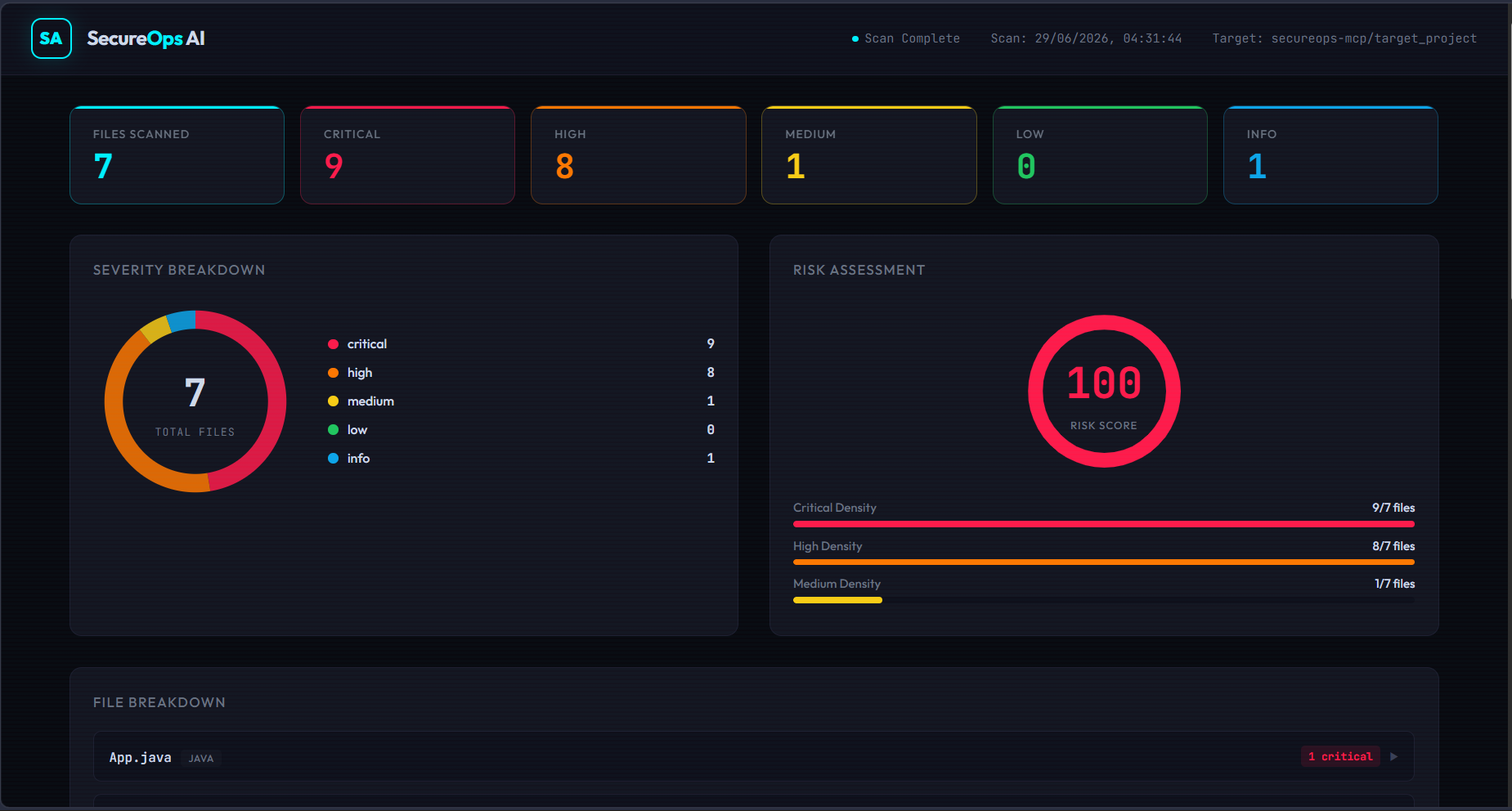
Open dashboard.html in any browser for an interactive visual report:
- Severity donut chart
- Risk score gauge (0–100)
- File-by-file findings breakdown
- Full searchable findings table
- Export to JSON or SARIF
Docker
docker compose up
Or build manually:
docker build -t secureops-ai .
docker run -it -v ./target_project:/app/target_project secureops-ai
Project Structure
secureops-mcp/
├── server.py                # MCP server (3 analyzers, 5 tools)
├── secureops_config.yaml    # 14 rules, 39 patterns, scan settings
├── dashboard.html           # Interactive HTML audit dashboard
├── Dockerfile               # Container build
├── docker-compose.yml       # docker compose up
├── requirements.txt         # Python dependencies
├── .secureops-ignore        # Per-project ignore patterns (optional)
├── DEVPOST_SUBMISSION.md    # Devpost pitch (ready to paste)
├── PRESENTATION.md          # Slide deck outline + talking points
├── DEMO_SCRIPT.md           # 3-minute video script
├── target_project/          # Demo vulnerable codebase (7 files, 5 languages)
│   ├── .env
│   ├── app.py
│   ├── app.js
│   ├── App.java
│   ├── main.go
│   ├── main.rs
│   └── requirements.txt
└── README.md
Установка SecureOps AI
У этого сервера нет опубликованного пакета — он собирается из исходников. Открой репозиторий и следуй инструкции в README.
▸ github.com/Vlex127/secureops-mcpFAQ
SecureOps AI MCP бесплатный?
Да, SecureOps AI MCP бесплатный — установка в пару кликов через Unyly без оплаты.
Нужен ли API-ключ для SecureOps AI?
Нет, SecureOps AI работает без API-ключей и переменных окружения.
SecureOps AI — hosted или self-hosted?
Self-hosted: сервер запускается локально на твоей машине командой из раздела установки.
Как установить SecureOps AI в Claude Desktop, Claude Code или Cursor?
Открой SecureOps AI на unyly.org, выбери вкладку своего клиента (Claude Desktop, Claude Code, Cursor) и нажми Install — конфиг сгенерируется автоматически, без правки JSON.
Похожие MCP
Fetch
Web content fetching and conversion for efficient LLM usage.
AWS KB Retrieval
Retrieval from AWS Knowledge Base using Bedrock Agent Runtime.
 автор: modelcontextprotocol
Spring AI MCP Server
Provides auto-configuration for setting up an MCP server in Spring Boot applications.
llm-analysis-assistant
A very streamlined mcp client that supports calling and monitoring stdio/sse/streamableHttp, and can also view request responses through the /logs page. It also
 автор: xuzexin-hz
Compare SecureOps AI with
Не уверен что выбрать?
Найди свой стек за 60 секунд
Автор?
Embed-бейдж для README
Похожее
Все в категории ai