
Security Audit
БесплатноНе проверенIntegrates with npm-audit-report and npm-registry-fetch to analyze and report potential vulnerabilities in Node.js project dependencies, offering actionable sec

Описание
Integrates with npm-audit-report and npm-registry-fetch to analyze and report potential vulnerabilities in Node.js project dependencies, offering actionable security insights for development teams.
README
smithery badge NPM version License: MIT
A powerful MCP (Model Context Protocol) Server that audits npm package dependencies for security vulnerabilities. Built with remote npm registry integration for real-time security checks.
Features
- 🔍 Real-time security vulnerability scanning
- 🚀 Remote npm registry integration
- 📊 Detailed vulnerability reports with severity levels
- 🛡️ Support for multiple severity levels (critical, high, moderate, low)
- 📦 Compatible with npm/pnpm/yarn package managers
- 🔄 Automatic fix recommendations
- 📋 CVSS scoring and CVE references
Installing via Smithery
To install Security Audit Tool for Claude Desktop automatically via Smithery:
npx -y @smithery/cli install @qianniuspace/mcp-security-audit --client claude
MCP Integration
Option 1: Using NPX (Recommended)
- Add MCP configuration to Cline /Cursor:
{
  "mcpServers": {
    "mcp-security-audit": {
      "command": "npx",
      "args": ["-y", "mcp-security-audit"]
    }
  }
}
Option 2: Download Source Code and Configure Manually
- Clone the repository:
git clone https://github.com/qianniuspace/mcp-security-audit.git
cd mcp-security-audit
- Install dependencies and build:
npm install
npm run build
- Add MCP configuration to Cline /Cursor :
{
  "mcpServers": {
    "mcp-security-audit": {
      "command": "npx",
      "args": ["-y", "/path/to/mcp-security-audit/build/index.js"]
    }
  }
}
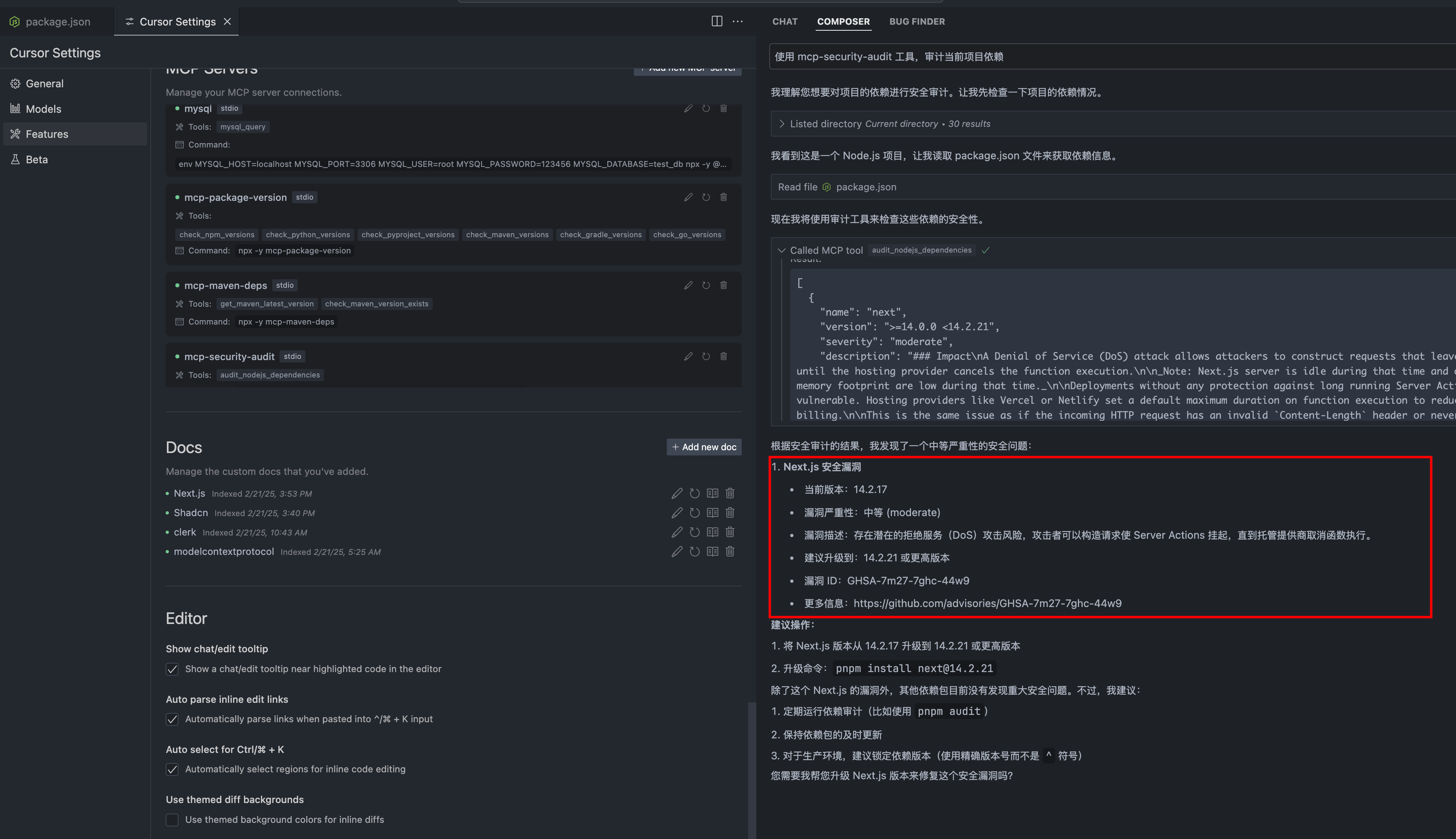
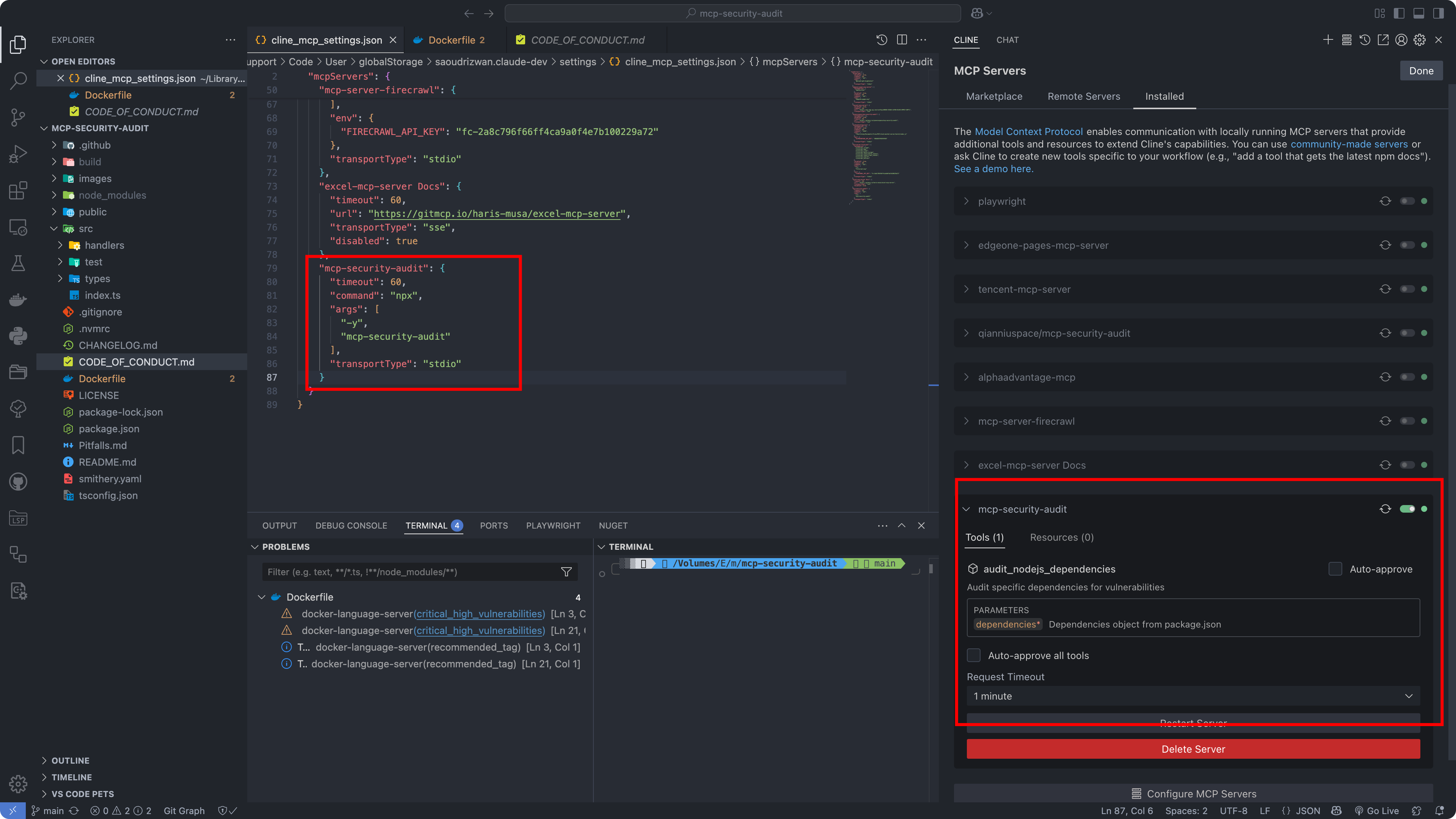
Configuration Screenshots
Cursor Configuration
Cline Configuration
API Response Format
The tool provides detailed vulnerability information including severity levels, fix recommendations, CVSS scores, and CVE references.
Response Examples
1. When Vulnerabilities Found (Severity-response.json)
{
  "content": [{
    "vulnerability": {
      "packageName": "lodash",
      "version": "4.17.15",
      "severity": "high",
      "description": "Prototype Pollution in lodash",
      "cve": "CVE-2020-8203",
      "githubAdvisoryId": "GHSA-p6mc-m468-83gw",
      "recommendation": "Upgrade to version 4.17.19 or later",
      "fixAvailable": true,
      "fixedVersion": "4.17.19",
      "cvss": {
        "score": 7.4,
        "vector": "CVSS:3.1/AV:N/AC:H/PR:N/UI:N/S:U/C:H/I:H/A:N"
      },
      "cwe": ["CWE-1321"],
      "url": "https://github.com/advisories/GHSA-p6mc-m468-83gw"
    },
    "metadata": {
      "timestamp": "2024-04-23T10:00:00.000Z",
      "packageManager": "npm"
    }
  }]
}
2. When No Vulnerabilities Found (no-Severity-response.json)
{
  "content": [{
    "vulnerability": null,
    "metadata": {
      "timestamp": "2024-04-23T10:00:00.000Z",
      "packageManager": "npm",
      "message": "No known vulnerabilities found"
    }
  }]
}
Development
For development reference, check the example response files in the public directory:
- Severity-response.json : Example response when vulnerabilities are found (transformed from npm audit API response)
- no-Severity-response.json : Example response when no vulnerabilities are found (transformed from npm audit API response)
Note: The example responses shown above are transformed from the raw npm audit API responses to provide a more structured format. The original npm audit API responses contain additional metadata and may have a different structure.
Contributing
Contributions are welcome! Please read our Contributing Guide for details on our code of conduct and the process for submitting pull requests.
License
This project is licensed under the MIT License - see the LICENSE file for details.
Author
ESX ([email protected])
Links
Установить Security Audit в Claude Desktop, Claude Code, Cursor
unyly install security-auditСтавит в Claude Desktop, Claude Code, Cursor и VS Code — сам разбирается с npx, uvx и сборкой из исходников.
Впервые? Поставь CLI: curl -fsSL https://unyly.org/install | sh
Или настроить вручную
Выполни в терминале:
claude mcp add security-audit -- npx -y mcp-security-auditПошаговые гайды: как установить Security Audit
FAQ
Security Audit MCP бесплатный?
Да, Security Audit MCP бесплатный — установка в пару кликов через Unyly без оплаты.
Нужен ли API-ключ для Security Audit?
Нет, Security Audit работает без API-ключей и переменных окружения.
Security Audit — hosted или self-hosted?
Self-hosted: сервер запускается локально на твоей машине командой из раздела установки.
Как установить Security Audit в Claude Desktop, Claude Code или Cursor?
Открой Security Audit на unyly.org, выбери вкладку своего клиента (Claude Desktop, Claude Code, Cursor) и нажми Install — конфиг сгенерируется автоматически, без правки JSON.
Похожие MCP
Gmail
Read, send and search emails from Claude
 автор: Google
Slack
Send, search and summarize Slack messages
 автор: Slack
Runbear
No-code MCP client for team chat platforms, such as Slack, Microsoft Teams, and Discord.
Discord Server
A community discord server dedicated to MCP by [Frank Fiegel](https://github.com/punkpeye)
Compare Security Audit with
Не уверен что выбрать?
Найди свой стек за 60 секунд
Автор?
Embed-бейдж для README
Похожее
Все в категории communication