
Self Host Fusion360
БесплатноНе проверенA self-hosted MCP server that lets Claude (or any MCP client) drive Autodesk Fusion 360 on your own machine.

Описание
A self-hosted MCP server that lets Claude (or any MCP client) drive Autodesk Fusion 360 on your own machine.
README
A self-hosted, unified MCP server that lets Claude (or any MCP client) drive Autodesk Fusion 360 on your own machine.
简体中文 · Full manual · Tool reference · Troubleshooting
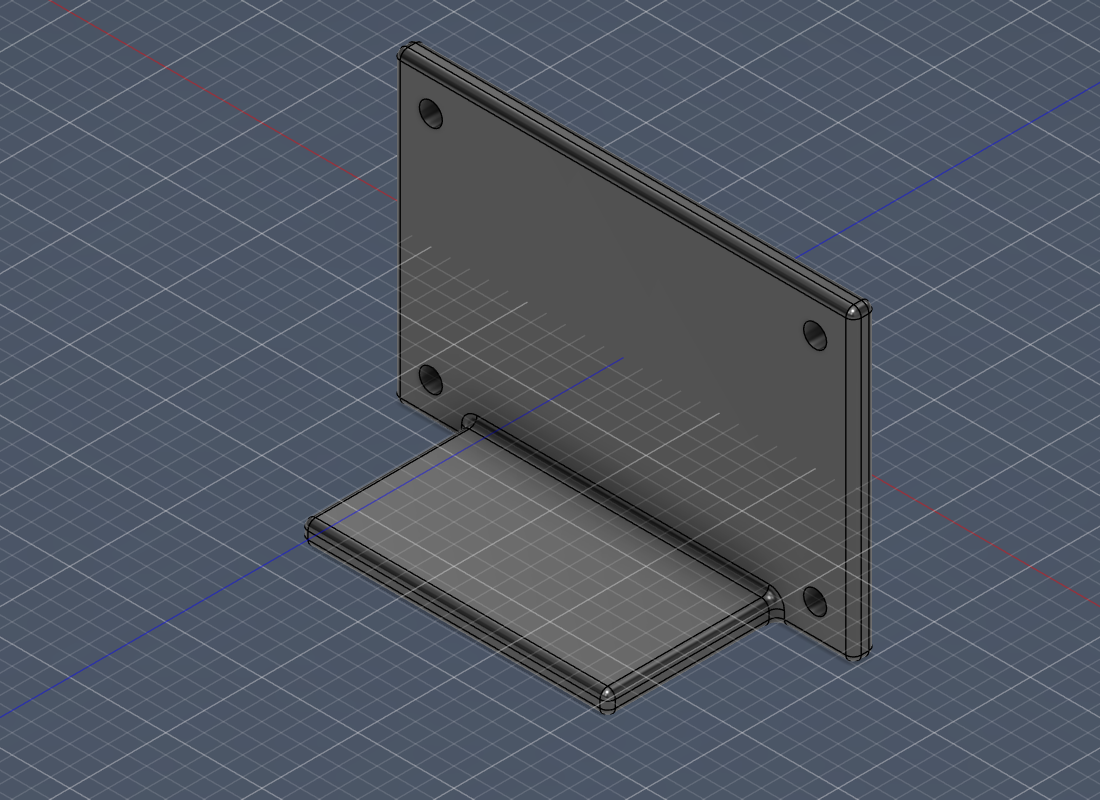
An L-bracket built entirely from a Claude conversation through this MCP — base + wall + boolean join + fillets + 4 mounting holes + mass check + export. See scripts/demo_conversation.py.
It unifies the best ideas from the community Fusion-MCP projects into one well-documented, foolproof package: bilingual docs (中/英), a Windows one-click installer, Docker one-command run, mm-first units, a shared auto-generated token, ~100 tools (plus a generic-API escape hatch for full coverage), auto-create-document, and a doctor that tells you exactly what's wrong. No Fusion subscription required — it works with the free personal-use license too.
✅ Validated against a real Fusion 360 install (Jan 2026 build, Python 3.14): a 57-step coverage test and a full bolt-circle-flange build pass end-to-end, with numerically-verified mass/volume. See Development & testing.
How it works (read this first)
Fusion's adsk.* API can only be called inside Fusion, on its main thread — no external process can touch it directly. So this project has two parts:
┌────────────────┐   MCP (stdio / http)   ┌─────────────────────┐  HTTP + token   ┌──────────────────────────┐
│ Claude          │ ─────────────────────▶ │  MCP server          │ ──────────────▶ │  Fusion add-in (in-process)│
│ Desktop / Code  │ ◀───────────────────── │  (this repo, server/) │ ◀────────────── │  (this repo, addin/)       │
└────────────────┘                         │  native OR Docker     │                 │  127.0.0.1, main thread    │
                                            └─────────────────────┘                 └─────────────┬────────────┘
                                                                                                  │ adsk.* API
                                                                                            ┌─────▼─────┐
                                                                                            │ Fusion 360 │
                                                                                            └───────────┘
⚠️ Fusion cannot run in Docker. It is a desktop GUI app. Docker only containerizes the MCP server; the add-in must run inside Fusion on the host. In Docker the server reaches the host add-in via
host.docker.internal. This is the single most common point of confusion — the installer anddoctorkeep reminding you.
Features
- Two transports —
stdio(Claude Desktop / Claude Code) andstreamable-http(Docker / remote). - ~100 tools — one-call primitives (box/cylinder/sphere), sketches (rect/circle/line/arc/polygon/spline, on construction planes or body faces) with constraints & dimensions for robust parametric sketches, extrude/revolve/sweep/loft, fillet/chamfer/shell/holes/draft/scale, split/offset faces, threads, rectangular & circular patterns, mirror, boolean combine, parameters, body ops, construction planes, appearances, surfaces (patch/thicken/ruled/stitch), inspection (physical properties, min-distance, angle, interference, face listing), timeline edit (undo/redo/suppress), export (STL/STEP/F3D/DXF), viewport screenshots Claude can see, units, assembly (components, joints, rigid groups), and CAM (setups, operations, tool assignment, toolpaths, G-code post).
- Generic API escape hatch —
fusion_api_call/fusion_api_introspect/fusion_api_docsreach anyadsk.*method by path (full coverage for anything not covered by a curated tool). Gated behind allow_arbitrary_code. - Auto-create document — build tools make a new design if none is open; no community server does this.
- mm-first — every dimension is millimetres; the cm conversion is done once, at the boundary (no 10× bugs).
- Tool annotations — read-only/destructive/idempotent hints so clients can auto-approve safe calls.
- Foolproof setup — auto-generated shared token (never copied by hand), safe Claude-config merge (your other servers are preserved), idempotent installer, UTF-8/GBK handling for Chinese Windows.
- Web config dashboard —
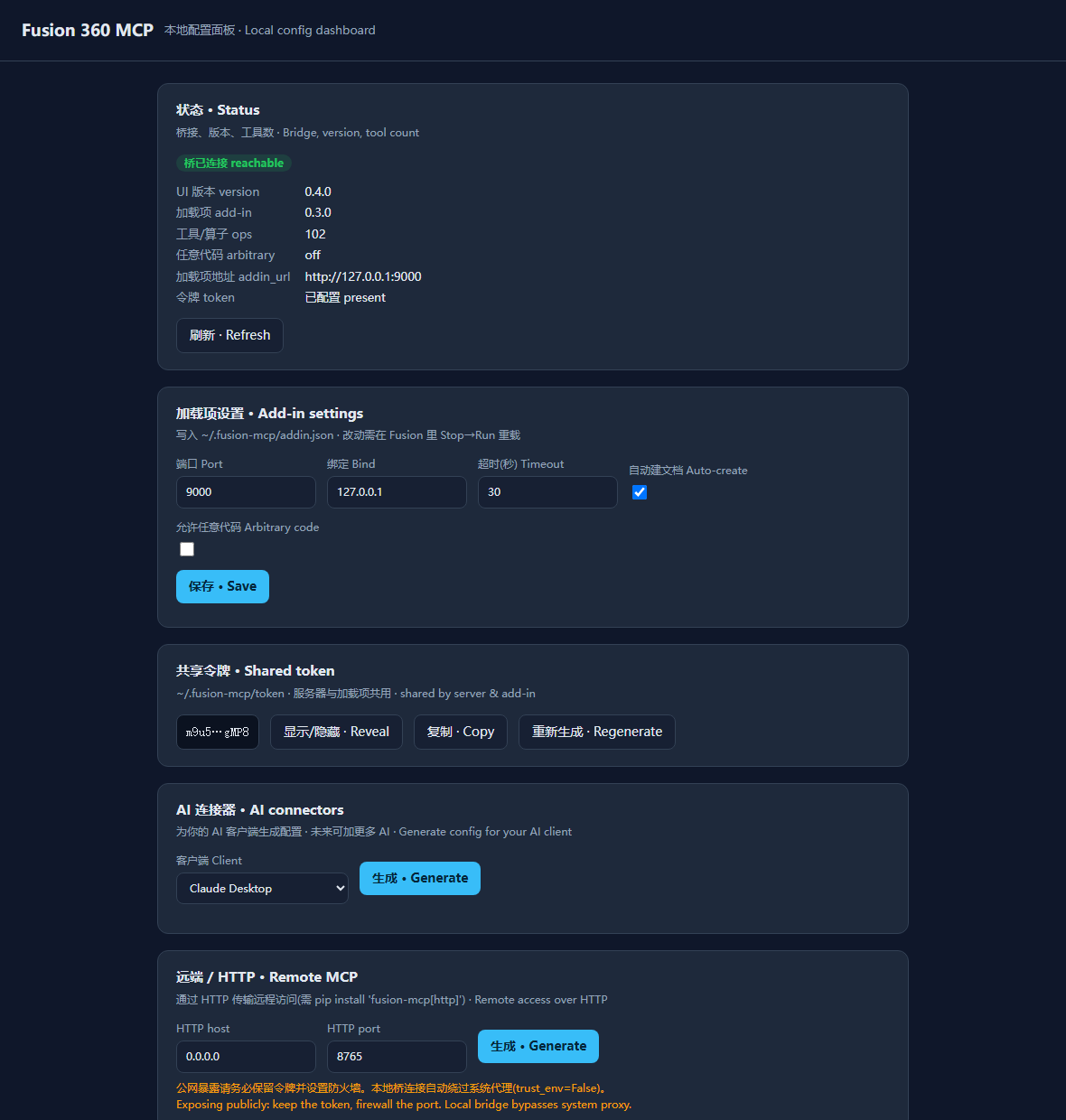
fusion-mcp webuiopens a local browser UI to see status, edit settings, manage the token, and generate/apply MCP client config for multiple AIs (Claude Desktop/Code, Cursor, VS Code, generic, remote HTTP). Loopback-only, zero new deps. doctor— bilingual diagnostics that pinpoint connection/token/version problems.- Mock mode — run the server, tests, and Docker image with no Fusion installed.
- Bilingual docs — everything in English and 简体中文.
- Safe by default — the arbitrary-code tool is off unless you explicitly enable it.
Quickstart
Option A — Windows one-click (recommended)
- Install Fusion 360 and Python 3.10+ (tick Add to PATH).
- Double-click
install/windows-install.bat(or runinstall/windows-install.ps1in PowerShell). It copies the add-in into Fusion, generates the token, installs the server, and merges your Claude Desktop config. - Start Fusion 360, open a design, then go to Utilities → ADD-INS → Scripts and Add-Ins, select Fusion360MCP, and click Run (set it to Run on Startup to skip this next time).
- Fully quit and reopen Claude Desktop. Ask: "Create a 20×20×10 mm box in Fusion and add 2 mm fillets."
Option B — Docker (server in a container)
The add-in still installs on the host (steps 1–3 above, or just copy addin/Fusion360MCP/ into your Fusion API/AddIns folder). Then:
cp .env.example .env          # set FUSION_MCP_TOKEN to the host token (~/.fusion-mcp/token)
docker compose up -d          # server listens on http://localhost:8765/mcp
docker compose run --rm fusion-mcp fusion-mcp doctor   # verify
Add it to Claude as a custom (remote/HTTP) connector pointing at http://localhost:8765/mcp.
Option C — Manual / cross-platform
pip install -e .                         # or: pip install -e ".[http,dev]"
cp addin/Fusion360MCP  ->  <Fusion>/API/AddIns/   # copy the add-in folder
fusion-mcp doctor                        # diagnose
fusion-mcp run                           # stdio (configure your client to launch this)
See the full manual for the exact Claude config JSON and the Fusion AddIns paths.
Web config dashboard
fusion-mcp webui # opens http://127.0.0.1:8088 in your browser
A local, loopback-only page to: check bridge status, edit add-in settings, view/
regenerate the token, and generate or one-click-apply MCP client config for
Claude Desktop, Claude Code, Cursor, VS Code, a generic client, or a remote/HTTP
connector. Adding a future AI = one entry in fusion_mcp.clientconfig.CONNECTORS.
Configuration
All optional; defaults shown. See .env.example.
| Variable | Default | Meaning |
|---|---|---|
FUSION_ADDIN_URL |
http://127.0.0.1:9000 |
Where the server reaches the add-in (http://host.docker.internal:9000 in Docker) |
FUSION_MCP_TOKEN / FUSION_MCP_TOKEN_FILE |
~/.fusion-mcp/token |
Shared bearer token (resolution order) |
FUSION_MCP_TRANSPORT |
stdio |
stdio or http |
FUSION_MCP_HTTP_HOST / _PORT |
0.0.0.0 / 8765 |
HTTP bind (http transport) |
FUSION_MCP_ALLOW_ARBITRARY_CODE |
0 |
Expose fusion_run_script (risky) |
FUSION_MCP_MOCK |
0 |
Run without Fusion |
Safety & limitations
- Verify everything. Claude is great at prismatic/parametric parts and repetitive edits, weaker at organic/freeform surfaces. A 0.1 mm slip breaks a fit — review (and ideally print) before trusting output.
- The connector mutates your live model. Save a version before batch operations.
fusion_run_scriptruns arbitrary Python in Fusion; it is disabled unless you opt in.- The bridge binds to
127.0.0.1and requires a bearer token. Read docs/TROUBLESHOOTING before exposing it to Docker/other hosts. - License limits: IGES/SAT export is blocked on personal-use Fusion licenses (the bridge returns a clear hint); STEP/STL/F3D work on all licenses. 3MF has no Fusion API and is not exposed — use STL for 3D printing.
- CAM prerequisites: the
cam_*tools require the Manufacturing workspace to have been opened once (so the CAM product exists); they return a clear hint otherwise. Most operation strategies also need a cutting tool assigned before a toolpath will generate.
Development & testing
Everything below was used to validate the project against a real Fusion 360 install.
# 1) Call any op directly against the live bridge (reads ~/.fusion-mcp/token)
python scripts/rpc.py health
python scripts/rpc.py primitive.box '{"width":20,"depth":20,"height":20}'

# 2) Comprehensive coverage test (fresh doc -> ~57 checks across every tool)
python scripts/smoketest.py

# 3) Realistic end-to-end part: a bolt-circle flange (+ inspection & export)
python scripts/demo_flange.py        # writes screenshots/flange.png

# 4) Mock unit tests (no Fusion needed)
python -m pytest -q
Hot-reload loop (no Fusion restart). The add-in entry purges its package
modules on Stop→Run, and a dev-only system.reload op re-imports all op code —
including _common — in place. So the edit→test cycle is:
cp -r addin/Fusion360MCP/. "$APPDATA/Autodesk/Autodesk Fusion 360/API/AddIns/Fusion360MCP/"
python scripts/rpc.py system.reload   # live-reload edited add-in code
python scripts/smoketest.py           # re-test
Only changes to the HTTP/bridge layer (bridge/, config.py, __init__.py)
need a Fusion Stop→Run; op edits are picked up by system.reload.
Status & roadmap
Done (v0.5.0) — every tool below validated against a real Fusion 360 install (Jan 2026 build, Python 3.14):
Active component — build a multi-part model in ONE document:
assembly.activate_componentmakes later sketch/feature/primitive ops target that component (each part isolated, existing bodies untouched); default is the root component.Auto-dismiss blocking dialogs — an external guard process closes save/recover/server-verification/stray modals that would otherwise freeze Fusion (they hold the GIL, so an in-process watchdog can't); safe WM_CLOSE-first, only when an op is stuck or the title matches a nuisance allowlist.
system.restart— full in-process reload (incl. bridge/__init__) over RPC, so code changes apply without a manual Fusion Stop→Run.Two-part architecture (in-Fusion add-in bridge + external MCP server); stdio and streamable-http transports; mock mode (no Fusion needed).
~100 tools: primitives; sketches with constraints & dimensions; extrude/ revolve/sweep/loft; fillet/chamfer/shell/hole/draft/split/offset-faces/thread/ scale; rectangular & circular patterns; mirror; boolean combine; surfaces (patch/thicken/ruled/stitch); parameters; body ops; construction planes; appearances; inspection (mass, min-distance, angle, interference, face listing); timeline edit (undo/redo/suppress); export (STL/STEP/F3D/DXF); viewport screenshots; units; assembly (components, joints incl. by-face, rigid groups); CAM (setups, operations, auto tool-assignment, toolpaths, G-code post).
Generic API escape hatch (
api.call/introspect/docs, gated) for full coverage.Auto-create-document, mm-first units, mutation
_deltafeedback, bilingual hints.Foolproof Windows installer, Docker,
doctor, hot-reload dev loop.Web config dashboard (
fusion-mcp webui) + multi-AI connector registry.28 mock tests; full bilingual docs.
Roadmap / TODO:
- CAM end-to-end validated (needs Manufacturing workspace + tool library): setup → operation → toolpath → G-code.
- Curated sheet-metal creation — currently blocked by the Fusion API (no create methods on FlangeFeatures/BendFeatures); revisit if Autodesk exposes it. (Only
create_flat_patternon existing SM bodies works today.) - Joints by edge / axis, joint limits & motion.
- Drawings (2D drawing docs, auto views) + richer DXF/PDF export.
- "Apply config" write-through for Cursor / VS Code (not just Claude Desktop).
- One-click webui launcher (
.bat) + optional system-tray. - macOS installer (
.command) at parity with the Windows installer. - Publish to PyPI (
uvx fusion-mcp) + signed release. - Tests for the webui API + more op-level mocks.
- More AI connectors as the ecosystem grows.
Project layout
addin/Fusion360MCP/   In-Fusion add-in (pure stdlib): HTTP bridge + main-thread dispatch + ops
server/fusion_mcp/    MCP server: FastMCP app, tools, client, doctor, CLI
install/              Windows installer, token gen, safe Claude-config merge
docs/                 Bilingual manual, architecture, tool reference, troubleshooting
scripts/              Dev helpers: rpc.py, smoketest.py, demo_flange.py, doctor, gen_tools_doc
tests/                Mock-driven tests (no Fusion needed)
License
MIT — see LICENSE. Not affiliated with or endorsed by Autodesk or Anthropic.
Установить Self Host Fusion360 в Claude Desktop, Claude Code, Cursor
unyly install self-host-fusion360-mcpСтавит в Claude Desktop, Claude Code, Cursor и VS Code — сам разбирается с npx, uvx и сборкой из исходников.
Впервые? Поставь CLI: curl -fsSL https://unyly.org/install | sh
Или настроить вручную
Выполни в терминале:
claude mcp add self-host-fusion360-mcp -- uvx fusion-mcpFAQ
Self Host Fusion360 MCP бесплатный?
Да, Self Host Fusion360 MCP бесплатный — установка в пару кликов через Unyly без оплаты.
Нужен ли API-ключ для Self Host Fusion360?
Нет, Self Host Fusion360 работает без API-ключей и переменных окружения.
Self Host Fusion360 — hosted или self-hosted?
Self-hosted: сервер запускается локально на твоей машине командой из раздела установки.
Как установить Self Host Fusion360 в Claude Desktop, Claude Code или Cursor?
Открой Self Host Fusion360 на unyly.org, выбери вкладку своего клиента (Claude Desktop, Claude Code, Cursor) и нажми Install — конфиг сгенерируется автоматически, без правки JSON.
Похожие MCP
Notion
Read and write pages in your workspace
 автор: Notion
Linear
Issues, cycles, triage — from Claude
 автор: Linear
Google Drive
Search and read your Drive files
 автор: Google
mindsdb/mindsdb
Connect and unify data across various platforms and databases with [MindsDB as a single MCP server](https://docs.mindsdb.com/mcp/overview).
 автор: mindsdb
Compare Self Host Fusion360 with
Не уверен что выбрать?
Найди свой стек за 60 секунд
Автор?
Embed-бейдж для README
Похожее
Все в категории productivity