
SEO Audit Console
БесплатноНе проверенMerges your Google Search Console data with a live crawl of your site to run a comprehensive technical SEO audit inside Claude, providing prioritized findings a

Описание
Merges your Google Search Console data with a live crawl of your site to run a comprehensive technical SEO audit inside Claude, providing prioritized findings and paste-ready fixes.
README
A technical SEO audit you can hold a conversation with - built from your own Search Console data and a live crawl of your site, run inside Claude.
npm version License: Source-Available MCP Node
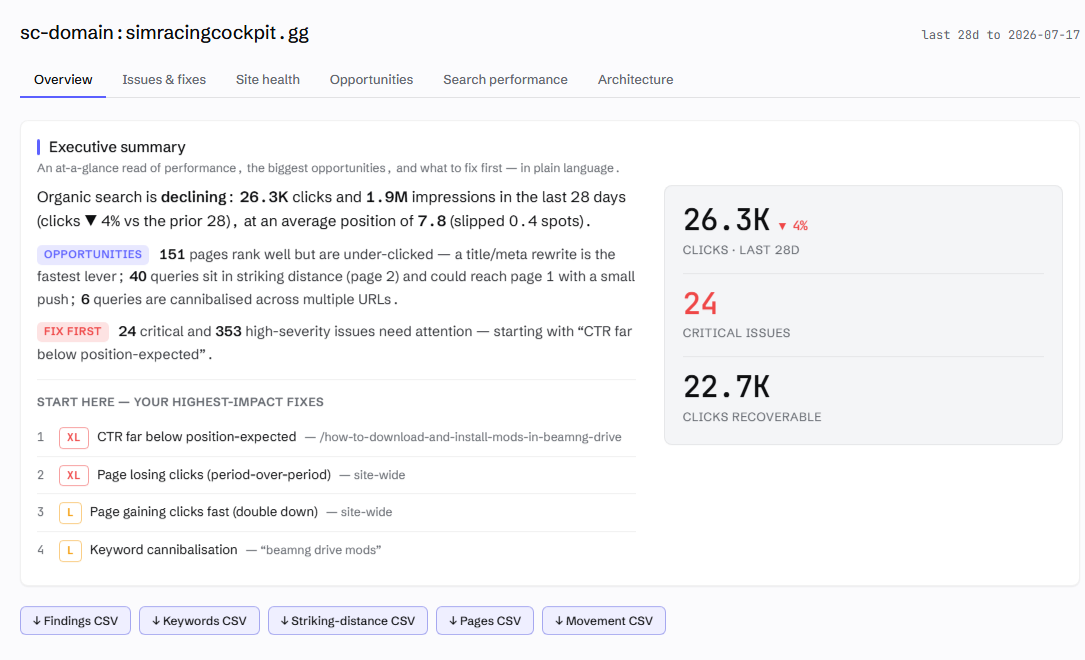
The complete technical SEO audit, at conversation speed. SEO Audit Console merges your Google Search Console history, a first-party crawl of your site, and on-demand DataForSEO market data into one prioritised audit inside Claude - from crawlability, indexation, canonicalisation, structured data, Core Web Vitals and hreflang right through to keyword cannibalisation, striking-distance queries, content gaps, competitor analysis and AI-search readiness. Ninety-three checks, every finding ranked by the clicks it could recover, every fix written for you: paste-ready redirects, JSON-LD, internal links and grounded content briefs. What used to be a fortnight of crawling, exporting and cross-referencing spreadsheets is twenty minutes and a prompt - and your data never leaves your machine.
Built by Houtini. We build automation for the grunt work of digital marketing - the data collection, the crawling, the merging, the checking - so your team's time goes on the thinking, the strategy and the client work that needs a human. This plugin is that idea applied to the technical SEO audit.
you  › run an SEO audit on simracingcockpit.gg

     ⣾ search console  1.8M rows synced (19s - incremental)
     ⣾ crawl           868 pages · HTTP/2 · robots-polite · 8 parallel
     ⣾ link graph      internal PageRank · click depth · in-degree
     ✓ 93 checks · 220 findings · ranked by expected clicks per dev-hour

     #1  CTR far below position-expected     /how-to-install-mods       XL
     #2  Page losing clicks (trend)          site-wide                  XL
     #3  Keyword cannibalisation             "beamng drive mods"        L
     #4  Robots-blocked page earning traffic /category/wheels           L

you  › generate the fix for #1 ▍
The manual
This README is the story and the quick start. The detail lives in the manual:
| Page | What's in it |
|---|---|
| Getting started | Install, the GSC service-account setup (and the step everyone misses), Claude Desktop and Claude Code config, your first audit, troubleshooting |
| Tool reference | Every tool: what it does, inputs, joins, an example prompt |
| The check registry | All 93 checks with what each catches, its D/N label, and the fix |
| Composition | The join keys, the grains, and thirteen worked recipes for asking your own questions across the data |
| Competitive analysis | The Semrush-replacement workflows, DataForSEO setup, and the real costs |
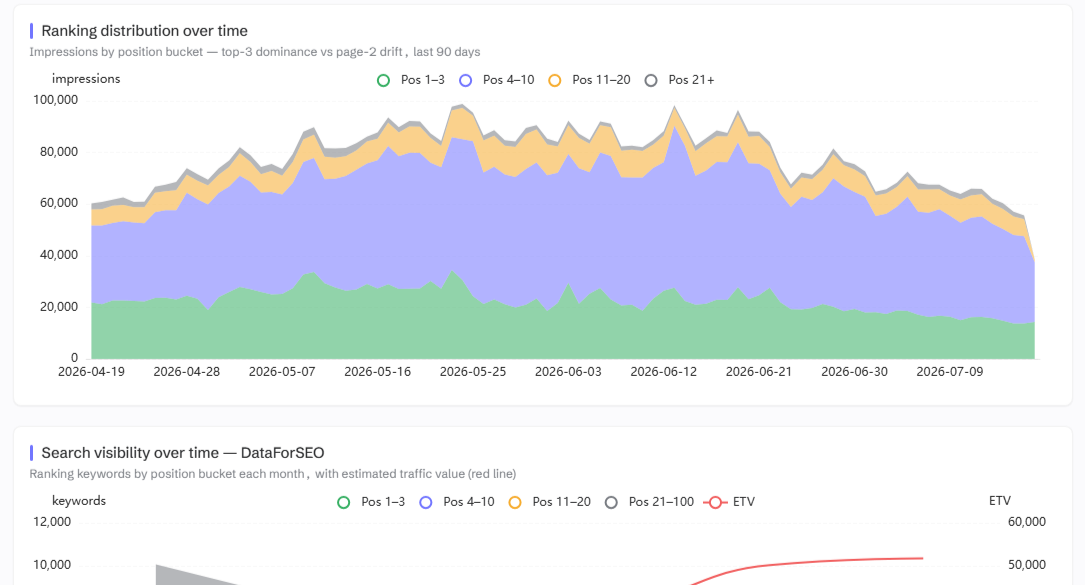
| Dashboard & reports | The six tabs, what each chart shows, and the shareable export |
Surprisingly little has changed in twenty years
The technical audit I was writing for clients in 2006 is, structurally, the audit most agencies still sell today. A crawler runs, a template fills, a 60-page PDF lands. Everything a crawler could find, in severity order, with no idea which findings are worth money and which are cosmetic.
What has changed is what's possible. Google gives every site owner a complete record of its search reality - which queries, which pages, how many impressions, where you ranked. Your crawl tells you what your site says. Search Console tells you what Google did about it. And in my experience, the gap between those two datasets is where nearly all of the recoverable traffic hides.
So that's what I built. SEO Audit Console is a Model Context Protocol server that merges your Search Console history with a first-party crawl of your site (and, when you want it, DataForSEO) into one thing: a prioritised, evidence-backed audit you can interrogate inside Claude Desktop. It hands you paste-ready fixes. Every finding traces back to a real datapoint.
One idea underneath all of it:
Your crawl is intent. Search Console is reality. The money is where they diverge.
A flat crawler tells you a page 404s. Useful, but only just. This tells you the 404 is draining 15% of your homepage's internal PageRank, that the page used to earn 10,000 clicks a month, and it writes the 301 rule to fix it. It finds the page at position #3 on 150,000 impressions with a 0.2% click-through rate - a title rewrite probably worth thousands of clicks - and ranks that above the cosmetic findings. Severity is what crawlers sell you. Yield is what moves the numbers.
Who is this for?
The SEO consultant who wants the collection and checking automated so the thinking time survives. The in-house marketer who's been quoted four figures for a commodity audit. And anyone newer to this who wants to learn what a good audit looks at - because every finding shows its evidence, the tool doubles as a teacher.
A note on where to run it. Claude Desktop is the easy start, but in my view Claude Code is the best home for this tool - because it closes the loop. In a chat client the audit hands you a 301 rule to paste somewhere. In Claude Code, the same session has your site's repo, a terminal and git: the audit finds the issue, writes the fix, applies it to the codebase, commits it, and re-crawls to verify. Finding to deployed fix, one conversation.
You don't need to learn an interface. You type "run an SEO audit on mysite.com" into Claude and it happens. Forget what's possible? Ask "run seo_audit_help" and you get the full menu with example prompts.
Does the approach work?
Yes. The crawl-plus-GSC merge is not a novelty; it's the method. On one property, seeding the crawl from Search Console URLs took coverage of GSC-known pages from 29% to 70% - every one of those extra pages is a page a conventional crawl silently missed, and several were earning traffic with no internal links pointing at them at all. On the same property the incremental sync turned a 33-minute data refresh into 19 seconds, which is the difference between "audit quarterly" and "audit whenever you're curious".
What the audit checks
run_audit executes 93 checks over the joined data and returns a ranked list - not a wall of everything, a priority order with the traffic at stake attached to each finding. The families, briefly:
| Family | What it catches |
|---|---|
| Crawlability & indexation | Broken links, redirect chains, orphans, index bloat, spider-traps, robots-blocked pages still earning traffic, and the reason every URL isn't indexable |
| On-page & structured data | Titles, metas, H1s, alt text - plus a local validator covering ~30 rich-result types, required fields only, so it never nags about properties Google ignores |
| Trends (GSC over time) | Pages losing clicks, rankings slipping, vanished queries, rising pages worth doubling down on, stale content decaying year-on-year |
| The merged questions | Cannibalisation, striking distance, ghost pages, traffic to dead URLs, internal authority wasted on no-click pages, titles missing the query you already rank for |
| AI-search readiness | Phrases you rank for but never say, queries your copy never answers in one passage, content that doesn't chunk cleanly for retrieval |
Every check is labelled D (deterministic - here are the bytes) or N (judgement - off by default, ask for "the judgement findings" to see them). In my view a wrong finding is worse than no finding at all, so the heuristic checks have to ask permission. The full registry, check by check, is in the manual.
And if you grew up on desktop crawlers, the dashboard's Site health tab will feel like home - response codes, indexability reasons, crawl depth, the heaviest images, server errors and slow pages, all as clean stat bars. The tab-by-tab tour is in dashboard.md.
The crawl, properly explained
The crawl is where audits usually go wrong, so it's worth understanding what this one does differently. I've spent enough of my career cleaning up after crawlers that fooled themselves.
It discovers pages three ways. Following links, reading your XML sitemaps, and - the important one - starting from every URL Google is already sending traffic to, straight out of your GSC data. Coverage stops depending on your sitemap being honest. It's also exactly how ghost pages get caught: if Google ranks a URL your own site structure can't reach, that URL still gets crawled, and the mismatch becomes a finding.
It records why, not just what. For every URL that isn't indexable it stores the reason - 404, noindex, X-Robots header, canonicalised elsewhere, robots-blocked, non-HTML. "This page won't rank" is a fact; "this page won't rank because a plugin set an X-Robots header nobody remembers" is a fix.
It refuses to be fooled. A redirect that leaves your site (Shopify OAuth flows, I'm looking at you) is recorded as a redirect-out, never stored as a page. It always uses GET rather than HEAD, because a HEAD request can return a different status than the real request would - but it abandons the body for images, PDFs and assets, so it records status and size without downloading the bytes.
It's quick without being rude. HTTP/2 where your origin supports it, gzip and brotli negotiated, keep-alive connections reused. The speed comes from efficiency, not from hammering your server. It respects robots.txt properly (a bot-specific group replaces *, per the spec, which plenty of commercial crawlers get wrong), backs off when your host rate-limits, and skips the junk: internal search, faceted filter combinations, login flows. This is a crawler for sites you own. Being a good guest is the point.
After the crawl it computes a real link graph: internal PageRank with nav and footer links down-weighted, click depth from the homepage counting body links only, in-degree per page. That graph powers the orphan, equity-leak and underlinked-page checks - and the donor rankings when the tool suggests internal links.
The workflows, briefly
Each of these is a real procedure I use, and each is one prompt. The expanded versions, with what happens underneath, live in the manual pages linked.
- Your first audit. "Refresh sc-domain:mysite.com", then "Run an SEO audit on mysite.com". Twenty minutes on a mid-size site, and the top five findings are usually worth more than the other eighty-five combined. Then "generate the fix for #1". → getting-started.md
- Sitewide keyword optimisation. The question isn't "what keywords should I target?" - it's "where does my copy fail to say what I already rank for?" "Score the passages on mysite.com" runs a small local relevance model over every ranking page; "draft the missing content for /page" writes the fix in your site's own voice, grounded so it invents nothing. → tools.md
- Cannibalisation. "Show me the cannibalisation findings with evidence" - thresholds tuned so incidental long-tail overlap doesn't count, so the consolidate-or-differentiate call is made on numbers. → checks.md
- The content plan. "Suggest new pages for mysite.com" mines demand Google already shows you; "what topics should mysite.com cover?" maps the demand it doesn't. Together: a quarter's plan. → competitive.md
- The template play. "List the page templates" - big sites aren't 50,000 pages, they're a dozen templates repeated, and one template fix corrects the whole cluster. → tools.md
- Monitoring and migrations. "Detect changes on mysite.com" diffs your two most recent crawls by severity. During a migration this is the difference between catching a stray noindex on Tuesday and explaining a traffic graph in a board meeting three weeks later. I've been on the wrong end of that one. → tools.md
- AI-search readiness. "Check agent readiness for mysite.com" - the web is quietly growing a second audience, and almost no SEO tool checks any of it. → tools.md
- Your own questions. The four datasets share three join keys, and the most valuable analyses are the ones you compose yourself - "which pages lost clicks after being cited in AI Overviews?" is one prompt here and a feature nowhere else. → composition.md
- Reporting. "Show me the dashboard" in the chat, or "export the report" as one self-contained HTML file you can send a client. → dashboard.md
What DataForSEO adds (and what it costs)
Everything above works with just your Search Console data. But GSC can only describe searches where you already appear. The moment your question is "how big is this market?" or "what do competitors rank for that I don't?", you need third-party data - and that's DataForSEO: a pay-as-you-go API for volumes, live rankings, competitor data and Lighthouse runs. No subscription; calls cost fractions of a cent to a few cents, cached for 20 days, and only ever run when you ask. My own usage runs to a few dollars a month.
It unlocks the Semrush-replacement layer: the organic visibility overview for any domain, any site's top pages and ranked keywords (including which keywords cite a site in AI Overviews), the content gap, topic gaps, search intent, lab Core Web Vitals and backlinks. The full workflows and setup: competitive.md.
Installation, in brief
Three steps - the full walkthrough with the gotchas is getting-started.md:
- Get it: the quick route is npx - point your MCP config at
npx -y @houtini/seo-audit-consoleand there's nothing to build. Or clone this repo,npm install,npm run buildif you want the source. Either way, Node ≥ 20. - Connect Search Console: create a Google Cloud service account, download its JSON key, and - the step everyone misses - add the service account's email as a user on your property in Search Console.
- Point your MCP client at
dist/index.jswithGOOGLE_APPLICATION_CREDENTIALSset. Works in Claude Desktop and Claude Code; only the one env var is required.
Then: "list properties" to check it's connected, "refresh", "run an SEO audit".
The tools, at a glance
The one-line version - full descriptions, inputs and example prompts for every tool are in the tool reference.
| Tool | What it does |
|---|---|
refresh_property |
Sync GSC + crawl + inspect + rank history, one job |
sync_gsc · start_crawl · inspect_urls · track_ranks |
Run a single part on its own |
check_sync_status · check_crawl_status |
Watch a long job's progress |
run_audit · query_audit · list_checks |
The scored audit · one check with evidence · the catalogue |
query_data |
Read-only queries over the raw tables - aggregates in the database, answers not rows |
fix_finding |
Paste-ready remediation (JSON-LD / 301 / internal links) |
detect_changes |
What changed between the two most recent crawls |
check_agent_readiness |
0-100 AI-agent readiness score with copy-paste fixes |
list_templates · suggest_pages |
Template clusters · new-page ideas from real demand |
score_passages · draft_content |
Local relevance scoring · grounded writing briefs |
resolve_entities |
Wikidata entities and the link gaps between them |
keyword_volume · related_terms · search_intent |
DataForSEO keyword data |
competitors_domain · page_intersection · topic_gaps |
Competitors · content gap · topic gaps |
domain_visibility · top_pages · ranked_keywords |
The Semrush-style views, any domain (+ aioOnly for AI Overview citations) |
page_lighthouse · pull_backlinks |
Lab CWV · backlink profile with live status |
get_dashboard · export_report |
In-chat dashboard · shareable HTML |
composition_cookbook |
The data-surface map and recipes for bespoke analyses |
data_storage |
Per-property disk usage and row counts, with confirm-gated pruning |
normalize_url · data_location · list_properties · seo_audit_help |
Utilities and the help menu |
How it works under the hood
- The join key (
url_key). GSCpageand crawlurlboth normalise down to the same key - force HTTPS, unify www and apex, strip tracking params, and so on. Everything joins on that. It's the whole trick, really. - One SQLite database per property (WAL, prepared statements). Your data stays on your machine.
- Scored once, sorted by yield.
(expected clicks × yield × certainty) / effort. Covering-indexed, so the audit stays fast even when the GSC table runs to millions of rows. - Careful with your history. Crawls and syncs never destroy the previous snapshot until new data has started arriving - a site outage mid-crawl doesn't cost you your data.
- Owned-site only, dry-run fixes. It crawls sites you control, and the generators return artifacts. They never write to your site. That's a line I won't cross.
Privacy and data
Your Search Console data and the crawl live in local SQLite files under SAC_DATA_DIR. The passage-scoring model runs locally too. Nothing leaves your machine except the API calls you trigger - Google (your own GSC) and, if you've set it up, DataForSEO. No telemetry. None.
What's coming
A few things I'm building next, in rough order:
- List mode. Paste any list of URLs - a migration map, old ranking pages, a PPC export - and have it status-checked and audited. The migration-verification workflow, basically.
- Structured-data opportunities, by template. Not "you have no schema" (most modern stores have plenty), but "this template could earn review stars or an FAQ rich result and doesn't."
- A per-page content scorecard. A dedicated table of every ranking phrase your copy misses, not just the top query.
- More agent readiness. A WebMCP advisory (which tool actions your site could expose to agents) and the agent-commerce protocols.
- A printable report. A proper A4 document you can hand a client, not a slide deck.
- Source-level parser checks. The audit spec is written - ~94 checks covering the layer most tools never touch: elements that silently break
<head>parsing, directives hoisted into the body and ignored, raw-vs-rendered divergence.
Got a weird edge case you wish a tool caught? Tell me - that's exactly how the merged GSC×crawl checks got built.
About Houtini
Houtini exists for one reason: the hours your team loses to grunt work. Pulling Search Console exports, running crawls, cross-referencing spreadsheets, re-checking what changed since last month - none of it needs a person, and all of it eats the time your people should be spending on strategy, on clients, on the work that moves numbers. So we automate exactly that layer. SEO Audit Console is one of a family of tools built on the same principle - if a machine can collect it, merge it and check it, a machine should.
Questions, licensing, or something you'd like automated: [email protected]
Contributing
Issues and PRs welcome. The check registry (src/audit/checks.ts) is built to be extended - each check is a pure read over the joined data that returns findings with evidence, so adding one is fairly self-contained. There's an end-to-end smoke test (npm run smoke) and per-feature probes (npm run probe:*) to keep you honest. By submitting a PR you grant the licence set out in the LICENSE contributions clause.
License
Source-available, converting to open source. Free to download, build, and run unmodified for personal, evaluation, and educational use. Commercial use - including agency and client work - needs a commercial licence, which is a short email away. Modifications and redistribution need written permission. And every released version automatically becomes Apache 2.0 three years after its release, so nothing stays locked up forever. Full terms in LICENSE.
Установка SEO Audit Console
У этого сервера нет опубликованного пакета — он собирается из исходников. Открой репозиторий и следуй инструкции в README.
▸ github.com/houtini-ai/seo-auditFAQ
SEO Audit Console MCP бесплатный?
Да, SEO Audit Console MCP бесплатный — установка в пару кликов через Unyly без оплаты.
Нужен ли API-ключ для SEO Audit Console?
Нет, SEO Audit Console работает без API-ключей и переменных окружения.
SEO Audit Console — hosted или self-hosted?
Self-hosted: сервер запускается локально на твоей машине командой из раздела установки.
Как установить SEO Audit Console в Claude Desktop, Claude Code или Cursor?
Открой SEO Audit Console на unyly.org, выбери вкладку своего клиента (Claude Desktop, Claude Code, Cursor) и нажми Install — конфиг сгенерируется автоматически, без правки JSON.
Похожие MCP
Fetch
Web content fetching and conversion for efficient LLM usage.
AWS KB Retrieval
Retrieval from AWS Knowledge Base using Bedrock Agent Runtime.
 автор: modelcontextprotocol
Spring AI MCP Server
Provides auto-configuration for setting up an MCP server in Spring Boot applications.
llm-analysis-assistant
A very streamlined mcp client that supports calling and monitoring stdio/sse/streamableHttp, and can also view request responses through the /logs page. It also
 автор: xuzexin-hz
Compare SEO Audit Console with
Не уверен что выбрать?
Найди свой стек за 60 секунд
Автор?
Embed-бейдж для README
Похожее
Все в категории ai