
ShipSmart Server
БесплатноНе проверенEnables AI assistants to manage logistics operations including orders, shipments, tracking, and warehouse management through standardized MCP tools.

Описание
Enables AI assistants to manage logistics operations including orders, shipments, tracking, and warehouse management through standardized MCP tools.
README
ShipSmart is a sample Logistics AI Backend that demonstrates how to expose an existing FastAPI application as an MCP (Model Context Protocol) Server.
The project simulates a logistics company that manages customer orders, shipments, warehouses, and package tracking. A FastAPI backend exposes REST APIs, while an MCP server wraps those APIs so AI assistants (such as Claude Desktop, Cursor, or MCP Inspector) can interact with the logistics system using standardized MCP tools.
This project demonstrates how to build AI-ready applications without modifying existing business logic.
🏗️ Architecture
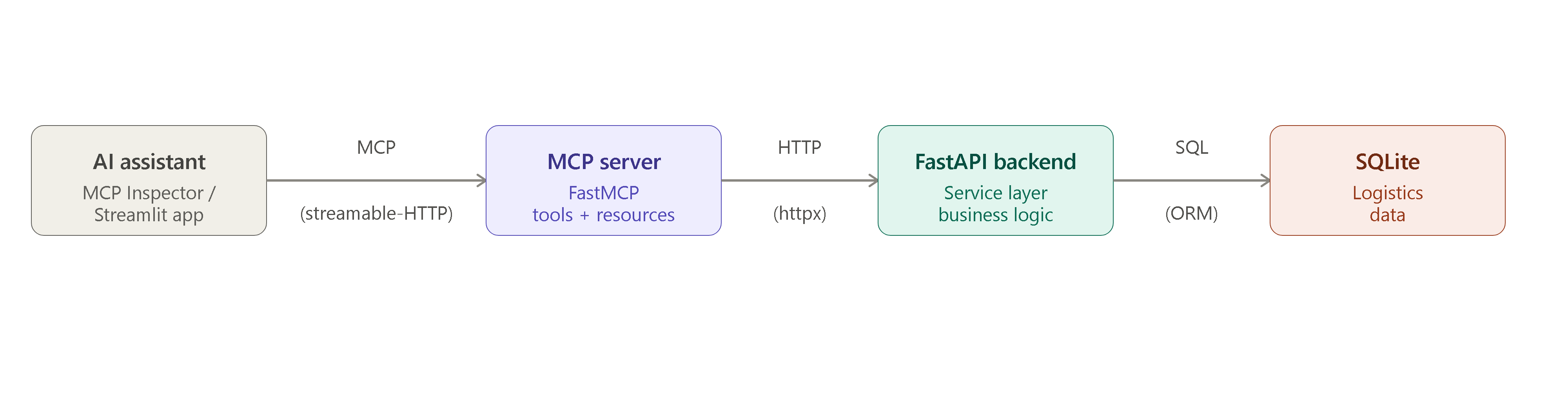
The MCP server does not access the database directly. Instead, it communicates with the FastAPI backend over HTTP, demonstrating how existing applications can be made AI-accessible without changing their internal architecture.
✨ Features
- FastAPI REST backend
- SQLite database using SQLAlchemy ORM
- MCP Server built using FastMCP
- AI-accessible logistics operations
- Sample logistics dataset
- Layered architecture (API → Services → Database)
- MCP Tools
- MCP Resources
- MCP Prompt
📁 Project Structure
logistics-mcp-server/
│
├── app/
│ ├── api/                      # FastAPI routes
│ ├── database/                 # Database connection, models and seed script
│ ├── mcp_server/
│ │ ├── api_client.py           # Calls FastAPI endpoints
│ │ ├── server_v1.py            # MCP Server using official MCP SDK
│ │ └── server_v2.py            # MCP Server using FastMCP package
│ ├── schemas/                  # Pydantic models
│ └── services/                 # Business logic
│
├── client/
│ └── streamlit_app.py          # Streamlit client application connecting to MCP Server
│
├── requirements.txt
├── .env
└── README.md
🛠 MCP Tools
The following tools are exposed through the MCP Server.
| Tool | Description |
|---|---|
| get_order_details | Retrieve complete order information |
| search_orders | Search orders by customer, city or status |
| track_package | Retrieve shipment tracking details |
| cancel_order | Cancel an order |
| reschedule_delivery | Update the estimated delivery date |
| find_warehouse | Find warehouse serving a city |
📄 MCP Resources
The project also exposes static resources.
| Resource | Description |
|---|---|
| company://shipping-policy | Company shipping policy |
| company://supported-couriers | Supported courier partners |
| company://warehouse-locations | Warehouse locations |
💬 MCP Prompt
| Prompt | Description |
|---|---|
| summarize_tracking | Generates a professional customer-friendly shipment update from tracking information |
🗄 Database
The project uses SQLite for simplicity.
Main entities:
- Customer
- Order
- OrderItem
- Shipment
- TrackingHistory
- Warehouse
🚀 Running the Project
1. Clone the repository
git clone <repository-url>
cd logistics-mcp-server
2. Create a virtual environment
Windows
python -m venv .venv
.venv\Scripts\activate
Linux / macOS
python3 -m venv .venv
source .venv/bin/activate
3. Install dependencies
pip install -r requirements.txt
4. Create the database
python -m app.database.create_db
5. Seed sample data
python -m app.database.seed
This populates the database with sample:
- Customers
- Orders
- Shipments
- Tracking history
- Warehouses
6. Start the FastAPI server
uvicorn app.api.main:app --reload
Swagger UI
http://localhost:8000/docs
7. Start the MCP Server
ShipSmart MCP Server contains two implementations:
MCP Server Implementations
| File | Implementation | Import Used | Usage |
|---|---|---|---|
server_v1.py |
Official MCP SDK FastMCP | from mcp.server.fastmcp import FastMCP |
Basic MCP server implementation |
server_v2.py |
FastMCP package | from fastmcp import FastMCP |
Used with the Streamlit + Gemini client |
The Streamlit application connects to server_v2.py.
Running servers
To start the MCP server:
python -m app.mcp_server.server_v1
#OR
python -m app.mcp_server.server_v2
Testing MCP Tools
You can test the MCP servers independently using the MCP Inspector:
mcp dev app/mcp_server/sever_v1.py
#OR
fastmcp dev inspector app/mcp_server/server_v2.py
The MCP Inspector allows you to test the available tools and verify that the server is exposing the expected MCP functionality.
8. Start the Streamlit Client
The Streamlit application acts as an MCP client and connects to server_v2.py.
Run:
streamlit run client/streamlit_app.py
💡 Example Questions for an AI Assistant
Once connected to the MCP Server, an AI assistant can answer questions like:
- Where is my order ORD-1001?
- Show me the tracking history for ORD-1002.
- Cancel order ORD-1003.
- Reschedule delivery for ORD-1004 to next Monday.
- Find the warehouse responsible for Pune.
- Search all delivered orders for Alice.
🧠 Why MCP?
Without MCP, every AI application would need custom integration code for each backend service.
MCP provides a standard interface that allows AI assistants to discover and invoke application capabilities through Tools, Resources, and Prompts.
This enables existing business applications to become AI-accessible with minimal changes.
🛠 Tech Stack
- Python
- FastAPI
- SQLAlchemy
- SQLite
- Pydantic
- HTTPX
- FastMCP (Model Context Protocol)
- Faker
Установка ShipSmart Server
У этого сервера нет опубликованного пакета — он собирается из исходников. Открой репозиторий и следуй инструкции в README.
▸ github.com/wickedseer/logistics-mcp-serverFAQ
ShipSmart Server MCP бесплатный?
Да, ShipSmart Server MCP бесплатный — установка в пару кликов через Unyly без оплаты.
Нужен ли API-ключ для ShipSmart Server?
Нет, ShipSmart Server работает без API-ключей и переменных окружения.
ShipSmart Server — hosted или self-hosted?
Self-hosted: сервер запускается локально на твоей машине командой из раздела установки.
Как установить ShipSmart Server в Claude Desktop, Claude Code или Cursor?
Открой ShipSmart Server на unyly.org, выбери вкладку своего клиента (Claude Desktop, Claude Code, Cursor) и нажми Install — конфиг сгенерируется автоматически, без правки JSON.
Похожие MCP
Fetch
Web content fetching and conversion for efficient LLM usage.
AWS KB Retrieval
Retrieval from AWS Knowledge Base using Bedrock Agent Runtime.
 автор: modelcontextprotocol
Spring AI MCP Server
Provides auto-configuration for setting up an MCP server in Spring Boot applications.
llm-analysis-assistant
A very streamlined mcp client that supports calling and monitoring stdio/sse/streamableHttp, and can also view request responses through the /logs page. It also
 автор: xuzexin-hz
Compare ShipSmart Server with
Не уверен что выбрать?
Найди свой стек за 60 секунд
Автор?
Embed-бейдж для README
Похожее
Все в категории ai