
Showcase
БесплатноНе проверенMCP server that opens a native desktop window to display rich content (Markdown, HTML, Mermaid diagrams, images) with real-time updates via SSE.

Описание
MCP server that opens a native desktop window to display rich content (Markdown, HTML, Mermaid diagrams, images) with real-time updates via SSE.
README
An MCP server that displays rich content (Markdown, HTML, Mermaid diagrams, images) in a native desktop window.
When an MCP client like Claude Code calls the show tool, a Neutralino.js-based window opens and renders content in real time via SSE.
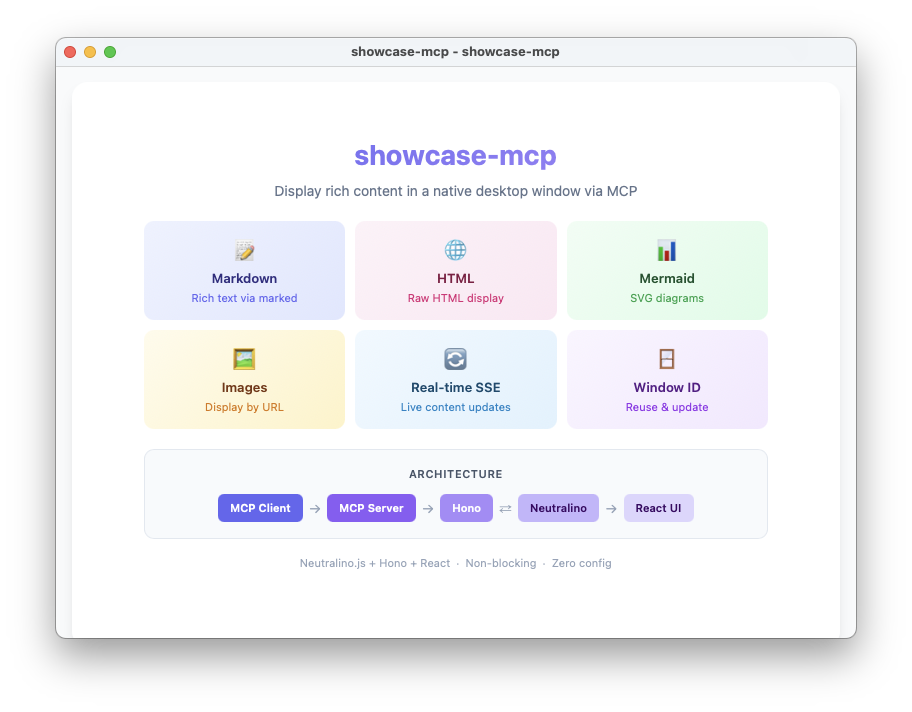
Features
- Markdown — Rendered via
marked - HTML — Raw HTML display
- Mermaid — SVG diagram rendering
- Images — Display by URL
- Window ID management — Update existing windows by ID, or open new ones
- Real-time updates via SSE — Content is pushed to the window without reopening
- Non-blocking — Tool calls return immediately
Requirements
- Node.js >= 20
- pnpm
Setup
pnpm install

# Download Neutralino binary
pnpm run setup

# Build React bundle + Tailwind CSS
pnpm run build:assets

# Compile TypeScript
pnpm run build:ts
Usage
With Claude Code
Add the following to your .mcp.json:
{
  "mcpServers": {
    "showcase-mcp": {
      "type": "stdio",
      "command": "npx",
      "args": ["tsx", "<path-to>/showcase-mcp/src/index.ts"]
    }
  }
}
Then call the show tool from Claude Code to open a window.
Development
pnpm dev
show Tool
Parameters
| Parameter | Type | Description |
|---|---|---|
title |
string |
Title displayed at the top of the window (required) |
message |
string? |
Markdown-formatted text |
html |
string? |
Raw HTML content |
mermaid |
string? |
Mermaid diagram source code |
imageUrl |
string? |
URL of an image to display |
windowId |
string? |
Window ID to update. Omit to open a new window. |
Response
{ "windowId": "xxxxxxxx-xxxx-xxxx-xxxx-xxxxxxxxxxxx" }
Behavior
windowId |
Action |
|---|---|
| Omitted | Opens a new window. Returns a new windowId. |
| Valid (window is open) | Updates the existing window's content. Returns the same windowId. |
| Invalid (window closed / unknown) | Opens a new window. Returns a new windowId. |
Architecture
MCP Client (stdio) → MCP Server → Hono HTTP Server (port=0) → Neutralino Window
                                         ↕ SSE
                                    React UI (App.tsx)
- MCP client calls
show - Hono HTTP server starts on a random port and a Neutralino window opens
- React UI connects via SSE (
/events) and renders content - Subsequent calls with the same
windowIdupdate content through SSE - Calls without
windowIdalways open a new window - Closing a window cleans up its HTTP server
Установка Showcase
У этого сервера нет опубликованного пакета — он собирается из исходников. Открой репозиторий и следуй инструкции в README.
▸ github.com/him0/showcase-mcpFAQ
Showcase MCP бесплатный?
Да, Showcase MCP бесплатный — установка в пару кликов через Unyly без оплаты.
Нужен ли API-ключ для Showcase?
Нет, Showcase работает без API-ключей и переменных окружения.
Showcase — hosted или self-hosted?
Self-hosted: сервер запускается локально на твоей машине командой из раздела установки.
Как установить Showcase в Claude Desktop, Claude Code или Cursor?
Открой Showcase на unyly.org, выбери вкладку своего клиента (Claude Desktop, Claude Code, Cursor) и нажми Install — конфиг сгенерируется автоматически, без правки JSON.
Похожие MCP
GitHub
PRs, issues, code search, CI status
 автор: GitHub
Filesystem
Secure file operations with configurable access controls.
Memory
Knowledge graph-based persistent memory system.
Template MCP Server
A CLI tool to create a new Model Context Protocol server project with TypeScript support, dual transport options, and an extensible structure
 автор: mcpdotdirect
Compare Showcase with
Не уверен что выбрать?
Найди свой стек за 60 секунд
Автор?
Embed-бейдж для README
Похожее
Все в категории development