
Spine Anim
БесплатноНе проверенAn MCP server that converts layered PSD characters into Spine 4.2 rigs with deterministic, parametric 2D/2.5D animations (idle, walk, run, jump, attack, hit) re

Описание
An MCP server that converts layered PSD characters into Spine 4.2 rigs with deterministic, parametric 2D/2.5D animations (idle, walk, run, jump, attack, hit) ready for the Spine editor and Unity.
README
An MCP server that turns a layered PSD character into a Spine 4.2 rig and generates deterministic, parametric 2D/2.5D animations — idle, walk, run, jump, attack, hit — ready for the Spine editor and Unity.


Walk, run, idle — same rig, generated procedurally, zero hand-keyed frames.
Most PSD→Spine tools stop at rigging — they hand you a skeleton and leave the animation to you. This one generates the animations too, with pure math: same parameters in → byte-identical output. Reproducible, diffable, no broken AI-guessed poses.
PSD ──▶ rig (bones + slots + atlas) ──▶ procedural animations ──▶ .json + .atlas + .png
Why deterministic instead of AI?
Generative pose prediction produces anatomically broken results that cost more time to fix than to author by hand. Every animation here is a sampled mathematical function — a walk cycle is antiphase leg sines with opposing arm swing and a 2× vertical bob, not a guess. The trade-off is explicit: this tool owns locomotion and combat basics; expressive one-off animation stays in the Spine editor where an artist's eye belongs.
Features
- PSD → joint-correct rig. Layers named after body parts (
head,torso,arm_left,leg_right, …) become a topologically-ordered Spine 4.2 skeleton with anatomical pivots (upper-arm rotates at the shoulder, not the image center). - Six procedural generators, each fully parametric (see table below).
- Loop-correct cycles.
idle/walk/runare authored so frame 0 == frame N — seamless Spine looping, no popping. - Validated before write. Structural invariants the runtime reader assumes (single root, topological bone order, resolvable references, monotonic keyframe times) are checked at generation time, so failures are clear errors instead of silent import breakage.
- Idempotent output. Identical inputs overwrite with byte-identical content and touch no other file in the output directory.
- Unity-ready. Emits
.json+.atlas+.png; full import guide in docs/UNITY.md.
Validation status
Phase 1 — implemented and validated end-to-end on two PSDs: a synthetic
stick rig (examples/hero) and a real stylized 2D character
(examples/adventurer) — a shaded adventurer with tunic, pants, and boots, split
into 17 convention-named layers.
Real character, posed by the procedural engine
Live animations (looping GIFs), all from the same rig with no hand-keying:


Source PSD → idle → walk (static reference):
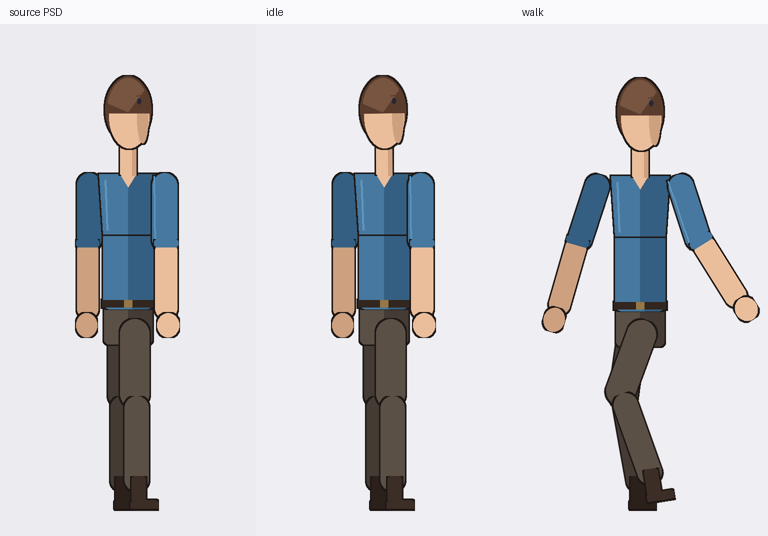
Per-animation keyframe breakdowns: examples/adventurer/walk_cycle.png,
attack_sequence.png, jump_sequence.png.
Testing against a real character surfaced — and fixed — several issues that flat rectangles hid: limb parts must overlap at joints to avoid gaps when bent; a bone-hierarchy bug had the foot parented to the upper leg instead of the shin, so it tracked the wrong segment and detached when the knee bent; and the walk now uses 2-bone analytic IK foot-lock — the ankle is placed on a plant/swing path (planted on the ground through stance, arcing forward in swing) and the leg is solved to reach it. Because the foot is the IK target, it stays locked to the shin through the entire stride. No detachment.
Recommended before shipping art: open the generated
.jsonin the actual Spine 4.2 editor and import into spine-unity to confirm against the real runtime. The headless renderer (examples/render_posed.py) solves forward kinematics independently — useful, but it is not the Spine runtime itself.
Animation catalog
| Type | Loops | Method | Key parameters (defaults) |
|---|---|---|---|
idle |
✓ | sine breathing on chest/torso, half-freq head sway, arm drift | duration 2.0, breath_amp 2.0, sway_amp 1.0 |
walk |
✓ | antiphase leg sine, opposing arm swing, 2× bob, torso counter-rotate | duration 1.0, stride 28, arm_swing 22, bob 3 |
run |
✓ | walk with larger amplitudes + constant forward lean | duration 0.6, stride 45, arm_swing 40, bob 7, lean 8 |
jump |
✗ | crouch → launch → apex → land → settle pose keys, eased | duration 0.9, crouch 18, rise 40 |
attack |
✗ | windup → stepped strike → follow-through; hand picks arm |
duration 0.5, windup 35, swing 80, hand "right" |
hit |
✗ | sharp recoil on root/torso/head then settle | duration 0.35, knockback 14 |
Generators are rig-agnostic within the humanoid convention: a 4-bone stick figure and an 18-bone character both animate; roles the rig lacks are silently skipped.
Install
git clone https://github.com/K-ulucay/spine_anim_mcp.git
cd spine-anim-mcp
pip install -e .          # pulls mcp, pydantic, Pillow, psd-tools
Requires Python 3.11+.
Run the tests
python3 tests/test_pipeline.py
Run the MCP server
spine-anim-mcp # or: python -m spine_anim_mcp.server
Then point an MCP client (Claude Desktop / Claude Code) at it.
Quickstart
Given hero.psd with layers named head, neck, chest, torso, hip,
arm_upper_left, arm_lower_left, leg_upper_right, … ask your MCP client to
call:
import_psd_to_spine(
  psd_path = "hero.psd",
  animations = [
    { "type": "idle" },
    { "type": "walk", "params": { "stride": 34, "bob": 4 } },
    { "type": "run" },
    { "type": "attack", "name": "slash", "params": { "hand": "left", "swing": 95 } }
  ]
)
Output (in hero_spine/):
hero.json     # skeleton + idle, walk, run, slash animations
hero.atlas    # texture atlas
hero.png      # packed atlas page
Import into Unity per docs/UNITY.md (note: rename
hero.atlas → hero.atlas.txt, spine-unity requires the .txt extension).
MCP tools
| Tool | Purpose |
|---|---|
import_psd_to_spine(psd_path, animations?, out_dir?, name?) |
Full pipeline: PSD → rig + animations → files. Defaults to idle + walk. |
animate_existing(skeleton_json_path, animations, out_dir?) |
Add animations to an existing Spine skeleton (bones auto-mapped by name). |
list_animation_types() |
List available generators. |
describe_animation_type(type) |
Tunable parameters + defaults for one type. |
animations is a list of { type, name?, params? }. type selects the
generator; optional name renames the produced animation; params overrides
defaults from the catalog above.
Layer naming
Layer names are matched to roles flexibly (lowercased, separators normalised), so
Left Arm, arm_l, upperarm.L, and arm_upper_left all resolve to the same
role.
| Region | Roles |
|---|---|
| Spine | root, hip, torso, chest, neck, head |
| Left arm | arm_upper_left, arm_lower_left, hand_left |
| Right arm | arm_upper_right, arm_lower_right, hand_right |
| Left leg | leg_upper_left, leg_lower_left, foot_left |
| Right leg | leg_upper_right, leg_lower_right, foot_right |
Full alias table: src/spine_anim_mcp/psd/conventions.py.
Project layout
src/spine_anim_mcp/
  server.py            FastMCP server + tool definitions
  pipeline.py          orchestration; idempotent file writes
  psd/parser.py        PSD -> flat part list (+ spec fallback for tests)
  psd/conventions.py   hierarchy, name->role aliases, pivot fractions
  spine/schema.py      Pydantic models = source of truth for Spine 4.2 JSON
  spine/builder.py     parts -> bones/slots/attachments (world->local transform)
  spine/writer.py      JSON serialiser + structural validator
  anim/generators.py   the procedural animation engine
  atlas/writer.py      shelf packer -> .atlas text + composite PNG
docs/
  SPECIFICATION.md     architecture, Spine 4.2 contract, animation math, roadmap
  UNITY.md             spine-unity 4.2 import + scripting guide
tests/
  test_pipeline.py     end-to-end test on a synthetic 18-bone humanoid
Roadmap
- Real-PSD round-trip through the pipeline with FK-verified rig (
examples/hero) - 2-bone IK foot-lock on walk/run (
anim/ik.py) — feet stay planted - Confirm
examples/adventurer/adventurer.jsonin the live Spine 4.2 editor + spine-unity - Extract real per-part PNG pixels into the atlas (currently bounds-only)
-
<part>[pivot]marker-layer support for per-part pivot overrides - Bezier easing on cyclic anims (currently linear/stepped) for snappier feel
- Mesh-deform + skin-swap timelines (stronger 2.5D perspective)
- Emit Spine IK constraints directly (so the editor re-solves), not just baked angles
Contributing
PRs welcome — especially:
- Real-PSD test fixtures and Spine/Unity round-trip reports. This is the most valuable contribution right now.
- New generators (add
gen_<name>(rig, **params)toanim/generators.py, register inGENERATORS, document params inserver.PARAM_DOCS). - Non-humanoid rig conventions (vehicles, creatures).
Generators must stay deterministic — no randomness, no model calls.
License
MIT — see LICENSE.
Установка Spine Anim
У этого сервера нет опубликованного пакета — он собирается из исходников. Открой репозиторий и следуй инструкции в README.
▸ github.com/K-ulucay/spine_anim_mcpFAQ
Spine Anim MCP бесплатный?
Да, Spine Anim MCP бесплатный — установка в пару кликов через Unyly без оплаты.
Нужен ли API-ключ для Spine Anim?
Нет, Spine Anim работает без API-ключей и переменных окружения.
Spine Anim — hosted или self-hosted?
Self-hosted: сервер запускается локально на твоей машине командой из раздела установки.
Как установить Spine Anim в Claude Desktop, Claude Code или Cursor?
Открой Spine Anim на unyly.org, выбери вкладку своего клиента (Claude Desktop, Claude Code, Cursor) и нажми Install — конфиг сгенерируется автоматически, без правки JSON.
Похожие MCP
GitHub
PRs, issues, code search, CI status
 автор: GitHub
Filesystem
Secure file operations with configurable access controls.
Memory
Knowledge graph-based persistent memory system.
Template MCP Server
A CLI tool to create a new Model Context Protocol server project with TypeScript support, dual transport options, and an extensible structure
 автор: mcpdotdirect
Compare Spine Anim with
Не уверен что выбрать?
Найди свой стек за 60 секунд
Автор?
Embed-бейдж для README
Похожее
Все в категории development