

Описание
Turn local files into searchable context for AI agents.
README
Turn local files into searchable context for Agents.
Website Release Status License: Apache 2.0 Discord
Much of your best context lives in local files that Agents can't easily search — papers, contracts, scanned documents, recordings. 📂 Open a folder in StashBase and its supported contents become searchable:
- 📄 Prepare: extract searchable text from PDFs, DOCX files, images, audio, and video.
- 🔎 Search: find relevant context by meaning, not just keywords.
- 🤖 Connect: share searchable context across Claude, Codex, and other MCP clients.
Your folders remain the source of truth; StashBase adds a search index that can be rebuilt from them.
The core idea:
Local files -> prepared text -> search index -> MCP -> Agents
🚀 Demo
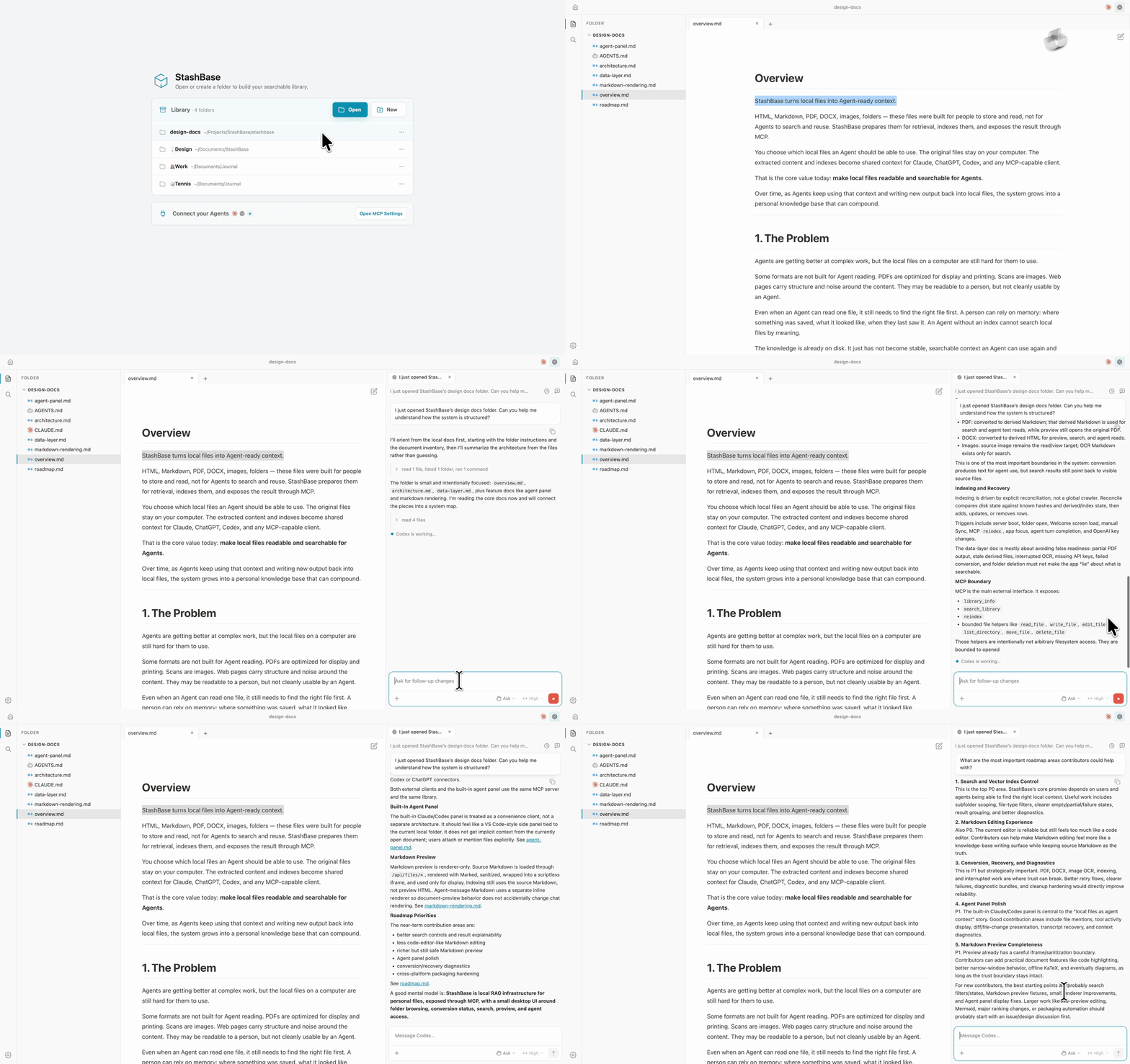
Open this repo in StashBase and ask the built-in Agent: How is this project designed?
💡 Try It
StashBase's primary platforms are macOS 12+ (Apple Silicon) and Windows 10+ (x64). A community-supported Linux build is also available for x86_64 Debian 12+ / Ubuntu 22.04+.
macOS
brew install --cask liliu-z/stashbase/stashbase
Windows
Download the latest StashBase-*-win-x64.exe installer from Releases, then run it.
Linux
Download the latest StashBase-*-linux-amd64.deb asset from Releases, then install it:
sudo dpkg -i ./StashBase-*-linux-amd64.deb
First Run
Don't have an embedding API key? In-app keyword search works without one. Join our Discord to ask about evaluation access.
- Open an existing local folder, or create a new one from the native folder picker.
- Add an OpenAI or OpenRouter API key when prompted if you want semantic search.
- To transcribe audio or video, download a speech model from Settings -> Transcription. Small (465 MiB) is the default; Tiny (74 MiB) and Base (141 MiB) are lighter options. Transcription runs entirely on your machine, with no API cost, and you can cancel or rerun it while viewing the file.
- Connect Claude, Codex, or another MCP client from Settings -> MCP.
- Ask the Agent to search or use your local files.
Your library is opt-in: only folders you open in StashBase are indexed. You can remove a folder from the library at any time; StashBase clears its index but never deletes the folder from disk.
Use File → New Window or Cmd/Ctrl+Shift+N to keep different folders and tools side by side. Window close follows VS Code's platform shortcuts; Cmd/Ctrl+W continues to close the active document tab.
Use Cmd/Ctrl+O to open a source file in the active folder. The Command Palette
opens with Cmd/Ctrl+Shift+P or F1 (or by typing > in Quick Open) and exposes
safe application actions with their existing safeguards.
What It Does
StashBase has two core jobs: prepare files and index their contents.
Prepare
Some formats need preparation before their contents can be searched. StashBase keeps the original files in place and creates derived text only where needed for search and Agent access.
| Format | Visible source | Indexed text |
|---|---|---|
| Markdown | The Markdown file | Source text |
| HTML | The HTML file | Clean text extracted from the HTML |
| The original PDF | Derived Markdown | |
| DOCX | The original DOCX | Derived HTML |
| Images | The original image | OCR text |
| Audio and video | The original media | Audio track transcribed locally to timestamped Markdown |
For PDF, DOCX, audio, and video, Agents read the derived text while the original remains the visible source file. Audio and video play directly when supported; otherwise, StashBase creates a compatible local audio preview. Large files dragged into the app stream to disk instead of being held entirely in memory. See Architecture and Preparation for the product and system contracts.
Index
StashBase builds semantic and keyword search over:
- Markdown and HTML text
- PDF-derived Markdown
- DOCX-derived HTML
- OCR text from images
- timestamped transcripts from audio and video
Search results point back to the user-visible source file, not hidden app data.
Background preparation is intentionally quiet. Browsing a folder should feel like browsing files, not watching an indexing job. If preparation fails, StashBase shows a lightweight failure marker and lets you retry. Readiness matters most when you search, so that is where StashBase shows how much of your content is ready.
MCP
MCP is the main interface between StashBase and Agents.
While the StashBase app is running, a local MCP server makes the same library available to external clients and the built-in Agent panel.
Core tools:
library_info- return the default folder home, opened folders, optional folder descriptions, and embedder status.search_library- search the library, optionally scoped by folder, path prefix, or file-type categories.reindex- reconcile disk changes and make updated files searchable.
StashBase also exposes bounded file helpers for opened folders:
list_directoryread_filewrite_fileedit_filemove_filedelete_file
These helpers exist for Agent clients that run in a sandbox and cannot directly access the user's host files. They are not a general-purpose filesystem API.
Connect a Client
The normal path is Settings -> MCP. StashBase can write the MCP config for supported clients or copy the stdio snippet for clients that manage config themselves.
For manual stdio setup, URL-based clients, Docker access, ports, CORS boundaries, and token rotation, see Advanced MCP configuration.
Built-In Agent Panel
StashBase includes a built-in panel for running local Agent CLIs such as Claude Code and Codex against the current folder.
The panel is a convenient client of the same MCP server, not a separate knowledge base. It adds:
- Sessions run in the current folder, next to the files they work on.
- Tool calls and file edits can be reviewed in the app.
- Session history stays in the Agent CLI's normal storage.
@mentions find files and folders with forgiving workspace-path search; selecting one inserts only its workspace-relative path.
Storage Model
Local files are the source of truth.
~/.stashbase/config.json          # app-level config, including transcription preferences

<folder>/
  paper.pdf                       # user file

<appData>/derived.nosync/         # derived text, assets, transcript work, media previews
<appData>/models/whisper/         # explicitly downloaded local speech models
<appData>/vector-store.nosync/    # Milvus Lite vector store
<appData>/state/state.db          # conversion failures and local app state
Removing a folder from the library clears StashBase's app-owned state for that folder. It does not delete the folder or its files from disk.
Design Docs
The design docs explain the product intent, system contracts, and contribution areas without duplicating the source tree:
- Design docs guide - contribution map and maintenance rules
- Overview - product thesis
- Principles - durable decision rules
- Architecture - system boundaries and invariants
- Product direction - intended product shape
Build From Source
For contributors and developers building locally, and for platforms without a prebuilt installer.
git clone https://github.com/liliu-z/stashbase
cd stashbase
pnpm install
pnpm setup:python

# Build the renderer and run Electron
pnpm build:web
pnpm electron

# Development mode
pnpm dev

# Build a distributable app for your platform
pnpm dist        # macOS
pnpm dist:win    # Windows
pnpm dist:linux  # Linux

# Optional: include the local PDF/OCR extractor sidecar
pnpm build:python-extract-sidecar
Before opening a PR:
pnpm check
Status
Early alpha.
Primary support:
- macOS arm64
- Windows 10+ x64
Community-supported:
- Linux x86_64 Debian 12+ / Ubuntu 22.04+
Reasonably stable:
- Local folder library model
- Markdown, HTML, PDF, and image preview
- PDF extraction, image OCR, and local audio and video transcription, with persisted failures and retry
- Semantic and keyword search
- MCP server and client connectors
- Bounded file helpers for sandboxed Agents
- Built-in Claude Code / Codex panel
Where We Need Help
- Agent panel polish
- Search filters and ranking controls
- Long-running conversion and recovery edge cases
- Packaging polish across platforms
Contributing
Small focused PRs are preferred. Open an issue before larger changes so scope and direction can be discussed first.
Not sure where to start? Pick something from Where We Need Help, or open design-docs/ in StashBase and ask the Agent — or just ask us.
See CONTRIBUTING.md for local development, validation, and release-maintainer notes.
About
StashBase is an independent open-source project built by Li Liu, who works on Milvus at Zilliz and brings years of vector-retrieval experience to making local files searchable in Agent workflows.
Установка Stashbase
У этого сервера нет опубликованного пакета — он собирается из исходников. Открой репозиторий и следуй инструкции в README.
▸ github.com/liliu-z/stashbaseFAQ
Stashbase MCP бесплатный?
Да, Stashbase MCP бесплатный — установка в пару кликов через Unyly без оплаты.
Нужен ли API-ключ для Stashbase?
Нет, Stashbase работает без API-ключей и переменных окружения.
Stashbase — hosted или self-hosted?
Self-hosted: сервер запускается локально на твоей машине командой из раздела установки.
Как установить Stashbase в Claude Desktop, Claude Code или Cursor?
Открой Stashbase на unyly.org, выбери вкладку своего клиента (Claude Desktop, Claude Code, Cursor) и нажми Install — конфиг сгенерируется автоматически, без правки JSON.
Похожие MCP
Fetch
Web content fetching and conversion for efficient LLM usage.
AWS KB Retrieval
Retrieval from AWS Knowledge Base using Bedrock Agent Runtime.
 автор: modelcontextprotocol
Spring AI MCP Server
Provides auto-configuration for setting up an MCP server in Spring Boot applications.
llm-analysis-assistant
A very streamlined mcp client that supports calling and monitoring stdio/sse/streamableHttp, and can also view request responses through the /logs page. It also
 автор: xuzexin-hz
Compare Stashbase with
Не уверен что выбрать?
Найди свой стек за 60 секунд
Автор?
Embed-бейдж для README
Похожее
Все в категории ai