
Study Tools
БесплатноНе проверенAn AI-powered study assistant that generates quizzes, flashcards, summaries, and concept explanations from study materials using the Model Context Protocol.

Описание
An AI-powered study assistant that generates quizzes, flashcards, summaries, and concept explanations from study materials using the Model Context Protocol.
README


An AI-powered study assistant built with Model Context Protocol (MCP) that generates quizzes, flashcards, summaries, and concept explanations from your study materials.
🎯 Features
- Smart Summarization — Generate concise summaries from study materials
- Quiz Generation — Create customizable quizzes with difficulty levels
- Concept Explanation — Get beginner/intermediate/advanced explanations
- Flashcards — Auto-generate flashcard decks from documents
- Comparison Tool — Compare and contrast multiple concepts
- MCP Integration — Works directly with Claude Desktop
- Web UI — Standalone chat interface with FastAPI backend
🛠️ Tech Stack
- Backend: FastAPI + Python 3.10
- AI Framework: Model Context Protocol (MCP)
- AI: OpenAI API
- Document Parsing: PyPDF2, pdfplumber, python-docx
- Frontend: Vanilla JavaScript, HTML, CSS
- Cloud: AWS EC2 + S3 + Secrets Manager
- CI/CD: GitHub Actions
🚀 Quick Start
Prerequisites
- Python 3.10+
- OpenAI API key
Installation
- Clone the repository:
git clone https://github.com/francis-rf/study-Tools-mcp-server.git
cd study-Tools-mcp-server
- Install dependencies:
pip install -r requirements.txt
- Create
.envfile:
cp .env.example .env
# Edit .env and add your OPENAI_API_KEY
- Add study materials:
Place PDF or Markdown files in data/notes/:
data/notes/
├── Machine Learning.pdf
└── Your Notes.md
- Run the application:
python app.py
- Open browser:
http://localhost:8080
🐳 Docker Deployment
Build and Run
docker build -t study-tools-mcp .
docker run -p 8080:8080 --env-file .env study-tools-mcp
☁️ AWS Deployment
Services Used
| Service | Purpose |
|---|---|
| EC2 (t2.micro) | Hosts the Docker container |
S3 (study-tools-mcp-materials) |
Stores PDF study materials |
Secrets Manager (study-tools-mcp) |
Stores OpenAI API key |
| IAM Role | Grants EC2 access to S3 and Secrets Manager |
Setup
- Store OpenAI API key in AWS Secrets Manager under secret name
study-tools-mcp - Upload PDFs to S3 bucket
study-tools-mcp-materials - Launch EC2 instance with IAM role attached (
study-tools-mcp-ec2-role) - SSH in, install Docker, clone repo and run container
⚙️ GitHub Actions CI/CD
Automated deployment is configured via .github/workflows/deploy.yml.
Workflow: Deploy to AWS EC2
On every push to main, the pipeline:
- Checks out the code
- SSHs into the EC2 instance
- Pulls latest code from GitHub
- Rebuilds the Docker image
- Restarts the container with zero downtime
Required GitHub Secrets
| Secret | Description |
|---|---|
EC2_HOST |
EC2 instance public IP |
EC2_USER |
ubuntu |
EC2_SSH_KEY |
Contents of the .pem key file |
Workflow Status
📁 Project Structure
study-Tools-mcp-server/
├── app.py                          # FastAPI web application
├── src/study_tools_mcp/
│   ├── server.py                   # MCP server entry point
│   ├── config.py                   # Configuration (Secrets Manager + .env fallback)
│   ├── tools/                      # Quiz, flashcards, summarizer, explainer
│   ├── parsers/                    # PDF and Markdown parsers
│   └── utils/                      # Logger
├── static/                         # Frontend assets
├── templates/                      # HTML templates
├── data/notes/                     # Study materials (local only — S3 on AWS)
├── logs/                           # Application logs
├── .github/workflows/              # CI/CD
│   └── deploy.yml
├── Dockerfile
├── requirements.txt
└── pyproject.toml
📡 API Endpoints
| Method | Endpoint | Description |
|---|---|---|
| GET | / |
Web UI |
| GET | /health |
Health check |
| GET | /api/files |
List available study materials |
| POST | /api/chat |
Chat with streaming |
| POST | /api/chat/clear |
Clear conversation history |
🔌 Claude Desktop Integration
Add to %APPDATA%\Claude\claude_desktop_config.json:
{
  "mcpServers": {
    "study-tools-mcp": {
      "command": "uv",
      "args": ["--directory", "C:\\path\\to\\study-tools-mcp", "run", "study-tools-mcp"]
    }
  }
}
Restart Claude Desktop — the tools will be available automatically.
📸 Screenshots
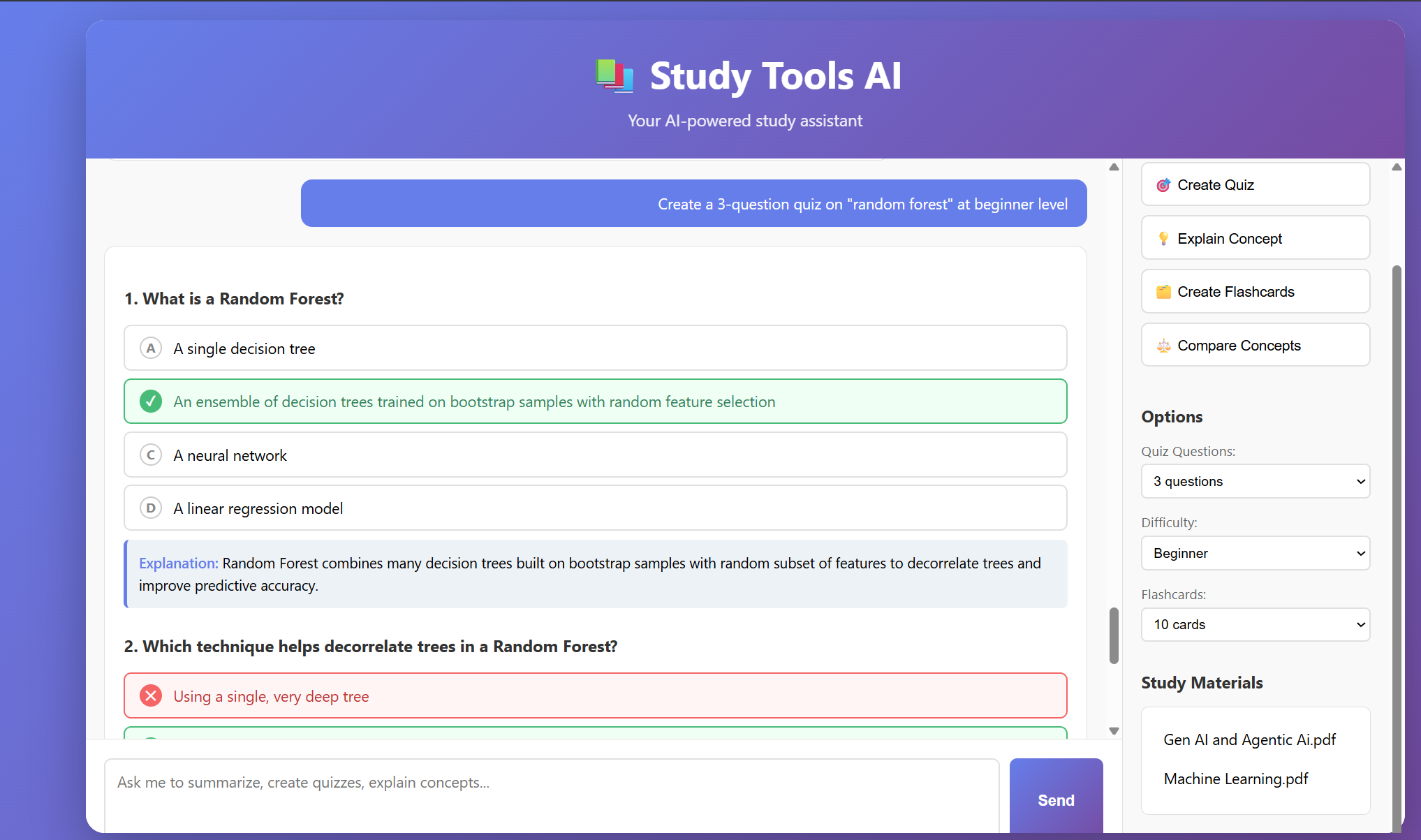 Study Tool AI Interface with quiz generation
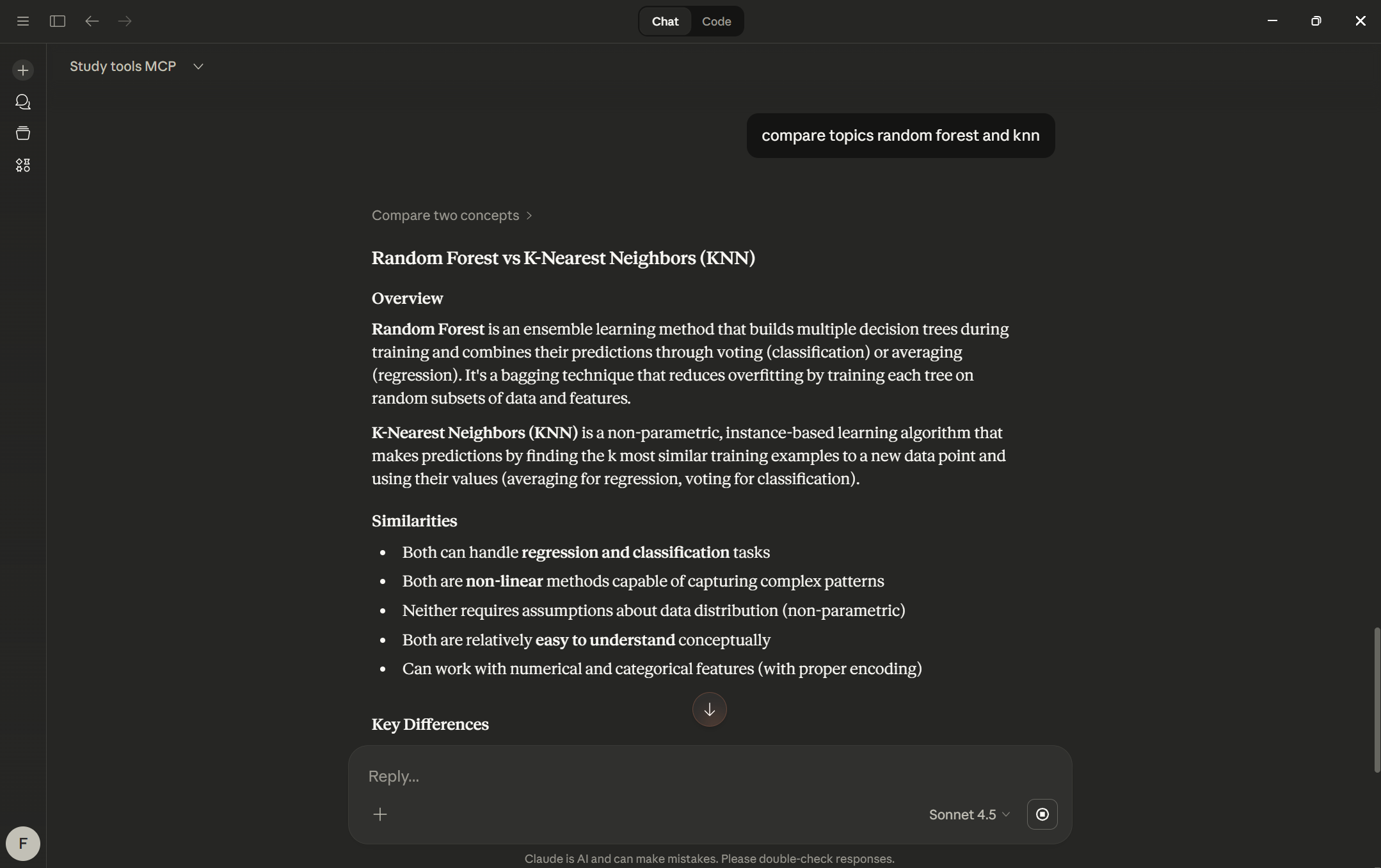 Study Tool AI Integration with Claude Desktop
📄 License
MIT License
Установить Study Tools в Claude Desktop, Claude Code, Cursor
unyly install study-tools-mcpСтавит в Claude Desktop, Claude Code, Cursor и VS Code — сам разбирается с npx, uvx и сборкой из исходников.
Впервые? Поставь CLI: curl -fsSL https://unyly.org/install | sh
Или настроить вручную
Выполни в терминале:
claude mcp add study-tools-mcp -- uvx --from git+https://github.com/francis-rf/study-Tools-mcp-server study-tools-mcpFAQ
Study Tools MCP бесплатный?
Да, Study Tools MCP бесплатный — установка в пару кликов через Unyly без оплаты.
Нужен ли API-ключ для Study Tools?
Нет, Study Tools работает без API-ключей и переменных окружения.
Study Tools — hosted или self-hosted?
Self-hosted: сервер запускается локально на твоей машине командой из раздела установки.
Как установить Study Tools в Claude Desktop, Claude Code или Cursor?
Открой Study Tools на unyly.org, выбери вкладку своего клиента (Claude Desktop, Claude Code, Cursor) и нажми Install — конфиг сгенерируется автоматически, без правки JSON.
Похожие MCP
Fetch
Web content fetching and conversion for efficient LLM usage.
AWS KB Retrieval
Retrieval from AWS Knowledge Base using Bedrock Agent Runtime.
 автор: modelcontextprotocol
Spring AI MCP Server
Provides auto-configuration for setting up an MCP server in Spring Boot applications.
llm-analysis-assistant
A very streamlined mcp client that supports calling and monitoring stdio/sse/streamableHttp, and can also view request responses through the /logs page. It also
 автор: xuzexin-hz
Compare Study Tools with
Не уверен что выбрать?
Найди свой стек за 60 секунд
Автор?
Embed-бейдж для README
Похожее
Все в категории ai