

Описание
MCP server for managing sub-agents
README
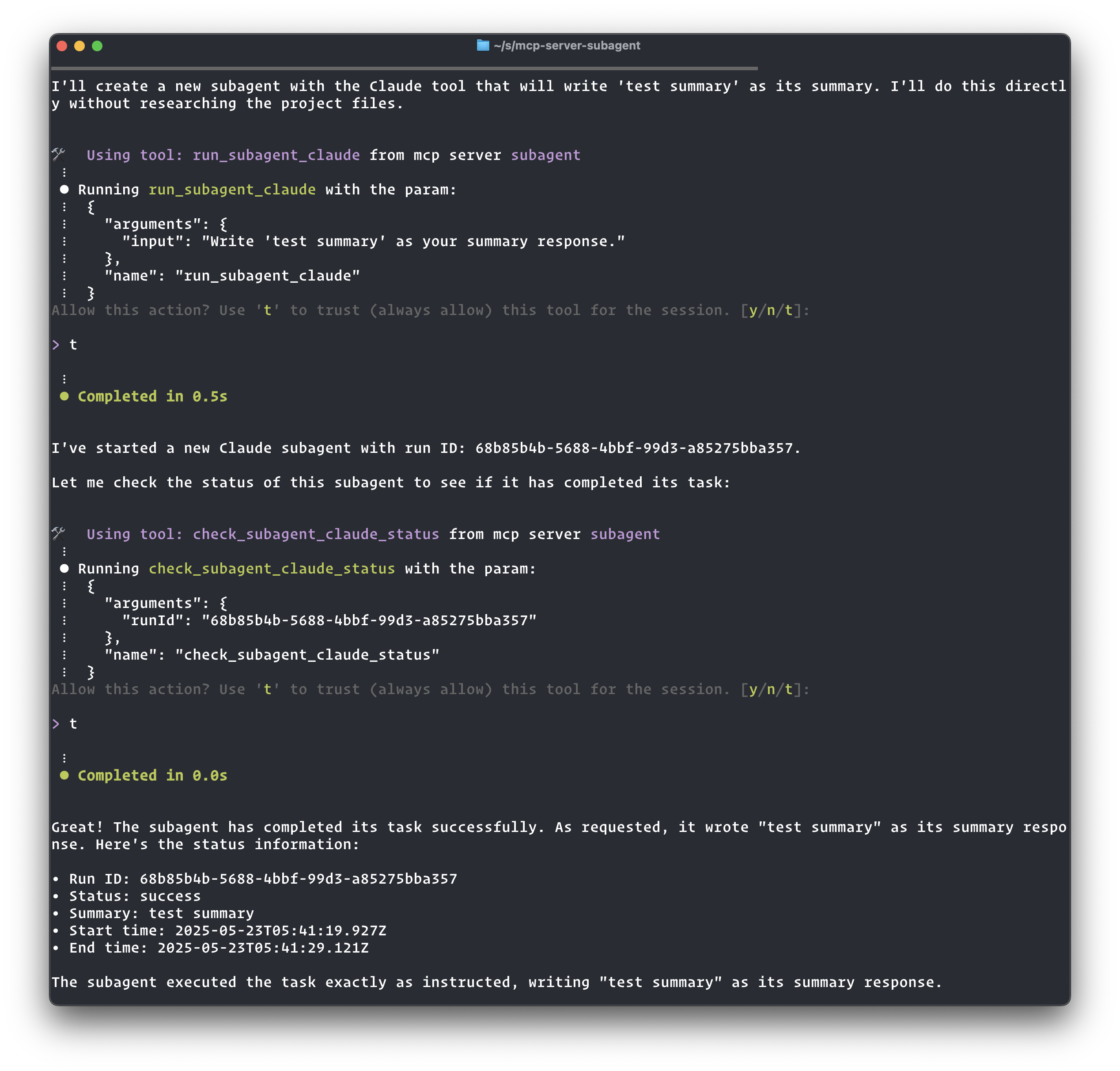
This is a Model Context Protocol (MCP) server that allows dispatching of tasks to sub-agent (like Claude Code, Q or Aider)
The purpose of this MCP is to allow a "planning" agent to delegate tasks to "executor" agents
Features
- Configure and run sub-agents through MCP tools
- Each sub-agent exposes three tools:
run_subagent_<n>: Runs the sub-agent with provided inputcheck_subagent_status: Allows the agent to check on the status of a sub-agentget_subagent_logs: Retrieves the logs of a sub-agent runupdate_subagent_status: Updates the status and adds a summary of a previous run
- Bi-directional communication: Sub-agents can ask questions to parent agents during execution using
ask_parent, parents can reply usingreply_subagent, and sub-agents can check for replies usingcheck_message_status - Currently supports the 'q' sub-agent (Amazon Q CLI) and 'claude' sub-agent (Claude CLI)
- Real-time streaming logs for monitoring sub-agent execution
Installation
Add this to your MCP configuration file (~/.aws/amazonq/mcp.json):
{
  "mcpServers": {
    "subagent": {
      "command": "npx",
      "args": ["-y", "mcp-server-subagent"]
    }
  }
}
Or if you installed it locally:
{
  "mcpServers": {
    "subagent": {
      "command": "node",
      "args": ["/ABSOLUTE/PATH/TO/mcp-server-subagent/build/index.js"]
    }
  }
}
Available Tools
Sub-agent Execution Tools
run_subagent_q: Run a query through the Amazon Q CLI- Parameters:
input(string) - The query to send to Amazon Q - Returns: A run ID that can be used to check the status or get logs
- Parameters:
run_subagent_claude: Run a query through the Claude CLI- Parameters:
input(string) - The query to send to Claude - Returns: A run ID that can be used to check the status or get logs
- Parameters:
check_subagent_status: Check the status of a previous run- Parameters:
runId(string) - The UUID of the run to check - Returns: The status and metadata of the run
- Parameters:
get_subagent_logs: Get the logs of a previous run- Parameters:
runId(string) - The UUID of the run to get logs for - Returns: The complete logs of the run
- Parameters:
update_subagent_status: Update the status and add a summary of a previous run- Parameters:
runId(string) - The UUID of the run to updatestatus(string) - The new status to set (one of: "success", "error", "running", "completed")summary(string, optional) - A summary or result message to include with the status update
- Returns: The updated status and metadata of the run
- Parameters:
Bi-directional Communication Tools
ask_parent: Enables sub-agents to ask questions to the parent agent- Parameters:
runId(string),question(string) - Returns: Message ID and polling instructions
- Parameters:
reply_subagent: Enables parents to reply to sub-agent questions- Parameters:
runId(string),messageId(string),answer(string) - Returns: Confirmation of the reply
- Parameters:
check_message_status: Check message status and retrieve replies- Parameters:
runId(string),messageId(string) - Returns: Message details and answer if available
- Parameters:
Bi-directional Communication
The MCP Subagent Server supports bi-directional communication between parent agents and sub-agents through a message passing system. This allows sub-agents to ask questions during execution and receive guidance from the parent agent.
Communication Tools
ask_parent: Enables sub-agents to ask questions to the parent agent- Parameters:
runId(string) - The sub-agent's current run IDquestion(string) - The question/message content
- Returns: A message ID and instructions for polling the answer
- Parameters:
reply_subagent: Enables parents to reply to specific questions from sub-agents- Parameters:
runId(string) - The sub-agent's run IDmessageId(string) - The ID of the message being replied toanswer(string) - The parent's reply content
- Returns: Confirmation of the reply
- Parameters:
check_message_status: Check the status of a specific message and retrieve replies- Parameters:
runId(string) - Run ID to check message status formessageId(string) - Message ID to check status for
- Returns: Message details and answer if available (acknowledges the message)
- Parameters:
Example Workflow
Here's how bi-directional communication works in practice:
1. Sub-agent asks a question
The sub-agent uses the ask_parent tool during execution:
{
  "tool": "ask_parent",
  "arguments": {
    "runId": "abc-123-def",
    "question": "I found multiple config files. Which one should I modify: config.json or settings.yaml?"
  }
}
Response:
{
  "messageId": "msg-456-789",
  "instructions": "Poll for the answer using the 'check_message_status' tool with your runId and messageId. Since this could take a while for the parent to respond, use 'sleep 60' between calls to avoid spamming."
}
2. Parent checks sub-agent status
When the parent checks the sub-agent status, they'll see:
Status: waiting_parent_reply

Question awaiting reply (Message ID: msg-456-789):
  I found multiple config files. Which one should I modify: config.json or settings.yaml?
  (Asked at: 2025-01-15T10:30:00.000Z)
  To reply, use the 'reply_subagent' tool.

Note: This may take a while for the parent to respond. Use 'sleep 60' between status checks to avoid spamming.
3. Parent provides an answer
The parent uses the reply_subagent tool:
{
  "tool": "reply_subagent",
  "arguments": {
    "runId": "abc-123-def",
    "messageId": "msg-456-789",
    "answer": "Please modify config.json - it's the main configuration file. The settings.yaml is just for development overrides."
  }
}
4. Sub-agent retrieves the answer
The sub-agent polls for the answer using check_message_status:
{
  "tool": "check_message_status",
  "arguments": {
    "runId": "abc-123-def",
    "messageId": "msg-456-789"
  }
}
Response when answer is available:
{
  "messageId": "msg-456-789",
  "questionContent": "I found multiple config files. Which one should I modify: config.json or settings.yaml?",
  "answerContent": "Please modify config.json - it's the main configuration file. The settings.yaml is just for development overrides.",
  "messageStatus": "acknowledged_by_subagent",
  "hasAnswer": true
}
The sub-agent can then continue execution with the parent's guidance.
Best Practices
- Polling Frequency: Use
sleep 30between status checks and message polling to avoid overwhelming the system - Question Clarity: Ask specific, actionable questions that help guide the task execution
- Timely Responses: Parents should monitor sub-agent status regularly to provide timely guidance
- Message Acknowledgment: The
check_message_statustool automatically acknowledges messages when answers are retrieved
Adding New Sub-agents
To add a new sub-agent, modify the SUBAGENTS object in src/index.ts:
const SUBAGENTS = {
  q: {
    name: "q",
    command: "q",
    getArgs: () => ["chat", "--trust-all-tools", "--no-interactive"],
    description: "Run a query through the Amazon Q CLI",
  },
  claude: {
    name: "claude",
    command: "claude",
    getArgs: () => [
      "--print",
      "--allowedTools",
      "Bash(git*) Bash(sleep*) Edit Write mcp__subagent__update_subagent_status",
      "--mcp-config",
      JSON.stringify(mcpConfig),
    ],
    description: "Run a query through the Claude CLI",
  },
  // Add your new sub-agent here
  newagent: {
    name: "newagent",
    command: "your-command",
    getArgs: () => ["--some-flag", "--other-flags"],
    description: "Description of your new agent",
  },
};
Logs
All sub-agent runs are logged to the logs directory with two files per run:
<run-id>.log: Contains the real-time output logs<run-id>.prompt.md: Contains the prompt passed to the agent<run-id>.meta.json: Contains metadata about the run (including communication messages)
Установить Subagent в Claude Desktop, Claude Code, Cursor
unyly install subagentСтавит в Claude Desktop, Claude Code, Cursor и VS Code — сам разбирается с npx, uvx и сборкой из исходников.
Впервые? Поставь CLI: curl -fsSL https://unyly.org/install | sh
Или настроить вручную
Выполни в терминале:
claude mcp add subagent -- npx -y @mseep/mcp-server-subagentПошаговые гайды: как установить Subagent
FAQ
Subagent MCP бесплатный?
Да, Subagent MCP бесплатный — установка в пару кликов через Unyly без оплаты.
Нужен ли API-ключ для Subagent?
Нет, Subagent работает без API-ключей и переменных окружения.
Subagent — hosted или self-hosted?
Self-hosted: сервер запускается локально на твоей машине командой из раздела установки.
Как установить Subagent в Claude Desktop, Claude Code или Cursor?
Открой Subagent на unyly.org, выбери вкладку своего клиента (Claude Desktop, Claude Code, Cursor) и нажми Install — конфиг сгенерируется автоматически, без правки JSON.
Изменения
Версии и запрашиваемые доступы со временем.
- Новая версия опубликована
- Новая версия опубликована
- Новая версия опубликована
- Новая версия опубликована
- Новая версия опубликована
- Новая версия опубликована
- Новая версия опубликована
- Новая версия опубликована
Похожие MCP
Opencode Omniroute Plugin
OpenCode plugin for the OmniRoute AI Gateway. Drives dynamic model discovery, /connect auth flow, and multi-instance OmniRoute providers via the official @openc
 автор: GitHub Actions
Roblox Studio
Enables AI coding tools to control Roblox Studio for workspace exploration, instance manipulation, and script management. It provides tools for playtesting, sce
 автор: paralov
Antigravity Drawio
MCP server that enables AI assistants to create, parse, render, and validate Draw.io diagrams programmatically.
 автор: S-SUJAN-S
Fetch
Web content fetching and conversion for efficient LLM usage.
AWS KB Retrieval
Retrieval from AWS Knowledge Base using Bedrock Agent Runtime.
 автор: modelcontextprotocol
Spring AI MCP Server
Provides auto-configuration for setting up an MCP server in Spring Boot applications.
llm-analysis-assistant
A very streamlined mcp client that supports calling and monitoring stdio/sse/streamableHttp, and can also view request responses through the /logs page. It also
 автор: xuzexin-hz
MCP-Agent
A simple, composable framework to build agents using Model Context Protocol by [LastMile AI](https://www.lastmileai.dev)
 автор: lastmile-ai
Spring AI MCP Client
Provides auto-configuration for MCP client functionality in Spring Boot applications.
mcp.natoma.ai
A Hosted MCP Platform to discover, install, manage and deploy MCP servers by [Natoma Labs](https://www.natoma.ai)
Compare Subagent with
Не уверен что выбрать?
Найди свой стек за 60 секунд
Автор?
Embed-бейдж для README
Похожее
Все в категории ai