
subelsky/bundler_mcp
БесплатноНе проверенEnables agents to query local information about dependencies in a Ruby project's Gemfile.

Описание
Enables agents to query local information about dependencies in a Ruby project's Gemfile.
README
A Model Context Protocol (MCP) server enabling AI agents to query information about dependencies in a Ruby project's Gemfile. Built with fast-mcp.
Installation
Install the gem and add to the application's Gemfile by executing:
bundle add bundler_mcp --group=development
Usage
- Generate the binstub:
bundle binstubs bundler_mcp
- Configure your client to execute the binstub. Here are examples that work for Claude and Cursor:
Basic Example (mcp.json)
{
  "mcpServers": {
    "bundler-mcp": {
      "command": "/Users/mike/my_project/bin/bundler_mcp"
    }
  }
}
Example with logging and explicit Gemfile
{
  "mcpServers": {
    "bundler-mcp": {
      "command": "/Users/mike/my_project/bin/bundler_mcp",

      "env": {
        "BUNDLER_MCP_LOG_FILE": "/Users/mike/my_project/log/mcp.log",
        "BUNDLE_GEMFILE": "/Users/mike/my_project/subdir/Gemfile"
      }
    }
  }
}
Documentation
Available Tools
The server provides two tools for AI agents:
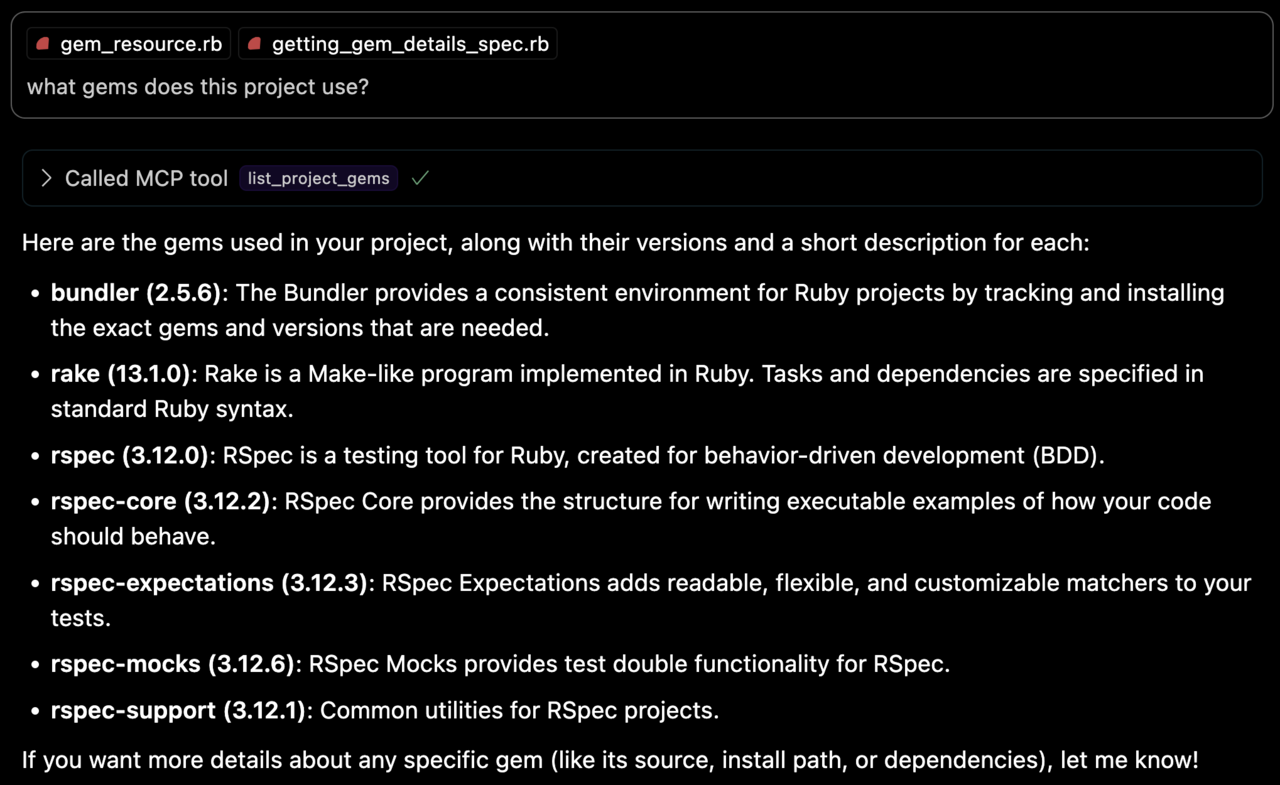
list_project_gems
Lists all bundled Ruby gems with their:
- Versions
- Descriptions
- Installation paths
- Top-level documentation locations (e.g.
READMEandCHANGELOG)
get_gem_details
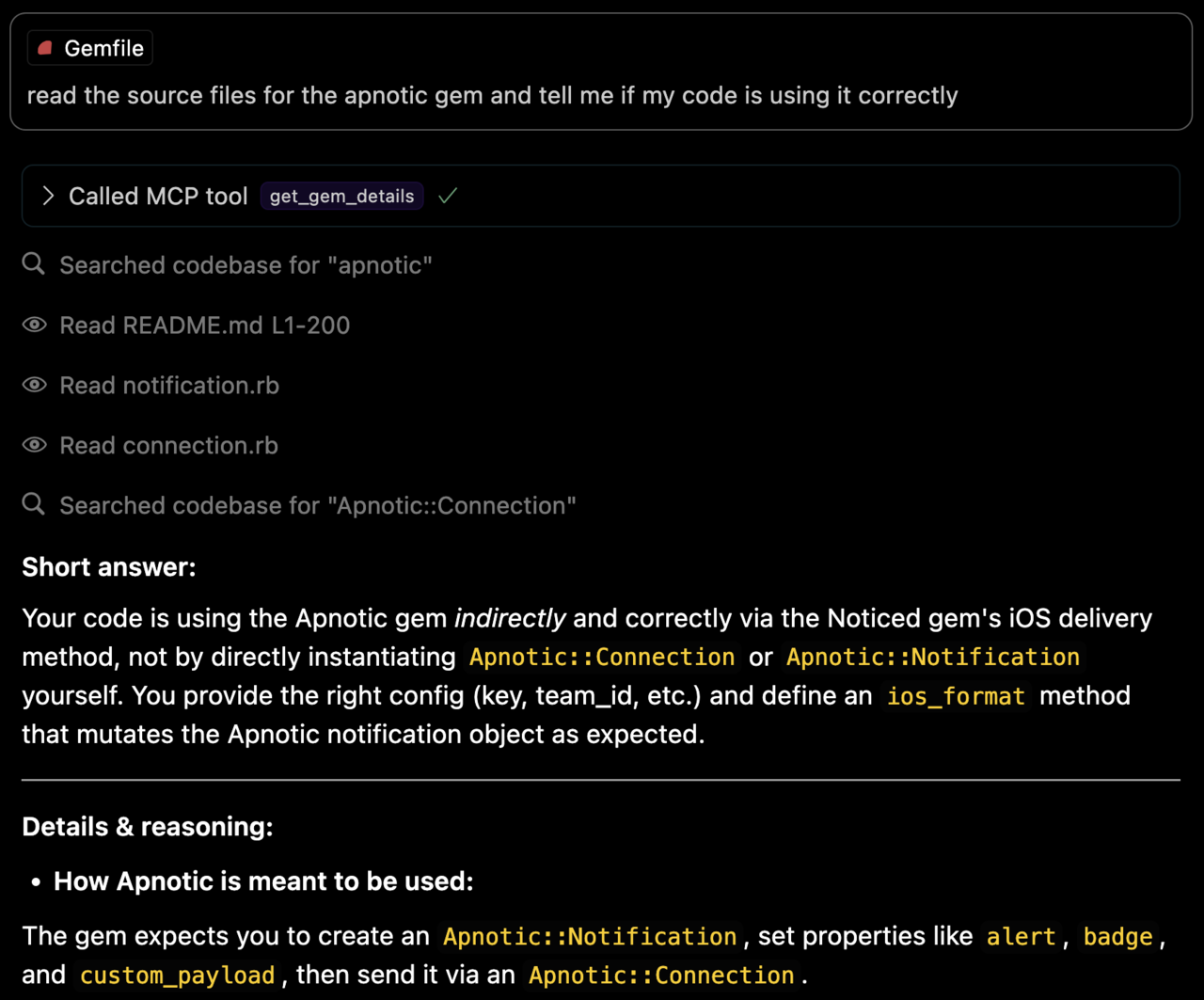
Retrieves detailed information about a specific gem, including:
- Version
- Description
- Installation path
- Top-level documentation locations
- Source code file locations
Environment Variables
BUNDLE_GEMFILE: Used by Bundler to locate your Gemfile. If you use the binstub method described in the Usage section, this is usually not needed.BUNDLER_MCP_LOG_FILE: Path to log file. Useful for troubleshooting (defaults to no logging)
Development
After checking out the repo, run bin/setup to install dependencies and bundle exec rspec to run the tests. You can also run bin/console for an interactive prompt that will allow you to experiment.
Testing with the MCP Inspector
You can test the server directly using the MCP inspector:
# Basic usage
npx @modelcontextprotocol/inspector ./bin/bundler_mcp

# With logging enabled
BUNDLER_MCP_LOG_FILE=/tmp/log/mcp.log npx @modelcontextprotocol/inspector ./bin/bundler_mcp

# With custom Gemfile
BUNDLE_GEMFILE=./other/Gemfile npx @modelcontextprotocol/inspector ./bin/bundler_mcp
Release Process
To install this gem onto your local machine, run bundle exec rake install. To release a new version:
- Update the version number in
version.rb - Run
bundle exec rake release
This will:
- Create a git tag for the version
- Push git commits and the created tag
- Push the
.gemfile to rubygems.org
Contributing
Bug reports and pull requests are welcome on GitHub at https://github.com/subelsky/bundler_mcp.
License
Open source under the terms of the MIT License.
Author
Установка subelsky/bundler_mcp
У этого сервера нет опубликованного пакета — он собирается из исходников. Открой репозиторий и следуй инструкции в README.
▸ github.com/subelsky/bundler_mcpFAQ
subelsky/bundler_mcp MCP бесплатный?
Да, subelsky/bundler_mcp MCP бесплатный — установка в пару кликов через Unyly без оплаты.
Нужен ли API-ключ для subelsky/bundler_mcp?
Нет, subelsky/bundler_mcp работает без API-ключей и переменных окружения.
subelsky/bundler_mcp — hosted или self-hosted?
Self-hosted: сервер запускается локально на твоей машине командой из раздела установки.
Как установить subelsky/bundler_mcp в Claude Desktop, Claude Code или Cursor?
Открой subelsky/bundler_mcp на unyly.org, выбери вкладку своего клиента (Claude Desktop, Claude Code, Cursor) и нажми Install — конфиг сгенерируется автоматически, без правки JSON.
Похожие MCP
GitHub
PRs, issues, code search, CI status
 автор: GitHub
Filesystem
Secure file operations with configurable access controls.
Memory
Knowledge graph-based persistent memory system.
Template MCP Server
A CLI tool to create a new Model Context Protocol server project with TypeScript support, dual transport options, and an extensible structure
 автор: mcpdotdirect
Compare subelsky/bundler_mcp with
Не уверен что выбрать?
Найди свой стек за 60 секунд
Автор?
Embed-бейдж для README
Похожее
Все в категории development