
Substack Publisher
БесплатноНе проверенMCP server for Substack's official Publisher API that enables querying post analytics, subscriber counts, and publication data through natural language from MCP

Описание
MCP server for Substack's official Publisher API that enables querying post analytics, subscriber counts, and publication data through natural language from MCP clients.
README
MCP server for Substack's official Publisher API
Note: This is an unofficial, community-developed tool and is not affiliated with, endorsed by, or supported by Substack, Inc.
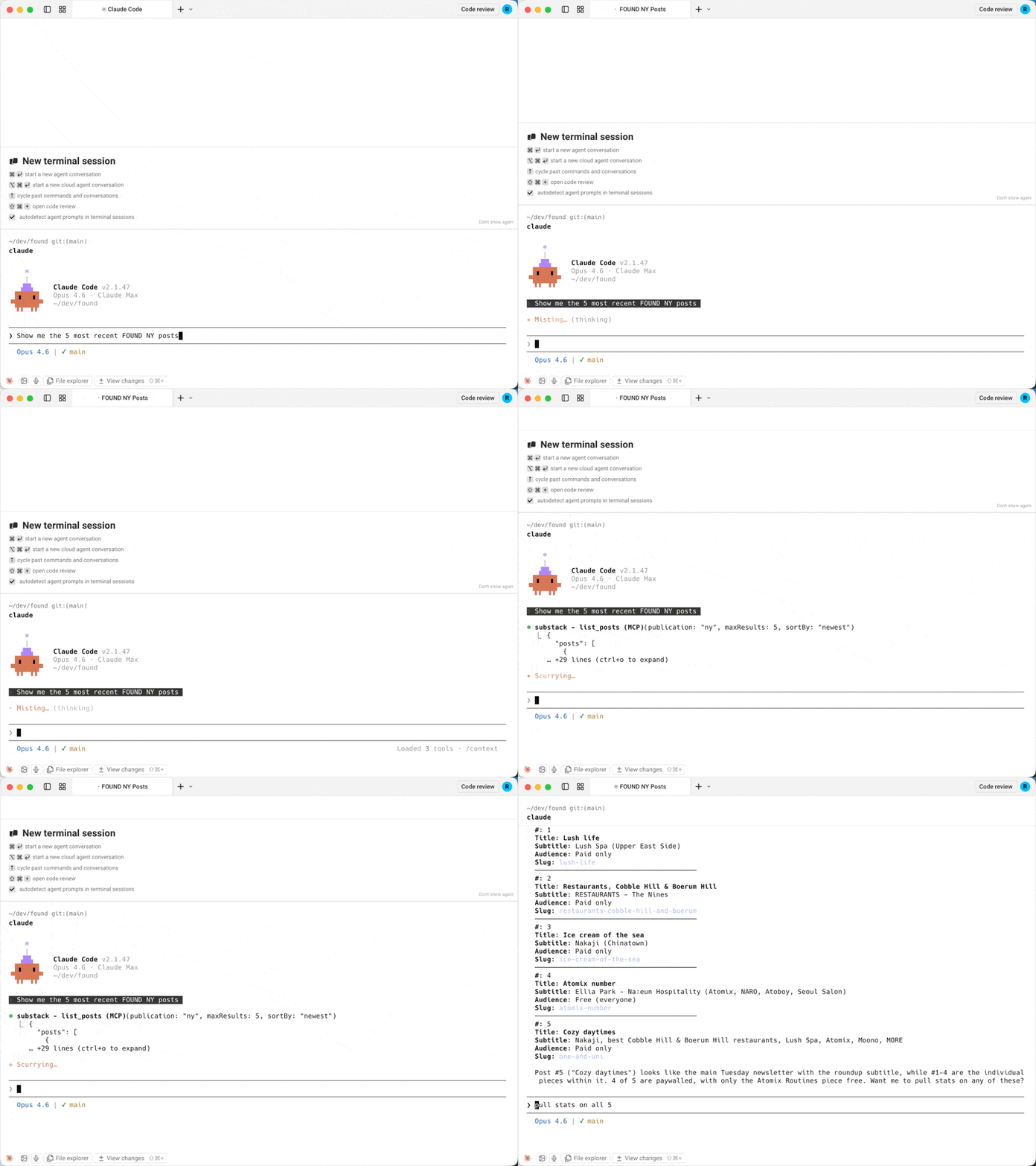
The first MCP server for Substack's official Publisher API. Query post analytics, subscriber counts, and publication data directly from Claude, Cursor, or any MCP client.
Why this server?
| substack-publisher-mcp | Other Substack MCP servers | |
|---|---|---|
| API | Official Publisher API | Unofficial internal API |
| Auth | API key (stable) | Browser cookies (fragile) |
| Stability | Official, documented API | Breaks when Substack changes internals |
| Multi-publication | Built-in support | Not available |
Prerequisites
- Node.js 18+. Check with
node --version; install from nodejs.org if missing. - Substack Publisher API key. Generate one from your publication's Substack dashboard. If you don't see a Publisher API option there, it may not be enabled for your publication yet; see the Publisher API docs for availability.
Quick Start
1. Install
git clone https://github.com/dkships/substack-publisher-mcp.git
cd substack-publisher-mcp
npm install && npm run build
2. Configure your MCP client
Add to your client's MCP config file (create the file if it doesn't exist):
| Client | Config file |
|---|---|
| Claude Desktop (macOS) | ~/Library/Application Support/Claude/claude_desktop_config.json |
| Claude Desktop (Windows) | %APPDATA%\Claude\claude_desktop_config.json |
| Claude Code | .mcp.json in your project directory |
| Cursor | .cursor/mcp.json |
{
  "mcpServers": {
    "substack": {
      "command": "node",
      "args": ["/path/to/substack-publisher-mcp/dist/index.js"],
      "env": {
        "SUBSTACK_API_KEY": "your-api-key-here"
      }
    }
  }
}
Claude Code users: Add
"type": "stdio"to the server config.
Restart your MCP client after editing the config — servers load at startup.
3. Start using it
Ask Claude (or your MCP client):
- "Which Substack publications do I have configured?"
- "Show me my posts from the last month"
- "Pull up my post with the slug my-latest-post"
- "How many opens and clicks did my latest post get?"
- "What are my subscriber counts for the last 30 days?"
- "Look up subscriber [email protected]"
Installing through an AI agent or registry? See llms-install.md for a condensed, machine-readable setup guide.
Tools
| Tool | Description | Key Parameters |
|---|---|---|
list_publications |
List configured publications | None |
list_posts |
List published posts | startDate, endDate, sortBy, type, maxResults, next |
get_post |
Get a specific post by URL slug | urlSlug (required) |
get_post_stats |
Get engagement stats for a post | urlSlug (required) |
get_subscriber_counts |
Get daily subscriber counts by type | startDate, endDate |
get_subscriber |
Look up a subscriber by email | email (required) |
All tools except list_publications accept an optional publication parameter when multiple publications are configured.
Example responses
get_subscriber_counts
[
  {
    "date": "2025-01-15",
    "total_email_subscribers": 25000,
    "paid_subscribers": 500,
    "free_trial_subscribers": 10,
    "comp_subscribers": 50,
    "gift_subscribers": 15,
    "lifetime_subscribers": 0,
    "founding_subscribers": 25
  }
]
get_post_stats
{
  "clicks": 320,
  "opens": 5400,
  "post_id": 12345678,
  "recipients": 10000,
  "views": 6100,
  "new_free_subscriptions": 80,
  "new_paid_subscriptions": 5,
  "estimated_revenue_increase": 400
}
list_posts
{
  "posts": [
    {
      "title": "My Latest Post",
      "audience": "only_paid",
      "subtitle": "A deep dive into the topic",
      "postDate": "2025-01-15T12:00:00.000Z",
      "urlSlug": "my-latest-post",
      "coverImage": "https://substackcdn.com/image/..."
    }
  ],
  "next": "abc123cursor"
}
Multiple publications
If you manage multiple Substack publications, configure a separate API key for each using the SUBSTACK_API_KEY_<NAME> pattern:
{
  "mcpServers": {
    "substack": {
      "command": "node",
      "args": ["/path/to/substack-publisher-mcp/dist/index.js"],
      "env": {
        "SUBSTACK_API_KEY_MAIN": "your-main-blog-key",
        "SUBSTACK_API_KEY_TECH": "your-tech-newsletter-key",
        "SUBSTACK_API_KEY_COMPANY": "your-company-updates-key"
      }
    }
  }
}
Then specify which publication to query:
"Show me subscriber counts for main" "List recent posts from the tech publication"
Use list_publications to see all configured publication names.
Troubleshooting
| Issue | Solution |
|---|---|
Unauthorized error |
Verify your API key is correct. The key goes directly in the authorization header with no Bearer prefix. |
Missing environment variables warning |
Only configure env vars for publications you have keys for. Remove the rest. |
| Server won't start | Make sure you ran npm run build after cloning. The server runs from dist/, not src/. |
No API keys configured |
Set SUBSTACK_API_KEY or SUBSTACK_API_KEY_<NAME> in your MCP client config. |
| Server doesn't appear in your client | Check the config file is valid JSON (no trailing commas), then restart the client. |
command not found / spawn node ENOENT |
Node.js isn't installed or isn't on your PATH. Check node --version. |
| Still stuck | Check your client's MCP logs. Claude Desktop on macOS: ~/Library/Logs/Claude/mcp*.log. |
API Reference
This server wraps the Substack Publisher API. See Substack's documentation for details on available data and rate limits.
Contributing
See CONTRIBUTING.md for guidelines.
License
MIT License. See LICENSE for details.
Substack is a trademark of Substack, Inc. This project is not affiliated with Substack, Inc. Use of the Substack name is for descriptive purposes only.
Установить Substack Publisher в Claude Desktop, Claude Code, Cursor
unyly install substack-publisher-mcpСтавит в Claude Desktop, Claude Code, Cursor и VS Code — сам разбирается с npx, uvx и сборкой из исходников.
Впервые? Поставь CLI: curl -fsSL https://unyly.org/install | sh
Или настроить вручную
Выполни в терминале:
claude mcp add substack-publisher-mcp -- npx -y github:dkships/substack-publisher-mcpFAQ
Substack Publisher MCP бесплатный?
Да, Substack Publisher MCP бесплатный — установка в пару кликов через Unyly без оплаты.
Нужен ли API-ключ для Substack Publisher?
Нет, Substack Publisher работает без API-ключей и переменных окружения.
Substack Publisher — hosted или self-hosted?
Доступен hosted-вариант: Unyly запускает сервер в облаке, локальная установка не обязательна.
Как установить Substack Publisher в Claude Desktop, Claude Code или Cursor?
Открой Substack Publisher на unyly.org, выбери вкладку своего клиента (Claude Desktop, Claude Code, Cursor) и нажми Install — конфиг сгенерируется автоматически, без правки JSON.
Похожие MCP
GitHub
PRs, issues, code search, CI status
 автор: GitHub
Filesystem
Secure file operations with configurable access controls.
Memory
Knowledge graph-based persistent memory system.
Template MCP Server
A CLI tool to create a new Model Context Protocol server project with TypeScript support, dual transport options, and an extensible structure
 автор: mcpdotdirect
Compare Substack Publisher with
Не уверен что выбрать?
Найди свой стек за 60 секунд
Автор?
Embed-бейдж для README
Похожее
Все в категории development