
Swiss Cultural Heritage
БесплатноНе проверенEnables AI-native access to Swiss cultural heritage data from SIK-ISEA (artists), Nationalmuseum (collections), and Nationalbibliothek (bibliography) via MCP to

Описание
Enables AI-native access to Swiss cultural heritage data from SIK-ISEA (artists), Nationalmuseum (collections), and Nationalbibliothek (bibliography) via MCP tools, without authentication.
README
🇨🇭 Part of the Swiss Public Data MCP Portfolio
🏛️ swiss-cultural-heritage-mcp


MCP Server for Swiss cultural heritage — SIK-ISEA artists, Nationalmuseum collections, and the Nationalbibliothek bibliography
Overview
swiss-cultural-heritage-mcp provides AI-native access to Swiss cultural heritage data sources, all without authentication:
| Source | Data | API |
|---|---|---|
| SIK-ISEA (SIKART) | ~17,000 Swiss artists — SIKART biographical data | opendata.swiss CKAN |
| Nationalmuseum (SNM) | Museum collections (numismatics, seals, special collections) | opendata.swiss CKAN |
| Nationalbibliothek (NB) | Swiss national bibliography (Helveticat) | SRU (search) + OAI-PMH (collections) |
| Memoriav / Memobase | Audiovisual heritage (photo, audio, video) | Linked Open Data (JSON-LD / Hydra) |
| Dodis | Diplomatic Documents of Switzerland (documents, persons, organisations) | JSON-REST (Solr) + permalinks |
This server completes the humanistic dimension of the Swiss public data portfolio — history, literature, and art — alongside existing servers for law (fedlex-mcp), transport, statistics, and more.
The memory-institution facade (Memobase + Dodis) is exposed through three
federated tools — search_heritage, get_heritage_item, list_heritage_collections —
rather than one tool-family per source. Every result carries source, permalink and
licence, and the licence is reported separately for metadata and for the
digitised object (they diverge: metadata is open Linked Open Data, but a
digitised object may be In Copyright). Only metadata and links are returned —
copyright-protected full texts (e.g. Dodis transcriptions) are never reproduced.
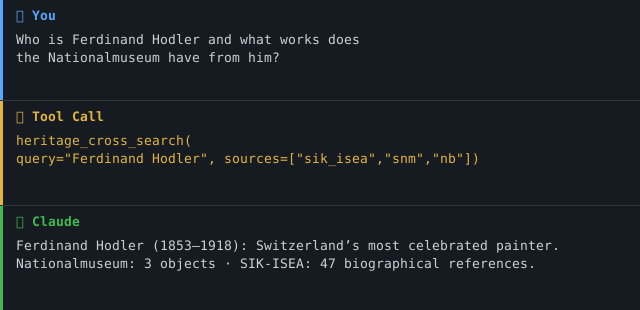
Anchor demo query (art): "Find works by Zurich-based painters from the 19th century in the Nationalmuseum, and cross-reference with their biography in the SIK-ISEA artist database."
Anchor demo query (memory institutions): "Which sources on the development of the Zurich Volksschule in the 19th century can be found in the Swiss memory institutions?" → search_heritage(query="Volksschule Zürich", collection="all", date_from="1800", date_to="1899").
Demo
Features
- 🏛️ 11 tools, 2 resources, 2 prompts across five data sources
- 🔍
heritage_cross_search— parallel search across SIK-ISEA + SNM + NB in a single call - 🏛️
search_heritage— federated facade over Memobase + Dodis with per-result source, permalink and split metadata/digitised-object licence - 🌐 Bilingual output (Markdown / JSON)
- 🔓 No API key required — all data under open licenses
- ☁️ Dual transport — stdio (Claude Desktop) + Streamable HTTP (cloud)
- 📚 Prompt templates for art research and finding educational materials
Project phase: Phase 1 — read-only. Every tool is annotated readOnlyHint: true; there are no write or destructive operations. Moving to Phase 2 (write-capable) requires the prerequisites in docs/roadmap.md.
Prerequisites
- Python 3.11+
- uv (recommended) or pip
Installation
# Clone the repository
git clone https://github.com/malkreide/swiss-cultural-heritage-mcp.git
cd swiss-cultural-heritage-mcp

# Install
pip install -e .
# or with uv:
uv pip install -e .
Or with uvx (no permanent installation):
uvx swiss-cultural-heritage-mcp
Quickstart
# stdio (for Claude Desktop)
python -m swiss_cultural_heritage_mcp.server

# Streamable HTTP (port 8000)
python -m swiss_cultural_heritage_mcp.server --http --port 8000
Try it immediately in Claude Desktop:
"Who is Ferdinand Hodler?" "What coins does the Nationalmuseum have from Zurich?" "Find publications about Volksschule in the Swiss national bibliography"
→ More use cases by audience →
Configuration
Claude Desktop
Edit ~/Library/Application Support/Claude/claude_desktop_config.json (macOS) or %APPDATA%\Claude\claude_desktop_config.json (Windows):
{
  "mcpServers": {
    "swiss-cultural-heritage": {
      "command": "python",
      "args": ["-m", "swiss_cultural_heritage_mcp.server"]
    }
  }
}
Or with uvx:
{
  "mcpServers": {
    "swiss-cultural-heritage": {
      "command": "uvx",
      "args": ["swiss-cultural-heritage-mcp"]
    }
  }
}
Config file locations:
- macOS:
~/Library/Application Support/Claude/claude_desktop_config.json - Windows:
%APPDATA%\Claude\claude_desktop_config.json
Cloud Deployment (SSE for browser access)
For use via claude.ai in the browser (e.g. on managed workstations without local software):
Render.com (recommended):
- Push/fork the repository to GitHub
- On render.com: New Web Service → connect GitHub repo
- Select region
Frankfurt(EU) — required for Swiss public-sector use under revDSG / EDÖB. See docs/data-residency.md. - Set start command:
python -m swiss_cultural_heritage_mcp.server --http --port 8000 - In claude.ai under Settings → MCP Servers, add:
https://your-app.onrender.com/sse
💡 "stdio for the developer laptop, SSE for the browser."
For container deployments (Docker / Kubernetes / Cloud Run): the repository ships a hardened Dockerfile (non-root UID 10001). See docs/security.md for recommended SecurityContext and docs/network-egress.md for egress policy. The service runs single-instance by default; before scaling horizontally, see docs/scaling.md for the session-affinity prerequisites.
Available Tools
SIK-ISEA (Swiss Art Research)
| Tool | Description |
|---|---|
heritage_search_artists |
Search ~17,000 Swiss artists (SIKART) by name or place |
heritage_get_artist |
Full artist profile by SIKART ID (HAUPTNR) |
Nationalmuseum (SNM)
| Tool | Description |
|---|---|
heritage_search_museum_datasets |
Search SNM datasets on opendata.swiss |
heritage_browse_collection |
Browse objects within a collection via CKAN DataStore |
Nationalbibliothek (NB)
| Tool | Description |
|---|---|
heritage_search_helveticat |
Full-text search over the whole holdings (SRU), or browse one collection (OAI-PMH) |
heritage_list_nb_collections |
List the 68 available OAI-PMH sets |
heritage_get_publication |
Selected MARC21 fields for one publication, normalised to Dublin-Core-style keys (OAI-PMH GetRecord) — not the complete catalogue record |
Cross-Source
| Tool | Description |
|---|---|
heritage_cross_search |
Parallel search across SIK-ISEA + SNM + NB |
Memory institutions (Memobase + Dodis) — federated facade
| Tool | Description |
|---|---|
search_heritage |
Federated search over Memobase + Dodis (collection = memobase | dodis | all), with date_from / date_to / media_type filters. Every result carries source, permalink and a split metadata/digitised-object licence |
get_heritage_item |
Full metadata for one object (collection, item_id). Metadata + links only — protected full texts are never reproduced |
list_heritage_collections |
Discovery: which collections exist, their protocol, auth and licences — including the probed-but-not-connected sources (Bundesarchiv, Landesmuseum) and why |
Example Use Cases
| Query | Tool |
|---|---|
| "Who is Ferdinand Hodler?" | heritage_get_artist |
| "Find Swiss artists born in Basel" | heritage_search_artists |
| "What coins from Zurich does the Nationalmuseum have?" | heritage_browse_collection |
| "Find publications about Volksschule" | heritage_search_helveticat |
| "Search for everything about Sophie Taeuber-Arp" | heritage_cross_search |
| "Sources on the 19th-c. Zurich Volksschule in Swiss memory institutions" | search_heritage |
Architecture
┌─────────────────┐     ┌──────────────────────────────┐     ┌──────────────────────────┐
│   Claude / AI   │────▶│  Swiss Cultural Heritage MCP  │────▶│  SIK-ISEA                │
│   (MCP Host)    │◀────│  (MCP Server)                │◀────│  opendata.swiss / CKAN   │
└─────────────────┘     │                              │     ├──────────────────────────┤
                        │  11 Tools · 2 Resources      │────▶│  Nationalmuseum (SNM)    │
                        │  2 Prompts                   │◀────│  opendata.swiss / CKAN   │
                        │  Stdio | SSE                 │     ├──────────────────────────┤
                        │                              │────▶│  Nationalbibliothek (NB) │
                        │  No authentication required  │◀────│  Helveticat: SRU, OAI-PMH│
                        │                              │     ├──────────────────────────┤
                        │  search_heritage facade      │────▶│  Memobase (JSON-LD/Hydra)│
                        │                              │◀────│  Dodis (JSON-REST/Solr)  │
                        └──────────────────────────────┘     └──────────────────────────┘
Data Source Characteristics
| Source | Protocol | Coverage | Auth |
|---|---|---|---|
| SIK-ISEA (SIKART) | CKAN DataStore | ~17,000 Swiss artists | None |
| Nationalmuseum | CKAN DataStore | Museum collections | None |
| Nationalbibliothek | SRU 1.2 (CQL) + OAI-PMH 2.0 | Swiss national bibliography | None |
| Memoriav / Memobase | Linked Open Data (JSON-LD / Hydra, RiC-O) | Audiovisual heritage (~460k records) | None |
| Dodis | JSON-REST (Solr) + stable permalinks | Diplomatic documents, persons, organisations | None |
Architecture decision — memory-institution facade
Verified by a live probe on 2026-07-19 (methodology: mcp-data-source-probe). Four memory institutions were evaluated; only two expose a clean, no-auth, standardised interface and are connected:
| Source | Result | Why |
|---|---|---|
| Memobase | ✅ connected | Linked-Open-Data API (api.memobase.ch, JSON-LD/Hydra); full-text search via ?q=, single record via /record/<id>; pagination via offset/size. Metadata open; digitised objects carry per-object rightsstatements.org rights ("In Copyright", access "onsite"). |
| Dodis | ✅ connected | JSON-REST/Solr (beta.dodis.ch/api): search via POST /api/solr/query, item via GET /api/solr/full/<id>; stable permalinks dodis.ch/<id>. Metadata open (citation required); documents carry per-document rights (TEI/PDF behind the permalink). |
| Bundesarchiv | ⛔ not connected | The recherche.bar.admin.ch backend (CMI AIS) sits behind eIAM login and Google reCAPTCHA — not machine-accessible without emulating a session, which is fragile and against the operator's intent. |
| Landesmuseum | ⛔ not connected | sammlung.nationalmuseum.ch has no public API (only an internal, undocumented Ajax/HTML surface) — connecting it would require scraping, which violates the resilience guardrails. |
Consequences: three federated tools instead of four tool-families; every result
carries source + permalink + a split metadata/digitised-object licence; no
copyright-protected full text is reproduced (metadata + links only); bar and
landesmuseum are documented as gated via list_heritage_collections, not scraped.
Project Structure
swiss-cultural-heritage-mcp/
├── src/swiss_cultural_heritage_mcp/
│   ├── __init__.py              # Package
│   └── server.py                # 11 tools, 2 resources, 2 prompts
├── tests/
│   └── test_server.py           # Unit + integration tests (mocked HTTP)
├── .github/workflows/ci.yml     # GitHub Actions (Python 3.11/3.12/3.13)
├── .github/dependabot.yml       # Monthly dependency + SDK update PRs
├── Dockerfile                   # Multi-stage, non-root, HEALTHCHECK
├── docs/                        # security, network-egress, scaling, data-residency, roadmap
├── pyproject.toml
├── CHANGELOG.md
├── CONTRIBUTING.md
├── LICENSE
├── README.md                    # This file (English)
└── README.de.md                 # German version
Single-file server: the 11 tools live in one
server.pyrather than atools/package. At this size a single, linear module is easier to read and review than a split; if the tool count grows materially, the SIK-ISEA / SNM / NB / cross-search blocks are the natural split points.
Safety & Limits
- Read-only: All tools perform HTTP GET requests only — no data is written, modified, or deleted.
- No personal data: The APIs return institutional records (artworks, publications, artists). No personally identifiable information (PII) is processed or stored by this server.
- Rate limits: No throttling was observed in roughly 380 probe requests on 2026-09-20. That says nothing about the published terms: the National Library's SRU and OAI-PMH terms of use have not been checked by this project (see
PROBE_REPORT_helveticat.md). Uselimitparameters conservatively. The server enforces a 30s timeout per request. - Data freshness: Records reflect the upstream source at query time. No caching is performed by this server.
- Terms of service: Data is subject to the ToS of each source — SIK-ISEA, opendata.swiss, Nationalbibliothek. The opendata.swiss datasets carry open licences (CC0 / CC BY). For the National Library this project has not verified the terms of either endpoint. Where a record carries its own rights statement it is surfaced as
rights(MARC 506/540) — many records carry none. The licence line in the attribution footer is the source's general statement, not a per-record one, and JSON responses carry no footer at all. Check with the source before redistributing. - No guarantees: This server is a community project, not affiliated with SIK-ISEA, SNM, or NB. Availability depends on upstream APIs.
Known Limitations
- SIK-ISEA: Artist data is updated periodically; very recent acquisitions may not yet be reflected
- Nationalmuseum: Only datasets published on opendata.swiss are accessible; not all SNM collections are available
- Nationalbibliothek:
maximumRecordsis capped at 50 server-side, silently — a request for more returns 50 without a warning. SRU cannot filter by OAI set, soqueryandset_specuse different endpoints and cannot be combined into one server-side search.from_date/until_dateare the catalogue record's modification dates, not publication years. Measured 2026-09-20; seePROBE_REPORT_helveticat.md. - Cross-search: Response time depends on the slowest of the three sources
Testing
# Unit tests (no API key required)
PYTHONPATH=src pytest tests/ -m "not live"

# Integration tests (live API calls)
pytest tests/ -m "live"

# Lint and format, as CI runs them
ruff check src/ tests/ scripts/
ruff format --check src/ tests/ scripts/
Ruff is pinned to an exact version in pyproject.toml ([project.optional-dependencies] dev), so pip install -e ".[dev]" gives you the version CI uses and the lint gates agree with it. Installing a newer ruff on top changes the rule set and the formatter, and reports differences on code nobody touched. See CONTRIBUTING.md.
MCP Protocol Version
| Item | Value |
|---|---|
| SDK | mcp[cli]>=2.0.0,<3 (pinned in pyproject.toml) |
Served via the initialize handshake |
2024-11-05 … 2025-11-25 — the handshake ceiling |
| Served via the per-request envelope | 2026-07-28 |
| Who picks | The client's first request, once per connection: a request carrying the 2026-07-28 _meta envelope opens a modern connection, anything else opens a handshake connection. A later claim from the other era is refused. |
| Update policy | The SDK pin is the source of truth for the protocol version. Dependabot opens monthly mcp update PRs; protocol-version bumps are reviewed there and recorded in CHANGELOG.md. |
This server does not override the negotiation — the official mcp SDK decides, and both eras are reachable over either transport (stdio and HTTP alike). Pin the SDK, not a hand-rolled version string, to control which protocol versions are spoken. The numbers above are the pinned SDK's own registry (mcp_types.version: HANDSHAKE_PROTOCOL_VERSIONS, MODERN_PROTOCOL_VERSIONS) — read them there rather than from this table if the pin has moved.
Both revisions are pinned in
tests/test_protocol_version.py and asserted
against the installed SDK — including the handshake ceiling, measured against a
live initialize through the assembled ASGI stack. A Dependabot bump of mcp
can no longer move either number without this table going stale unnoticed.
Server identity
| Field | Value | Source |
|---|---|---|
name |
swiss-cultural-heritage-mcp |
__dist__ — the PyPI name, also in server.json |
title |
Schweizer Kulturerbe | server.SERVER_TITLE |
version |
the shipped package version | pyproject.toml via importlib.metadata |
description |
the PyPI one-liner | pyproject.toml → [project].description |
websiteUrl |
the project homepage | pyproject.toml → [project.urls].Homepage |
instructions |
what this server is for | server.INSTRUCTIONS |
The identifier is hyphenated, like the repository, the PyPI package and the
console script. The Python module keeps underscores — python -m swiss_cultural_heritage_mcp.server above is not an inconsistency, it is the
only spelling Python allows for a package name.
The 2026-07-28 era has no handshake. Instead of sending serverInfo once per
connection, the SDK stamps the identity into the _meta of every response,
and server/discover carries exactly one field beyond the capabilities:
instructions.
The SDK supplies none of these on its own — Server.server_info says so
outright: "An unversioned server reports an empty version; the SDK never
substitutes its own." Until 18 September 2026 this server passed none of them and
reported "version": "" on every call. That is now measured in
tests/test_server_identity.py, across both
eras and through real HTTP requests: a constructor argument that is set is not
yet a field on the wire.
Version, description and URL are derived, not written. A literal in the shipped
path would be a second truth next to pyproject.toml — the very drift
scripts/check_version_sync.py forbids for the version number.
Changelog
See CHANGELOG.md
Contributing
See CONTRIBUTING.md
Security
See SECURITY.md (Deutsch) for the security posture and how to report a vulnerability.
License
MIT License — see LICENSE
Author
Hayal Oezkan · malkreide
Credits & Related Projects
- SIK-ISEA: www.sik-isea.ch — Swiss Institute for Art Research
- Nationalmuseum: www.nationalmuseum.ch / opendata.swiss
- Nationalbibliothek: www.nb.admin.ch — Swiss National Library
- Protocol: Model Context Protocol — Anthropic / Linux Foundation
- Related: eth-library-mcp — ETH Library: full Swiss library coverage (ETH = science, NB = humanities)
- Related: fedlex-mcp — Cultural heritage law + primary legislation
- Related: zurich-opendata-mcp — Spatial-historical: museum objects + Zurich geodata
- Portfolio: Swiss Public Data MCP Portfolio
Installation
Run via uv's uvx — no clone or manual install needed. Add to your MCP client config (mcpServers for Claude Desktop, Cursor and Windsurf; use a top-level servers key for VS Code in .vscode/mcp.json):
{
  "mcpServers": {
    "swiss-cultural-heritage-mcp": {
      "command": "uvx",
      "args": [
        "swiss-cultural-heritage-mcp"
      ]
    }
  }
}
Установить Swiss Cultural Heritage в Claude Desktop, Claude Code, Cursor
unyly install swiss-cultural-heritage-mcpСтавит в Claude Desktop, Claude Code, Cursor и VS Code — сам разбирается с npx, uvx и сборкой из исходников.
Впервые? Поставь CLI: curl -fsSL https://unyly.org/install | sh
Или настроить вручную
Выполни в терминале:
claude mcp add swiss-cultural-heritage-mcp -- uvx swiss-cultural-heritage-mcpПошаговые гайды: как установить Swiss Cultural Heritage
FAQ
Swiss Cultural Heritage MCP бесплатный?
Да, Swiss Cultural Heritage MCP бесплатный — установка в пару кликов через Unyly без оплаты.
Нужен ли API-ключ для Swiss Cultural Heritage?
Нет, Swiss Cultural Heritage работает без API-ключей и переменных окружения.
Swiss Cultural Heritage — hosted или self-hosted?
Self-hosted: сервер запускается локально на твоей машине командой из раздела установки.
Как установить Swiss Cultural Heritage в Claude Desktop, Claude Code или Cursor?
Открой Swiss Cultural Heritage на unyly.org, выбери вкладку своего клиента (Claude Desktop, Claude Code, Cursor) и нажми Install — конфиг сгенерируется автоматически, без правки JSON.
Похожие MCP
Opencode Omniroute Plugin
OpenCode plugin for the OmniRoute AI Gateway. Drives dynamic model discovery, /connect auth flow, and multi-instance OmniRoute providers via the official @openc
 автор: GitHub Actions
Roblox Studio
Enables AI coding tools to control Roblox Studio for workspace exploration, instance manipulation, and script management. It provides tools for playtesting, sce
 автор: paralov
Antigravity Drawio
MCP server that enables AI assistants to create, parse, render, and validate Draw.io diagrams programmatically.
 автор: S-SUJAN-S
Fetch
Web content fetching and conversion for efficient LLM usage.
AWS KB Retrieval
Retrieval from AWS Knowledge Base using Bedrock Agent Runtime.
 автор: modelcontextprotocol
Spring AI MCP Server
Provides auto-configuration for setting up an MCP server in Spring Boot applications.
llm-analysis-assistant
A very streamlined mcp client that supports calling and monitoring stdio/sse/streamableHttp, and can also view request responses through the /logs page. It also
 автор: xuzexin-hz
MCP-Agent
A simple, composable framework to build agents using Model Context Protocol by [LastMile AI](https://www.lastmileai.dev)
 автор: lastmile-ai
Spring AI MCP Client
Provides auto-configuration for MCP client functionality in Spring Boot applications.
mcp.natoma.ai
A Hosted MCP Platform to discover, install, manage and deploy MCP servers by [Natoma Labs](https://www.natoma.ai)
Compare Swiss Cultural Heritage with
Не уверен что выбрать?
Найди свой стек за 60 секунд
Автор?
Embed-бейдж для README
Похожее
Все в категории ai