
Swiss Efv
БесплатноНе проверенMCP server for Swiss federal finances (EFV), providing read-only tools to query budget, debt, forecasts, and spending by task and institution from public data.

Описание
MCP server for Swiss federal finances (EFV), providing read-only tools to query budget, debt, forecasts, and spending by task and institution from public data.
README
🇨🇭 Part of the Swiss Public Data MCP Portfolio — open-source MCP servers connecting AI agents to Swiss public and open data. This is a private project. It is independent of any employer or institutional affiliation.
🏛️ swiss-efv-mcp
Version CI License: MIT Python 3.11+ MCP Auth: none Portfolio
MCP server for Swiss federal finances (EFV): budget, debt, forecasts and spending by task and institution.
Overview
This server closes the fiscal gap in the portfolio's Economics & Finance cluster.
swiss-snb-mcp already covers monetary policy; swiss-efv-mcp adds the state
budget — federal revenue, expenditure, balance, debt ratios (with forecasts to
2029), a hierarchical budget drill-down, and spending by department. Data comes
from the Eidgenössische Finanzverwaltung (EFV) via opendata.swiss (OGD Schweiz).
Features
- Five read-only tools over the curated EFV FS/GFS dump files.
- Headline series 1990–2029 per household (bund, ktn, gdn, staat, sv) and model
(FS / GFS); every point carries
is_projectionso actuals and plan/forecast years are unambiguous. - Hierarchical federal-budget drill-down and spending by department / unit.
- 24 h TTL in-memory cache with stale-serve fallback; retry with exponential
backoff (2/4/8 s);
dump_statusnever returns empty silently. - Dual transport:
stdio(local) and SSE (cloud). - No authentication required — public open-government data (No-Auth-First).
🎯 Anchor Demo Query
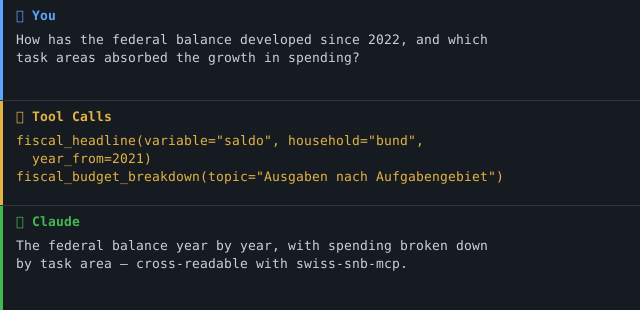
"How has the federal balance developed since the SNB rate turnaround in 2022 — and which task areas absorbed the growth in spending?"
fiscal_headline(variable="saldo", household="bund", year_from=2021)
fiscal_budget_breakdown(topic="Ausgaben nach Aufgabengebiet", level=2)
Cross-read with swiss-snb-mcp, this connects the interest-rate cycle to the
federal deficit — something neither server can answer alone.
Demo
Prerequisites
- Python 3.11+
- uv / uvx (recommended) or
pip - Network access to
data.finance.admin.chandefv.admin.ch— no API key needed
Installation
uvx swiss-efv-mcp            # zero-install run (once published to PyPI)
# or
pip install swiss-efv-mcp
Claude Desktop (claude_desktop_config.json):
{
  "mcpServers": {
    "swiss-efv": {
      "command": "uvx",
      "args": ["swiss-efv-mcp"]
    }
  }
}
Quickstart
# Run locally over stdio (default transport)
uvx swiss-efv-mcp

# From a checkout, without installing
PYTHONPATH=src python -m swiss_efv_mcp
Configuration
All configuration is loaded once into a typed Settings object
(pydantic-settings). The legacy unprefixed names below keep working; the
canonical names use the EFV_MCP_ prefix. Defaults are safe for local use.
| Variable | Default | Purpose |
|---|---|---|
TRANSPORT |
stdio |
Transport: stdio (Claude Desktop) or sse / streamable-http (cloud) |
HOST |
127.0.0.1 |
Bind host (SSE only). Loopback by default; set 0.0.0.0 only in a container |
PORT |
8000 |
Bind port (SSE only) |
EFV_MCP_LOG_LEVEL |
INFO |
structlog level (JSON to stderr) |
EFV_MCP_CORS_ORIGINS |
[] |
SSE only: explicit allowed browser origins (default-deny; comma-separated or JSON) |
EFV_MCP_OTEL_ENABLED |
false |
Enable OpenTelemetry tracing (requires the otel extra); standard OTEL_* env vars configure export |
Cloud (Render / Railway):
TRANSPORT=sse PORT=8000 swiss-efv-mcp # exposes /sse
Available Tools
| Tool | Purpose |
|---|---|
fiscal_headline |
Revenue / expenditure / balance / debt ratios over 1990–2029, per household and model; every point flags is_projection |
fiscal_budget_breakdown |
Hierarchical federal budget by topic (Ausgaben nach Art / nach Aufgabengebiet, Einnahmen, Bilanz, …) |
fiscal_by_institution |
Spending per department / administrative unit since 2007 (Personalausgaben, Informatik, external services, FTE) |
fiscal_list_dimensions |
Discover valid parameter values — call this first to build correct arguments |
fiscal_status |
Cache freshness and upstream health per dataset; never returns empty silently |
dump_status |
Deprecated alias of fiscal_status (kept for backward compatibility; removed in a future minor) |
All tools are read-only: each is annotated readOnlyHint: true,
destructiveHint: false, only issues HTTP GETs against the EFV dump files, and
has no write, send, or filesystem capability.
MCP primitives. This server uses only the Tools primitive. The EFV data
are sliced live from cached dumps with no stable resource hierarchy to expose as
Resources, and there are no server-authored Prompts. The five tools are small
and closely related, so they live in a single server.py rather than a tools/
package.
Architecture
                      ┌──────────────────────────────┐
   Claude / Agent ──▶ │  swiss-efv-mcp (FastMCP)      │
                      │  5 tools · Pydantic v2 env.   │
                      └───────────────┬──────────────┘
                                      │ fetch + retry + TTL cache
              ┌───────────────────────┴───────────────────────┐
              ▼                                               ▼
   data.finance.admin.ch                          efv.admin.ch/dam
   fs_dashboard/main_extern.csv                   bundeshaushalt_de.csv
   (headline, 1990–2029)                          institutionen_de.csv
Architecture decision
This server uses Architecture C (Dump-first).
Rationale (verified live on 2026-07-24):
- The EFV FS/GFS dashboard has no filtered query API; it serves static CSV dumps that its front-end filters in the browser.
- Three curated files are small enough to fetch-and-cache whole (516 KB / 5 MB / 1 MB). They cover the headline aggregates, the hierarchical budget and the by-institution view — i.e. the answerable questions.
- The full detail cubes (
standardauswertung.csv157 MB,fir_art_funk.csv1.23 GB) are out of scope for v0.1.0; loading them per request is not viable. A future Phase 2 would pre-process them into SQLite/Parquet.
Consequences:
- Files are cached in memory with a 24 h TTL; stale cache is preferred over an empty response when upstream is down.
- Retry with exponential backoff on all HTTP;
dump_statusalways returns a readable state.
Project Structure
swiss-efv-mcp/
├── src/swiss_efv_mcp/
│   ├── __init__.py
│   ├── __main__.py        # entry point; dual transport (stdio / SSE+CORS)
│   ├── client.py          # dump-first data layer: egress allow-list, retry, UA, TTL cache
│   ├── logging_config.py  # structlog JSON to stderr
│   ├── models.py          # Pydantic v2 envelopes (source + provenance)
│   ├── server.py          # 5 FastMCP tools (annotated) + testable *_impl functions
│   └── settings.py        # typed pydantic-settings config
├── tests/                 # respx mock tests + hardening tests + @pytest.mark.live
├── docs/                  # network-egress.md + accepted-risk ADRs
├── audits/                # MCP best-practice audit runs (findings, report, summary)
├── README.md · README.de.md · CHANGELOG.md · SECURITY.md · CONTRIBUTING.md
├── Dockerfile · server.json · LICENSE
└── pyproject.toml
Safety & Limits
- Read-only. Every tool is annotated
readOnlyHint: true, only issues HTTP GETs against the EFV dump files, and has no write, send, or filesystem capability. - Egress allow-list. An immutable
ALLOWED_HOSTSfrozenset +assert_host_allowed()is enforced before every request (HTTPS-only, two fixed EFV hosts). URLs are hardcoded constants; no user input builds a URL. See docs/network-egress.md. - TLS on. httpx certificate verification is on by default and never disabled.
- No credentials. The endpoints are public OGD; no API keys or secrets are
stored or forwarded. A browser
User-Agentis injected because the endpoints403the default httpx/curl UA (see Known limitations) — do not remove it. - Error masking.
mask_error_details=Trueplus client-side masking keep raw upstream/internal detail out of tool results; full detail goes only to the structlog stderr log. - Input bounds. Tool arguments carry explicit Pydantic constraints (year
1900–2100,level 1–8, stringmax_length). - Graceful degradation. Retry with exponential backoff (2/4/8 s); a stale
cache is served over an empty response;
dump_statusalways returns a readable state and never a silent empty. - Loopback + default-deny CORS. SSE binds to
HOST, default127.0.0.1; setHOST=0.0.0.0only inside a container (the provided Dockerfile does). Browser origins must be listed explicitly viaEFV_MCP_CORS_ORIGINS. - Audited. Reviewed against the portfolio MCP best-practice catalogue (44 applicable checks) — see audits/ and SECURITY.md. Accepted risks are documented as ADRs under docs/adr/.
- Not authoritative. Figures are not official; consult the EFV originals for official use.
Known limitations
Live-probe findings (2026-07-24), also in CHANGELOG.md → Known findings:
| Finding | Impact |
|---|---|
| Endpoints return HTTP 403 without a browser User-Agent | UA is injected by the client; do not remove it |
| opendata.swiss "CSV" links for 2 datasets point to an HTML landing page | real files resolved to a DAM path (/dam/de/sd-web/{id}/…) whose opaque id may rotate on re-upload |
NA appears as a literal string in hh/model/source |
cleaned to None centrally |
"Forward-looking" is not one label: Bund uses "Budget/financial plans", staat uses "Forecasts" |
abstracted via is_projection |
| Accounting-model break at 2022/2023 ("bis 2022" vs "ab 2023" topics) | series has a seam; a note flags affected topics |
| Detail cubes (157 MB / 1.23 GB) not served | Phase 2; use the curated files for now |
Project Phase
This server is in Phase 1 (read-only). Every tool only ever fetches the public EFV dump files — there are no write, send, or filesystem capabilities.
| Phase | Scope | Status |
|---|---|---|
| 1 — Read-only | Headline series, budget breakdown, spending by institution | ✅ current |
| 2 — Detail cubes | Pre-process the 157 MB / 1.23 GB cubes to SQLite/Parquet | planned |
| 3 — Multi-agent | (none planned) | — |
A transition to a later phase would require a re-audit before any write-capable tool is added.
MCP Protocol Version
This server is native to MCP spec 2026-07-28 and still serves the older
handshake era, so both pins are stated — a single number would describe only
half of what clients actually get.
| Era | Revision | How a connection negotiates it | Pinned as |
|---|---|---|---|
| modern (default) | 2026-07-28 |
server/discover + a per-request envelope; no initialize handshake, and Client.initialize_result is None |
MCP_MODERN_PROTOCOL_VERSION |
| handshake (legacy clients) | 2025-11-25 |
the classic initialize handshake |
MCP_HANDSHAKE_PROTOCOL_VERSION |
Both constants live in server.py and are held against the mcp SDK's own
LATEST_MODERN_VERSION / LATEST_HANDSHAKE_VERSION rather than against
copied-out spec text, and both eras are exercised over a real connection — a
protocol-changing SDK bump fails CI loudly instead of drifting silently
(ARCH-012).
The 2026-07-28 era carries consequences beyond the number:
- Routing headers. Every modern request carries
Mcp-Protocol-Version,Mcp-Methodand (fortools/call)Mcp-Name. They are listed in the CORS allow-list in__main__.py; without them a browser client fails at the preflight and never reaches the server.Mcp-Param-*is deliberately absent — no tool schema here carries thex-mcp-headerannotation that would make a client send one, and a test fails the day one does. - Logging is deprecated (SEP-2577). Tool handlers no longer send
client-facing log notifications; per-call diagnostics go to the structlog
stderr stream, honouring
EFV_MCP_LOG_LEVEL. Progress reporting is unaffected and stays. fastmcp>=4.0is a floor, not cosmetics. Only fastmcp 4 pulls inmcp2.x, and only there does revision2026-07-28exist at all. Under fastmcp 3.x this server would speak2025-11-25at best.
Dependencies are kept current via monthly Dependabot PRs
(.github/dependabot.yml); protocol-relevant bumps are noted in
CHANGELOG.md.
Testing
PYTHONPATH=src pytest tests/ -m "not live"   # offline, respx-mocked
PYTHONPATH=src pytest tests/ -m live         # hits the real EFV endpoints
PYTHONPATH=src ruff check src tests
Changelog
See CHANGELOG.md.
Contributing
Issues and pull requests are welcome. Please keep tools read-only, run
ruff check and the offline test suite before submitting, and add a
CHANGELOG.md entry under [Unreleased] for user-facing changes. See
CONTRIBUTING.md.
Maintainers: see PUBLISHING.md for the step-by-step PyPI release process (Trusted Publishing via GitHub Release).
Security
See SECURITY.md for the security posture, hardening controls, and how to report a vulnerability.
License
MIT for this server — see LICENSE. The EFV data remain subject to the OGD Schweiz terms (freely usable, with attribution).
Author
Hayal Oezkan · github.com/malkreide
Credits & Related Projects
- Data: Eidgenössische Finanzverwaltung EFV via opendata.swiss (OGD Schweiz, freely usable)
- Companion: swiss-snb-mcp (monetary policy) — the fiscal/monetary pair
- Portfolio index: swiss-public-data-mcp
Disclaimer: private project, independent of any employer or institution. No warranty; figures are not authoritative — consult the EFV originals for official use.
Установка Swiss Efv
У этого сервера нет опубликованного пакета — он собирается из исходников. Открой репозиторий и следуй инструкции в README.
▸ github.com/malkreide/swiss-efv-mcpFAQ
Swiss Efv MCP бесплатный?
Да, Swiss Efv MCP бесплатный — установка в пару кликов через Unyly без оплаты.
Нужен ли API-ключ для Swiss Efv?
Нет, Swiss Efv работает без API-ключей и переменных окружения.
Swiss Efv — hosted или self-hosted?
Self-hosted: сервер запускается локально на твоей машине командой из раздела установки.
Как установить Swiss Efv в Claude Desktop, Claude Code или Cursor?
Открой Swiss Efv на unyly.org, выбери вкладку своего клиента (Claude Desktop, Claude Code, Cursor) и нажми Install — конфиг сгенерируется автоматически, без правки JSON.
Похожие MCP
Notion
Read and write pages in your workspace
 автор: Notion
Linear
Issues, cycles, triage — from Claude
 автор: Linear
Google Drive
Search and read your Drive files
 автор: Google
mindsdb/mindsdb
Connect and unify data across various platforms and databases with [MindsDB as a single MCP server](https://docs.mindsdb.com/mcp/overview).
 автор: mindsdb
fulcradynamics/fulcra-context-mcp
Access personal health and biometric data (sleep stages, heart rate, HRV, glucose, workouts), calendar and location via the Fulcra Life API.
 автор: fulcradynamics
rinadelph/Agent-MCP
Framework for building multi-agent systems that coordinate over MCP, with task management, shared context and RAG.
 автор: rinadelph
WhenLabs-org/when
Developer toolkit: stack detection for AI context files, port conflicts, .env schema validation, docs drift, dependency license audits and task timing.
 автор: WhenLabs-org
Beltran12138/wecom-docs-mcp-server
WeCom (Enterprise WeChat) document operations via MCP: create, read, and edit Docs and Smartsheets (9 tools). Fills the doc-CRUD gap — existing WeCom MCP server
 автор: Beltran12138
freema/mcp-gsheets
Google Sheets API integration for reading, writing, formatting and sheet management.
 автор: freema
mattijsdp/dbt-docs-mcp
dbt-core (OSS) project metadata, model and column-level lineage, and dbt documentation.
 автор: mattijsdp
Compare Swiss Efv with
Не уверен что выбрать?
Найди свой стек за 60 секунд
Автор?
Embed-бейдж для README
Похожее
Все в категории productivity