
Swiss Statistics
БесплатноНе проверенProvides AI-native access to Swiss Federal Statistical Office datasets through 9 tools for querying education, population, and cross-cantonal comparisons withou

Описание
Provides AI-native access to Swiss Federal Statistical Office datasets through 9 tools for querying education, population, and cross-cantonal comparisons without authentication.
README
🇨🇭 Part of the Swiss Public Data MCP Portfolio
📊 swiss-statistics-mcp


MCP Server for Swiss Federal Statistical Office (BFS) data via STAT-TAB PxWeb API — 682 datasets across 21 themes, no authentication required
Demo
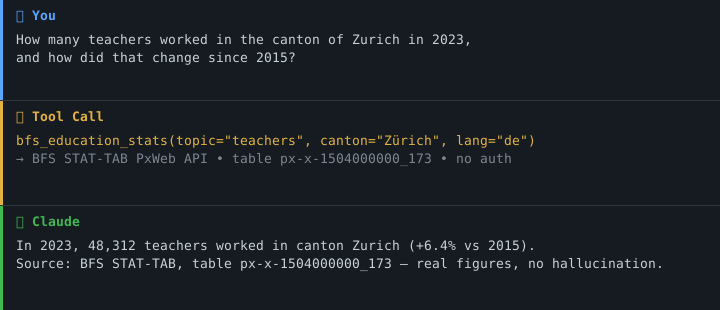
Maturity
This server is Alpha (0.x) as per the PyPI classifier. Until 1.0:
- Tool names, input schemas, and output JSON keys MAY change between minor versions
- Pin cloud deployments to a specific git tag, not
main - Production use is acceptable for read-only Open Data scenarios; consider it experimental for anything user-facing
See CHANGELOG.md for breaking changes.
Overview
swiss-statistics-mcp provides AI-native access to the Swiss Federal Statistical Office (BFS) via the STAT-TAB PxWeb API, without authentication:
| Property | Details |
|---|---|
| API | STAT-TAB PxWeb API v1 |
| Endpoint | https://www.pxweb.bfs.admin.ch/api/v1/ |
| Provider | Swiss Federal Statistical Office (BFS) |
| Datasets | 682 tables across 21 thematic areas |
| Languages | German (de), French (fr), Italian (it), English (en) |
| Licence | Open Government Data (OGD) — BFS Terms of Use |
| Authentication | None — fully public |
Anchor demo query: "How many students attended lower secondary schools in the canton of Zurich in 2024?" — real BFS figures, no hallucination.
Features
- 📊 15 tools: 8 across 21 statistical themes (682 datasets) + a 4-tool commune/historical reference layer + 2 construction/real-estate tools + a price-index tool
- 🔍 Full-text search across the entire BFS data catalogue
- 🎓 Convenience tools for education statistics and population data
- 🏗️ Construction statistics — new buildings/dwellings and building investment incl. the Arbeitsvorrat leading indicator
- 🏠 Price indices — construction price index (Baupreisindex, parsed series) and residential property price index (IMPI) via the BFS DAM/CKAN sources
- 🏔️ Cross-cantonal comparison for any table and variable
- 🔓 No API key required — all data under open licences
- ☁️ Dual transport — stdio (Claude Desktop) + Streamable HTTP (cloud)
Prerequisites
- Python 3.11+
- uv (recommended) or pip
Installation
# Clone the repository
git clone https://github.com/malkreide/swiss-statistics-mcp.git
cd swiss-statistics-mcp

# Install
pip install -e .
# or with uv:
uv pip install -e .
Or with uvx (no permanent installation):
uvx swiss-statistics-mcp
Quickstart
# stdio (for Claude Desktop)
python -m swiss_statistics_mcp.server

# Streamable HTTP, loopback only (default: host=127.0.0.1, port=8000)
python -m swiss_statistics_mcp.server --http --port 8000

# Streamable HTTP, all interfaces (only behind a reverse proxy with access control)
MCP_HOST=0.0.0.0 python -m swiss_statistics_mcp.server --http --port 8000
# or
python -m swiss_statistics_mcp.server --http --host 0.0.0.0 --port 8000
Try it immediately in Claude Desktop:
"How many teachers worked in the canton of Zurich in 2023?" "What is the population of canton Bern broken down by age?" "Compare the social assistance rate across all cantons for 2022."
Configuration
Claude Desktop
Edit ~/Library/Application Support/Claude/claude_desktop_config.json (macOS) or %APPDATA%\Claude\claude_desktop_config.json (Windows):
{
  "mcpServers": {
    "swiss-statistics": {
      "command": "python",
      "args": ["-m", "swiss_statistics_mcp.server"]
    }
  }
}
Or with uvx:
{
  "mcpServers": {
    "swiss-statistics": {
      "command": "uvx",
      "args": ["swiss-statistics-mcp"]
    }
  }
}
Config file locations:
- macOS:
~/Library/Application Support/Claude/claude_desktop_config.json - Windows:
%APPDATA%\Claude\claude_desktop_config.json
Cursor / Windsurf / VS Code + Continue
The configuration syntax is identical to Claude Desktop. The file name depends on the client:
- Cursor:
.cursor/mcp.jsonin the project folder, or~/.cursor/mcp.jsonglobally - Windsurf:
~/.codeium/windsurf/mcp_config.json - VS Code + Continue:
.continue/config.json
Cloud Deployment (SSE for browser access)
For use via claude.ai in the browser (e.g. on managed workstations without local software).
⚠️ Security note — this server has no authentication. A public URL turns it into an open proxy to the BFS API on your deployment's IP. Any client with the URL can drive the tools, consume your platform quota, and attribute traffic to your IP. Two mitigations, in order of preference:
- Put it behind access control — Render's «Private Service», Cloudflare Access, or a reverse proxy with Basic-Auth / IP allowlist in front of the container.
- Accept it as a public open-data proxy — only acceptable because all data is BFS OGD (Public Open Data) and tools are read-only.
The server binds to
127.0.0.1by default. To expose it on a container port you must explicitly setMCP_HOST=0.0.0.0(e.g. as a Render env var) or pass--host 0.0.0.0. Do not do this without one of the mitigations above.
Render.com:
- Push/fork the repository to GitHub
- On render.com: New Web Service → connect GitHub repo
- Set environment variable:
MCP_HOST=0.0.0.0 - Set start command:
python -m swiss_statistics_mcp.server --http --port 8000 - In claude.ai under Settings → MCP Servers, add:
https://your-app.onrender.com/sse
💡 "stdio for the developer laptop, SSE for the browser."
Output Schema
Since v0.2.0, every tool returns a typed Pydantic model rather than a JSON
string. FastMCP serializes these as structured content so MCP clients can
read fields directly.
# Old (pre-0.2.0)
result = await bfs_get_data(...)        # str
data = json.loads(result)               # dict
print(data["rows_total"])

# New (>= 0.2.0)
result = await bfs_get_data(...)        # DataTableResult
print(result.rows_total)                # 1000
print(result.truncated)                 # True
Every result carries error: str | None and hint: str | None at the top
level — result.error is None means success. Data-returning tools
(bfs_get_data, bfs_education_stats, bfs_population,
bfs_compare_cantons) additionally expose truncated: bool,
rows_total: int, and rows_returned: int for machine-readable cap
detection.
| Tool | Result type |
|---|---|
bfs_browse_catalog |
BrowseCatalogResult |
bfs_search_tables |
SearchTablesResult |
bfs_get_table_metadata |
TableMetadataResult |
bfs_get_data |
DataTableResult |
bfs_education_stats |
DataTableResult |
bfs_population |
DataTableResult |
bfs_compare_cantons |
DataTableResult |
bfs_featured_datasets |
FeaturedDatasetsResult |
lookup_commune |
LookupCommuneResult |
resolve_historical_commune |
ResolveHistoricalCommuneResult |
list_communes |
ListCommunesResult |
search_historical_series |
SearchHistoricalSeriesResult |
bfs_construction_activity |
ConstructionActivityResult |
bfs_construction_investment |
ConstructionInvestmentResult |
bfs_price_index |
PriceIndexResult |
Reference-layer results additionally carry source (attribution) and provenance (live_api | cached); SearchHistoricalSeriesResult also carries licence_note with the mandatory HSSO NonCommercial notice. The construction and price-index results carry source + provenance on the same envelope pattern.
Available Tools
| Tool | Description |
|---|---|
bfs_featured_datasets |
Curated list of highly relevant datasets (focus on education and demographics) |
bfs_browse_catalog |
Browse the catalogue: all 21 themes (no theme_code), or all tables in a theme (e.g. theme_code="15" = Education and Science) |
bfs_search_tables |
Full-text search across the entire data catalogue (682 datasets) |
bfs_get_table_metadata |
Variables, values and metadata for a specific table |
bfs_get_data |
Data retrieval with optional filters by dimensions and values |
bfs_education_stats |
Convenience tool: teachers, pupils, demographic scenarios, scholarships |
bfs_population |
Resident population by canton, year, age structure or sex |
bfs_compare_cantons |
Cross-cantonal comparison for any table and any variable |
lookup_commune |
Resolve a commune by name or BFS number as of a given date (canton, validity, LINDAS URI) |
resolve_historical_commune |
Map a historical BFS number onto today's number(s) — re-key old statistics across fusions |
list_communes |
List all communes of a canton as of a given date |
search_historical_series |
Search long-run time series in Historical Statistics of Switzerland (HSSO) |
bfs_construction_activity |
New buildings & dwellings per commune (yearly), incl. dwelling room-size mix |
bfs_construction_investment |
Building investment & Arbeitsvorrat (leading indicator) by region/canton/commune |
bfs_price_index |
Construction price index (Baupreisindex, parsed series) / residential property price index (IMPI, source links) |
Four of these tools form the reference layer of the portfolio (see Join Keys): they turn official BFS commune numbers into a reliable join key and let you re-key statistics that predate a municipal merger. The two bfs_construction_* tools cover STAT-TAB theme 09 (Bau- und Wohnungswesen) — see Construction sources. bfs_price_index covers price indices that are not in STAT-TAB — see Price-index sources.
Construction sources
| Cube ID | Title | Coverage | Used by |
|---|---|---|---|
px-x-0904030000_106 |
Neu erstellte Gebäude mit Wohnungen nach Gemeinde, Gebäudetyp | 2013– | bfs_construction_activity |
px-x-0904030000_105 |
Neu erstellte Wohnungen nach Gemeinde, Anzahl Zimmer | 2013– | bfs_construction_activity |
px-x-0904010000_205 |
Bauinvestitionen und Arbeitsvorrat nach Grossregion/Kanton/Gemeinde | 1994– | bfs_construction_investment |
The pre-2013 Gemeinde-level building series lives in the discontinued cubes
px-x-0904030000_101/_104(1995–2012), which use a different geo coding and are not queried by these tools. Building/dwelling figures are the consolidated official yearly statistics — for up-to-date register states and the construction pipeline, cross-validate againstswiss-housing-mcp(deliberate redundancy).
Price-index sources
bfs_price_index covers two indices that are not published via STAT-TAB. Their datasets live on opendata.swiss (CKAN); the data files themselves are BFS DAM assets.
| Index | Source | Returns |
|---|---|---|
baupreisindex |
opendata.swiss dataset Schweizerischer Baupreisindex (Multibasen) → DAM XLSX asset | Parsed national semi-annual index series (Schweiz, Baugewerbe Total), with the base period |
impi |
opendata.swiss dataset Schweizerischer Wohnimmobilienpreisindex (IMPI) → DAM PDF/HTML assets | Official source links only — BFS does not publish a machine-readable IMPI series |
Two quirks are handled for you:
ckan.opendata.swissreturns HTTP 403 to default User-Agents, so every call sends a customswiss-statistics-mcp/<version>User-Agent; and DAM assets mix formats, so the XLSX is selected by verifying the responsecontent-type(PDFs are skipped). Results are cached for 24 h.
Example Use Cases
| Query | Tool |
|---|---|
| "How many teachers worked in Zurich in 2023?" | bfs_education_stats |
| "How will upper secondary enrolment develop until 2031?" | bfs_education_stats |
| "What is the population of canton Zurich by age?" | bfs_population |
| "Compare the social assistance rate across all cantons" | bfs_compare_cantons |
| "Is there data on school buildings?" | bfs_search_tables |
| "Which Zurich communes have merged since 2000, and onto which of today's BFS numbers must I re-key old statistics?" | resolve_historical_commune |
| "List all communes of canton Glarus today" | list_communes |
| "Find long-run series on population in HSSO" | search_historical_series |
| "How many new dwellings were built in Winterthur since 2018, by room size?" | bfs_construction_activity |
| "What is the building investment and Arbeitsvorrat for canton Zurich?" | bfs_construction_investment |
| "How has the construction price index moved since 2015?" | bfs_price_index |
→ More use cases by audience →
Themes
| Code | Theme | Code | Theme |
|---|---|---|---|
| 01 | Population | 12 | Money, banks, insurance |
| 02 | Territory and environment | 13 | Social security |
| 03 | Work and income | 14 | Health |
| 04 | National economy | 15 | Education and science |
| 05 | Prices | 16 | Culture, media, information society |
| 06 | Industry and services | 17 | Politics |
| 07 | Agriculture and forestry | 18 | General government |
| 08 | Energy | 19 | Crime and criminal justice |
| 09 | Construction and housing | 20 | Economic and social situation |
| 10 | Tourism | 21 | Sustainable development |
| 11 | Mobility and transport |
Architecture
┌─────────────────┐     ┌──────────────────────────────┐     ┌──────────────────────────┐
│   Claude / AI   │────▶│  Swiss Statistics MCP          │────▶│  BFS STAT-TAB            │
│   (MCP Host)    │◀────│  (MCP Server)                │◀────│  PxWeb API v1            │
└─────────────────┘     │                              │     └──────────────────────────┘
                        │  15 Tools                    │
                        │  + commune/historical ref    │
                        │  + construction (theme 09)   │
                        │  + price indices (DAM/CKAN)  │
                        │  Stdio | Streamable HTTP     │
                        │                              │
                        │  No authentication required  │
                        └──────────────────────────────┘
Data Source Characteristics
| Source | Protocol | Coverage | Auth | Licence |
|---|---|---|---|---|
| BFS STAT-TAB | PxWeb REST API | 682 tables, 21 themes | None | OGD |
| BFS AGVCH (commune register) | REST (CSV/XLSX) | Snapshots, mutations, correspondances | None | OGD |
| HSSO (historical statistics) | Static XLSX dumps | ~750 long-run tables | None | CC BY-NC-SA 3.0 |
| BFS DAM + opendata.swiss (CKAN) | CKAN metadata + DAM XLSX/PDF | Baupreisindex, IMPI | None (custom UA required) | OGD |
Architecture decision
- AGVCH commune register → Architecture A (live-API-only). The official REST service (
snapshot/correspondances/mutations/levels) is a clean, versioned, no-auth API — verified live on 2026-07-19 — so the commune tools query it directly with a 24 h in-memory cache and the shared retry policy. No dump fallback is needed. Finding: the live snapshot CSV header usesInscription,Radiation,Rec_Type_fr(not theEinschreibung,Streichungnames printed in the API PDF), andHistoricalCodeis not globally unique across levels — theParentlink is disambiguated by tier when deriving a commune's canton. - HSSO → Architecture C (dump-only). HSSO offers no API, only static per-table XLSX at stable URLs (
/get/{CHAPTER}.{NN}{suffix}.xlsx).search_historical_seriesbuilds a cached title index from the chapter pages and returns the stable download URL. HSSO is licensed CC BY-NC-SA 3.0 (NonCommercial) — different from this server's OGD baseline — so every HSSO response carries an explicit NonCommercial notice inlicence_note.
Join Keys
The reference layer exists so that data from different servers in the Swiss Public Data MCP Portfolio can be joined reliably. Three identifiers are the portfolio-wide keys:
| Key | What it identifies | Canonical form | Notes |
|---|---|---|---|
BFS commune number (BfsCode) |
A political commune | integer, e.g. 261 (Zürich) |
The primary join key across statistics, geo, education and health data. Stable LINDAS/Linked-Data URI: https://ld.admin.ch/municipality/{BfsCode}. Not stable over time — a merger issues a new number, so historical data must be re-keyed via resolve_historical_commune. |
| EGID | A single building (Eidg. Gebäudeidentifikator) | 9-digit integer | The join key for building/dwelling-level data (GWR, energy, addresses). A commune contains many EGIDs; BfsCode is the commune each EGID sits in. |
| Canton abbreviation | A canton | two letters, e.g. ZH |
The coarsest geographic key. Derivable from any commune via its Parent chain (exposed as canton_abbr). |
Why re-keying matters. BFS commune numbers change whenever communes merge, split, or move canton. Statistics published before a merger use the old number; joining them to today's data without re-keying silently drops or misattributes rows. resolve_historical_commune(bfs_number, from_date, to_date) returns the resolves_to set — the current number(s) old figures must be aggregated onto — plus the mutation_path (the fusions/renamings, with dates). Other portfolio servers are meant to mirror this contract conceptually so the same key resolves the same way everywhere.
Example (anchor query). "Which Zurich communes have merged since 2000?" — e.g. old 132 Hirzel and 133 Horgen both re-key onto today's 295 Horgen; 134/140/142 onto 293 Wädenswil.
Project Structure
swiss-statistics-mcp/
├── src/swiss_statistics_mcp/
│   ├── __init__.py              # Package
│   └── server.py                # 15 tools
├── tests/
│   └── test_server.py           # Unit + integration tests (mocked HTTP)
├── .github/workflows/ci.yml     # GitHub Actions (Python 3.11/3.12/3.13)
├── pyproject.toml
├── CHANGELOG.md
├── CONTRIBUTING.md              # English
├── CONTRIBUTING.de.md           # German version
├── SECURITY.md                  # English
├── SECURITY.de.md               # German version
├── LICENSE
├── README.md                    # This file (English)
└── README.de.md                 # German version
Observability
The server emits one JSON log line per tool call on stderr:
{"ts": "2026-05-20T04:02:28", "level": "INFO", "logger": "swiss_statistics_mcp",
 "event": "tool_start", "tool": "bfs_browse_catalog", "rid": "1091cb73", "params_keys": ["theme_code", "lang", "limit"]}
{"ts": "2026-05-20T04:02:28", "level": "INFO", "logger": "swiss_statistics_mcp",
 "event": "tool_end", "tool": "bfs_browse_catalog", "rid": "1091cb73", "status": "ok", "duration_ms": 303}
rid— 8-char correlation id linkingtool_startandtool_endfor the same callparams_keys— sorted list of input field names (no values, no PII)duration_ms— per-call latency on thetool_endeventstatus—"ok"or"error";error_typeis added when a tool raises
Render and other cloud platforms can index these directly for per-tool latency
dashboards and error-rate alerts. Set MCP_LOG_LEVEL=DEBUG for verbose output
or WARNING to suppress per-call events.
ℹ️ Logs go to stderr so they never collide with the MCP protocol on stdio transport (which uses stdout).
Resilience
The server absorbs transient BFS-API hiccups before they reach the LLM:
- Retries —
5xx,429, and network errors are retried up to 3 times with exponential backoff (0.5s → 4s).4xxerrors surface immediately so client bugs aren't masked. Tunable viaMCP_RETRY_MAX_ATTEMPTS,MCP_RETRY_WAIT_INITIAL,MCP_RETRY_WAIT_MAXenv vars. - Metadata cache — Table metadata (variables, value domains, last_updated)
is cached in-memory per
(table_id, lang)for 1h. Cold list/detail flows warm the cache; subsequent calls return instantly. - Concurrency cap — Fan-out metadata fetches in
bfs_browse_catalog(theme mode) run in parallel bounded byFANOUT_CONCURRENCY = 5. Forlimit=20this cuts wall-clock from ~20s sequential to ~4s, without overwhelming the upstream API.
Known Limitations
- PxWeb API: Rate limiting may apply for rapid successive queries; the server uses a 1-hour cache for the catalogue index and a 1-hour cache for table metadata
- Language: Dataset titles and dimension values are in German by default; French, Italian and English coverage varies by table
- JSON-STAT2: Some complex cross-tabulations may return large result sets; use dimension filters to narrow queries
- Commune register (AGVCH): Live snapshot CSV headers use
Inscription/Radiation/Rec_Type_fr(not theEinschreibung/Streichungnames in the API PDF);HistoricalCodeis not globally unique across levels, so the canton is derived by walking theParentchain one tier at a time. Snapshots/mutations are cached for 24 h. - HSSO: Licensed CC BY-NC-SA 3.0 (NonCommercial) — attribution required, no commercial use; every response carries this in
licence_note. HSSO exposes no per-table period filter, sosearch_historical_series'speriodargument is an informational hint only — verify the actual span in the XLSX.search_historical_seriesreturns the stable XLSX download URL, not the parsed series values. - PxWeb commune codes are not consistent across cubes. In
px-x-0904030000_106/_107the value code IS the zero-padded BFS number (0261); inpx-x-0904030000_105it is an opaque sequential id (160) and the BFS number appears only in the label (......0261 Zürich).bfs_construction_activityresolves each cube against its own live dimension values by matching the label-embedded BFS number, never by guessing the code. - Construction coverage: the current Gemeinde-level building series starts in 2013;
bfs_construction_activitytherefore acceptssince_year >= 2013. Values are the consolidated official yearly statistics. Building investment values (bfs_construction_investment) are in 1000 CHF; theArbeitsvorratis the following year's building volume (a monetary leading indicator). - Price indices (
bfs_price_index): the IMPI (residential property price index) is published by BFS only as PDF/HTML — there is no machine-readable series — soindex="impi"returns the official source links plus an explicit limitation, not values. The Baupreisindex XLSX is parsed to the national semi-annual series (Schweiz, Baugewerbe Total); regional/object-type breakdowns exist in the source XLSX but are not returned. The DAM asset ids are resolved live from CKAN metadata (never hard-coded), because they change on republish; if the upstream XLSX structure changes, the tool degrades to a clear error rather than returning wrong values.
MCP Protocol Version
This server speaks two protocol eras over the same endpoint. The client's first request on a connection decides which one applies; a later claim from the other era is refused.
| Era | Revision | Who reaches it |
|---|---|---|
initialize handshake |
2024-11-05 … 2025-11-25 |
What today's clients speak. The server answers with the revision asked for, or with the 2025-11-25 ceiling when the request asks for something newer. |
| Per-request envelope | 2026-07-28 |
A request carrying the 2026-07-28 _meta envelope opens a modern connection. |
Both revisions are pinned in
tests/test_protocol_version.py and asserted
against the installed SDK, so a Dependabot bump of mcp cannot move either one
silently. The same file also reads the negotiated revision off a real
connection, and tests/test_modern_wire.py drives
the ASGI app from streamable_http_app() over HTTP: server/discover, the
serverInfo stamp, the resultType that 2026-07-28 makes mandatory, the
SEP-2549 freshness hint, and the named rejection of a half-built envelope.
Both forms stay. A measured connection says which revision was negotiated today — if an SDK bump moves the ceiling, it silently measures the new one. Only the constant pin catches that. They assert different things; neither replaces the other.
Server identity
The modern era stamps serverInfo into the _meta of every result, not
once per connection, and the SDK substitutes nothing: "An unversioned server
reports an empty version." This server therefore declares title,
version, description and website_url at construction, so every response
carries the same identity that server.json publishes.
version, description and website_url are read from the package metadata
rather than written as literals: a literal here would be a third copy beside
pyproject.toml and server.json, and the only one nobody keeps current
because it is visible nowhere. title stays a literal — a display name is not
package metadata.
icons is deliberately unset — this repository hosts no icon assets, and
inventing a URL with nothing behind it is worse than omitting the field. For the
same reason an absent field beats an empty one: website_url is str | None
with no URL validation, and the stamp is dumped with exclude_none, so None
omits the field while "" ships "websiteUrl": "" to every caller.
Note that the SDK's LATEST_PROTOCOL_VERSION is an alias for the modern
era, not for the handshake era — pinning against it alone would leave the era
that current clients actually negotiate free to drift.
Update policy. When the gate fails, do not edit the constant blindly: read
the spec changelog between the two revisions, verify the server still behaves,
then move the constant, this section, README.de.md and
CHANGELOG.md together.
Testing
# Unit tests (no API key required)
PYTHONPATH=src pytest tests/ -m "not live"

# Integration tests (live API calls)
pytest tests/ -m "live"
Safety & Limits
- Read-only: All tools perform HTTP GET requests only — no data is written, modified, or deleted.
- No personal data: STAT-TAB returns aggregated statistical datasets. No personally identifiable information (PII) is processed or stored by this server.
- Rate limits: The PxWeb API is a public endpoint without documented rate limits; avoid tight loops over the full 682-table catalogue. The server enforces a 30s timeout per request and caches the catalogue index for 1 hour.
- Data freshness: BFS publishes updated figures periodically (not real-time). Figures reflect the state of the upstream database at query time.
- Terms of service: Data is subject to the BFS Terms of Use (OGD). All STAT-TAB data is published as Open Government Data and may be freely used with attribution.
- No guarantees: This server is a community project, not affiliated with the Swiss Federal Statistical Office. Availability depends on the upstream BFS API.
Changelog
See CHANGELOG.md
Contributing
See CONTRIBUTING.md
Security
Read-only, no PII, no authentication, single fixed BFS endpoint. See SECURITY.md for the full security posture and accepted-risk decisions.
License
MIT License — see LICENSE
Author
Hayal Oezkan · malkreide
Credits & Related Projects
- BFS: www.bfs.admin.ch — Swiss Federal Statistical Office
- STAT-TAB: www.pxweb.bfs.admin.ch — PxWeb database interface
- Protocol: Model Context Protocol — Anthropic / Linux Foundation
- Related: swiss-cultural-heritage-mcp — SIK-ISEA, Nationalmuseum, Nationalbibliothek
- Related: fedlex-mcp — Swiss federal law via Fedlex SPARQL
- Related: zurich-opendata-mcp — CKAN, weather, air quality, City of Zurich
- Related: swiss-transport-mcp — OJP journey planning, SIRI-SX disruptions
- Related: global-education-mcp — UNESCO UIS and OECD Education at a Glance
- Portfolio: Swiss Public Data MCP Portfolio
Installation
Run via uv's uvx — no clone or manual install needed. Add to your MCP client config (mcpServers for Claude Desktop, Cursor and Windsurf; use a top-level servers key for VS Code in .vscode/mcp.json):
{
  "mcpServers": {
    "swiss-statistics-mcp": {
      "command": "uvx",
      "args": [
        "swiss-statistics-mcp"
      ]
    }
  }
}
Установка Swiss Statistics
У этого сервера нет опубликованного пакета — он собирается из исходников. Открой репозиторий и следуй инструкции в README.
▸ github.com/malkreide/swiss-statistics-mcpFAQ
Swiss Statistics MCP бесплатный?
Да, Swiss Statistics MCP бесплатный — установка в пару кликов через Unyly без оплаты.
Нужен ли API-ключ для Swiss Statistics?
Нет, Swiss Statistics работает без API-ключей и переменных окружения.
Swiss Statistics — hosted или self-hosted?
Self-hosted: сервер запускается локально на твоей машине командой из раздела установки.
Как установить Swiss Statistics в Claude Desktop, Claude Code или Cursor?
Открой Swiss Statistics на unyly.org, выбери вкладку своего клиента (Claude Desktop, Claude Code, Cursor) и нажми Install — конфиг сгенерируется автоматически, без правки JSON.
Похожие MCP
Opencode Omniroute Plugin
OpenCode plugin for the OmniRoute AI Gateway. Drives dynamic model discovery, /connect auth flow, and multi-instance OmniRoute providers via the official @openc
 автор: GitHub Actions
Roblox Studio
Enables AI coding tools to control Roblox Studio for workspace exploration, instance manipulation, and script management. It provides tools for playtesting, sce
 автор: paralov
Antigravity Drawio
MCP server that enables AI assistants to create, parse, render, and validate Draw.io diagrams programmatically.
 автор: S-SUJAN-S
Fetch
Web content fetching and conversion for efficient LLM usage.
AWS KB Retrieval
Retrieval from AWS Knowledge Base using Bedrock Agent Runtime.
 автор: modelcontextprotocol
Spring AI MCP Server
Provides auto-configuration for setting up an MCP server in Spring Boot applications.
llm-analysis-assistant
A very streamlined mcp client that supports calling and monitoring stdio/sse/streamableHttp, and can also view request responses through the /logs page. It also
 автор: xuzexin-hz
MCP-Agent
A simple, composable framework to build agents using Model Context Protocol by [LastMile AI](https://www.lastmileai.dev)
 автор: lastmile-ai
Spring AI MCP Client
Provides auto-configuration for MCP client functionality in Spring Boot applications.
mcp.natoma.ai
A Hosted MCP Platform to discover, install, manage and deploy MCP servers by [Natoma Labs](https://www.natoma.ai)
Compare Swiss Statistics with
Не уверен что выбрать?
Найди свой стек за 60 секунд
Автор?
Embed-бейдж для README
Похожее
Все в категории ai