
Task Crusader
БесплатноНе проверенA campaign and task management MCP server for AI coding assistants, enabling dependency tracking, acceptance criteria, testing strategies, and progress monitori

Описание
A campaign and task management MCP server for AI coding assistants, enabling dependency tracking, acceptance criteria, testing strategies, and progress monitoring for projects.
README
[!WARNING] This project is no longer maintained. I originally built Task Crusader to solve the problem of tracking long-running task and project lists for AI-assisted development. Since then, most major AI coding agents have added robust built-in task management, and this project is no longer particularly useful in practice.
Your AI coding assistant's quest companion - campaign and task management via MCP.
Overview
Task Crusader is a campaign and task management system designed for AI coding assistants. It provides a Model Context Protocol (MCP) server that enables AI agents like Claude, Cursor, and others to organize work into campaigns (projects) and tasks with:
- Dependency tracking: Tasks can depend on other tasks
- Acceptance criteria: Define completion requirements for each task
- Testing strategy: Document verification approaches for tasks
- Research & notes: Capture findings and implementation details
- Progress monitoring: Track campaign progress and find actionable tasks
- Quality hints: Context-aware guidance for campaign setup and execution
- Sequential & parallel execution: Support for both single-agent and multi-agent workflows
Installation
pip install task-crusader-mcp
Task Crusader installs with all features by default:
- MCP Server: Core campaign/task management for AI assistants (63 tools)
- CLI: Command-line interface (
crusadercommand) - TUI: Terminal user interface (
crusader-tuicommand)
Advanced users needing minimal installs can use pip install --no-deps task-crusader-mcp and manually specify dependencies.
Quick Start
1. Configure Your AI Assistant
Add to your MCP client configuration (e.g., Claude Desktop claude_desktop_config.json):
{
  "mcpServers": {
    "task-crusade": {
      "command": "crusader-mcp"
    }
  }
}
Or for Cursor (.cursor/mcp.json):
{
  "mcpServers": {
    "task-crusade": {
      "command": "crusader-mcp"
    }
  }
}
2. Basic Workflow
Create a campaign:
campaign_create(name="My Project")Add tasks:
task_create(title="Implement feature", campaign_id="...")Add acceptance criteria:
task_acceptance_criteria_add(task_id="...", content="Unit tests pass")Add testing strategy:
task_testing_strategy_add(task_id="...", content="Run pytest with coverage")Execute the task loop:
while campaign not complete:
    1. campaign_get_next_actionable_task(campaign_id) -> get next task
    2. task_update(task_id, status="in-progress") -> claim task
    3. [Implement the task]
    4. task_acceptance_criteria_mark_met(criteria_id) -> mark criteria met
    5. task_complete(task_id) -> complete task
3. Bulk Campaign Creation (Recommended)
For new projects, use campaign_create_with_tasks to create everything atomically:
campaign_create_with_tasks(campaign_json='{
  "campaign": {"name": "Auth System", "priority": "high"},
  "tasks": [
    {"temp_id": "setup", "title": "Setup environment", "acceptance_criteria": ["Dev server runs"]},
    {"temp_id": "impl", "title": "Implement login", "dependencies": ["setup"]},
    {"temp_id": "test", "title": "Integration tests", "dependencies": ["impl"]}
  ]
}')
Available Tools (63 total)
Campaign Management (21 tools)
| Category | Tools |
|---|---|
| Core CRUD | campaign_create, campaign_list, campaign_show, campaign_update, campaign_delete |
| Progress & Actions | campaign_get_progress_summary, campaign_get_next_actionable_task, campaign_get_all_actionable_tasks, campaign_overview, campaign_details |
| Bulk & Workflow | campaign_create_with_tasks, campaign_validate_readiness, campaign_workflow_guide, campaign_get_state_snapshot, campaign_renumber_tasks |
| Research | campaign_research_add, campaign_research_list, campaign_research_show, campaign_research_update, campaign_research_delete, campaign_research_reorder |
Task Management (42 tools)
| Category | Tools |
|---|---|
| Core CRUD | task_create, task_list, task_show, task_update, task_delete, task_complete |
| Acceptance Criteria | task_acceptance_criteria_add, task_acceptance_criteria_mark_met, task_acceptance_criteria_mark_unmet, task_acceptance_criteria_list, task_acceptance_criteria_show, task_acceptance_criteria_update, task_acceptance_criteria_delete, task_acceptance_criteria_reorder |
| Testing Strategy | task_testing_strategy_add, task_testing_strategy_list, task_testing_strategy_show, task_testing_strategy_update, task_testing_strategy_delete, task_testing_strategy_mark_passed, task_testing_strategy_mark_failed, task_testing_strategy_mark_skipped, task_testing_strategy_reorder, task_testing_step_add |
| Research | task_research_add, task_research_list, task_research_show, task_research_update, task_research_delete, task_research_reorder |
| Implementation Notes | task_implementation_notes_add, task_implementation_notes_list, task_implementation_notes_show, task_implementation_notes_update, task_implementation_notes_delete, task_implementation_notes_reorder |
| Search & Analytics | task_search, task_stats, task_get_dependency_info |
| Bulk & Workflow | task_bulk_update, task_create_from_template, task_complete_with_workflow |
CLI Usage
# Create a campaign
crusader campaign create "My Project" --description "My awesome project"

# List campaigns
crusader campaign list

# Show campaign details
crusader campaign show <campaign-id>

# Create a task
crusader task create "Implement feature" --campaign <campaign-id>

# Show task details
crusader task show <task-id>

# Update task status
crusader task update <task-id> --status in-progress
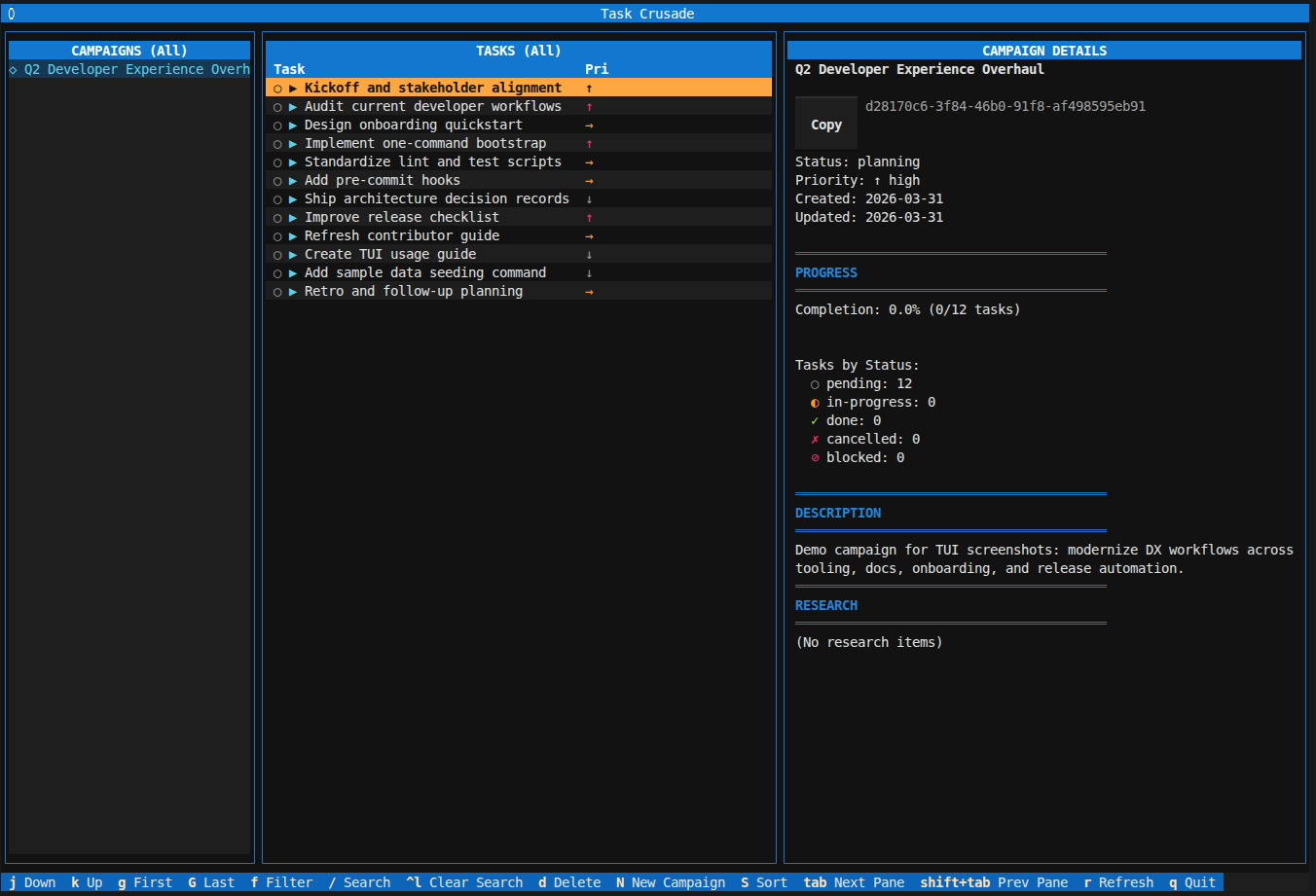
TUI Usage
crusader-tui
This opens an interactive terminal interface for browsing campaigns and tasks with keyboard navigation, filtering, and bulk operations.
Database
By default, Task Crusader stores data in ~/.crusader/database.db. You can configure a custom path by setting the CRUSADER_DB_PATH environment variable.
Architecture
Task Crusader follows a clean hexagonal architecture:
MCP Server → Service Layer → Repository Layer → SQLite Database
                  ↓
            Domain Layer (DTOs, Result Types, Hints)
Key design decisions:
- Direct service calls: MCP tools call services directly (no CLI subprocess overhead)
- Result pattern: All operations return
DomainResultfor explicit error handling - Context-aware hints: Operations return guidance hints for next actions
- Memory system internal: Acceptance criteria, research, notes, and testing steps use an internal memory system
Contributing
Contributions are welcome! Before pushing, run the CI checks locally:
./scripts/check_ci.sh
This runs:
- Linting with
ruff check src/ tests/ - Tests with coverage:
pytest --cov --cov-fail-under=65 - Optional type checking:
mypy src/
See CONTRIBUTING.md for detailed guidelines.
License
MIT License - see LICENSE file for details.
Установка Task Crusader
У этого сервера нет опубликованного пакета — он собирается из исходников. Открой репозиторий и следуй инструкции в README.
▸ github.com/mcrescenzo/task-crusader-mcpFAQ
Task Crusader MCP бесплатный?
Да, Task Crusader MCP бесплатный — установка в пару кликов через Unyly без оплаты.
Нужен ли API-ключ для Task Crusader?
Нет, Task Crusader работает без API-ключей и переменных окружения.
Task Crusader — hosted или self-hosted?
Self-hosted: сервер запускается локально на твоей машине командой из раздела установки.
Как установить Task Crusader в Claude Desktop, Claude Code или Cursor?
Открой Task Crusader на unyly.org, выбери вкладку своего клиента (Claude Desktop, Claude Code, Cursor) и нажми Install — конфиг сгенерируется автоматически, без правки JSON.
Похожие MCP
Notion
Read and write pages in your workspace
 автор: Notion
Linear
Issues, cycles, triage — from Claude
 автор: Linear
Google Drive
Search and read your Drive files
 автор: Google
mindsdb/mindsdb
Connect and unify data across various platforms and databases with [MindsDB as a single MCP server](https://docs.mindsdb.com/mcp/overview).
 автор: mindsdb
Compare Task Crusader with
Не уверен что выбрать?
Найди свой стек за 60 секунд
Автор?
Embed-бейдж для README
Похожее
Все в категории productivity