
Team Task Manager
БесплатноНе проверенA production-ready full-stack project and task management system with React, Express, MongoDB, and a LangGraph-orchestrated Python AI Swarm service.

Описание
A production-ready full-stack project and task management system with React, Express, MongoDB, and a LangGraph-orchestrated Python AI Swarm service.
README
Node.js npm Python FastAPI Express MongoDB License
A production-ready, full-stack project and task management application integrated with a specialized multi-agent AI Swarm microservice. The platform features a responsive glassmorphic React frontend, a secure Express API server, and a LangGraph-orchestrated Python service for project health auditing, workload risk detection, and smart task recommendations.
🗺️ System Architecture
The application is built as a three-tier system communicating over secure cross-origin APIs:
graph TD
    Client[React Client <br> Port 5173] <-->|HTTP / JSON / JWT| Server[Express API Server <br> Port 5000]
    Server <-->|MongoDB Driver| DB[(MongoDB <br> Port 27017)]
    Server <-->|HTTP / JSON / JWT| Swarm[FastAPI AI Swarm <br> Port 8000]
    Swarm <-->|Motor / PyMongo| DB
    Swarm -->|Ollama Client| LocalLLM[Ollama Local LLM <br> Port 11434]
    Swarm -->|OpenRouter API| CloudLLM[OpenRouter AI <br> Cloud]

    subgraph AI Swarm Service
        Swarm
        LocalLLM
        CloudLLM
    end
📸 Visual Preview
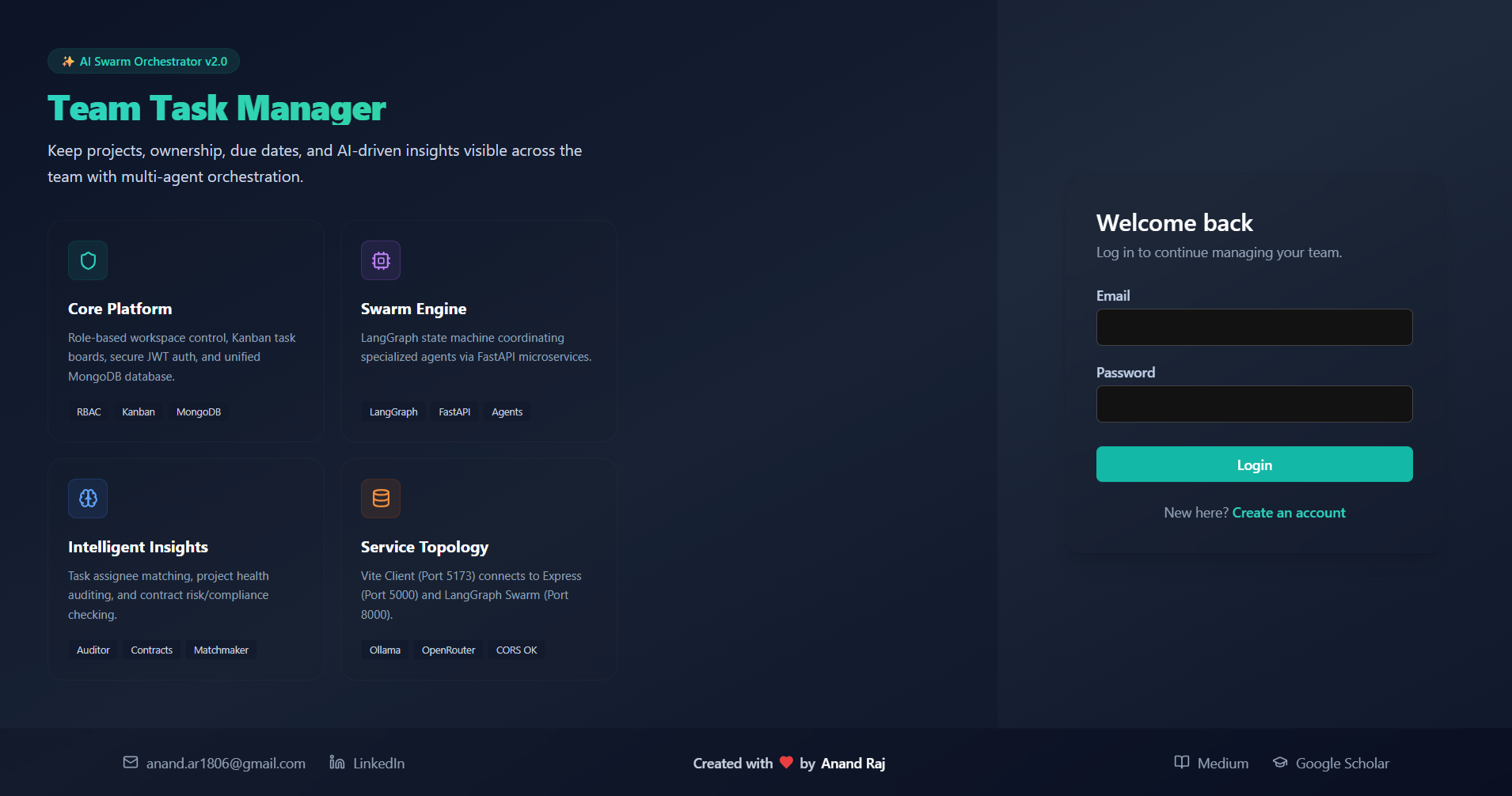
🔐 Bento Promo & Onboarding
The split-screen authorization screen features a custom Bento Promo Panel mapping system network structures and AI service layers, complete with a platform-wide contact footer:
Try With this id
User id- [email protected] & password:- abc123456
⚠️ DEMO ACCOUNT NOTICE ⚠️This demo account is shared publicly. Please do not flood the database with spam, create unnecessary new accounts, or abuse the system.
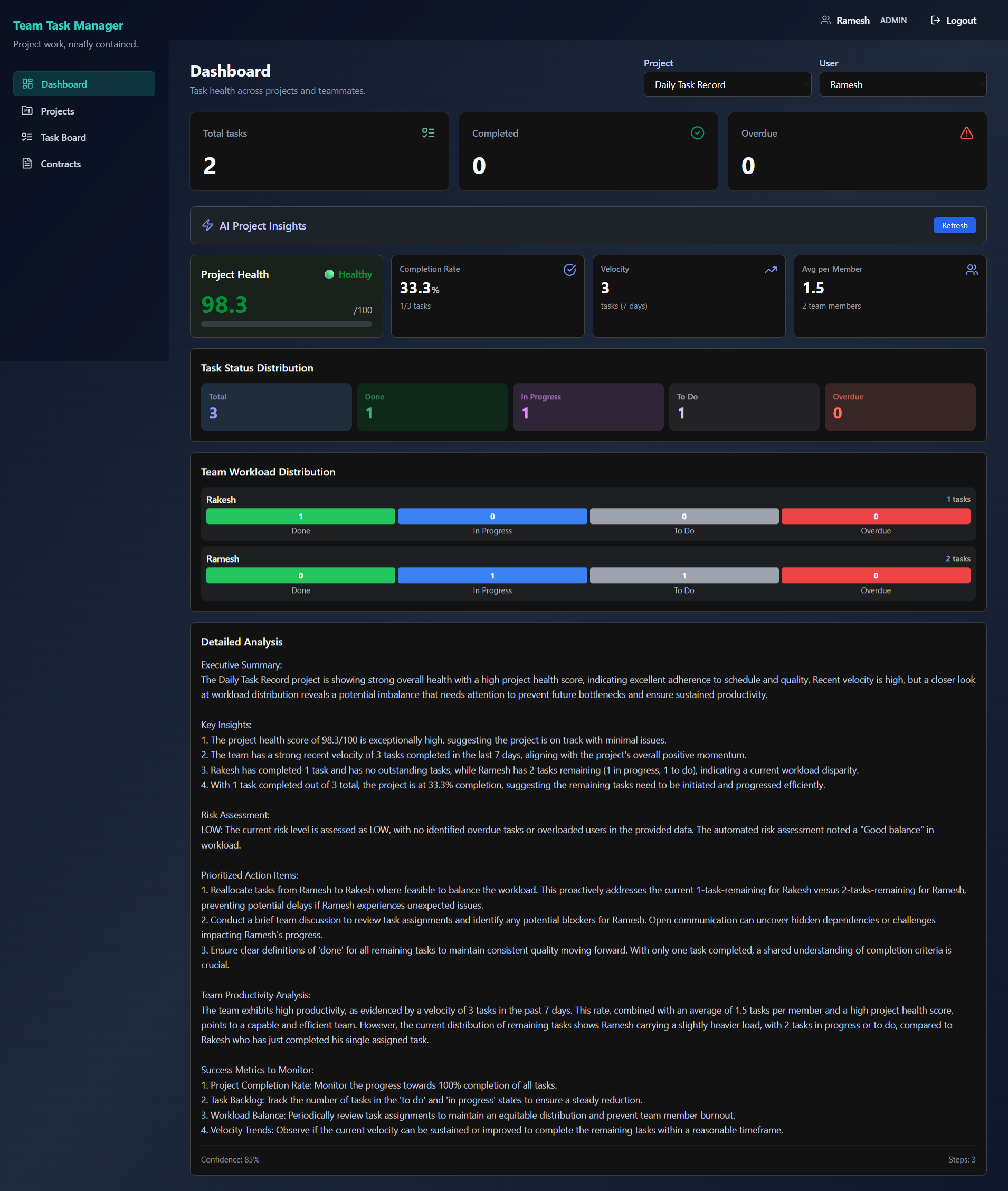
📊 Real-time Dashboard & AI Insights
Monitor project completion progress, health metrics, and run deep-dive task workload audits using the LangGraph swarm analyzer:
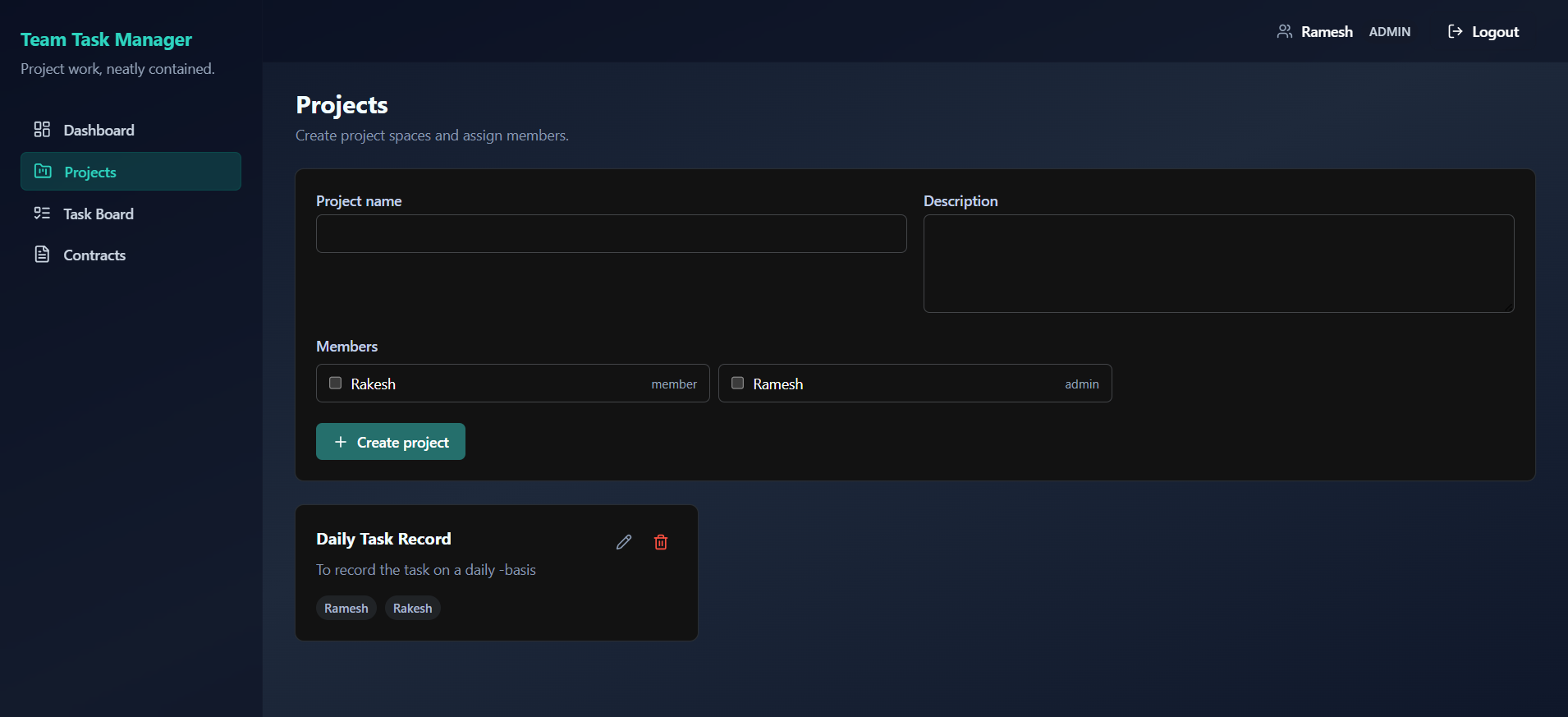
📁 Workspace & Project Auditing
Manage projects, allocate team access, and audit overall workspace status:
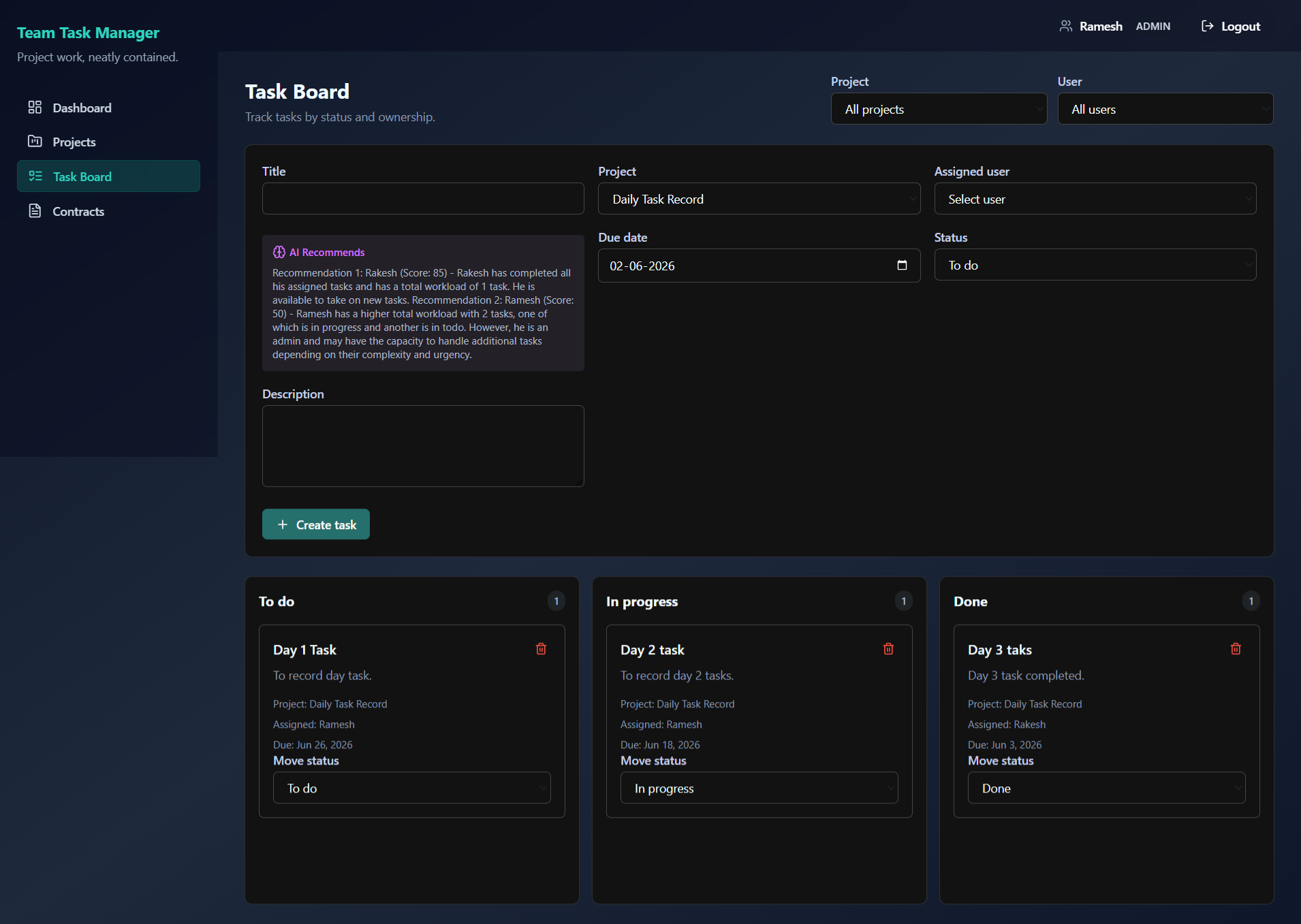
📋 Interactive Kanban Task Board
Assign, review, and filter tasks. Track team performance and instantly detect overdue items:
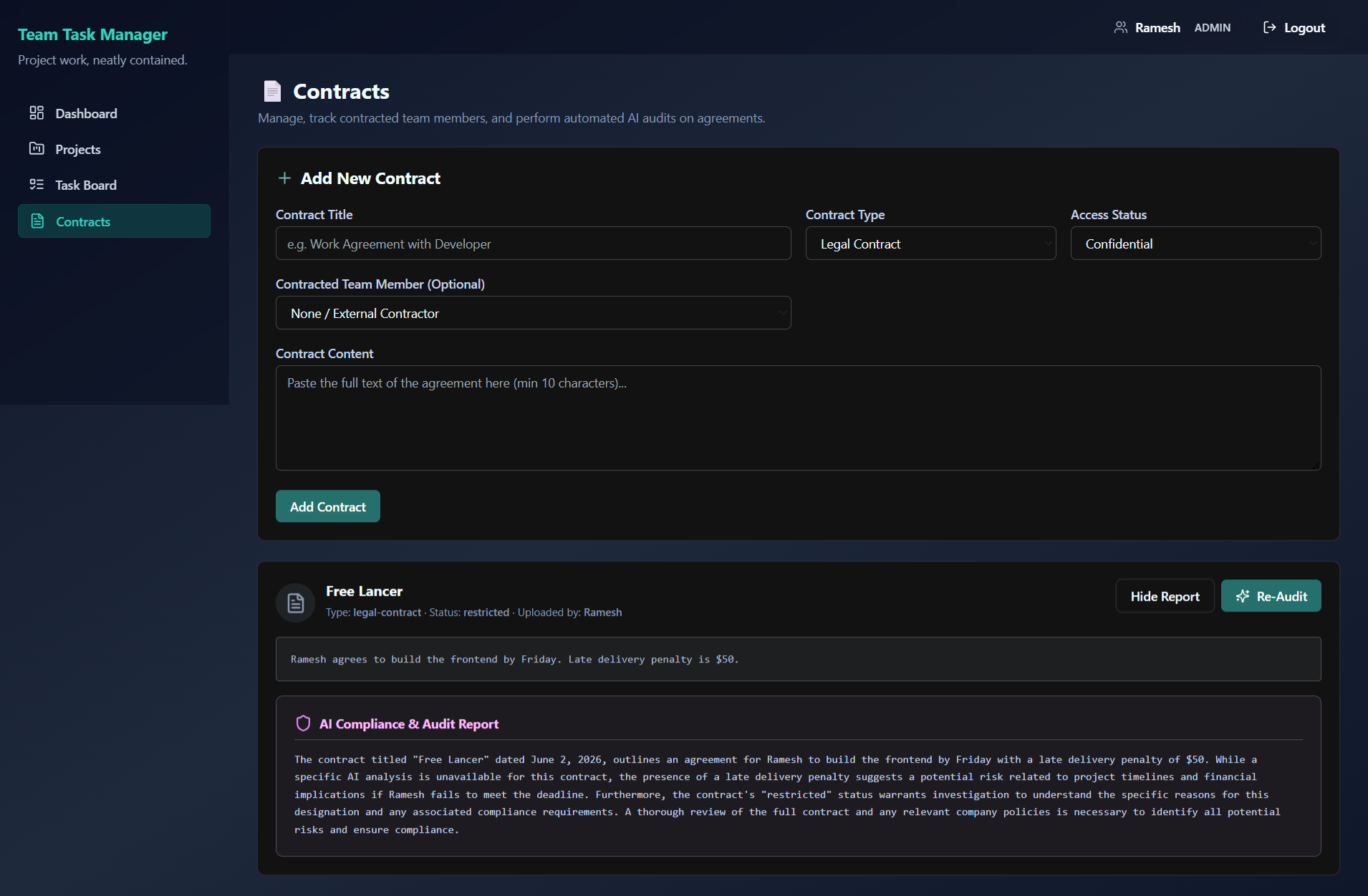
📄 Document Classification & Compliance Risk Mapping
Upload organizational contracts and memos to execute compliance audits and OPA policy-based verification:
✨ Features & Benefits
💻 Core Platform
- Role-Based Access Control (RBAC): Secure access levels featuring
adminandmemberroles. The initial registered user is promoted automatically toadmin. - Kanban Task Board: Intuitive drag-and-drop workflow status updating (
To Do➔In Progress➔Done). - Real-time Analytics: High-performance dashboard detailing project task metrics, completed percentages, workload statistics, and overdue tasks.
- Document Audit System: Secure contract management allowing admins to upload and classify documents (SEC filings, legal contracts, internal memos).
🧠 AI Swarm Engine
- Multi-Agent Orchestration: Powered by LangGraph to execute complex workflow graphs (Retrieve ➔ Analyze ➔ Synthesize ➔ Finalize).
- Model Context Protocol (MCP): Utilizes custom MCP servers for data retrieval:
- Task Retriever Server: Gathers real-time task statuses and user workloads directly.
- Project Auditor Server: Audits project metrics, checks due dates, and detects overload risks.
- Report Synthesizer Server: Compiles natural language project health summaries.
- Flexible LLM Backends: Integrates with local LLMs (via Ollama) or cloud LLMs (via OpenRouter like DeepSeek-R1 or Claude-3.5-Sonnet).
🔒 Policy-Based Security
- OPA (Open Policy Agent): Security policies defined via Rego (
ai-swarm/security/policies.rego) run at the agent level to guard tool execution, ensuring members can only request authorized tools (e.g. limiting contract analysis exclusively to admins).
🎨 Premium UI/UX Experience
- Glassmorphic Theme: Dark slate layouts (
bg-gradient-to-br from-slate-900 via-slate-800 to-slate-900) combined with backdrop-blur sidebars and headers. - Bento Promo Panel: Beautiful, responsive onboarding graphics detailing platform capabilities during Login/Signup.
- Contrast-Optimized: High-visibility glowing teal brand styling (
text-teal-400) ensuring perfect accessibility.
📁 Repository Structure
team-task-manager/
├── package.json          # Root scripts for concurrent development
├── docs/                 # Detailed system documentation and guides
│   ├── DEV_TRACKING.md   # Setup notes, troubleshooting, and dev history
│   ├── TESTING_REPORT.md # End-to-end integration and verification logs
│   └── AI_INTEGRATION_LEARNING_PATH.md # Complete multi-agent building path
│
├── client/               # React Frontend (Vite, Tailwind, Lucide React)
│   ├── src/
│   │   ├── components/   # Bento PromoPanel, Layout, and routing guards
│   │   ├── pages/        # Kanban board, Dashboard, Contracts, Auth
│   │   └── api/          # Axios configurations with JWT auth interceptors
│   └── package.json
│
├── server/               # Express API Server (Node.js, MongoDB, JWT)
│   ├── src/
│   │   ├── controllers/  # Auth, projects, contracts, and tasks endpoints
│   │   ├── models/       # Mongoose Schemas (User, Project, Task, Contract)
│   │   └── routes/       # Express routes including /api/ai proxy endpoints
│   └── package.json
│
└── ai-swarm/             # Python AI Swarm Microservice (FastAPI, LangGraph)
    ├── api/main.py       # FastAPI application and query router
    ├── orchestration/    # LangGraph agent definitions and state machines
    ├── mcp_servers/      # TaskRetriever, ProjectAuditor, ReportSynthesizer
    ├── security/         # OPA integration and policies.rego policies
    └── run.py            # Service runner and prerequisite validator
🚀 Getting Started
📋 Prerequisites
| Component | Requirement | Check Command |
|---|---|---|
| Node.js | >= 18.0.0 |
node -v |
| npm | >= 9.0.0 |
npm -v |
| Python | >= 3.8.0 |
python --version |
| MongoDB | >= 6.0 |
mongod --version |
| Ollama (Optional) | Local Service | ollama --version |
🔧 Installation & Setup
Clone the Repository
git clone https://github.com/anan5093/team-task-manager.git
cd team-task-manager
Install Node.js Dependencies
# Install root tools (concurrently)
npm install

# Install Express Server dependencies
npm install --prefix server

# Install React Client dependencies
npm install --prefix client
Install AI Swarm Dependencies Ensure you have a Python virtual environment activated:
cd ai-swarm
python -m venv .venv

# Windows:
.venv\Scripts\activate
# Unix/macOS:
source .venv/bin/activate

pip install -r requirements.txt
cd ..
⚙️ Environment Configuration
Create the following files in their respective folders:
1. Express Backend Setup (server/.env)
PORT=5000
NODE_ENV=development
MONGO_URI=mongodb://127.0.0.1:27017/team-task-manager
JWT_SECRET=generate-a-long-secure-random-key-here
JWT_EXPIRES_IN=7d
CLIENT_URL=http://localhost:5173
SWARM_API_URL=http://localhost:8000/api/swarm
SWARM_ENABLED=true
AI_SERVICE_SECRET=your-shared-agentic-secret
2. React Client Setup (client/.env)
VITE_API_URL=http://localhost:5000/api
3. AI Swarm Service Setup (ai-swarm/.env)
# LLM Provider Configuration
OLLAMA_BASE_URL=http://localhost:11434
MODEL=tinyllama

# For Cloud LLM override (Optional)
USE_OPENROUTER=false
OPENROUTER_API_KEY=your-openrouter-key-here
OPENROUTER_MODEL=deepseek/deepseek-r1:free

# Service Bindings
EXPRESS_API_URL=http://localhost:5000/api
FASTAPI_PORT=8000
MONGO_URI=mongodb://127.0.0.1:27017/team-task-manager
JWT_SECRET=generate-a-long-secure-random-key-here
AI_SERVICE_SECRET=your-shared-agentic-secret
🏃 Running the Application
For the application to run successfully, ensure MongoDB (and Ollama if running locally) is running in the background.
Step 1: Start Database & LLM Engine
# Start MongoDB (Default port: 27017)
mongod

# Start Ollama (Default port: 11434)
ollama serve
Step 2: Start the Web App Services
From the root directory, run:
npm run dev
This concurrently boots the React Frontend and the Express Backend.
Step 3: Start the Python AI Swarm Service
Open a new terminal window, activate your virtual environment, and run:
cd ai-swarm
python run.py
This runs validation checks and starts the FastAPI service.
Service Network Map
| Service | Port | Endpoint / URL |
|---|---|---|
| React Client | 5173 |
http://localhost:5173/ |
| Express Server | 5000 |
http://localhost:5000/health |
| FastAPI Swarm | 8000 |
http://localhost:8000/health |
🛠️ Usage Workflows
- User Registration: Sign up via the login screen. The first account created will be given the
adminrole automatically. - Setup Projects & Teams: Admins can navigate to Projects, create a new workspace, and invite registered members.
- Task Allocation: Create tasks inside the Task Board, assigning specific users, descriptions, and due dates.
- Kanban Operations: Team members move tasks between
Todo,In-Progress, andDonestates. Overdue tasks are highlighted automatically in red. - AI Dashboard Insights: Navigate to a project dashboard and click Get AI Insights to execute the multi-agent swarm analysis. The service analyzes workloads, formats risks, and returns recommendations.
- AI Document Audit: Upload a contract (Admin only) and click Analyze Contract to trigger the compliance risk evaluation.
📚 Documentation & Help
- Detailed Development Logs: Review DEV_TRACKING.md for step-by-step setup guides, troubleshooting steps, and session logs.
- AI Architecture Walkthrough: Refer to AI_INTEGRATION_LEARNING_PATH.md for details on LangGraph configuration, MCP state models, and security structures.
- Testing Reports: See TESTING_REPORT.md for end-to-end trace validation and performance analysis.
For bugs, inquiries, or support, please open an issue in the GitHub Issues tab or use the Discussions panel.
👥 Maintenance & Contributing
This project is currently maintained by @anan5093.
Contributions are highly encouraged! Please review our Contribution Guidelines to get started. For details on code style standards, linting, and development tracking, please read the Developer Tracking Docs.
📄 License
This project is licensed under the MIT License. See the LICENSE file for more information.
Установка Team Task Manager
У этого сервера нет опубликованного пакета — он собирается из исходников. Открой репозиторий и следуй инструкции в README.
▸ github.com/anan5093/team-task-managerFAQ
Team Task Manager MCP бесплатный?
Да, Team Task Manager MCP бесплатный — установка в пару кликов через Unyly без оплаты.
Нужен ли API-ключ для Team Task Manager?
Нет, Team Task Manager работает без API-ключей и переменных окружения.
Team Task Manager — hosted или self-hosted?
Self-hosted: сервер запускается локально на твоей машине командой из раздела установки.
Как установить Team Task Manager в Claude Desktop, Claude Code или Cursor?
Открой Team Task Manager на unyly.org, выбери вкладку своего клиента (Claude Desktop, Claude Code, Cursor) и нажми Install — конфиг сгенерируется автоматически, без правки JSON.
Похожие MCP
Notion
Read and write pages in your workspace
 автор: Notion
Linear
Issues, cycles, triage — from Claude
 автор: Linear
Google Drive
Search and read your Drive files
 автор: Google
mindsdb/mindsdb
Connect and unify data across various platforms and databases with [MindsDB as a single MCP server](https://docs.mindsdb.com/mcp/overview).
 автор: mindsdb
fulcradynamics/fulcra-context-mcp
MCP server for accessing personal health and biometric data including sleep stages, heart rate, HRV, glucose, workouts, calendar, and location via the Fulcra Li
 автор: fulcradynamics
aymericzip/intlayer
A MCP Server that enhance your IDE with AI-powered assistance for Intlayer i18n / CMS tool: smart CLI access, access to the docs.
 автор: aymericzip
rinadelph/Agent-MCP
A framework for creating multi-agent systems using MCP for coordinated AI collaboration, featuring task management, shared context, and RAG capabilities.
 автор: rinadelph
WhenLabs-org/when
Developer toolkit: auto-detect stack for AI context files, catch port conflicts, validate .env schemas, spot docs drift, audit dependency licenses, and time cod
 автор: WhenLabs-org
Beltran12138/wecom-docs-mcp-server
WeCom (Enterprise WeChat) document operations via MCP: create, read, and edit Docs and Smartsheets (9 tools). Fills the doc-CRUD gap — existing WeCom MCP server
 автор: Beltran12138
madbonez/caldav-mcp
Universal MCP server for CalDAV protocol integration. Works with any CalDAV-compatible calendar server including Yandex Calendar, Google Calendar (via CalDAV),
 автор: madbonez
Compare Team Task Manager with
Не уверен что выбрать?
Найди свой стек за 60 секунд
Автор?
Embed-бейдж для README
Похожее
Все в категории productivity