
Tex Web
БесплатноНе проверенMCP server for agentic-first PDF review of LaTeX papers, enabling commenting, compiling, and visual inspection via Claude Code.

Описание
MCP server for agentic-first PDF review of LaTeX papers, enabling commenting, compiling, and visual inspection via Claude Code.
README
Review a LaTeX paper from its rendered PDF while Claude Code or Codex edits the source.
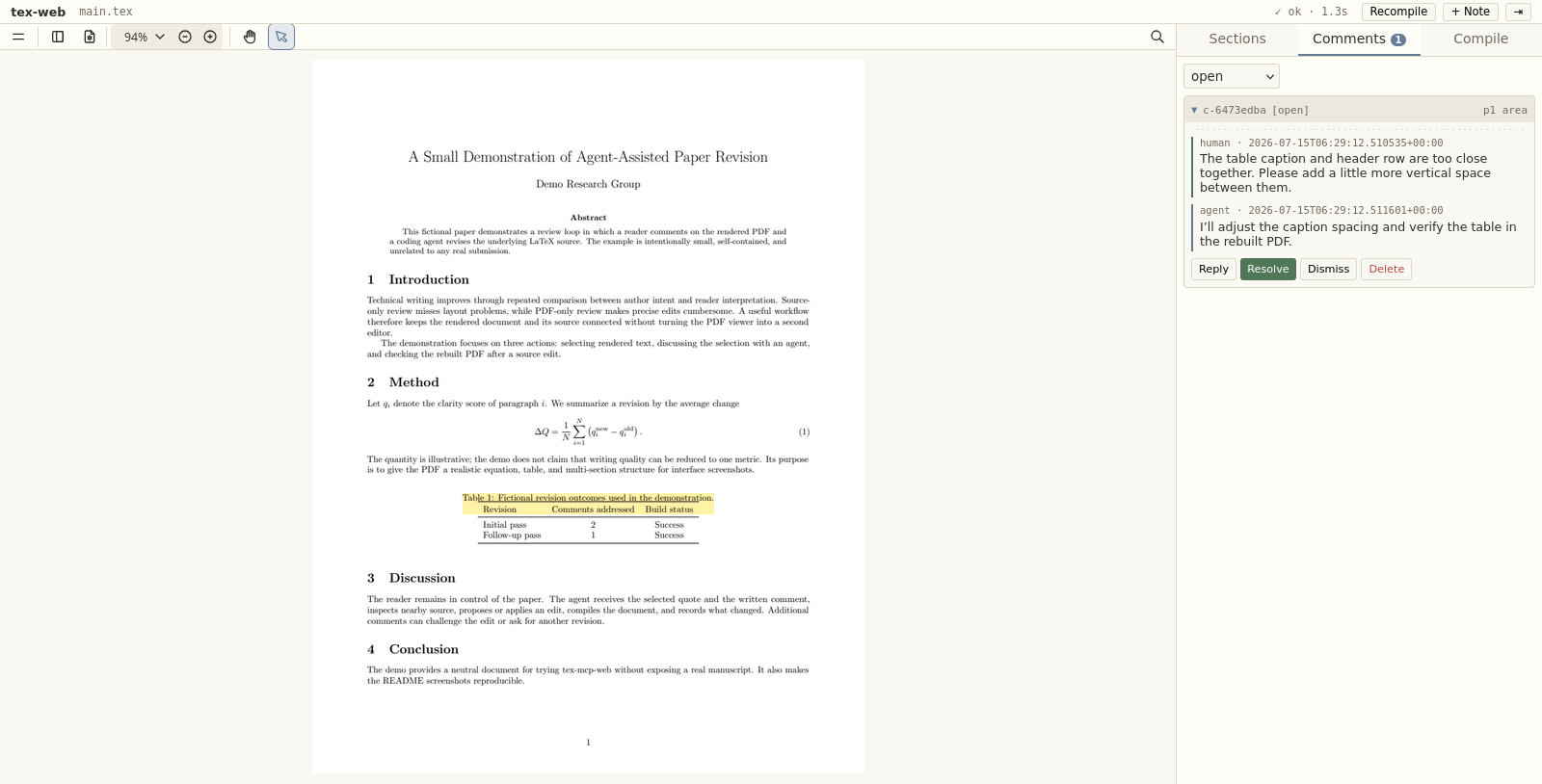
You read the PDF in a browser and leave comments on selected text, sections, or the whole paper. The coding agent reads those comments through MCP and edits the LaTeX source. The running web server detects the edit, rebuilds the PDF, and displays it in the same browser.
Install
tex-mcp-web requires Python 3.10 or newer and a supported document compiler on PATH. LaTeX projects use latexmk by default; pdflatex, xelatex, lualatex, and pandoc are also supported.
pip install "tex-mcp-web[mcp] @ git+https://github.com/MiiKiyoshi/tex-mcp-web"
Connect Claude Code or Codex
Register tex-mcp-web once for the agent you use.
Claude Code:
claude mcp add --scope user tex-mcp -- tex-mcp
Codex:
codex mcp add tex-mcp -- tex-mcp
tex-mcp is the process that the agent starts for the MCP connection. You do not run it separately after registration.
Set up a paper
Each paper needs a .tex-mcp-web.yaml in its project root. This file identifies the paper, tells the web server what to compile and watch, and lets the MCP process find the same project when the agent is working in a subdirectory.
Without this file, tex-web falls back to main.tex on port 8765 in the current directory. That fallback does not mark the project root or assign a per-paper port, so the normal MCP workflow uses .tex-mcp-web.yaml.
Enter the paper directory and create the file if it does not already exist:
cd my-paper
tex-mcp-web init --main main.tex
--main is the path to the top-level source file, relative to the project root. init refuses to overwrite an existing .tex-mcp-web.yaml.
The generated file contains:
main: main.tex
watch:
- '*.tex'
- '*.bib'
- '*.md'
- '*.txt'
ignore:
- '*_backup.tex'
compiler: auto
port: 8765
| Field | Effect |
|---|---|
main |
Top-level source file compiled into the PDF. |
watch |
File patterns that trigger recompilation after a change. Patterns are matched against filenames and project-relative paths. |
ignore |
Paths checked before watch. A matching change does not trigger recompilation. |
compiler |
auto uses latexmk for LaTeX and pandoc for Markdown or text. It can also name a supported compiler explicitly. |
port |
Browser and MCP daemon port for this paper. |
Inspect the settings, then start the web server:
tex-mcp-web config
tex-web
Open the address printed by tex-web, such as http://localhost:8765. Keep this process running while reviewing the paper. Start Claude Code or Codex from the paper directory or one of its subdirectories.
Serve multiple papers
Every paper running at the same time needs a different port. Set each port before starting tex-web and the corresponding agent session:
cd paper-a
tex-mcp-web config port 8765
tex-web
In another terminal:
cd paper-b
tex-mcp-web config port 8766
tex-web
The papers are then available at http://localhost:8765 and http://localhost:8766. If you change a port after starting the processes, restart tex-web and the agent session so both use the new value.
Review with the agent
Select text in the PDF and write a comment. The comment dialog can also carry an exact replacement. Use + Note for a paper-level comment or the Sections tab for a section-level comment.
Click a numbered citation such as [3] to preview its bibliography entry as selectable text. Click the preview to select the entry for copying, or click elsewhere to close it.
Then ask the agent:
Process the open tex-mcp-web comments.
The agent reads the open comments and nearby source, makes the requested edits, waits for the automatic rebuild, verifies the result, and only then replies to or resolves each comment. You can inspect the rebuilt PDF, reply in the same thread, or add another comment.
Other useful requests include:
Read my replies and continue the revision.
Review the Methods section and add comments without editing the paper.
The web interface also provides Reply, Resolve, and Dismiss actions. j and k move between comments, r opens a reply, R opens resolve, d opens dismiss, Esc cancels the current action, and \ collapses the sidebar. Ctrl/Cmd + wheel zooms around the pointer.
Read and change project settings
tex-mcp-web config reads and edits the nearest .tex-mcp-web.yaml found in the current directory or its parents.
tex-mcp-web config                    # print the file and all settings
tex-mcp-web config port               # print one value
tex-mcp-web config port 8766          # change one value
The editable keys and value formats are:
tex-mcp-web config main paper.tex
tex-mcp-web config port 8766
tex-mcp-web config compiler xelatex
tex-mcp-web config watch 'main.tex,sections/**,*.bib'
tex-mcp-web config ignore '*_backup.tex,old/**'
watch and ignore accept comma-separated patterns. Supported compiler values are auto, latexmk, pdflatex, xelatex, lualatex, and pandoc.
Choose what triggers recompilation
Watcher paths are relative to the directory containing .tex-mcp-web.yaml. A filename pattern such as *.tex matches that filename extension at any depth. A path pattern such as private/** matches only that project directory and its contents. ignore is checked before watch, so an ignored path never triggers automatic recompilation even when it also matches watch.
For a paper that watches its LaTeX and bibliography files but ignores the entire private/ directory:
watch:
- '*.tex'
- '*.bib'
ignore:
- 'private/**'
- '*_backup.tex'
This excludes both private/note.tex and nested paths such as private/experiments/result.tex. The same setting can be written from the shell:
tex-mcp-web config ignore 'private/**,*_backup.tex'
ignore controls only whether a file change triggers automatic recompilation. It does not prevent LaTeX from reading an \input file, prevent the agent from opening the directory, or exclude files from Git. Repository privacy still belongs in .gitignore.
Other commands
tex-mcp-web compile performs one compilation without starting the web server and reports errors and warnings. Add --json for structured output.
tex-mcp-web goto TARGET moves a running viewer. A target can be a section title, a page such as p2, a line number, or a source location such as tex/intro.tex:47.
Running tex-mcp-web without a subcommand starts the same web server as tex-web.
Try the included demo
The repository includes a fictional one-page paper that is unrelated to any real manuscript:
cd examples/demo-paper
tex-web
Open http://localhost:8876. The demo starts with an empty comment queue. Its source is examples/demo-paper/main.tex, and its project settings are examples/demo-paper/.tex-mcp-web.yaml.
Project files and privacy
.tex-mcp-web.yaml contains the project settings. Review conversations are stored in .tex-mcp-web/comments.json beside the paper. That file can contain selected manuscript text and discussion, so decide whether to track or ignore it according to the paper's privacy requirements.
Troubleshooting
If the browser opens without a PDF, run tex-mcp-web config main and confirm that it names the correct top-level source file. Then inspect the Compile tab or run tex-mcp-web compile in the paper directory.
If a port is already in use, choose an unused value with tex-mcp-web config port PORT, then restart tex-web and the agent session.
If the agent opens the wrong paper, run tex-mcp-web config from its working directory. The first output line shows which .tex-mcp-web.yaml was found. The agent must run inside that project root or one of its subdirectories.
If agent-triggered compilation or viewer navigation cannot reach the daemon, confirm that tex-web is running for the same project and port.
tex-mcp-web is a hard fork of queelius/scholia v0.6.1 and is independently developed under the MIT license. See LICENSE.
Установка Tex Web
У этого сервера нет опубликованного пакета — он собирается из исходников. Открой репозиторий и следуй инструкции в README.
▸ github.com/MiiKiyoshi/tex-mcp-webFAQ
Tex Web MCP бесплатный?
Да, Tex Web MCP бесплатный — установка в пару кликов через Unyly без оплаты.
Нужен ли API-ключ для Tex Web?
Нет, Tex Web работает без API-ключей и переменных окружения.
Tex Web — hosted или self-hosted?
Self-hosted: сервер запускается локально на твоей машине командой из раздела установки.
Как установить Tex Web в Claude Desktop, Claude Code или Cursor?
Открой Tex Web на unyly.org, выбери вкладку своего клиента (Claude Desktop, Claude Code, Cursor) и нажми Install — конфиг сгенерируется автоматически, без правки JSON.
Похожие MCP
GitHub
PRs, issues, code search, CI status
 автор: GitHub
Filesystem
Secure file operations with configurable access controls.
Memory
Knowledge graph-based persistent memory system.
Template MCP Server
A CLI tool to create a new Model Context Protocol server project with TypeScript support, dual transport options, and an extensible structure
 автор: mcpdotdirect
Compare Tex Web with
Не уверен что выбрать?
Найди свой стек за 60 секунд
Автор?
Embed-бейдж для README
Похожее
Все в категории development