
Text2animate
БесплатноНе проверенTurns plain-language descriptions into animated SVGs with a live preview and conversational editing.

Описание
Turns plain-language descriptions into animated SVGs with a live preview and conversational editing.
README
text2animate
Turn plain-language descriptions into animated SVGs — and refine them in a live chat, right from your editor.
An MCP server that lets Claude (or any MCP client) compose animated SVGs from text, preview them in a clean floating UI, and iterate on them conversationally.
Why
LLMs are good at writing SVG, but "make me an animation" usually produces something stiff and templated. text2animate fixes that two ways:
- It bakes in motion-design best practices — layered scenes, natural easing, anticipation/overshoot, seamless loops, restrained palettes — and hands them to the model before it draws anything.
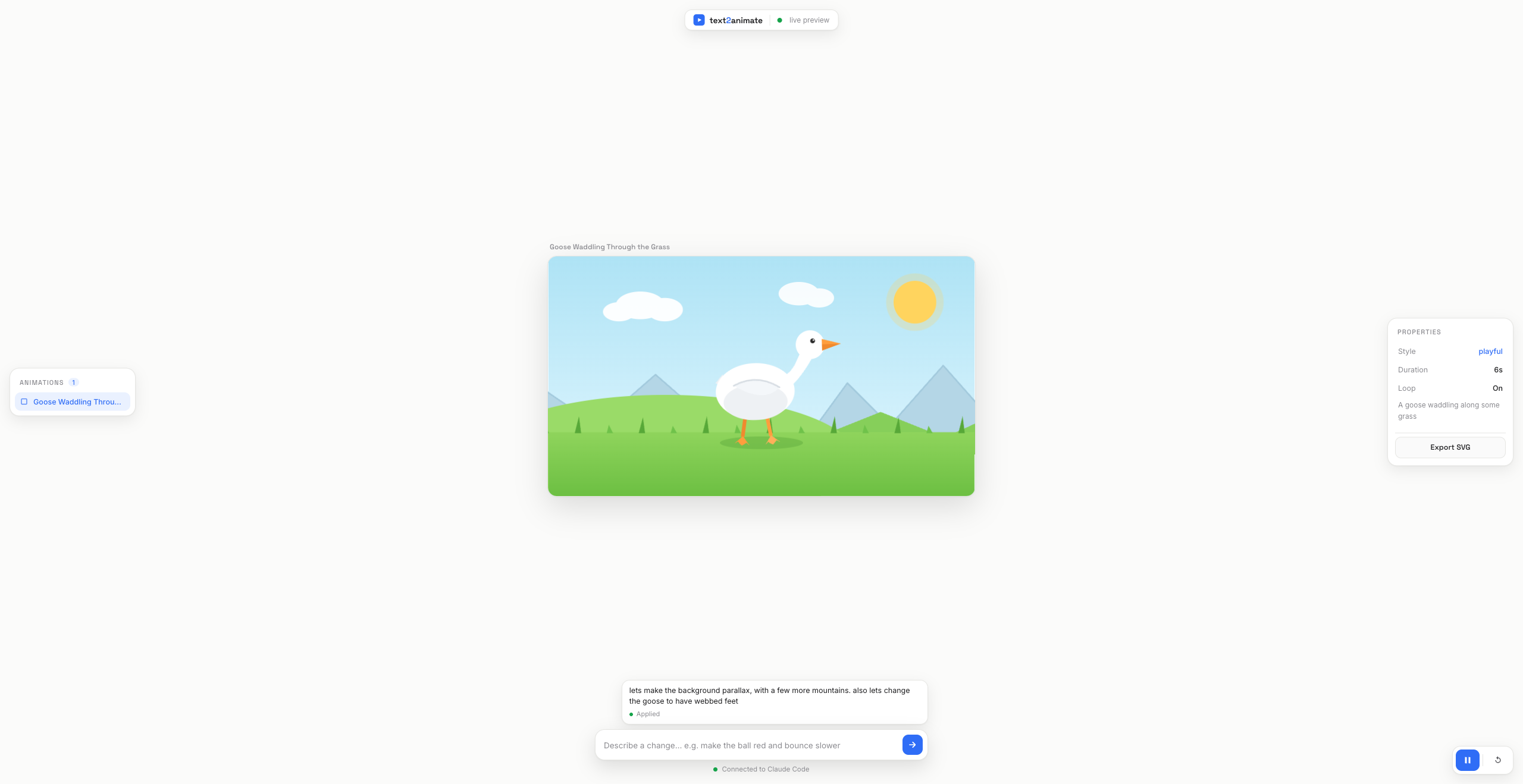
- It closes the feedback loop. The result renders instantly in a local preview, and a chat box under the animation lets you say "make the goose have webbed feet and add parallax mountains" — the change applies live, through your own Claude Code session.
No API key, no separate billing — edits run on the model you're already using.
How it works
                    create_animation
   ┌──────────┐   ──────────────────►   ┌──────────────────┐   ──►  Preview UI
   │  Claude  │                          │  text2animate    │        (floating,
   │ (MCP host)│  ◄──────────────────    │  MCP server      │   ◄──   live over SSE)
   └──────────┘    await_edit_request    └──────────────────┘
        ▲          (long-poll for your         │  embeds best practices
        │           typed changes)             │  validates + stores SVG
        └─ apply_patch / apply_edit ───────────┘  serves the local UI
The model is the renderer's brain. Guided by the embedded best practices, it writes
a self-contained <svg> with @keyframes/SMIL animation. The server validates it,
stores it, and serves a preview. When you type a change, the server queues it and the
in-session agent picks it up, edits the SVG, and the preview refreshes.
Install
Option A — Claude Code plugin (recommended)
No clone, no build. In Claude Code:
/plugin marketplace add tom-pettit/text2animate
/plugin install text2animate@tom-pettit
That registers the MCP server (it runs a prebuilt, dependency-free bundle), so just ask:
"Use text2animate to animate a goose waddling through the grass, playful style."
The preview opens automatically at http://127.0.0.1:4321. The CLI equivalent:
claude plugin marketplace add tom-pettit/text2animate
claude plugin install text2animate@tom-pettit
Option B — from source (for development)
git clone https://github.com/tom-pettit/text2animate.git
cd text2animate
npm install
npm install builds the server and auto-registers it in the surrounding
workspace's .mcp.json (merging — it never clobbers other servers). Restart Claude
Code to pick it up.
[!TIP] Registering somewhere specific, or not at all:
npm run register -- ~/.mcp.json   # a specific config file
npm run unregister                # remove the entry
T2A_NO_AUTO_REGISTER=1 npm install # skip auto-registration
Resolution order: explicit path →
T2A_MCP_TARGETenv →<repo-parent>/.mcp.json.
Styling the look
Tell it the aesthetic and the server feeds concrete art direction (palette, shape language, motion feel, typography) to the model. Use a preset or any freeform phrase:
"Animate a loading spinner, minimalistic but modern."
Built-in presets: minimal-modern, playful, neon-cyber, flat-corporate,
hand-drawn, retro-80s. The chosen style is recorded and shown in the preview's
properties panel.
Live editing (the chat box)
Under the animation is a ChatGPT-style box. Type a change and it round-trips through your Claude Code session:
- The box queues your request on the server.
- The agent's watch loop (
await_edit_request) is long-polling — it unblocks with your text and the current SVG. - The agent applies the change; the preview updates live.
Fast iteration. Small tweaks (color, size, timing, text, easing) go through
apply_patch — the agent sends a tiny find/replace instead of re-emitting the whole
document, so a recolor is ~10 tokens rather than a full regeneration. Structural
changes fall back to apply_edit. A bad patch is rejected wholesale (nothing
changes) so the request stays open to retry.
To turn it on, tell Claude once: "watch the preview for edits" — it keeps calling
await_edit_request. Pairs naturally with /loop, and /fast makes each turn
snappier. The box shows a green dot when a watcher is connected, amber when it
isn't.
Preview UI
A light, floating interface (no chrome docked to the edges):
- Artboard — the animation in a 16:9 frame, centered on a warm canvas.
- Animations panel (left) — everything created this session.
- Properties panel (right) — style, duration, loop, and Export SVG.
- Playback (bottom-right) — play/pause (
Space) and restart (R); pausing freezes both CSS@keyframesand SMIL timelines. - Chat dock (bottom) — the live-edit box plus the watcher status.
Tools, resources & prompts
| Tool | Purpose |
|---|---|
get_best_practices |
The animation guidelines. Optional style adds concrete art direction. |
list_styles |
List the built-in style presets. |
create_animation |
Render a self-contained animated <svg> in the preview and open it. |
list_animations |
List animations created this session. |
await_edit_request |
Long-poll for a change typed into the preview's chat box. |
apply_patch |
Fast edit: apply small find/replace tweaks in place. |
apply_edit |
Apply a fully regenerated SVG in place. |
open_preview |
Ensure the preview server is running and open it. |
Also exposed: an animation-best-practices resource and an animate prompt.
Configuration
| Variable | Default | Meaning |
|---|---|---|
TEXT2ANIMATE_PORT |
4321 |
Preferred preview port (walks upward if taken). |
T2A_MCP_TARGET |
<repo-parent>/.mcp.json |
Where register writes the MCP entry. |
T2A_NO_AUTO_REGISTER |
– | Set to skip auto-registration on npm install. |
Development
npm run build      # compile TypeScript → dist/
npm run dev        # tsc --watch
npm run typecheck  # tsc --noEmit
npm test           # node:test suite (via tsx)
npm run serve      # run just the preview UI (no MCP stdio channel)
Stack: TypeScript + @modelcontextprotocol/sdk (stdio) for the MCP server, Express +
Server-Sent Events for the preview. Animations are self-contained SVGs — no runtime
dependencies in the browser.
src/
├─ index.ts          # entry: stdio transport + --web-only mode
├─ config.ts         # ports, timeouts, paths
├─ core/             # framework-free domain logic (unit-tested)
│  ├─ svg.ts         #   validate + patch helpers (pure)
│  ├─ store.ts       #   in-memory animation store
│  └─ edits.ts       #   edit-request queue + long-poll
├─ content/          # styles.ts, best-practices.ts (the guidance)
├─ web/server.ts     # Express preview server + SSE
└─ mcp/server.ts     # MCP tools, resources & prompts
public/              # the preview UI (vanilla HTML/CSS/JS)
test/                # node:test specs for core/
bundle/index.mjs     # prebuilt single-file server for the plugin (generated)
.claude-plugin/      # plugin.json + marketplace.json
The plugin ships a prebuilt bundle (npm run bundle, via esbuild) so it runs on
node alone with no install step. CI fails if the committed bundle is stale, so run
npm run bundle and commit it whenever src/ changes.
License
MIT
Установка Text2animate
У этого сервера нет опубликованного пакета — он собирается из исходников. Открой репозиторий и следуй инструкции в README.
▸ github.com/tom-pettit/text2animateFAQ
Text2animate MCP бесплатный?
Да, Text2animate MCP бесплатный — установка в пару кликов через Unyly без оплаты.
Нужен ли API-ключ для Text2animate?
Нет, Text2animate работает без API-ключей и переменных окружения.
Text2animate — hosted или self-hosted?
Self-hosted: сервер запускается локально на твоей машине командой из раздела установки.
Как установить Text2animate в Claude Desktop, Claude Code или Cursor?
Открой Text2animate на unyly.org, выбери вкладку своего клиента (Claude Desktop, Claude Code, Cursor) и нажми Install — конфиг сгенерируется автоматически, без правки JSON.
Похожие MCP
GitHub
PRs, issues, code search, CI status
 автор: GitHub
Filesystem
Secure file operations with configurable access controls.
Memory
Knowledge graph-based persistent memory system.
Template MCP Server
A CLI tool to create a new Model Context Protocol server project with TypeScript support, dual transport options, and an extensible structure
 автор: mcpdotdirect
Compare Text2animate with
Не уверен что выбрать?
Найди свой стек за 60 секунд
Автор?
Embed-бейдж для README
Похожее
Все в категории development