
Thoth Mem
БесплатноНе проверенPersistent memory for AI coding agents, storing learned architecture decisions, patterns, and bug fixes in a local SQLite database with full-text search, enabli

Описание
Persistent memory for AI coding agents, storing learned architecture decisions, patterns, and bug fixes in a local SQLite database with full-text search, enabling agents to recall information across sessions.
README

Thoth-Mem
Persistent memory for AI coding agents
npm version Node.js License: MIT
Give your AI coding agent a brain that survives across sessions, compactions, and context resets.
Thoth-Mem is an MCP server with an optional HTTP REST API that stores what your agent learns — architecture decisions, bug fixes, patterns, preferences — in a local SQLite database with full-text search. When a new session starts, the agent picks up right where it left off.
Agent Session 1                    Agent Session 2
┌─────────────────┐               ┌─────────────────┐
│ discovers auth   │──── save ───▶│ recalls auth     │
│ uses JWT+refresh │               │ pattern instantly │
│ fixes edge case  │──── save ───▶│ avoids same bug  │
└─────────────────┘               └─────────────────┘
         │                                 ▲
         └──── thoth.db (SQLite) ──────────┘
Features
- 6 compact MCP tools — workflow-level tools instead of one tool per internal view
- Dashboard v2 operations console served by the HTTP bridge at
/, with OpenAPI docs preserved at/docs - CLI + MCP dual mode — use as a server or directly from the terminal
- SQLite + FTS5 full-text search (fast, zero external dependencies)
- Git-friendly sync — export memory as gzipped chunks for version control
- JSON export/import — portable memory backup and transfer
- Project migration — rename projects across all entities in one operation
- Knowledge Graph recall — deterministic KG extraction, optional LLM enrichment, multi-hop recall, supersession history, pruning, and bounded graph navigation
- Community summaries — derived KG community metadata with default-off read-path rollout gates
- Operational health — semantic lane, KG, community, job, trace, and token-savings telemetry through existing tools and HTTP
- MCP Server Instructions — built-in protocol guidance for connected agents
- Observation versioning — full history preserved on topic_key upserts
- Session enrichment — sessions auto-fill missing project/directory on reconnect
- Normalized deduplication — whitespace/formatting-insensitive duplicate detection
- Strict type taxonomy — observation types enforced at the database level
- Paginated retrieval — large observations served in chunks via offset/max_length
- Privacy defense —
<private>tags stripped before storage - Token-efficient recall — compact fused evidence first, context expansion only when needed
- Retrieval and KG eval baselines — deterministic hybrid retrieval and graph-quality benchmarks (lexical, semantic raw/HyDE, KG, compression, lineage, forbidden triples, optional LLM KG acceptance)
- Agent-first MCP tools — recall, save, context, project navigation, session lifecycle, and full-content fetch
- Admin tools via CLI & HTTP — export/import, sync, migration, graph prune/rebuild, community summaries, index jobs, and maintenance without cluttering the MCP tool surface
- Operation trace logging — MCP and HTTP calls persist sanitized request/response traces for dashboard inspection
Quick Start
# Run the MCP server + HTTP bridge directly (no install needed)
npx -y thoth-mem@latest mcp

# Or install globally
pnpm add -g thoth-mem
thoth-mem mcp
Requires Node.js >= 18.
For backwards compatibility, running thoth-mem with no subcommand also starts the MCP server and HTTP bridge. New MCP client configs should prefer the explicit mcp subcommand.
Transitioning to native harness integration
Native setup is opt-in. Existing manual MCP connections and stored memories continue to work until you deliberately enable a native integration. OpenCode and Codex use the managed setup commands documented below; Claude Code uses its plugin marketplace flow:
claude plugin marketplace add EremesNG/thoth-mem
claude plugin install thoth-mem
The installed plugin may also be shown in qualified form as thoth-mem@thoth-mem, but the commands above are the supported transition path.
Global scope manages only the current user's harness configuration plus thoth-mem receipts and backups. Project scope manages only the explicitly selected project directory and its project-local receipt tree. Neither scope grants ownership of another project or repository.
Engram, thoth-agents, or another memory integration may already provide overlapping hooks or instructions. Treat this as a warning only: thoth-mem does not edit, disable, remove, or write to external repositories. Review the active harness configuration and choose which integration should own overlapping lifecycle events.
Manual MCP fallback
Native hooks are optional. You can keep or restore a plain MCP connection at any time using the manual MCP configuration below; this fallback uses the same six-tool server and does not require managed setup or a native plugin.
Managed Harness Setup
Use managed setup for native OpenCode or Codex integration. Global scope is the default:
thoth-mem setup opencode
thoth-mem setup codex --scope global --plan --json
Project scope is explicit and requires a project path. The following examples also show the ownership-bounded conflict override and receipt rollback forms:
thoth-mem setup opencode --scope project --project /path/to/project --force
thoth-mem setup codex --rollback /path/to/receipt.json
Setup reference
| Option | Behavior |
|---|---|
| no scope option | Uses global scope. |
--scope global |
Explicitly selects global scope; --project is rejected. |
--scope project --project <path> |
Confines inspection, files, receipts, and rollback to the selected project. |
--plan |
Reports the ordered plan and detected conflicts/capabilities. Plan mode performs zero writes, backups, receipts, or mutating external commands. |
--force |
Replaces conflicts only at thoth-mem-managed locations after backup. It never grants access to unrelated configuration or bypasses receipt validation. |
--rollback <receipt-path> |
Reverts only locations owned by that valid receipt and preserves unrelated settings and later unrelated edits. |
--json |
Emits the stable machine-readable result object. |
OpenCode global setup probes ${XDG_CONFIG_HOME:-~/.config}/opencode/opencode.json or opencode.jsonc; in other words, the selected filename is opencode.json or opencode.jsonc. On Windows the default root is %USERPROFILE%\.config\opencode. Project setup probes <project>/opencode.json or <project>/opencode.jsonc and installs the direct plugin entry under <project>/.opencode/plugins/. If both sibling configuration files exist, setup stops for explicit operator action instead of guessing ownership.
Setup reports one status and matching process exit code:
| Status | Exit code | Meaning |
|---|---|---|
complete |
0 |
Every required outcome is verified, including a no-op. |
failed |
1 |
Validation, backup, mutation, verification, or rollback failed. |
partial |
2 |
At least one Codex external step verified and another attempted step failed or remained unverifiable. |
requires_user_action |
3 |
A conflict or unavailable/unsafe capability needs operator action. |
Receipts, recovery, and rollback
Backups are created before the first mutation. After backups succeed, setup durably writes an HMAC-protected receipt with status in_progress before changing a target or invoking a mutating external command. Each attempted step is then recorded atomically. Receipt locations are:
- global receipts:
<thoth-data-dir>/setup/receipts/<receipt-id>/receipt.json - project receipts:
<project>/.thoth/setup/receipts/<receipt-id>/receipt.json
An interrupted in_progress transaction is never inferred as complete. The next setup or rollback reports recovery guidance based on the receipt. A missing, invalid, or tampered receipt is refused even with --force; restore only from verified receipt evidence and its named backups.
Rollback restores or removes only receipt-owned values. If an owned value diverged, rollback stops with requires_user_action; --force remains limited to that valid receipt-owned location and creates fresh rollback backups and a rollback receipt. Repeated setup and repeated completed rollback are no-ops with changed=false when the verified state already matches.
Codex capability limits
Codex marketplace registration and plugin installation are capability-gated and verified independently. Exit zero from an external command is not enough to report complete. If the installed Codex CLI does not advertise a safe command or cannot verify the result, setup returns requires_user_action or partial with exact manual actions; open Codex /plugins to inspect or complete the plugin installation. External Codex registration is not atomically reversible, so its receipt steps report evidence independently from reversible filesystem changes.
MCP Configuration
Claude Code
claude mcp add thoth-mem -- npx -y thoth-mem@latest mcp
OpenCode
Add to ~/.config/opencode/opencode.json (or the sibling opencode.jsonc):
{
  "mcp": {
    "thoth": {
      "type": "local",
      "command": [
        "npx",
        "-y",
        "thoth-mem@latest",
        "mcp"
      ]
    }
  }
}
Gemini CLI
Add to ~/.gemini/settings.json:
{
  "mcpServers": {
    "thoth": {
      "command": "npx",
      "args": ["-y", "thoth-mem@latest", "mcp"]
    }
  }
}
CLI Commands
Thoth-Mem also works as a standalone CLI. When no subcommand is given, it starts the MCP server (and HTTP bridge by default).
thoth-mem                              # Start MCP server + HTTP bridge (default)
thoth-mem mcp                          # Start MCP server (explicit)
thoth-mem mcp --no-http                # Start MCP server without HTTP bridge
thoth-mem search <query>               # Search memories
thoth-mem save <title> <content>       # Save a memory
thoth-mem timeline <observation_id>    # Chronological context around an observation
thoth-mem context                      # Recent session context
thoth-mem stats                        # Memory statistics
thoth-mem export [file]                # Export to JSON (stdout if no file)
thoth-mem import <file>                # Import from JSON
thoth-mem sync [--dir=<path>]          # Git sync export
thoth-mem sync-import [--dir=<path>]   # Git sync import from another instance
thoth-mem migrate-project <old> <new>  # Rename a project across all entities
thoth-mem delete-project <project>     # Delete a project and its related data
thoth-mem rebuild-graph --project <name> # Rebuild graph facts for one project
thoth-mem rebuild-graph --all          # Rebuild graph facts for every project
thoth-mem prune-graph --project <name> # Bound superseded graph history
thoth-mem rebuild-communities --project <name> # Rebuild KG community summaries
thoth-mem preview-communities -p <name> # Preview KG community summaries
thoth-mem communities-status -p <name>  # Inspect KG community summary state
thoth-mem drop-communities --project <name> # Drop KG community summaries
thoth-mem rebuild-index --project <name> # Queue semantic index rebuild for one project
thoth-mem rebuild-index --all          # Queue semantic index rebuild for all projects
thoth-mem rebuild-index --all --process 500 # Queue and process up to 500 jobs
thoth-mem rebuild-index --status       # Show semantic index queue/coverage progress
thoth-mem maintain-memory --project <name> # Preview maintenance metadata
thoth-mem maintain-memory --project <name> --apply # Apply maintenance metadata
thoth-mem version                      # Show version
thoth-mem help                         # Show help
Common CLI path/filter flags:
thoth-mem stats --data-dir=/custom/path
thoth-mem search "auth pattern" -p my-project
--no-http is a server startup flag, so use it with MCP/server mode:
thoth-mem mcp --no-http
HTTP REST API
Thoth-Mem runs an HTTP REST API bridge alongside the MCP server by default. The bridge listens on port 7438, serves Dashboard v2 at / when dashboard assets are built, and provides full access to memory operations via standard HTTP.
Local dashboard:
- Dashboard:
http://localhost:7438/ - Build assets locally with
pnpm run dashboard:buildduring development or release packaging. - If
dist/dashboard/index.htmlis missing,/returns a clear local build message while/docs,/openapi.json, and REST APIs remain available. - Dashboard v2 is a local operations console for retrieval lanes, operation traces, indexing/background state, graph exploration, and HTTP/CLI-equivalent commands.
- Dashboard deep links live under
/console/*so API routes such as/operationsand/graph/rebuildare never shadowed. - The console can create observations and queue rebuild operations through the same REST contracts documented in OpenAPI.
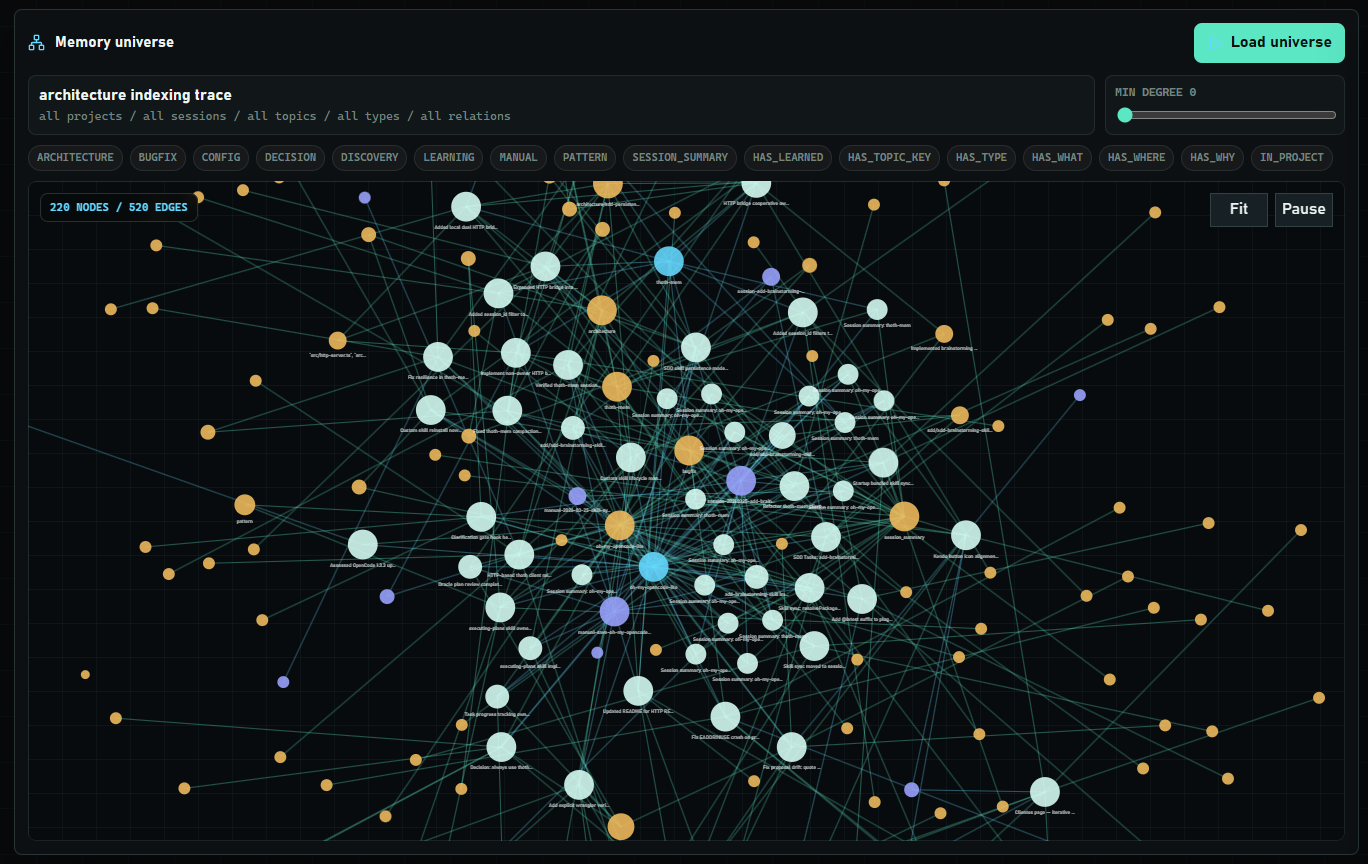
Memory universe D3 graph view with clustered nodes and relationship edges.
Interactive Documentation:
- OpenAPI spec:
http://localhost:7438/openapi.json - Interactive docs:
http://localhost:7438/docs
Disable the HTTP bridge:
thoth-mem mcp --no-http
# or
THOTH_HTTP_DISABLED=true thoth-mem mcp
Example: Search memories via HTTP
curl http://localhost:7438/observations/search?query=auth+pattern
Example: Get memory statistics
curl http://localhost:7438/stats
Example: Inspect operation traces
curl "http://localhost:7438/operation-traces?origin=http&status=error&limit=20"
Example: Queue an index rebuild
curl -X POST http://localhost:7438/index/rebuild \
  -H "content-type: application/json" \
  -d '{"project":"my-project","reason":"manual","process_limit":0}'
The HTTP API supports sessions, observations, prompts, search, export/import, sync, operation traces, index status/rebuild, graph rebuild/prune, community summaries, maintenance preview/apply, operation catalog, and version inspection. See the interactive /docs interface for the full API reference.
Admin surfaces also include graph pruning (POST /graph/prune), community summary rebuild/preview/status/drop (/communities/* and /projects/:project/communities), and memory maintenance preview/apply (/maintenance/preview, /maintenance/apply). These remain CLI/HTTP-only by design; they are not registered as MCP tools.
Development Checks
pnpm run build
pnpm run dashboard:typecheck
pnpm run dashboard:build
pnpm test
pnpm run eval:retrieval
pnpm run eval:kg
pnpm run eval:retrieval runs a deterministic in-memory hybrid retrieval eval against seeded observations, curated non-synthetic project-documentation examples, and synthetic distractors. It reports hybrid recall under noise, corpus size, direct vs rephrased vs non-synthetic case mix, measured surgical compression, HyDE lift, pending/degraded fallback, lexical prefix behavior, semantic raw vs HyDE contribution, sentence-first small-to-big promotion, KG enrichment, KG-as-primary lane rate, and evidence lineage coverage without requiring model downloads or remote APIs. The community rollout section is scoped to P3 community read-path eligibility only: it compares disabled and enabled same-corpus runs, P4 token-savings rows, readiness inputs, fallback states, lane truth, direct KG, and B2 multi-hop no-regression for that read path. Passing these gates does not mean global default-on readiness, P5 graph navigation v2, GraphRAG synthesis, multi-harness completion, G3 harness parity, or MemoryIntegrationCore migration. The CLI gate fails below 95% recall@1 or 90% recall@k, while curated non-synthetic/current-state cases keep stricter per-case assertions.
Scale the retrieval eval with THOTH_RETRIEVAL_EVAL_NOISE when you want hundreds or thousands of synthetic distractors. In PowerShell:
$env:THOTH_RETRIEVAL_EVAL_NOISE='250'; pnpm run eval:retrieval
pnpm run eval:kg runs a deterministic KG quality eval for subject-relation-object extraction. It reports expected triple recall, forbidden triple rate, long-conversation cases where deterministic extraction should be paired with optional LLM enrichment, and acceptance of validated LLM triples while rejecting unknown relations.
MCP Tools (6)
| Tool | Purpose |
|---|---|
mem_save |
Save observations, prompts, session summaries, or passive learnings |
mem_recall |
Primary fused hybrid recall across semantic, KG, and lexical lanes |
mem_context |
Get recent context — sessions, prompts, observations, stats |
mem_get |
Retrieve an observation or prompt by ID, with optional timeline or pagination |
mem_project |
List projects, summarize one project, inspect graph facts/topics/health |
mem_session |
Start, checkpoint, or summarize a memory session |
Current tool/action map:
| Tool | Current shape |
|---|---|
mem_save |
kind="observation", kind="prompt", kind="session_summary", or kind="passive_learnings" |
mem_recall |
mode="compact" first, mode="context" for retrieved text; supports filters plus hyde and debug |
mem_context |
Recent sessions/prompts/observations, optionally with recall_query fused evidence |
mem_get |
id, kind, offset, max_length, include_timeline, before, and after |
mem_project |
action="list", "summary", "graph", "topics", "topic", or "health" |
mem_session |
action="start", "checkpoint", or "summary" |
Legacy one-tool-per-view names are intentionally obsolete and are not registered. Use mem_recall instead of mem_search, mem_get instead of mem_get_observation or mem_timeline, mem_project instead of mem_project_summary, mem_project_graph, or mem_topic_keys, mem_session instead of mem_session_start or mem_session_summary, and mem_save(kind="prompt") instead of mem_save_prompt.
mem_project(action="graph") defaults to the current-state KG ledger. Add navigation="neighborhood" with focus_node_id="obs:<id>" for bounded frontier expansion, navigation="lineage" for timeline-style evidence, navigation="community" for community-summary inspection, or navigation="superseded" for retained superseded history. Each navigation view supports bounded limit/max_chars output; superseded history is explicit and opt-in.
mem_project(action="health") returns compact operational health for all projects or one project: semantic lane state, vector coverage, KG availability, community-summary state, recent indexing/KG errors, job counts, and trace/token telemetry.
Admin operations (export, import, sync, sync-import, migrate-project, delete-project, rebuild-graph, prune-graph, rebuild-index, community-summary operations, and maintenance preview/apply) are available via the CLI. Export, import, sync, migration, operation traces, index status/rebuild, graph rebuild/prune, community summaries, maintenance, operation catalog, and version inspection are also available through the HTTP REST API. They are not registered as MCP tools to keep the agent's tool surface lean.
Retrieval and Embeddings
mem_recallis the primary retrieval tool. Usemode=compactfirst, thenmode=contextfor the strongest hits, andmem_getonly when full content is needed.mem_recallaccepts precision filters forproject,session_id,scope,topic_key,type,time_from, andtime_to; these pass through to all retrieval lanes.- Hybrid retrieval defaults use tuned core lane fusion: sentence top-k 100, chunk top-k 20, lexical limit 20, min semantic score 0.3, and lane order
sentence > kg > chunk > lexical. Knowledge-graph facts now participate as a first-class ranking lane and also enrich returned hits with supporting graph evidence. - Lexical ranking filters low-signal query stopwords and scores prefix matches by content-term coverage, so a broad one-word overlap cannot outrank stronger semantic/KG evidence under noisy corpora.
- Surgical trimming is explicit in
mem_recall mode=context: sentence hits return aprimary_sentenceand, when the score clears the small-to-big threshold, a labeledsurrounding_parent_chunk. Lexical hits return matching sentences instead of whole observations. Each context hit includesretrieval_contract,compression_ratio,evidence_chars, andfull_charsso noise reduction is measured rather than claimed. - Semantic indexing is eventual and non-blocking. Save/update operations can return while indexing stays pending in the background. Terminal job failures keep
last_errorandfinished_at, stale running leases are recoverable, and later queued jobs continue processing instead of being starved by failed work. - Semantic lane state is reconciled from queue health plus vector coverage on startup/status reads, so completed lanes do not remain stuck in
pendingafter a restart when queue and coverage are clean. /viz/health,/observatory/health, and/index/statusinclude product telemetry for semantic lanes, job totals, job-kind breakdowns, queue lag, vector coverage ratios, and recent indexing/KG warnings. Optional KG LLM failures are recorded as job telemetry while deterministic KG extraction still completes.- Automatic rebuild is triggered when embedding configuration hash changes; manual rebuild is available through
thoth-mem rebuild-index --project <name>,thoth-mem rebuild-index --all, andPOST /index/rebuild. Usethoth-mem rebuild-index --statusorGET /index/statusto inspect queue progress, lane state, recent errors, and vector coverage. - When semantic lanes are pending or unavailable, retrieval degrades safely to lexical recall with graph enrichment where matching facts exist, and reports fallback metadata (
pending,degraded_fallback) instead of failing. sqlite-vecis optional at runtime: if unavailable, Thoth-Mem marks semantic lanes degraded and continues serving lexical retrieval with KG enrichment.- Local embeddings default to provider
transformers_localand modelnomic-ai/nomic-embed-text-v1.5unless overridden. - HyDE is enabled by default. The local fallback uses Transformers.js text generation with
onnx-community/Qwen2.5-Coder-0.5B-Instruct; remote HyDE can use Ollama or an OpenAI-compatible LM Studio server. - KG extraction is deterministic-first. Optional LLM enrichment can be enabled for long conversations with Ollama or LM Studio; generated triples are filtered through the same relation taxonomy and merged with deterministic triples. If the remote extractor is disabled or unavailable, deterministic KG extraction still completes.
- KG recall includes entity-anchored multi-hop traversal, current-state supersession handling, keep-N pruning of superseded history, and bounded graph navigation through
mem_project(action="graph"). - Community summaries derive compact KG neighborhoods for eligible projects. They are built and inspected through CLI/HTTP admin surfaces, and their retrieval read path stays default-off behind rollout gates.
- Maintenance metadata supports consolidation, reflection, and decay scoring. Read-path consumption is configurable, while preview/apply operations remain CLI/HTTP-only.
Recommended Embedding Models
Model choice affects vector dimensions, quality, memory use, and index compatibility. Keep the same provider/model/dimensions for an existing semantic index; changing them marks embeddings stale and queues a rebuild.
| Use case | Ollama model | LM Studio model to look for | Notes |
|---|---|---|---|
| Lightweight local default | nomic-embed-text | nomic-ai/nomic-embed-text-v1.5 | Good first choice for local RAG. Small download, mature support, 768-dimensional embeddings in the upstream model card. |
| Strong general retrieval | mxbai-embed-large | mixedbread-ai/mxbai-embed-large-v1 | Good quality/performance balance for English and technical notes. Use the exact loaded model id shown by LM Studio. |
| Multilingual / Spanish-heavy memory | bge-m3 | BAAI/bge-m3 | Strong multilingual option. The upstream model card highlights 100+ languages and inputs up to 8192 tokens. |
| Higher-quality modern option | qwen3-embedding:0.6b | Qwen/Qwen3-Embedding-0.6B | Better multilingual/code retrieval when you can spend more RAM/CPU than nomic-embed-text. Upstream lists 0.6B parameters, 32K context, and up to 1024 dimensions. |
Ollama example:
ollama pull bge-m3
THOTH_EMBEDDING_PROVIDER=ollama \
THOTH_EMBEDDING_BASE_URL=http://127.0.0.1:11434 \
THOTH_EMBEDDING_MODEL=bge-m3 \
thoth-mem
LM Studio example:
# In LM Studio, load an embedding-capable model and start the local server.
# Use the exact model id shown by LM Studio for THOTH_EMBEDDING_MODEL.
THOTH_EMBEDDING_PROVIDER=lmstudio \
THOTH_EMBEDDING_BASE_URL=http://127.0.0.1:1234 \
THOTH_EMBEDDING_MODEL=nomic-embed-text-v1.5 \
thoth-mem
THOTH_EMBEDDING_DIMENSIONS is inferred for known models such as nomic-ai/nomic-embed-text-v1.5 and nomic-embed-text. Set it explicitly when using a custom model or when the selected runtime supports a stable dimension override and you want to force a specific sqlite-vec table shape.
Recommended HyDE Models
HyDE needs a generative/instruct model, not an embedding model. It writes a short hypothetical answer to the recall query; Thoth-Mem embeds both the raw query and the HyDE answer as separate semantic inputs.
| Use case | Provider/model | Notes |
|---|---|---|
| Default local fallback | onnx-community/Qwen2.5-Coder-0.5B-Instruct via Transformers.js | Small ONNX model for local text generation. Good enough for short retrieval hints and code-heavy memories; loaded with dtype: "q4". |
| Ollama code-heavy memory | qwen2.5-coder:7b | Recommended 7B-class local model for coding-agent memory and technical HyDE prompts. |
| Ollama general/multilingual | qwen2.5:7b-instruct | Better general-purpose choice when memory is not mostly code. |
| LM Studio code-heavy memory | Qwen/Qwen2.5-Coder-7B-Instruct GGUF | In LM Studio, use the exact model id shown in the Developer panel, often from an lmstudio-community/...-GGUF download. |
| LM Studio general fallback | meta-llama/Meta-Llama-3.1-8B-Instruct GGUF | Strong general 8B-class option if you already have Llama available locally. |
Example with LM Studio embeddings and LM Studio HyDE:
{
  "embedding": {
    "provider": "lmstudio",
    "model": "text-embedding-nomic-embed-text-v1.5@q8_0",
    "baseUrl": "http://127.0.0.1:1234",
    "dimensions": 768
  },
  "hyde": {
    "enabled": true,
    "provider": "lmstudio",
    "model": "loaded_model",
    "baseUrl": "http://127.0.0.1:1234/v1",
    "timeoutMs": 4000
  }
}
Optional KG LLM Enrichment
KG extraction defaults to the deterministic extractor. To enrich long observations, enable the local Transformers.js provider or a remote local model provider and set the minimum content length that should trigger the LLM pass:
THOTH_KG_LLM_ENABLED=true \
THOTH_KG_LLM_PROVIDER=transformers_local \
THOTH_KG_LLM_MODEL=onnx-community/Qwen2.5-Coder-0.5B-Instruct \
THOTH_KG_LLM_MIN_CONTENT_CHARS=12000 \
thoth-mem
Ollama remains available for remote local generation:
THOTH_KG_LLM_ENABLED=true \
THOTH_KG_LLM_PROVIDER=ollama \
THOTH_KG_LLM_BASE_URL=http://127.0.0.1:11434 \
THOTH_KG_LLM_MODEL=qwen2.5:7b-instruct \
THOTH_KG_LLM_MIN_CONTENT_CHARS=12000 \
thoth-mem
LM Studio uses the OpenAI-compatible chat completions endpoint:
THOTH_KG_LLM_ENABLED=true \
THOTH_KG_LLM_PROVIDER=lmstudio \
THOTH_KG_LLM_BASE_URL=http://127.0.0.1:1234/v1 \
THOTH_KG_LLM_MODEL=loaded_model \
thoth-mem
For LM Studio, Thoth-Mem requests response_format: { "type": "text" } and parses JSON from message.content. This matches current LM Studio servers that reject json_object but accept text or json_schema. Use the exact model id shown by LM Studio, keep the server running on the configured base URL, and increase THOTH_KG_LLM_TIMEOUT_MS if your model needs longer first-load time.
The LLM pass is an enrichment step, not the source of truth: invalid relation names are discarded, duplicate triples are deduped, and KG jobs continue with deterministic triples if the remote request fails.
Sync & Portability
JSON Export/Import
Full memory backup in a single JSON file:
# Export everything
thoth-mem export backup.json

# Export one project
thoth-mem export --project=my-app backup.json

# Import (duplicates are skipped via sync_id)
thoth-mem import backup.json
Git Sync
Incremental, append-only gzipped chunks designed for version control — no merge conflicts:
# Export a chunk to the sync directory
thoth-mem sync --dir=.thoth-sync

# Structure created:
# .thoth-sync/
#   manifest.json        ← ordered chunk list
#   chunks/
#     <timestamp>.json.gz ← compressed memory chunk
Import on another machine:
thoth-mem sync-import --dir=.thoth-sync
Each observation and prompt carries a sync_id (UUID) that prevents duplicates on re-import.
Incremental exports: Only changes since the last sync are exported, tracked via mutation journal for efficiency.
Tombstones: Deleted observations propagate correctly across synced instances, ensuring consistency.
Replay safety: Re-importing the same data is safe; duplicates are detected and skipped automatically via sync_id.
Project Migration
Rename a project across every entity in one transaction:
thoth-mem migrate-project old-name new-name
Updates sessions, observations, and prompts atomically.
Project Deletion
Delete a project and its related data safely:
thoth-mem delete-project project-name
This runs as a transaction, blocks deletion if shared sessions or data are detected in another project, and keeps sync tombstones consistent.
Configuration
On startup, Thoth-Mem creates ~/.thoth/config.json if it does not exist and backfills missing keys when the file is partial. The config starts with a public $schema URL served from the published package on unpkg; the schema source lives in this repo at config.schema.json. Environment variables override config file values at runtime, but they are not written back to the file.
Default editable config:
{
  "$schema": "https://unpkg.com/[email protected]/config.schema.json",
  "version": 1,
  "maxContentLength": 100000,
  "maxContextChars": 8000,
  "maxContextResults": 20,
  "maxSearchResults": 20,
  "dedupeWindowMinutes": 15,
  "previewLength": 300,
  "http": {
    "port": 7438,
    "disabled": false
  },
  "project": {
    "default": null
  },
  "retrievalDefaults": {
    "sentenceTopK": 100,
    "chunkTopK": 20,
    "lexicalLimit": 20,
    "minSemanticScore": 0.3,
    "l2DistanceScale": 20
  },
  "embedding": {
    "provider": "transformers_local",
    "model": "nomic-ai/nomic-embed-text-v1.5",
    "baseUrl": null,
    "dimensions": 768
  },
  "hyde": {
    "enabled": true,
    "provider": "transformers_local",
    "model": "onnx-community/Qwen2.5-Coder-0.5B-Instruct",
    "baseUrl": null,
    "timeoutMs": 4000
  },
  "kgLlm": {
    "enabled": false,
    "provider": "transformers_local",
    "model": "onnx-community/Qwen2.5-Coder-0.5B-Instruct",
    "baseUrl": null,
    "timeoutMs": 30000,
    "minContentChars": 12000
  },
  "knowledgeGraph": {
    "kgMultiHopEnabled": true,
    "kgMaxDepth": 2,
    "kgNeighborhoodLimit": 50,
    "kgMultiHopWeight": 0.7,
    "kgDepthDecay": 0.5,
    "kgTraversalTimeoutMs": 50,
    "kgRelationAllowList": [
      "USES",
      "DEPENDS_ON",
      "BELONGS_TO",
      "PART_OF",
      "OWNS",
      "CONFIGURES",
      "IMPLEMENTS",
      "RUNS_IN",
      "DEPLOYS_TO",
      "CAUSES",
      "FIXES",
      "BLOCKS",
      "UNBLOCKS",
      "AFFECTS",
      "REFERENCES",
      "AUTHENTICATES_WITH",
      "PRECEDES",
      "FOLLOWS"
    ],
    "kgSupersedeEnabled": true,
    "kgSupersedeContentPatterns": false,
    "kgSupersedeConfidenceThreshold": 0.8,
    "kgSupersedeDeprioritizeWeight": 0.5,
    "kgPruneEnabled": true,
    "kgSupersededKeepN": 10,
    "kgPruneOrphanEntities": true
  },
  "communitySummaries": {
    "enabled": true,
    "readPath": {
      "enabled": false
    },
    "algorithm": "connected_components",
    "advancedAlgorithmFallback": "connected_components",
    "summaryMaxChars": 1200,
    "maxCommunitiesPerProject": 200,
    "maxRetrievalCommunities": 3,
    "maxEvidencePerCommunity": 8,
    "sourceObservationLimit": 12,
    "rebuildMaxTriples": 5000,
    "staleBehavior": "skip",
    "kgCommunityWeight": 0.45,
    "enrichment": {
      "enabled": false,
      "timeoutMs": 8000,
      "maxCostUsd": 0,
      "maxChars": 1200
    }
  },
  "maintenance": {
    "enabled": true,
    "defaultMode": "dry-run",
    "automatic": {
      "enabled": false,
      "maxRecordsPerRun": 500
    },
    "readPath": {
      "enabled": true
    },
    "consolidation": {
      "enabled": true,
      "exactHashThreshold": 1,
      "lexicalSimilarityThreshold": 0.92,
      "reviewSimilarityThreshold": 0.82
    },
    "reflection": {
      "enabled": true,
      "minSourceCount": 2,
      "maxSourceCount": 8,
      "contentBudgetChars": 1200,
      "modelAssisted": false
    },
    "decay": {
      "enabled": true,
      "defaultState": "attenuated",
      "staleAfterDays": 180,
      "redundantDuplicateCount": 2,
      "lowValueTypes": [
        "discovery",
        "manual"
      ],
      "scoreMultiplier": 0.6
    }
  },
  "graphFactsSource": "kg"
}
communitySummaries derives compressed graph neighborhoods for maintenance/rebuild and retrieval support. Rebuilds are enabled by config (communitySummaries.enabled) and can generate metadata continuously, but retrieval/context usage requires operator opt-in via communitySummaries.readPath.enabled (default false) and per-project rollout eligibility gates. Opt-in is necessary but not sufficient: eligibility gates still control which projects can surface community summaries. This is reversible—clearing the opt-in in env or persisted config restores the disabled baseline. This gate is evidence-bounded and does not make community summaries globally default-on or claim deferred-scope parity; it does not add P5 graph navigation, GraphRAG synthesis, or multi-harness behavior. This lets eligible projects reuse cross-session context without re-reading all raw observations.
knowledgeGraph.kgSupersedeContentPatterns is intentionally default-off. Deterministic same-source graph diffs remain the primary supersession signal; optional content phrases such as "replaced by" or "deprecated" are lower-confidence hints and should only be enabled after validating the project corpus against false positives.
| Environment Variable | Default | Description |
|---|---|---|
THOTH_DATA_DIR |
~/.thoth |
Data directory for SQLite database |
THOTH_PROJECT |
unset | Default project for saves/searches when callers omit one |
THOTH_MAX_CONTENT_LENGTH |
100000 |
Max content length (warns, never truncates) |
THOTH_MAX_CONTEXT_CHARS |
8000 |
Default output budget for context/summary responses |
THOTH_MAX_CONTEXT_RESULTS |
20 |
Max observations in context response |
THOTH_MAX_SEARCH_RESULTS |
20 |
Max search results returned |
THOTH_DEDUPE_WINDOW_MINUTES |
15 |
Rolling deduplication window |
THOTH_PREVIEW_LENGTH |
300 |
Search result preview length |
THOTH_HTTP_PORT |
7438 |
HTTP REST API port |
THOTH_HTTP_DISABLED |
false |
Disable HTTP REST API bridge |
THOTH_EMBEDDING_PROVIDER |
transformers_local |
Embedding provider (transformers_local, ollama, lmstudio) |
THOTH_EMBEDDING_MODEL |
nomic-ai/nomic-embed-text-v1.5 (local) |
Embedding model id |
THOTH_EMBEDDING_BASE_URL |
provider-specific | Base URL for remote/local API providers |
THOTH_EMBEDDING_DIMENSIONS |
inferred for known models | Optional embedding dimensions override |
THOTH_HYDE_ENABLED |
true |
Enable HyDE dual-input semantic query expansion |
THOTH_HYDE_PROVIDER |
transformers_local |
HyDE generation provider (transformers_local, ollama, lmstudio) |
THOTH_HYDE_MODEL |
onnx-community/Qwen2.5-Coder-0.5B-Instruct |
HyDE generation model id |
THOTH_HYDE_BASE_URL |
unset | Optional HyDE provider base URL |
THOTH_HYDE_TIMEOUT_MS |
4000 |
HyDE timeout before raw-query-only fallback |
THOTH_KG_LLM_ENABLED |
false |
Enable optional LLM KG enrichment for long observations |
THOTH_KG_LLM_PROVIDER |
transformers_local |
KG LLM provider (transformers_local, ollama, lmstudio) |
THOTH_KG_LLM_MODEL |
onnx-community/Qwen2.5-Coder-0.5B-Instruct |
KG LLM model id |
THOTH_KG_LLM_BASE_URL |
unset | KG LLM provider base URL for remote providers |
THOTH_KG_LLM_TIMEOUT_MS |
30000 |
KG LLM timeout before deterministic-only fallback |
THOTH_KG_LLM_MIN_CONTENT_CHARS |
12000 |
Minimum observation size that triggers LLM enrichment |
THOTH_GRAPH_FACTS_SOURCE |
kg |
Graph facts source for read paths |
THOTH_KG_MULTI_HOP_ENABLED |
true |
Enable entity-anchored multi-hop KG recall |
THOTH_KG_MAX_DEPTH |
2 |
Maximum KG traversal depth |
THOTH_KG_NEIGHBORHOOD_LIMIT |
50 |
Maximum KG neighborhood rows considered |
THOTH_KG_MULTI_HOP_WEIGHT |
0.7 |
Ranking contribution from multi-hop KG evidence |
THOTH_KG_DEPTH_DECAY |
0.5 |
Per-depth decay for KG traversal weight |
THOTH_KG_TRAVERSAL_TIMEOUT_MS |
50 |
KG traversal time budget |
THOTH_KG_RELATION_ALLOW_LIST |
default relation taxonomy | Comma-separated relation allow-list override |
THOTH_KG_SUPERSEDE_ENABLED |
true |
Enable KG supersession marking/current-state graph views |
THOTH_KG_SUPERSEDE_CONTENT_PATTERNS |
false |
Optional lower-confidence content phrase supersession hints |
THOTH_KG_SUPERSEDE_CONFIDENCE_THRESHOLD |
0.8 |
Minimum confidence for optional content-pattern hints |
THOTH_KG_SUPERSEDE_DEPRIORITIZE_WEIGHT |
0.5 |
Ranking multiplier for superseded KG evidence |
THOTH_KG_PRUNE_ENABLED |
true |
Enable keep-N pruning of superseded KG history |
THOTH_KG_SUPERSEDED_KEEP_N |
10 |
Superseded KG triples retained per source/subject/relation slot |
THOTH_KG_PRUNE_ORPHAN_ENTITIES |
true |
Remove KG entities left without referencing triples after pruning |
THOTH_COMMUNITY_ENABLED |
true |
Enable derived community metadata/rebuild behavior |
THOTH_COMMUNITY_READ_PATH_ENABLED |
false |
Opt-in retrieval/context use of community summaries; clear/unset to rollback to disabled baseline |
THOTH_COMMUNITY_ALGORITHM |
connected_components |
Community detection algorithm |
THOTH_COMMUNITY_ADVANCED_ALGORITHM_FALLBACK |
connected_components |
Fallback community algorithm |
THOTH_COMMUNITY_SUMMARY_MAX_CHARS |
1200 |
Max chars per community summary |
THOTH_COMMUNITY_MAX_COMMUNITIES_PER_PROJECT |
200 |
Max communities built per project |
THOTH_COMMUNITY_MAX_RETRIEVAL_COMMUNITIES |
3 |
Max communities surfaced per retrieval |
THOTH_COMMUNITY_MAX_EVIDENCE_PER_COMMUNITY |
8 |
Evidence rows per community summary |
THOTH_COMMUNITY_SOURCE_OBSERVATION_LIMIT |
12 |
Max source observations sampled per community |
THOTH_COMMUNITY_REBUILD_MAX_TRIPLES |
5000 |
Rebuild triplets cap |
THOTH_COMMUNITY_STALE_BEHAVIOR |
skip |
Stale community metadata handling |
THOTH_COMMUNITY_KG_WEIGHT |
0.45 |
Ranking weight for community signal |
THOTH_COMMUNITY_ENRICHMENT_ENABLED |
false |
Optional community summary enrichment |
THOTH_COMMUNITY_ENRICHMENT_TIMEOUT_MS |
8000 |
Community enrichment timeout |
THOTH_COMMUNITY_ENRICHMENT_MAX_COST_USD |
0 |
Community enrichment cost ceiling |
THOTH_COMMUNITY_ENRICHMENT_MAX_CHARS |
1200 |
Max chars per enriched community summary |
THOTH_MAINTENANCE_ENABLED |
true |
Global maintenance switch |
THOTH_MAINTENANCE_DEFAULT_MODE |
dry-run |
Maintenance default mode |
THOTH_MAINTENANCE_AUTOMATIC_ENABLED |
false |
Enable automatic maintenance jobs |
THOTH_MAINTENANCE_AUTOMATIC_MAX_RECORDS_PER_RUN |
500 |
Automatic job batch size |
THOTH_MAINTENANCE_READ_PATH_ENABLED |
true |
Consume maintenance metadata in retrieval/context |
THOTH_MAINTENANCE_CONSOLIDATION_ENABLED |
true |
Enable consolidation metadata generation |
THOTH_MAINTENANCE_CONSOLIDATION_EXACT_HASH_THRESHOLD |
1 |
Consolidation hash threshold |
THOTH_MAINTENANCE_CONSOLIDATION_LEXICAL_SIMILARITY_THRESHOLD |
0.92 |
Consolidation lexical threshold |
THOTH_MAINTENANCE_CONSOLIDATION_REVIEW_SIMILARITY_THRESHOLD |
0.82 |
Consolidation review threshold |
THOTH_MAINTENANCE_REFLECTION_ENABLED |
true |
Enable reflection maintenance lane |
THOTH_MAINTENANCE_REFLECTION_MIN_SOURCE_COUNT |
2 |
Reflection minimum source count |
THOTH_MAINTENANCE_REFLECTION_MAX_SOURCE_COUNT |
8 |
Reflection maximum source count |
THOTH_MAINTENANCE_REFLECTION_CONTENT_BUDGET_CHARS |
1200 |
Reflection content budget |
THOTH_MAINTENANCE_REFLECTION_MODEL_ASSISTED |
false |
Optional model-assisted reflection |
THOTH_MAINTENANCE_DECAY_ENABLED |
true |
Enable maintenance decay metadata |
THOTH_MAINTENANCE_DECAY_DEFAULT_STATE |
attenuated |
Default decay state |
THOTH_MAINTENANCE_DECAY_STALE_AFTER_DAYS |
180 |
Decay staleness window |
THOTH_MAINTENANCE_DECAY_REDUNDANT_DUPLICATE_COUNT |
2 |
Consolidation duplicate trigger |
THOTH_MAINTENANCE_DECAY_LOW_VALUE_TYPES |
discovery,manual |
Low-value observation types |
THOTH_MAINTENANCE_DECAY_SCORE_MULTIPLIER |
0.6 |
Decay score multiplier |
Storage
All data lives in a single SQLite database at ~/.thoth/thoth.db (configurable via THOTH_DATA_DIR or --data-dir).
- WAL journal mode for concurrent read performance
- FTS5 full-text search over observations and prompts
- Foreign keys + CHECK constraints for data integrity
- Automatic schema migrations for seamless upgrades
Observation Types
Observations are categorized with an enforced taxonomy:
| Type | Use for |
|---|---|
decision |
Architecture or design choices |
architecture |
System structure and patterns |
bugfix |
Bug fixes and root causes |
pattern |
Established conventions |
config |
Configuration and environment setup |
discovery |
Non-obvious findings about the codebase |
learning |
General learnings and gotchas |
session_summary |
End-of-session summaries |
manual |
Anything that doesn't fit above |
License
MIT
Установить Thoth Mem в Claude Desktop, Claude Code, Cursor
unyly install thoth-memСтавит в Claude Desktop, Claude Code, Cursor и VS Code — сам разбирается с npx, uvx и сборкой из исходников.
Впервые? Поставь CLI: curl -fsSL https://unyly.org/install | sh
Или настроить вручную
Выполни в терминале:
claude mcp add thoth-mem -- npx -y thoth-memFAQ
Thoth Mem MCP бесплатный?
Да, Thoth Mem MCP бесплатный — установка в пару кликов через Unyly без оплаты.
Нужен ли API-ключ для Thoth Mem?
Нет, Thoth Mem работает без API-ключей и переменных окружения.
Thoth Mem — hosted или self-hosted?
Self-hosted: сервер запускается локально на твоей машине командой из раздела установки.
Как установить Thoth Mem в Claude Desktop, Claude Code или Cursor?
Открой Thoth Mem на unyly.org, выбери вкладку своего клиента (Claude Desktop, Claude Code, Cursor) и нажми Install — конфиг сгенерируется автоматически, без правки JSON.
Похожие MCP
wenb1n-dev/SmartDB_MCP
A universal database MCP server supporting simultaneous connections to multiple databases. It provides tools for database operations, health analysis, SQL optim
 автор: wenb1n-dev
Postgres Server
This server enables interaction with PostgreSQL databases through the Model Context Protocol, optimized for the AWS Bedrock AgentCore Runtime. It provides tools
 автор: madhurprash
Postgres
Query your database in natural language
 автор: Anthropic
PostgreSQL
Read-only database access with schema inspection.
автор: modelcontextprotocolCompare Thoth Mem with
Не уверен что выбрать?
Найди свой стек за 60 секунд
Автор?
Embed-бейдж для README
Похожее
Все в категории data