
Threatmodel
БесплатноНе проверенEnables AI-powered threat modeling with tools for creating threat models, analyzing security threats, generating security controls, and validating architecture

Описание
Enables AI-powered threat modeling with tools for creating threat models, analyzing security threats, generating security controls, and validating architecture against best practices.
README
Model Context Protocol server for AI-powered threat modeling.
Demo
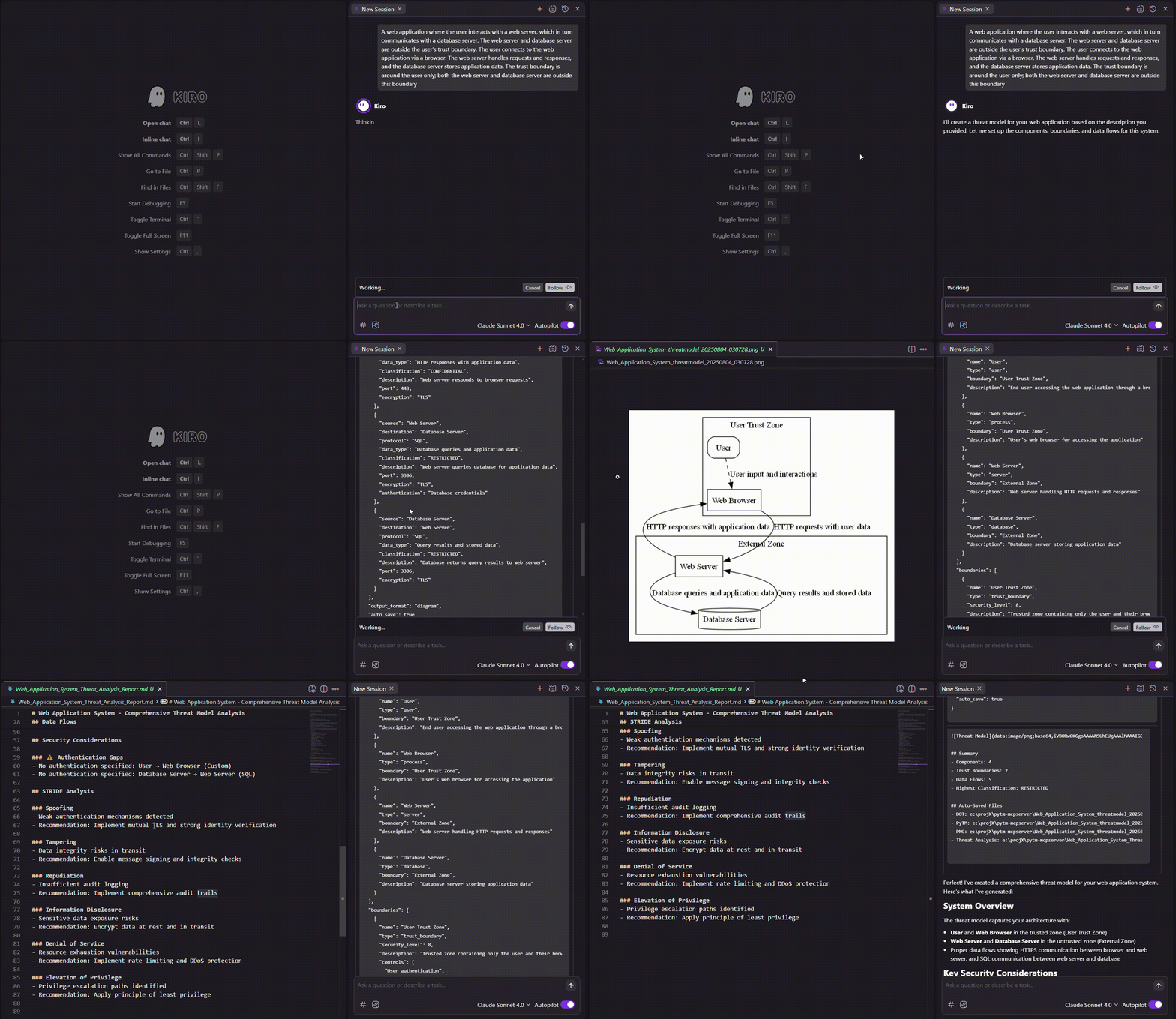
Setup
Install dependencies
pip install -r requirements.txtInstall Graphviz(optional, for PNG diagrams)- Windows: Download from https://graphviz.org/download/
- Mac:
brew install graphviz - Linux:
sudo apt-get install graphviz
- Windows: Download from https://graphviz.org/download/
Configure MCP client(Claude Desktop, etc.){ "mcpServers": { "threatmodel": { "command": "python", "args": ["/full/path/to/threatmodel_server.py"] } } }
Available Tools
create_threat_model
Creates comprehensive threat models with components, boundaries, and data flows.
Parameters:
system_name- Name of the systemcomponents- Array of system components with types, boundaries, security controlsboundaries- Trust boundaries with security levels (0-10)dataflows- Data flows between components with protocols and classificationsoutput_format- "diagram", "pytm_code", "threats", or "full_analysis"auto_save- Auto-save files (default: true)save_path- Directory to save files (default: current directory)
analyze_security_threats
Performs deep security analysis using multiple frameworks.
Parameters:
analysis_depth- "basic", "standard", "comprehensive", or "paranoid"threat_frameworks- ["STRIDE", "MITRE_ATTACK", "OWASP", "NIST", "CIS"]focus_areas- Authentication, data protection, network security, etc.compliance_frameworks- ["SOC2", "ISO27001", "HIPAA", "PCI-DSS", "GDPR"]
generate_security_controls
Generates security control recommendations based on threats.
Parameters:
threats- Array of identified threatsrisk_appetite- "low", "medium", or "high"technology_stack- Current technologies (AWS, k8s, etc.)prioritization_method- "risk_based", "quick_wins", "compliance_driven"
validate_architecture
Validates architecture against security best practices.
Parameters:
components- System components to validatevalidation_rules- ["zero_trust", "encryption_in_transit", "api_gateway_pattern"]architecture_patterns- ["microservices", "serverless", "hybrid_cloud"]
Component Types
Actors: user, admin, service_account
Services: server, api_gateway, microservice, lambda, container
Data: database, cache, message_queue, file_storage
Infrastructure: load_balancer, firewall, external_service
Protocols & Classifications
Protocols: HTTPS, gRPC, WebSocket, SQL, Redis, S3 API
Data Classifications: PUBLIC → INTERNAL → CONFIDENTIAL → RESTRICTED → TOP_SECRET
Auto-Save Features
Generated files (with timestamps):
SystemName_threatmodel_YYYYMMDD_HHMMSS.png- Diagram (when output_format="diagram")SystemName_threatmodel_YYYYMMDD_HHMMSS.dot- DOT source (always)SystemName_threatmodel_YYYYMMDD_HHMMSS.py- PyTM code (always)SystemName_threatmodel_analysis_YYYYMMDD_HHMMSS.md- Analysis report (when output_format="full_analysis")
Example Usage
Example 1: Codebase Analysis
Prompt:
"Create a high level threat diagram of current codebase"
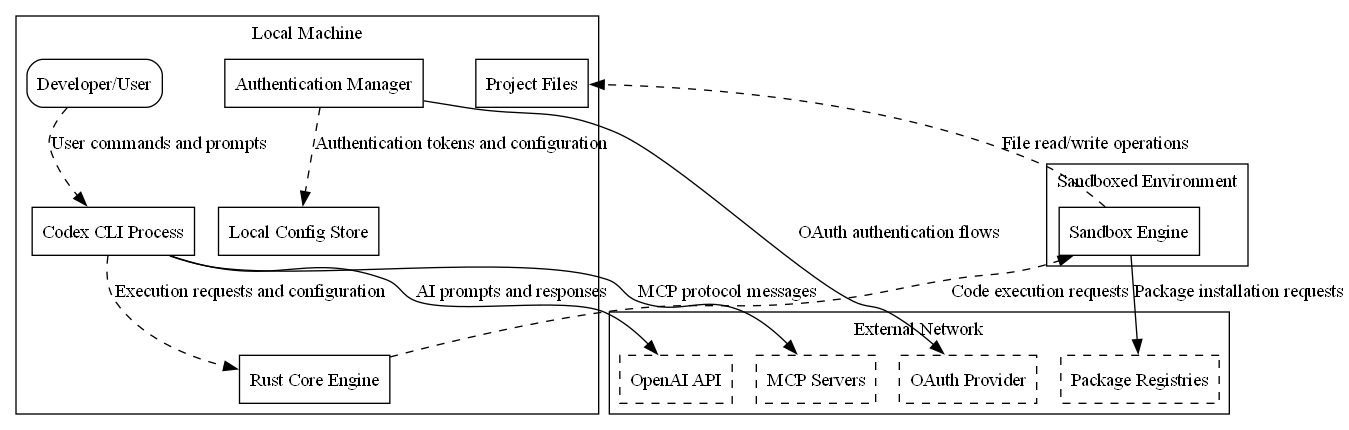
Example threat model diagram generated from a cloned OpenAI Codex codebase, showing multi-layer security boundaries, component classifications, and encrypted data flows between services.
Example 2: Web Application Architecture
Prompt:
"A web application where the user interacts with a web server, which in turn communicates with a database server. The web server and database server are outside the user's trust boundary. The user connects to the web application via a browser. The web server handles requests and responses, and the database server stores application data. The trust boundary is around the user only; both the web server and database server are outside this boundary"
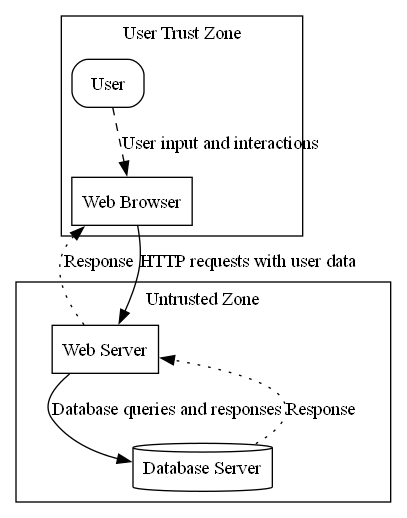
Example threat model showing user trust boundary with web and database servers in untrusted zone.
Refer to threat analysis report in assets/Web_Application_System_Threat_Analysis_Report.md
Troubleshooting
Graphviz issues: Verify with dot -V
DOT syntax errors: Component names automatically sanitized
No Python: Ensure Python in PATH
Установка Threatmodel
У этого сервера нет опубликованного пакета — он собирается из исходников. Открой репозиторий и следуй инструкции в README.
▸ github.com/boxed-dev/threatModelling-mcpFAQ
Threatmodel MCP бесплатный?
Да, Threatmodel MCP бесплатный — установка в пару кликов через Unyly без оплаты.
Нужен ли API-ключ для Threatmodel?
Нет, Threatmodel работает без API-ключей и переменных окружения.
Threatmodel — hosted или self-hosted?
Self-hosted: сервер запускается локально на твоей машине командой из раздела установки.
Как установить Threatmodel в Claude Desktop, Claude Code или Cursor?
Открой Threatmodel на unyly.org, выбери вкладку своего клиента (Claude Desktop, Claude Code, Cursor) и нажми Install — конфиг сгенерируется автоматически, без правки JSON.
Похожие MCP
Fetch
Web content fetching and conversion for efficient LLM usage.
AWS KB Retrieval
Retrieval from AWS Knowledge Base using Bedrock Agent Runtime.
 автор: modelcontextprotocol
Spring AI MCP Server
Provides auto-configuration for setting up an MCP server in Spring Boot applications.
llm-analysis-assistant
A very streamlined mcp client that supports calling and monitoring stdio/sse/streamableHttp, and can also view request responses through the /logs page. It also
 автор: xuzexin-hz
Compare Threatmodel with
Не уверен что выбрать?
Найди свой стек за 60 секунд
Автор?
Embed-бейдж для README
Похожее
Все в категории ai