
Token Ops
БесплатноНе проверенA local Cursor plugin and CLI that reduces wasted AI coding context.

Описание
A local Cursor plugin and CLI that reduces wasted AI coding context.
README
日本語: README.ja.md
Token Ops reduces wasted context during AI coding sessions. It gives Cursor, Claude Code, Codex, and other MCP-compatible agents a compact task-focused context pack before they read broadly, then records an estimated saved-token report.
Install once, code normally, see how much the agent avoided reading. No API key, no account, no cloud backend, and no telemetry — the tool never makes network calls.
How it works
When you ask an AI assistant about your code, it usually has to dig around your repo first — opening files, searching for keywords, reading more — before it can answer. That digging eats tokens.
Token Ops does the digging up front. Every time you send a question:
- It looks at your project files
- Picks the ones most likely to matter for your question
- Pulls out just the relevant lines
Then it hands those to the AI together with your question. The AI gets what it needs from the start — no wandering.
sequenceDiagram
    participant U as You
    participant T as Token Ops
    participant A as AI
    U->>T: "Fix the auth bug"
    T->>T: find relevant files + key lines
    T->>A: question + prepared context
    A-->>U: answer
Same answer quality, fewer tokens. The AI can still read more files if the pack isn't enough.
Measured Savings
Example:
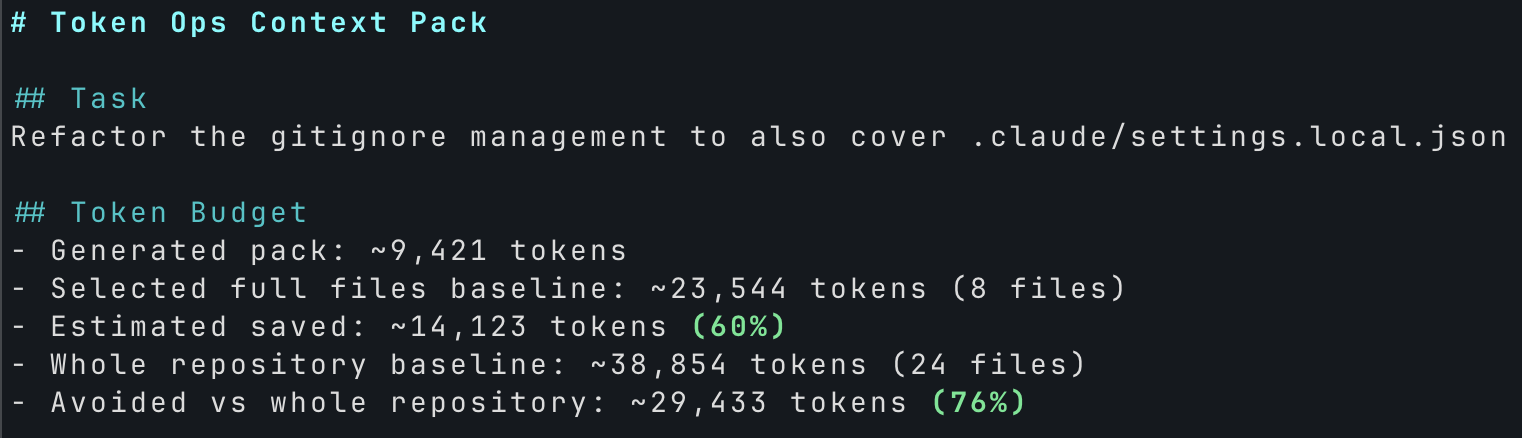
- Total tokens across this project's history: ~288,000 → ~71,000 (4× smaller)
- Saved: ~217,000 tokens ≈ $0.65 (Sonnet 4.5) / $3.25 (Opus 4.7)
By prompt type
Savings broken down by the kind of prompt (prompt content not disclosed).
---
config:
  xyChart:
    width: 760
    height: 320
  themeVariables:
    xyChart:
      plotColorPalette: "#16a34a"
---
xychart-beta
  title "Median tokens saved per prompt type (vs same files in full)"
  x-axis ["Question", "General", "Bug fix", "Decision", "Diagnosis"]
  y-axis "Tokens saved" 0 --> 15000
  bar [9392, 12285, 4202, 5742, 5348]
| Prompt type | Median pack | Median saved |
|---|---|---|
| Question / clarification | ~2,967 tokens | ~9,392 tokens |
| General comments / feedback | ~3,789 tokens | ~12,285 tokens |
| Bug fix / task request | ~906 tokens | ~4,202 tokens |
| Decision / verification | ~2,032 tokens | ~5,742 tokens |
| Diagnosis (pasted log) | ~2,926 tokens | ~5,348 tokens |
A raw verbatim pack output is checked in at docs/sample-pack.md so you can see exactly what Token Ops produces.
What these numbers measure
- Upper bound, not guaranteed savings. The AI might still read more files after the pack arrives. Real savings will be at most the figures above, often less.
- Rough estimates. Token counts are approximated from character length. Per-prompt-type figures come from a small sample — trust the aggregate more than the breakdown.
- Quality is preserved. Token Ops only adds context to the conversation. The AI keeps all its tools, so it can read more files when the pack doesn't cover everything.
- The hook itself costs tokens. In the default
allmode,claude-hookadds a pack (typically a few thousand tokens) to every prompt. That cost is paid every time; the savings only materialize when the pack keeps the agent from reading files in full. If most of your prompts are short or conversational, install with--trigger-mode smartso the hook fires only on coding prompts.
Quick Start
Prerequisites: git installed, and the project initialized as a git repo (
git initif not). No remote required.
💡 Easiest: ask your AI. Paste this in Claude Code, Cursor, or any AI tool with shell access:
Install Token Ops in this project: https://github.com/maikoo811/token-opsThe AI reads this README and runs the install for you. Follow the manual steps below if that doesn't work.
1. Install the CLI
npm install -g token-ops
2. Wire Token Ops into your project
cd /path/to/your-project
token-ops install
Default installs hooks/rules for Claude Code, Cursor, and Codex. To install only one:
token-ops install claude-hook— Claude Code hooktoken-ops install cursor— Cursor ruletoken-ops install codex— CodexAGENTS.md
Add --trigger-mode smart to claude-hook to fire only when the prompt contains a coding keyword (default fires on any prompt ≥ 6 chars).
Measure compliance on Cursor / Codex (optional, opt-in)
Claude Code compliance is measured from transcripts by token-ops audit. Cursor and Codex have no transcripts, so measuring them needs an observation-only hook. It is not part of the default install — enable it explicitly:
token-ops install observe
This writes fail-open hooks to .cursor/hooks.json and .codex/hooks.json that only record tool-call metadata (path, size, time) to .token-ops/session.jsonl. It never allow/denies anything, and file contents and command text are never stored. Remove with token-ops uninstall observe. Then run token-ops audit to see the measured Cursor/Codex Cn/Ct.
Coverage is best-effort, by design. Codex does not intercept shell calls made through
unified_exec, so those are missed. Cursor "before" hooks fire without a result, so shell/MCP calls contribute counts but not token sizes. If the hook process ever crashes it fails open (the editor is never blocked) and the next call self-heals — you may just lose that one measurement.
Install globally (optional)
Add --global to install user-wide (writes to ~/.claude/, ~/.cursor/). Token Ops then fires in every project, no per-project install needed.
token-ops install --global
token-ops install claude-hook --global
Codex (AGENTS.md) is project-only. Cursor User Rules require a manual paste — the command prints the text to copy.
Enable MCP tools in Claude Code (optional)
Lets Claude Code answer "how many tokens have I saved?" and call Token Ops tools directly. Register once:
claude mcp add token-ops token-ops-mcp
Verify with claude mcp list. Remove with claude mcp remove token-ops.
3. Restart your editor
Claude Code, Cursor, and similar editors read hook / MCP configuration at startup. Quit (Cmd+Q on macOS) and reopen the project.
4. Verify it's working
Use your editor normally. After a few coding-action prompts (fix..., refactor..., バグ..., etc.), run:
token-ops report
Runs: N with N > 0 means it's firing.
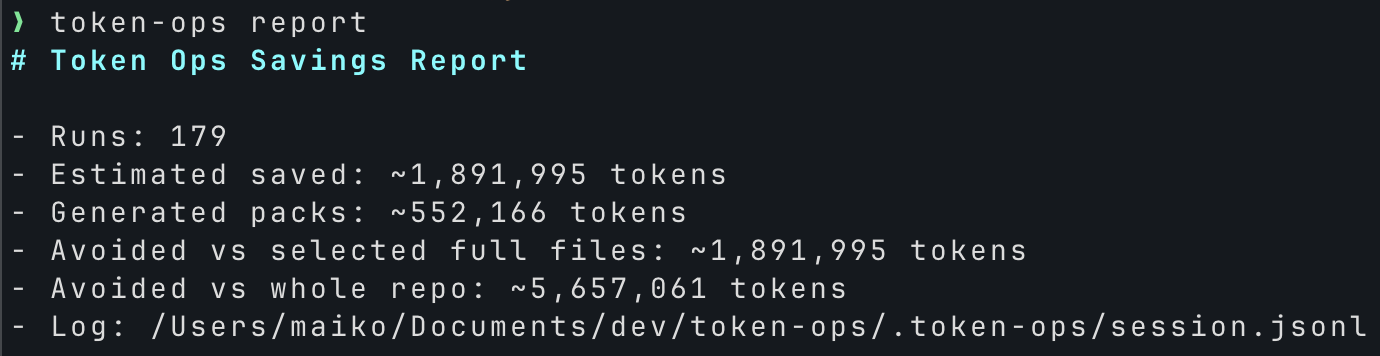
Or ask your AI in chat:
"How many tokens has Token Ops saved me so far?"
Remove later
token-ops uninstall
token-ops uninstall --global
Removes only what install added; unrelated settings are preserved.
Detailed savings breakdown
token-ops report (covered in Verify above) gives the aggregate numbers. For a per-prompt-type breakdown (and an approximate USD cost saved at Claude API list prices), run:
node /path/to/token-ops/docs/session-stats.mjs
Sample output:
## Aggregate

- Hook firings: 35
- Generated packs: ~97,000 tokens
- Equivalent full reads of the same ranked files: ~406,000 tokens
- Avoided: ~309,000 tokens
- Approx Sonnet 4.5 input cost saved: ~$0.93
- Approx Opus 4.7 input cost saved: ~$4.63

## By prompt type (median per firing)
| Prompt type | Median pack | Median saved |
|---|---|---|
| Question / clarification | ~2,967 tokens | ~9,392 tokens |
| ... |
The script is zero-dependency Node 18+. It filters known test-fixture prompts (so npm test runs don't pollute your aggregate) and writes nothing — read-only.
Measure what the agent actually read (Claude Code, Cursor, Codex)
token-ops audit
Parses your local Claude Code transcripts for the current project and reports how many tokens the agent fetched through built-in Read/Grep/bash, how often Token Ops MCP tools were used, and an upper bound on what capped snippets could have avoided. Read-only, this project only, and only counts and sizes are aggregated — prompt text and file contents are never included in the report.
If you enabled the observation hook (token-ops install observe), audit also prints a per-client Cn/Ct section for Cursor and Codex, measured from the observe log. Coverage there is best-effort (Codex misses unified_exec shell calls).
Reference
Levels of Automation
Pick by editor and how much setup you want:
| Level | Editor | Setup | What happens per prompt |
|---|---|---|---|
| ★★★★ Pre-injection | Claude Code | token-ops install claude-hook |
A hook prepends a compact pack to every prompt. Works even if the model would skip the tool. |
| ★★★ One-click plugin | Cursor (Marketplace) | One click (once published) | Agent is told to call build_compact_context first. |
| ★★ Global rule | Cursor | Paste the rule into Settings → Rules → User Rules |
Same as ★★★ but rule-based, applies to every project. |
| ★ Per-project rule | Cursor | token-ops install cursor |
Same as ★★ but scoped to one project. |
| Manual | Any | None | Type Use build_compact_context for: <task> in chat. |
Cursor Plugin
On the Cursor Marketplace. Includes the MCP server, a rule that calls build_compact_context first, and the four MCP tools below.
MCP Tools
build_compact_context: create a small task-focused context packestimate_context_cost: estimate selected-file and whole-repo context costlist_high_cost_files: find tracked files that are expensive to put in contextreport_saved_tokens: show the local saved-token report
Global Cursor rule (copy-paste)
For Level ★★, paste this into Cursor Settings → Rules → User Rules:
Use Token Ops before broad repository exploration, large file reads, or noisy test-log analysis — it cuts wasted context. Prefer this order:

1. Call build_compact_context for the current task.
2. Use the returned snippets and token budget before reading more files.
3. Call list_high_cost_files before opening large files, generated files, lockfiles, or logs.
4. Call report_saved_tokens when the user asks about cost, tokens, usage, or savings.

Always pass cwd as the absolute path to the project root (the directory containing .git) — infer it from recent file paths or the workspace folder. Without cwd the call fails in Cursor.
And add Token Ops as an MCP server in ~/.cursor/mcp.json (one time):
{
  "mcpServers": {
    "token-ops": {
      "command": "/absolute/path/to/node",
      "args": ["/absolute/path/to/token-ops/mcp/server.js"]
    }
  }
}
Use an absolute path to
node— Cursor GUI subprocesses do not inherit nvm'sPATH.
Advanced
Wire the MCP server manually
For users who want to register Token Ops without going through token-ops install:
token-ops-mcp
Or run the server file directly:
node mcp/server.js
Cursor-compatible local MCP template:
{
  "mcpServers": {
    "token-ops": {
      "command": "node",
      "args": ["${workspaceFolder}/mcp/server.js"]
    }
  }
}
Prefer an absolute path to the
nodebinary if you use nvm — Cursor GUI subprocesses don't inherit shellPATH.
Roadmap
- Cursor Marketplace review metadata
- One-click Cursor installation flow
- Pre-read guard policies for generated files, lockfiles, and logs
- Code graph and impact analysis inspired by trace-mcp
- Multi-agent savings reports across Cursor, Codex, and Claude Code
- Real A/B-measured savings (current numbers are theoretical upper bounds)
Установить Token Ops в Claude Desktop, Claude Code, Cursor
unyly install token-opsСтавит в Claude Desktop, Claude Code, Cursor и VS Code — сам разбирается с npx, uvx и сборкой из исходников.
Впервые? Поставь CLI: curl -fsSL https://unyly.org/install | sh
Или настроить вручную
Выполни в терминале:
claude mcp add token-ops -- npx -y token-opsFAQ
Token Ops MCP бесплатный?
Да, Token Ops MCP бесплатный — установка в пару кликов через Unyly без оплаты.
Нужен ли API-ключ для Token Ops?
Нет, Token Ops работает без API-ключей и переменных окружения.
Token Ops — hosted или self-hosted?
Self-hosted: сервер запускается локально на твоей машине командой из раздела установки.
Как установить Token Ops в Claude Desktop, Claude Code или Cursor?
Открой Token Ops на unyly.org, выбери вкладку своего клиента (Claude Desktop, Claude Code, Cursor) и нажми Install — конфиг сгенерируется автоматически, без правки JSON.
Похожие MCP
GitHub
PRs, issues, code search, CI status
 автор: GitHub
Filesystem
Secure file operations with configurable access controls.
Memory
Knowledge graph-based persistent memory system.
Template MCP Server
A CLI tool to create a new Model Context Protocol server project with TypeScript support, dual transport options, and an extensible structure
 автор: mcpdotdirect
Compare Token Ops with
Не уверен что выбрать?
Найди свой стек за 60 секунд
Автор?
Embed-бейдж для README
Похожее
Все в категории development