
Toshi
БесплатноНе проверенEnables a side-panel companion that watches your coding session and provides context-aware answers about your codebase and session state through a small, token-

Описание
Enables a side-panel companion that watches your coding session and provides context-aware answers about your codebase and session state through a small, token-cheap MCP interface.
README
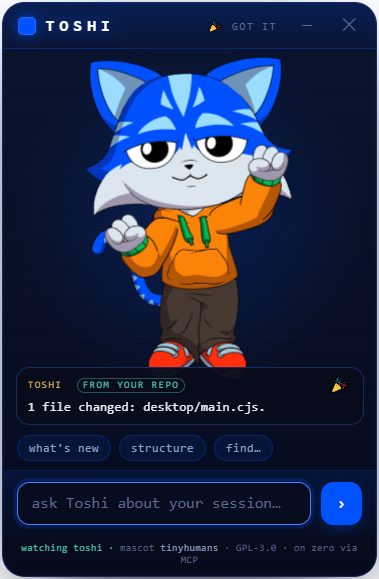
A tiny AI companion that lives beside your terminal, wearing the community-ready Toshi mascot from tinyhumansai/mascots. It watches your gitlawb/zero coding session and you can talk to it about what's happening — what changed, why a test is red, what to do next — through a small, token-cheap context instead of a full chat UI.
Not a new mascot. We take the already-open-source Toshi model (PR #2, merged) and give it tools: a
zeroplugin + an MCP server + a side-panel that renders the real Rive mascot.
What it is
- Rides on
gitlawb/zero— Zero is the runtime (Go, MIT, MCP client and server). Toshi is a plugin (./.zero/plugins/toshi/) plus a stdio MCP server so any MCP client (Claude Desktop, Cline, …) can call it. - The mascot on the side —
panel/index.htmlis a WebView that loads the realtoshi.rivfrom the tinyhumans manifest and drives its state machine (idle · look_around · pointing · hand_wave · dancing · celebration, plus the eye channel). It's the face; the MCP is the brain. - Token-cheap by design — session awareness comes from DeusData/codebase-memory-mcp (MIT): a persistent knowledge graph of the repo, ~99% fewer tokens than reading files one by one. Toshi asks it what changed instead of re-reading the tree, so most turns stay small.
- You sign, always — any money action is descriptor-only: Toshi prepares a transaction, you sign it. No custody.
Layout
toshi/
├── panel/index.html      the side-panel WebView (renders the real Toshi mascot + talk-to-session)
├── mcp/toshi-mcp.mjs      the MCP server (toshi_status / toshi_ask / toshi_mood) + the /ask bridge the panel calls
├── plugin/plugin.json     the gitlawb/zero plugin manifest
├── tinyhumans/mascots.json pinned copy of the upstream manifest (the mascot contract we consume)
├── ATTRIBUTION.md         upstream credits + licences
└── LICENSE                GPL-3.0 (the Toshi mascot is GPL-3.0, so this is too)
Run it
The floating companion (Clippy-energy) — one command launches the mascot window and its brain:
npm install          # once
npm run toshi        # a frameless, always-on-top Toshi floats bottom-right, over any terminal
Launch from anywhere (Windows · macOS · Linux) — npm i -g . once, then just type toshi in any repo and
it floats over that terminal, reading that repo. Windows also has a double-clickable toshi.bat. Drag Toshi
by its header; hide it with ✕. It greets you with a wave, floats + blinks on its own, reacts when you ask, and
bursts into a celebration when it has a grounded answer from your repo.
Make its answers real — index your repo so toshi_ask reads the graph instead of guessing (token-cheap):
# get codebase-memory-mcp (MIT, local, no telemetry), then:
codebase-memory-mcp cli index_repository '{"repo_path":"/abs/path/to/your/repo"}'
# tell Toshi where the repo + binary are (optional; defaults to cwd / PATH):
export TOSHI_REPO=/abs/path/to/your/repo
export CODEBASE_MEMORY_BIN=/abs/path/to/codebase-memory-mcp
Until then Toshi runs in honest demo mode — the mascot is fully alive, and it says it can't read your session yet (with the exact index command) rather than inventing an answer.
Give Toshi a voice + chat (optional) — install zero and run zero setup with any
provider (free/local models like ollama work). Toshi then speaks its grounded answers in your language —
1-3 warm sentences synthesized ONLY from what it retrieved, never invented — and it can just chat like a
normal assistant when your message isn't a repo question (a greeting, small talk, a general "how do I…"). Chat
replies are clearly conversation, not invented repo facts. No zero? Point Toshi at any OpenAI-compatible endpoint
instead (see below). TOSHI_LLM=off disables both voice and chat.
Change Toshi's brain model
Toshi talks through any OpenAI-compatible chat endpoint. Two ways to wire it — env vars, or the toshi model command.
1. Point it at a provider. Either give a full explicit endpoint, or just drop in a provider key you already have and Toshi auto-maps it:
| Env | What it does |
|---|---|
TOSHI_API_URL + TOSHI_API_KEY + TOSHI_API_MODEL |
Explicit endpoint — any OpenAI-compatible /chat/completions URL. Highest priority. |
OPENROUTER_API_KEY |
Auto → https://openrouter.ai/api/v1 (default model meta-llama/llama-3.3-70b-instruct:free). |
XAI_API_KEY / GROK_API_KEY |
Auto → x.ai (default grok-2-latest). |
GROQ_API_KEY |
Auto → Groq (default llama-3.3-70b-versatile). |
OPENAI_API_KEY |
Auto → OpenAI (default gpt-4o-mini). |
Keys are read from your environment and from a local .env — they never leave the process, and are never
committed.
2. Choose the model — persisted to ~/.toshi.json, no env editing needed:
toshi model minimax/minimax-m3   # pick a model (saved to ~/.toshi.json)
toshi model                      # show the current model
toshi model --clear              # back to the provider default
Model resolution order: TOSHI_API_MODEL (env) → toshi model (~/.toshi.json) → the provider default above.
Example — MiniMax M3 via OpenRouter (what Phil runs):
export OPENROUTER_API_KEY=sk-or-...     # your OpenRouter key
toshi model minimax/minimax-m3          # the exact OpenRouter model id
The model id must be the exact slug OpenRouter lists on the model's page at openrouter.ai/models — copy it verbatim (e.g.
minimax/minimax-m3,minimax/minimax-m2,deepseek/deepseek-r1:free). A wrong slug just makes the model call fail and Toshi falls back to its structural/greeting answer, so nothing breaks — it just won't speak.New to OpenRouter? Step-by-step first-key guide (get a key → place it → verify it → pick a model, with copy-paste for Windows / mac / Linux and a troubleshooting table): docs/openrouter-key.md.
Put the CLI everywhere
The same three files run on Windows, macOS and Linux (CI-proven on all three):
| Surface | How |
|---|---|
| Any terminal (everyone) | npm i -g github:philpof102-svg/toshi — no registry needed. Then type toshi in any repo: first call floats the companion; typing toshi in another terminal connects that repo to it (no second window). Electron is optional — where it can't install, toshi runs the brain + a browser panel at http://127.0.0.1:4821/panel/ instead. |
| zero plugin | drop this repo at ./.zero/plugins/toshi/ → zero gets toshi_status / toshi_ask / toshi_mood / toshi_watch. |
| Auto-float with zero | toshi setup (or npm run zero-hook) once → a sessionStart hook makes Toshi appear (watching that repo) every time you launch zero. toshi setup --remove undoes it. |
| Summon / minimize | toshi show · toshi hide · toshi toggle from any terminal (picked up in ~4s). The ─ button folds Toshi into a small floating head — click it to expand; ✕ quits. |
| openclaude | toshi setup --mcp registers Toshi's MCP in ~/.openclaude.json → toshi_ask / toshi_status / toshi_mood / toshi_watch inside openclaude. |
| Claude Desktop / Cline / any MCP client | toshi setup --mcp --file <path-to-config>, or by hand: {"command": "node", "args": ["/abs/path/toshi/mcp/toshi-mcp.mjs"]} |
| Scripts / anything HTTP | POST http://127.0.0.1:4820/ask {"q":"…"} · POST /repo {"path":"…"} · GET /health |
| Browser (no Electron) | node serve.js → http://127.0.0.1:4821/panel/ |
Honest status
- v0, unaudited. The panel + mascot rendering are real; the MCP's "answer about your session" is a skeleton that
bridges to
codebase-memory-mcp— wire your model/provider before trusting its answers. - The Rive runtime and the
.rivload over the network in a real browser/WebView. Vendor them for offline use. - Licence: GPL-3.0 (the upstream Toshi mascot is GPL-3.0; a derivative must match it). See
ATTRIBUTION.md.
Credits
Mascot Toshi by tinyhumans (GPL-3.0). Session memory by codebase-memory-mcp (MIT). Runtime gitlawb/zero (MIT).
Установка Toshi
У этого сервера нет опубликованного пакета — он собирается из исходников. Открой репозиторий и следуй инструкции в README.
▸ github.com/philpof102-svg/toshiFAQ
Toshi MCP бесплатный?
Да, Toshi MCP бесплатный — установка в пару кликов через Unyly без оплаты.
Нужен ли API-ключ для Toshi?
Нет, Toshi работает без API-ключей и переменных окружения.
Toshi — hosted или self-hosted?
Self-hosted: сервер запускается локально на твоей машине командой из раздела установки.
Как установить Toshi в Claude Desktop, Claude Code или Cursor?
Открой Toshi на unyly.org, выбери вкладку своего клиента (Claude Desktop, Claude Code, Cursor) и нажми Install — конфиг сгенерируется автоматически, без правки JSON.
Похожие MCP
GitHub
PRs, issues, code search, CI status
 автор: GitHub
Filesystem
Secure file operations with configurable access controls.
Memory
Knowledge graph-based persistent memory system.
Template MCP Server
A CLI tool to create a new Model Context Protocol server project with TypeScript support, dual transport options, and an extensible structure
 автор: mcpdotdirect
Compare Toshi with
Не уверен что выбрать?
Найди свой стек за 60 секунд
Автор?
Embed-бейдж для README
Похожее
Все в категории development