
Truepng
БесплатноНе проверенRecovers genuine transparency from images with painted checkerboard backgrounds, outputting RGBA PNGs with proper alpha channels. Supports CLI and MCP stdio ser

Описание
Recovers genuine transparency from images with painted checkerboard backgrounds, outputting RGBA PNGs with proper alpha channels. Supports CLI and MCP stdio server for macOS.
README
Turn painted transparency checkerboards into real PNG alpha.
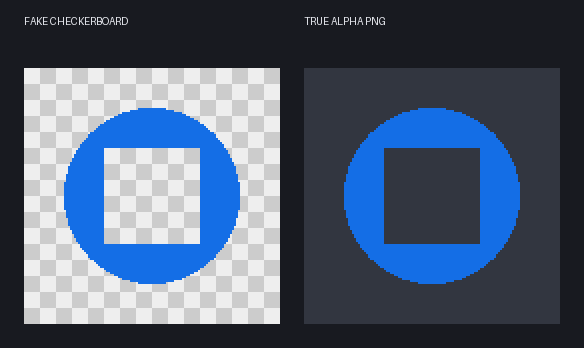
truepng-mcp is built for images that look transparent because they contain a gray-and-white PNG checkerboard, but are actually flat RGB images with no usable alpha channel. It detects the painted checker pattern, reconstructs foreground edges, recovers enclosed transparent holes, and writes a genuine RGBA PNG.
This is not a general image-format converter. The primary job is to recover real transparency from fake checkerboard backgrounds embedded in PNG, JPEG, or WebP image pixels.
The input may already have a .png extension and still be fake: PNG is a file format, not proof that transparency exists. A flattened PNG often has mode RGB and the checkerboard is ordinary visible pixel data. The output from truepng has mode RGBA and a verified, used alpha channel.
It provides an on-demand CLI and a standard MCP stdio server for macOS. It never installs a daemon, HTTP server, login item, or background service.
Why this exists
Image previews, generated assets, screenshots, and some download sites may flatten an originally transparent asset onto a visible checkerboard before saving it. A conventional background remover treats this as a generic segmentation problem and may damage colors, pixel-art edges, white foreground details, or holes inside map pins and rings.
truepng treats the checkerboard as a known compositing pattern. It detects the grid period, colors, origin, and parity, then reconstructs transparency against the expected checker color. Enclosed regions are classified with parity coverage, size, density, robust border error, and periodic fit so genuine holes become transparent while white foreground remains intact.
The design is derived from the MIT-licensed image_tools_mcp v1.3.0 checker reconstruction. See UPSTREAM.md.
Features
- Deterministic fake-checkerboard detection and removal
- Genuine RGBA PNG output from flattened RGB checkerboard images
- Hole-aware recovery for rings, map pins, frames, and glyph counters
- White and light foreground preservation
- Existing-alpha sanitization with hidden RGB cleanup
- Optional BiRefNet and rembg fallback for non-checker images
- CLI and MCP stdio server in one command
- Absolute output paths and structured JSON results
- Atomic PNG writes, safe overwrite behavior, and output validation
- No resident process, daemon, HTTP server, Docker container, or CUDA dependency
Requirements
- macOS on Apple Silicon
- Python 3.11, 3.12, or 3.13
- uv
- Internet access only during installation and the first use of an AI model
Install
Clone the repository, then install the lightweight checker, sanitize, CLI, and MCP routes:
git clone https://github.com/gkhntpbs/truepng-mcp.git
cd truepng-mcp
./install.sh
Installation with the optional AI fallback:
TRUEPNG_INSTALL_AI=1 ./install.sh
The executable is installed at ~/.local/bin/truepng, support files at ~/.local/share/truepng-mcp, and models at ~/.cache/truepng-mcp. Models download only on their first AI use. No CUDA packages are installed and the system Python environment is not modified.
Add to an MCP client
After running ./install.sh, add the installed stdio server globally with one command.
Codex
codex mcp add true-png -- "$HOME/.local/bin/truepng" mcp
Confirm the entry:
codex mcp get true-png
Claude Code
claude mcp add --scope user --transport stdio true-png -- "$HOME/.local/bin/truepng" mcp
Confirm the entry:
claude mcp get true-png
Restart an already-open client session if the tools do not appear immediately.
ChatGPT Work
After connecting true-png to ChatGPT Work as an MCP server, you can give it an instruction such as:
When you generate or receive an image, save it locally if necessary and use the
true-pngimage_to_true_pngtool to remove its background. Return the resulting transparent PNG in the chat and tell me its file path.
This lets ChatGPT Work generate an image and then remove its background in the same conversation. The true-png tool returns a real RGBA PNG with transparency. For non-checkerboard images, install the optional AI fallback and ask ChatGPT Work to use background-removal mode when needed:
TRUEPNG_INSTALL_AI=1 ./install.sh
The MCP server must be configured in ChatGPT Work before it can call the tool. The exact connection screen and server configuration format may vary by ChatGPT Work version; use the same installed command shown in the MCP configuration below.
CLI
truepng input.png
truepng input.jpg -o output.png
truepng convert input.webp --output output.png
truepng input.png --mode checker
truepng input.png --mode ai --model isnet-anime
truepng input.png --mode sanitize
truepng inspect output.png --json
truepng verify output.png --json
truepng doctor
auto preserves and sanitizes used alpha, otherwise tries deterministic checker recovery, and only then starts the isolated AI worker. The AI model is imported in a short-lived child process with compute thread counts fixed to one. Checker and sanitize calls never import ONNX or load a model.
Existing output files are not overwritten by default. A safe numbered name is selected. Use --force for explicit overwrite. Reported paths are absolute.
MCP
The main tool is image_to_true_png with input_path, optional output_path, mode, model, overwrite, and return_preview. return_preview is accepted for schema compatibility but the full image is never embedded in the response. The result includes an absolute path and file URI. Additional tools are inspect_image_transparency and verify_true_png.
Codex ~/.codex/config.toml:
[mcp_servers.true-png]
command = "/Users/ACTUAL_USER/.local/bin/truepng"
args = ["mcp"]
Claude Code:
claude mcp add --scope user --transport stdio true-png -- /Users/ACTUAL_USER/.local/bin/truepng mcp
Claude Desktop, Cursor, and generic MCP clients:
{
  "mcpServers": {
    "true-png": {
      "command": "/Users/ACTUAL_USER/.local/bin/truepng",
      "args": ["mcp"]
    }
  }
}
MCP tools
image_to_true_png:
{
  "input_path": "/absolute/path/input.png",
  "output_path": "/absolute/path/output.png",
  "mode": "auto",
  "model": "birefnet-general",
  "overwrite": false,
  "return_preview": false
}
The server also exposes inspect_image_transparency and verify_true_png.
Processing modes
| Mode | Behavior | Model loaded |
|---|---|---|
auto |
Preserve used alpha, recover fake checkerboard, otherwise use optional AI fallback | Only if needed |
checker |
Require deterministic checkerboard recovery | No |
sanitize |
Preserve alpha and clear hidden RGB | No |
ai |
Force background-removal fallback | Yes |
The default AI model is birefnet-general. birefnet-general-lite, isnet-anime, and other safe rembg model identifiers can be selected with --model.
The AI route is a fallback for inputs that are not fake-checkerboard images. It is not the defining feature of this project. Checker recovery remains deterministic, lighter, and better suited to the core use case.
Resource usage
Checker recovery uses compact byte masks and float arrays instead of full-size Python object grids. It does not import rembg, NumPy, or ONNX. AI inference runs in a short-lived child process, restricts compute libraries to one thread, and is stopped if it exceeds the configurable RSS limit.
TRUEPNG_MAX_AI_RSS_MB=3072 truepng photo.jpg --mode ai
The default AI RSS limit is 4096 MB.
Maintenance
git pull --ff-only
./update.sh
./uninstall.sh
The uninstaller intentionally retains downloaded models. Remove ~/.cache/truepng-mcp manually if they are no longer needed.
Troubleshooting
If truepng is not found, add this to your shell configuration:
export PATH="$HOME/.local/bin:$PATH"
If auto mode reaches AI fallback and reports that rembg is missing, rerun TRUEPNG_INSTALL_AI=1 ./install.sh. If memory pressure matters more than segmentation, use --mode checker or --mode sanitize; these deterministic paths have no model runtime.
Development
uv sync --extra test
uv run pytest -q
uv build
See TESTING.md, ARCHITECTURE.md, and CONTRIBUTING.md.
Releases
Version tags create GitHub Releases automatically:
git tag -a v1.0.0 -m "truepng-mcp v1.0.0"
git push origin v1.0.0
The release workflow runs the test suite, builds the package, and attaches:
truepng_mcp-1.0.0-py3-none-any.whltruepng_mcp-1.0.0.tar.gz- GitHub-generated source code archives in ZIP and TAR.GZ formats
Security
Path values are normalized and never interpolated into shell commands. Same-file writes and symlink outputs are rejected. See SECURITY.md for vulnerability reporting.
License
MIT. See LICENSE and UPSTREAM.md.
Установка Truepng
У этого сервера нет опубликованного пакета — он собирается из исходников. Открой репозиторий и следуй инструкции в README.
▸ github.com/gkhntpbs/truepng-mcpFAQ
Truepng MCP бесплатный?
Да, Truepng MCP бесплатный — установка в пару кликов через Unyly без оплаты.
Нужен ли API-ключ для Truepng?
Нет, Truepng работает без API-ключей и переменных окружения.
Truepng — hosted или self-hosted?
Self-hosted: сервер запускается локально на твоей машине командой из раздела установки.
Как установить Truepng в Claude Desktop, Claude Code или Cursor?
Открой Truepng на unyly.org, выбери вкладку своего клиента (Claude Desktop, Claude Code, Cursor) и нажми Install — конфиг сгенерируется автоматически, без правки JSON.
Похожие MCP
GitHub
PRs, issues, code search, CI status
 автор: GitHub
Filesystem
Secure file operations with configurable access controls.
Memory
Knowledge graph-based persistent memory system.
Template MCP Server
A CLI tool to create a new Model Context Protocol server project with TypeScript support, dual transport options, and an extensible structure
 автор: mcpdotdirect
Compare Truepng with
Не уверен что выбрать?
Найди свой стек за 60 секунд
Автор?
Embed-бейдж для README
Похожее
Все в категории development