
Tuma250
БесплатноНе проверенEnables AI clients to search products, manage shopping carts, and browse order history on the Tuma 250 grocery site in Kigali, Rwanda.

Описание
Enables AI clients to search products, manage shopping carts, and browse order history on the Tuma 250 grocery site in Kigali, Rwanda.
README
An MCP server for the Tuma 250 grocery site (Kigali, Rwanda).
Gives any MCP-compatible AI client (Cursor, Claude Desktop, etc.) the ability to search products, manage a shopping cart, and browse order history on Tuma250 — using a headless Playwright browser under the hood.
Example uses
Imported as MCP server in Perplexity (or any other MCP-compatible client)
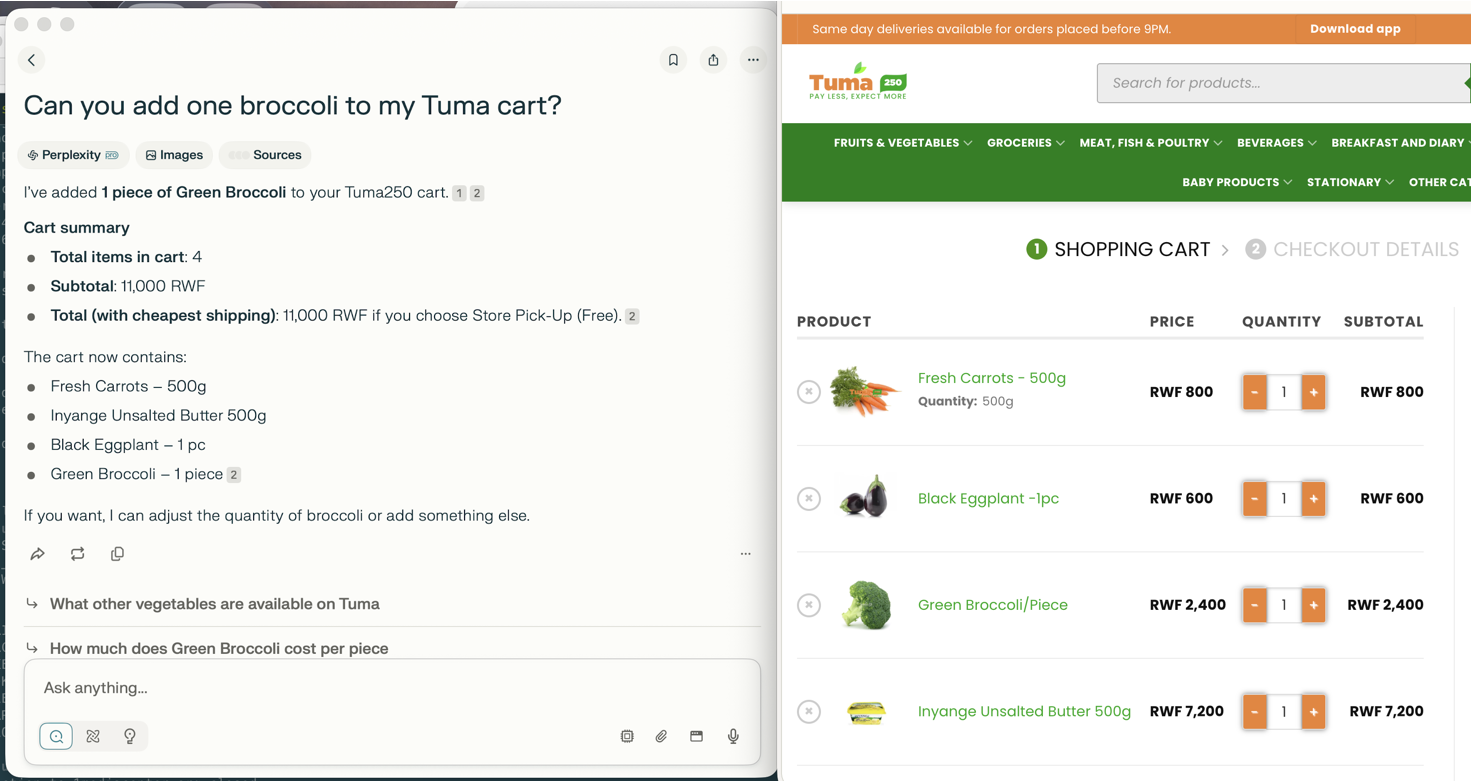
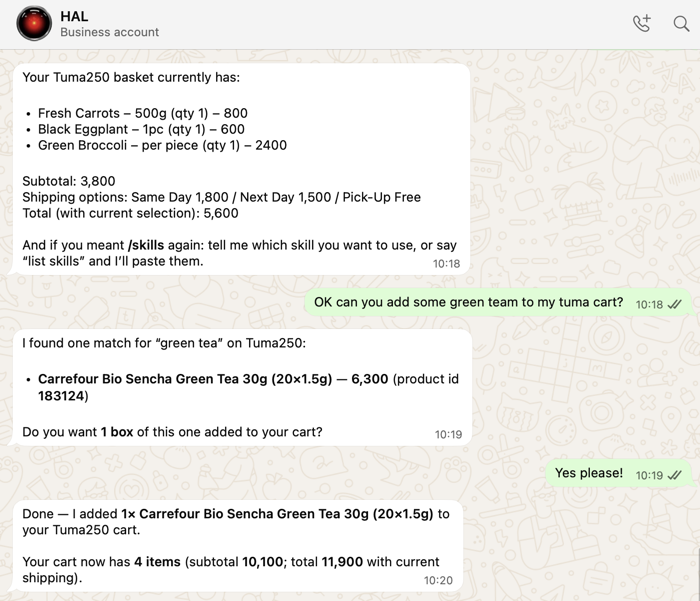
Imported as a skill in OpenClaw
The skill definition can be copied from skills/tuma250/SKILL.md (requires the mcporter skill to be enabled, and the MCP server added to its configuration)
Tools
| Tool | Description |
|---|---|
login |
Authenticate and persist the browser session |
search_products |
Search for products by keyword |
get_product_variations |
List available variants (size/weight) for a variable product |
add_to_cart |
Add a product (or specific variant) to the cart |
get_cart |
Retrieve cart contents with full cost breakdown |
list_recent_orders |
List recent orders from My Account |
get_order_details |
Fetch line items for a specific order |
Prerequisites
Playwright with one headless browser
npm i -g playwright
playwright install chromium
Configuration
The server reads credentials from environment variables (or a .env file):
TUMA250_BASE_URL=https://tuma250.com
[email protected]
TUMA250_PASSWORD=your-password

# Optional
TUMA250_SESSION_FILE=.tuma250_session.json  # persists login between runs
TUMA250_DEBUG=false                          # set true for headed browser
Usage
Cursor / Claude Desktop
Add to ~/.cursor/mcp.json / ~/Library/Application Support/Claude/claude_desktop_config.json:
{
  "mcpServers": {
    "tuma250": {
      "command": "uvx",
      "args": ["tuma250-mcp"],
      "env": {
        "TUMA250_BASE_URL": "https://tuma250.com",
        "TUMA250_USERNAME": "[email protected]",
        "TUMA250_PASSWORD": "your-password"
      }
    }
  }
}
Direct (stdio)
pip install tuma250-mcp
[email protected] TUMA250_PASSWORD=secret tuma250-mcp
Session persistence
After the first successful login, the browser session (cookies) is saved to TUMA250_SESSION_FILE (default: .tuma250_session.json). Subsequent runs reuse the saved session and skip the login step entirely.
Variable products
Some products on Tuma250 require a size/weight selection before they can be added to the cart. Pass the product slug (from search_products or get_order_details) and optionally variation_attributes:
1. search_products("fresh carrots")          → returns slug in each result
2. get_product_variations(product_url)       → lists 250g / 500g / 1kg variants
3. add_to_cart(product_slug, quantity=1, variation_attributes={"attribute_quantity": "500g"})
Development
# Clone and setup
uv venv
source .venv/bin/activate   # or: .venv\Scripts\activate on Windows
uv pip install -e ".[dev]"
playwright install chromium

# Run tests
pytest -v
Copy config-example.env to .env and fill in your Tuma250 credentials before running tests or the server locally.
To test from command line, you may use mcporter, e.g.:
npx mcporter call --stdio "uv run tuma250-mcp" get_cart
npx mcporter call --stdio "uv run tuma250-mcp" 'tuma250.get_order_details(order_id: "193457")'
npx mcporter call --stdio "uv run tuma250-mcp" 'tuma250.add_to_cart(product_slug: "ripe-mango-fruit-1kg")'
npx mcporter call --stdio "uv run tuma250-mcp" add_to_cart --args '{"product_slug": "viande-hachee-de-bouef-ordinaire-regular-ground-beef", "variation_attributes": {"attribute_weight":"1kg"}}'
License
MIT
Установка Tuma250
У этого сервера нет опубликованного пакета — он собирается из исходников. Открой репозиторий и следуй инструкции в README.
▸ github.com/Yann-J/tuma250_mcpFAQ
Tuma250 MCP бесплатный?
Да, Tuma250 MCP бесплатный — установка в пару кликов через Unyly без оплаты.
Нужен ли API-ключ для Tuma250?
Нет, Tuma250 работает без API-ключей и переменных окружения.
Tuma250 — hosted или self-hosted?
Self-hosted: сервер запускается локально на твоей машине командой из раздела установки.
Как установить Tuma250 в Claude Desktop, Claude Code или Cursor?
Открой Tuma250 на unyly.org, выбери вкладку своего клиента (Claude Desktop, Claude Code, Cursor) и нажми Install — конфиг сгенерируется автоматически, без правки JSON.
Похожие MCP
Fetch
Web content fetching and conversion for efficient LLM usage.
AWS KB Retrieval
Retrieval from AWS Knowledge Base using Bedrock Agent Runtime.
 автор: modelcontextprotocol
Spring AI MCP Server
Provides auto-configuration for setting up an MCP server in Spring Boot applications.
llm-analysis-assistant
A very streamlined mcp client that supports calling and monitoring stdio/sse/streamableHttp, and can also view request responses through the /logs page. It also
 автор: xuzexin-hz
Compare Tuma250 with
Не уверен что выбрать?
Найди свой стек за 60 секунд
Автор?
Embed-бейдж для README
Похожее
Все в категории ai