
Vlc Server
БесплатноНе проверенAn MCP server to control VLC media player, allowing remote playback and control of videos via any MCP client.

Описание
An MCP server to control VLC media player, allowing remote playback and control of videos via any MCP client.
README
An MCP (Model Context Protocol) Server to play and control movies using the VLC media player. Use any MCP client to control play videos remotely (e.g. awesome-mcp-clients)
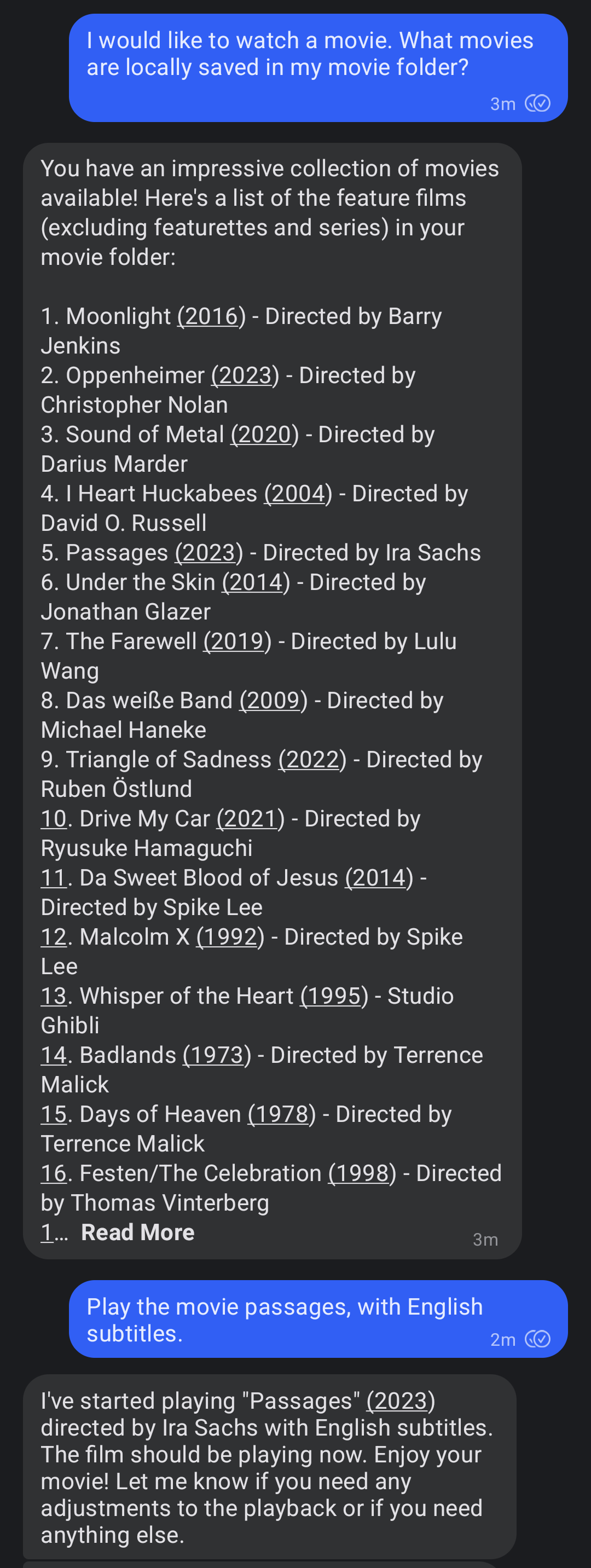
I use my signal-mcp-client running on an old laptop connected to my beamer. This way I can play a movie by sending a signal message. An example of how to use it is shown in the screenshot below.
Usage
This installation is for Linux systems running Ubuntu or a similar Debian-based system like Raspberry Pi OS. With a few modifications it should also work on other systems. Feel free to create a pull request if you get it working on another system.
Install VLC, mediainfo and uv.
sudo apt-get install vlc mediainfo
curl -LsSf https://astral.sh/uv/install.sh | sh
Start the VLC http server:
export DISPLAY=:0 # needed when running it remotely on a server
vlc --extraintf=http --http-host=localhost --http-port=8081 --http-password=your_password
Add the server to the MCP config file of your client (like signal-mcp-client or awesome-mcp-clients)
{
    "name": "vlc-mcp-server",
    "command": "uvx",
    "args": [
        "vlc-mcp-server"
    ],
    "env": {
        "ROOT_VIDEO_FOLDER": "path/to/your/video/folder",
        "VLC_HTTP_HOST": "localhost",
        "VLC_HTTP_PORT": "8081",
        "VLC_HTTP_PASSWORD": "your_password"
    }
}
or clone the repo and use
uvwith a directory:{ "name": "vlc-mcp-server", "command": "uv", "args": [ "--directory", "path/to/root/dir/", "run", "vlc_mcp_player/main.py" ], "env": { "the same as above" } }
Contributing
Contributions to this project are welcome. Feel free to report bugs, suggest ideas, or create merge requests.
Development
Clone repo and install dependencies:
git clone https://github.com/piebro/vlc-mcp-server.git
uv venv
uv sync --extra dev
uv run pre-commit install
Testing
Use mcp-client-for-testing to test the tools of the server using the json config using the local path.
uvx mcp-client-for-testing \
    --config '
    [
        "the json config from above"
    ]
    ' \
    --client_log_level "INFO" \
	--server_log_level "INFO" \
    --tool_call '{"name": "show_video", "arguments": {"video_title": "David Lynch - Dune", "subtitle_language_code": "en"}}'
Formatting and Linting
The code is formatted and linted with ruff:
uv run ruff format
uv run ruff check --fix
Building with uv
Build the package using uv:
uv build
Releasing a New Version
To release a new version of the package to PyPI, create and push a new Git tag:
Checkout the main branch and get the current version:
git checkout main
git pull origin main
git describe --tags
Create and push a new Git tag:
git tag v0.2.0
git push origin v0.2.0
The GitHub Actions workflow will automatically build and publish the package to PyPI when a new tag is pushed. The python package version number will be derived directly from the Git tag.
Running as a Systemd Service
To ensure the VLC HTTP interface runs automatically on boot and restarts if it fails (on Linux systems), you can set it up as a systemd user service. User services run under your specific user account.
This setup assumes that you have completed the setup steps.
Enable User Lingering to keep your user session active after logging out.
sudo loginctl enable-linger $USERCreate Systemd Service Directory
mkdir -p /home/$USER/.config/systemd/user/Create Service File for VLC HTTP Server. Make sure vlc is installed using apt and not using snap or change the path to the vlc binary.
cat << EOF > "/home/$USER/.config/systemd/user/vlc-http.service"
[Unit]
Description=VLC Media Player with HTTP Interface
After=network.target sound.target

[Service]
Restart=on-failure
RestartSec=30
SyslogIdentifier=vlc-http
Environment="DISPLAY=:0"

ExecStart=/usr/bin/vlc --extraintf=http --http-host=localhost --http-port=8081 --http-password=your_password

ExecStop=/usr/bin/pkill -f '/usr/bin/vlc --extraintf=http --http-host=localhost --http-port=8080'

[Install]
WantedBy=default.target
EOF
Enable and Start the Services
systemctl --user daemon-reload
systemctl --user enable vlc-http.service
systemctl --user start vlc-http.service
Check Service Status and Logs
systemctl --user status vlc-http.service
journalctl --user -u vlc-http.service -f
License
This project is licensed under the MIT License. See the LICENSE file for details.
Установка Vlc Server
У этого сервера нет опубликованного пакета — он собирается из исходников. Открой репозиторий и следуй инструкции в README.
▸ github.com/piebro/vlc-mcp-serverFAQ
Vlc Server MCP бесплатный?
Да, Vlc Server MCP бесплатный — установка в пару кликов через Unyly без оплаты.
Нужен ли API-ключ для Vlc Server?
Нет, Vlc Server работает без API-ключей и переменных окружения.
Vlc Server — hosted или self-hosted?
Self-hosted: сервер запускается локально на твоей машине командой из раздела установки.
Как установить Vlc Server в Claude Desktop, Claude Code или Cursor?
Открой Vlc Server на unyly.org, выбери вкладку своего клиента (Claude Desktop, Claude Code, Cursor) и нажми Install — конфиг сгенерируется автоматически, без правки JSON.
Похожие MCP
Omni Video
An MCP server that transforms LLM-enabled IDEs into professional video editors by pre-processing footage into text proxies, generating motion graphics via HTML/
 автор: buildwithtaza
ARA
Generate images, video and audio from any AI agent — one connector.
 автор: ARA
YouTube
Transcripts, channel stats, search
 автор: YouTube
EverArt
AI image generation using various models.
 автор: modelcontextprotocol
Compare Vlc Server with
Не уверен что выбрать?
Найди свой стек за 60 секунд
Автор?
Embed-бейдж для README
Похожее
Все в категории media