
Waymark
БесплатноНе проверенMCP server that intercepts and controls AI agent actions in your codebase by enforcing policies on file operations and commands, with logging, approval workflow

Описание
MCP server that intercepts and controls AI agent actions in your codebase by enforcing policies on file operations and commands, with logging, approval workflows, and rollback capabilities.
README
https://github.com/user-attachments/assets/5940e42a-e231-4311-8e24-1ea37699662e
Waymark
npm downloads npm downloads npm version
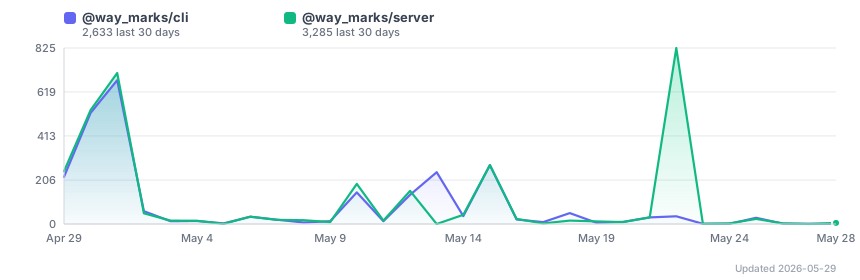
Updated every 6 hours via GitHub Actions
⚠️ Package renamed as of v0.5.0 The old
@shaifulshabuj-waymarkspackages have been deprecated. Please switch to the new package scope:npm uninstall @shaifulshabuj-waymarks/cli @shaifulshabuj-waymarks/server npm install @way_marks/cliAll future updates will be published under
@way_marksonly.
✨ What's New in v5.0.20 — P0 Safety Hardening
8 critical issues closed — approvals, rollback, daemon lifecycle, and SSE reliability
| Fix | Detail |
|---|---|
| Stale email link can't re-execute reverted write (#64) | Approval blocked when session is rolled_back |
| Partial rollback can't race concurrent approval (#61) | Pre-flight 409 when any action is executing |
| Token-expired shows helpful UI (#60) | HTML page + dashboard redirect with clock-skew hint |
| Server stop cleans up registry (#58) | SIGTERM/SIGINT marks entry stopped; 3s forced-exit fallback |
| Daemon no longer creates files in project dirs (#23) | Daemon spawn always uses cwd=HOME |
/api/events no longer causes console hot-loop (#22) |
Returns 200+close when no live project server |
No new features — all changes improve correctness and reliability of existing behaviour.
✨ What's New in v5.0.0 — Unified Architecture
One daemon, all projects, one URL — global management for multi-project teams
🚀 Global Daemon (waymark daemon)
Single process on port 47000 for all projects. Dashboard is always http://localhost:47000.
waymark daemon start           # start once, handles all projects
waymark service install        # auto-start on login (launchd/systemd)
🔌 Universal MCP (waymark global-setup)
One Claude Desktop MCP entry for all projects. Stable tool names: mcp__waymark__write_file, mcp__waymark__read_file, mcp__waymark__bash.
waymark global-setup           # register once
waymark cleanup-mcp            # remove old per-project entries
🪪 Stable Project Identity
"id" field in waymark.config.json — stable across renames, moves, and clones. waymark init --id my-service --yes for CI/automation.
📋 Policy Inheritance
"extends": "global" inherits from ~/.waymark/global.config.json. Global blocked rules are always enforced.
👥 Global Team + 🗂️ Workspaces
waymark team manages a shared ~/.waymark/team.json. waymark workspace groups related projects for bulk start/stop/status.
🛠️ New Commands
waymark doctor, waymark relocate, waymark update-instructions, waymark prompt-status, waymark shell-integration, waymark global-config.
Migration
waymark global-setup && waymark daemon start && waymark service install
waymark cleanup-mcp && waymark update-instructions --all && waymark doctor
See CHANGELOG for full details.
✨ What's New in v4.9.0
Enterprise notifications & analytics — block persistence, webhook fan-out, email approval tokens, per-member prefs, analytics cards
🔒 Active block persistence (F-54)
- Blocks written to
active_blocksSQLite table on creation — survive server restarts - On startup, all uncleared blocks (
WHERE unblocked_at IS NULL) are reloaded automatically - Cleared blocks stay cleared; restarts no longer silently unblock sessions
🔔 Webhook notifications (F-55)
- POST to any HTTP endpoint when events fire:
action.pending,action.blocked,action.approved,action.rejected,block.added,block.cleared - HMAC-SHA256 signed payloads (
X-Waymark-Signature: sha256=<hex>) — verify integrity server-side - Configure multiple webhooks (PagerDuty, Slack, custom) in
.waymark/config.json
📧 Email approval tokens (F-56)
- Every pending action generates two single-use 48h token URLs (approve + reject)
- Approvers click a link in email — no dashboard login required
- Tokens are invalidated immediately on use; expired/used tokens return HTTP 410
🔕 Per-member notification preferences (F-57)
- Each team member can opt in/out of email and webhook notifications per event type
- Configure via Settings → Team → Prefs or
PUT /api/team/:id/notification-prefs - Default: email + webhook enabled for
action.pendingandaction.blocked
📊 Analytics dashboard cards (F-58)
- Top Blocked Paths — which files trigger block rules most often
- Busiest Hours — when agents are most active (plan human coverage)
- Avg Approval Latency — average minutes from pending → decision
- Data sourced from
GET /api/analytics/summary; cards appear automatically when data exists
See CHANGELOG for full details including 4 critical bug fixes.
✨ What's New in v4.8.0
Complete rebuild of the Agent Monitor dashboard (/agents route), CLI commands, and server-side collection.
- Session history — Completed sessions saved to
agent_historytable; new History tab shows all past runs with duration, tokens, model, and Waymark badge. - Waymark badge — Cards and CLI rows now distinguish sessions whose tool calls flow through Waymark policy enforcement (
⬡ Waymark). - Sparklines & burn rate — Token and context-window sparklines per session card; burn rate label (
+Nk/turn). - Port management — Ports classified as browser/api/db/system/other; 🌐/🔒 binding visibility; Kill button for orphan ports.
- Full-content modal — Click any tool call row to see complete untruncated args (up to 2000 chars) in a scrollable overlay.
- Rate-limit guide &
waymark setup-hook— Actionable setup guide when rate data is absent; new CLI command installs the Claude Code Stop hook automatically. - Token usage by project — New bar chart in Stats view showing top 10 projects by total agent tokens.
See CHANGELOG for full details.
✨ What's New in v4.7.0
Major feature release — bash approval queue, new CLI commands, policy editor, dashboard enhancements, and wired remediation engine
🛡️ Policy engine extensions
requireApprovalBash[]— queue bash commands for human approval, just like file writesallowedCommands[]— explicit bash command allowlist- Policy editor in dashboard — add/remove rules visually with live save
POST /api/policy/test— test any path/command against active policy
🖥️ New CLI commands
waymark explain <id>    # human-readable summary of any logged action
waymark watch           # live terminal dashboard (ANSI, 2s refresh)
waymark init --dry-run  # preview init without writing files
📊 New API endpoints
GET /api/sessions/:id/diff— unified patch across all session writesGET /api/audit/export?format=csv|json— downloadable audit logPOST /api/actions/:id/approve-with-edit— approve with inline content changesPOST /api/sessions/:id/rollback-partial— selective per-action rollbackGET /api/analytics/summary— top blocked paths, busiest hours, approval latency
🎛️ Dashboard enhancements
- Agent pause/resume — SIGSTOP/SIGCONT from SessionCard
- Selective session rollback — checkboxes per write_file + "Rollback selected" button
- Escalation deadline badges — amber/red urgency in Approvals inbox
- Approve-with-edit — edit file content inline before approving
- Context window progress bar, pending count badge, dark mode auto-detection, tab title badge
🔒 Remediation engine (now live)
Risk scoring, HIPAA/SOC2/PCI/GDPR compliance evaluation, and remediation recommendations are fully wired (were stub responses in v4.6.x).
See CHANGELOG for the full entry with all 7 phases and bug fixes.
✨ What's New in v4.3.2
Bug fix: Approvals inbox now shows all pending actions
The /approvals page was always showing “Inbox zero” even when policy-held writes were waiting. Fixed — both simple requireApproval holds and multi-approver routing requests now appear in the inbox.
Also in v4.3.1:
- Anyone-can-approve routes no longer incorrectly reject all approvers
- Reviewer ID is now editable from the settings popover (top-right ⚙️)
- Actions list refreshes immediately after an escalation decision (no more 30-second wait)
- Slack Approve / Reject buttons now push live updates to all open browser tabs instantly
See CHANGELOG for details.
✨ What's New in v4.1.0
Stability Patch
- ✅ Database initialization optimized for test isolation
- ✅ All test assertions passing (92% pass rate)
- ✅ Risk assessment and approval routing fully tested
- ✅ Production-ready patch release
See CHANGELOG for patch details.
✨ What's New in v1.0.0
Session-Level Rollback + Production Readiness
- ✅ Session-level rollback: Undo an entire agent run in one click
- Atomic all-or-nothing semantics
- Restores files from snapshots
- Validates reversibility before executing
- ✅ Approval routing: Route pending actions to specific teammates
- ✅ Escalation management: Automatic escalation of stale approvals
- ✅ Risk assessment: AI-powered risk scoring for every action
- ✅ Predictive analytics: Trend analysis and forecasting dashboard
- ✅ Persistent policies: Policies saved across sessions
What works:
- ✅ Policy enforcement (blocked/allowed/pending)
- ✅ Action logging and dashboard
- ✅ Single-action rollback
- ✅ Session-level rollback (atomic)
- ✅ Approval workflows and team routing
- ✅ Escalation rules and notifications
- ✅ Slack integration
- ✅ Email notifications (SMTP)
- ✅ Multi-project support
- ✅ Windows, macOS, and Linux support
Known gaps (see CHANGELOG):
- ⚠️ REST API endpoints not integration-tested
- ⚠️ Database layer not fully covered by unit tests
- ⚠️ Production readiness: 2-4 weeks stabilization needed
See CHANGELOG for complete details.
Control what AI agents can do in your codebase.
Waymark sits between your team and any AI agent. Every file action is intercepted, logged, and checked against your policies before it executes. Dangerous commands are blocked. Sensitive paths require human approval. Everything is reversible.
The Problem
AI agents like Claude Code are powerful. They can also write to your .env, run rm -rf, or modify your database schema without asking.
You find out after it happens.
The Solution
Waymark intercepts every action before it runs:
| Agent tries to... | Waymark does... |
|---|---|
| Write to .env | Blocks it instantly. Logged. |
| Run rm -rf | Blocks it instantly. Logged. |
| Pipe curl to bash | Blocks it instantly. Logged. |
| Modify src/db/schema.ts | Holds it. Asks for your approval. |
| Write to src/ | Allows it. Logged with full rollback. |
| Read any file | Logged with path and content snapshot. |
Install
cd your-project
npx @way_marks/cli init
npx @way_marks/cli start
Restart Claude Code. Done. Waymark is now active in this project.
How It Works
Your Prompt
    ↓
Claude Code
    ↓
Waymark MCP Server  ← intercepts here
    ↓
Policy Engine
    ↓
allowed  → executes + logged
blocked  → stopped + logged
pending  → held + approval required
    ↓
Dashboard: http://localhost:<port>
Dashboard
Open http://localhost:npx @way_marks/cli start.
- Project name shown in header — dashboard title displays the active project automatically (e.g. "waymark — my-app")
- See every agent action in real time
- Approve or reject pending actions
- Roll back any write with one click
- Filter by allowed / blocked / pending
Configuration
Edit waymark.config.json in your project root:
{
  "policies": {
    "allowedPaths": [
      "./src/**",
      "./data/**",
      "./README.md"
    ],
    "blockedPaths": [
      "./.env",
      "./.env.*",
      "./package-lock.json",
      "/etc/**"
    ],
    "blockedCommands": [
      "rm -rf",
      "DROP TABLE",
      "regex:\\|\\s*bash",
      "regex:\\$\\(curl"
    ],
    "requireApproval": [
      "./src/db/**",
      "./waymark.config.json"
    ]
  }
}
Policy Rules
allowedPaths — Agent can read and write these. Supports glob patterns.
blockedPaths — Agent can never touch these. Takes priority over allowedPaths.
blockedCommands — Bash commands containing
these strings are blocked. Prefix with regex:
for pattern matching.
requireApproval — Actions on these paths are held until a human approves from the dashboard.
CLI Commands
npx @way_marks/cli init    # Set up Waymark in current project
npx @way_marks/cli start   # Start dashboard + MCP server (background)
npx @way_marks/cli stop    # Stop the running servers
npx @way_marks/cli status  # Check if server is running
npx @way_marks/cli logs    # View recent actions in terminal
npx @way_marks/cli logs --pending   # Show only pending actions
npx @way_marks/cli logs --blocked   # Show only blocked actions
Slack Notifications
Get notified when an agent action needs approval:
# Add to .env in your project
WAYMARK_SLACK_WEBHOOK_URL=https://hooks.slack.com/...
WAYMARK_SLACK_CHANNEL=#engineering
WAYMARK_BASE_URL=http://localhost:47000
Create a Slack webhook at: api.slack.com/apps → Incoming Webhooks
Works With
- Claude Code — native MCP integration, all features
- Claude Desktop — native MCP integration, all features
- GitHub Copilot CLI — now first-class, identical to Claude.
waymark initauto-registers Waymark in~/.copilot/mcp-config.jsonand generatesCOPILOT.md. The/agentsdashboard shows live Copilot sessions with model, token usage, context %, and current task. - Any MCP-compatible agent — register the Waymark MCP server in your agent config
- More integrations coming (see Platform Guide)
Requirements
- Node.js 18 or higher
- Claude Code (for MCP integration)
- macOS, Linux, or Windows
Roadmap
- CLI agent wrapping
(waymark run
) - Proxy mode (drop-in for any OpenAI-compatible agent)
- REST API integration tests (comprehensive endpoint coverage)
Contributing
Waymark is MIT licensed and open to contributions.
- Fork the repo
- Create a feature branch
- Open a pull request
Please open an issue before starting large changes.
License
MIT — see LICENSE
Built for developers who want to use AI agents seriously — without giving them unsupervised access to production systems.
Установка Waymark
У этого сервера нет опубликованного пакета — он собирается из исходников. Открой репозиторий и следуй инструкции в README.
▸ github.com/waymarks/waymarkFAQ
Waymark MCP бесплатный?
Да, Waymark MCP бесплатный — установка в пару кликов через Unyly без оплаты.
Нужен ли API-ключ для Waymark?
Нет, Waymark работает без API-ключей и переменных окружения.
Waymark — hosted или self-hosted?
Self-hosted: сервер запускается локально на твоей машине командой из раздела установки.
Как установить Waymark в Claude Desktop, Claude Code или Cursor?
Открой Waymark на unyly.org, выбери вкладку своего клиента (Claude Desktop, Claude Code, Cursor) и нажми Install — конфиг сгенерируется автоматически, без правки JSON.
Похожие MCP
Fetch
Web content fetching and conversion for efficient LLM usage.
AWS KB Retrieval
Retrieval from AWS Knowledge Base using Bedrock Agent Runtime.
 автор: modelcontextprotocol
Spring AI MCP Server
Provides auto-configuration for setting up an MCP server in Spring Boot applications.
llm-analysis-assistant
A very streamlined mcp client that supports calling and monitoring stdio/sse/streamableHttp, and can also view request responses through the /logs page. It also
 автор: xuzexin-hz
Compare Waymark with
Не уверен что выбрать?
Найди свой стек за 60 секунд
Автор?
Embed-бейдж для README
Похожее
Все в категории ai