

Описание
MCP Weather Tool
README
A Model Context Protocol (MCP) server that provides real-time weather information using the wttr.in API. This project was created during the learning phase of understanding MCP systems.
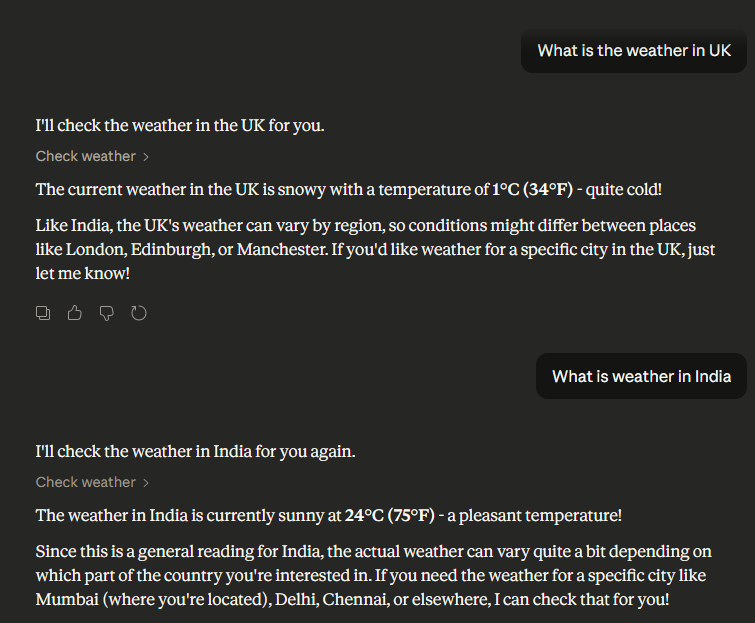
📖 About This Project
This is a custom MCP tool that demonstrates the core concepts of building MCP servers. The tool:
- Takes a location as user input (string format)
- Constructs a weather API URL using wttr.in
- Fetches real-time temperature and weather data
- Returns formatted results to the MCP client (Claude)
🎓 Key Learnings
- ✅ How to create a custom MCP Tool - Understanding MCP server architecture and tool registration
- ✅ Using MCP Inspector - Testing and debugging MCP tools locally before deployment
- ✅ Connecting MCP tools with Claude - Configuration through
.configfiles to integrate with Claude Desktop - ✅ Working with FastMCP - Simplified MCP server creation with decorators
- ✅ Async Python patterns - Using async/await for non-blocking I/O operations
🌟 Features
- 🌤️ Real-time weather information for any location worldwide
- 🌍 No API key required - Uses the free wttr.in service
- 🔧 Easy MCP integration with Claude Desktop
- ⚡ Fast and lightweight - Uses Python's built-in urllib
- 📚 Beginner-friendly codebase - Perfect for learning MCP concepts
- 🎯 Production-ready - One-command setup and execution
📋 Prerequisites
- Python 3.8 or higher
- Internet connection (to fetch weather data)
- Claude Desktop (optional, for integration)
No API keys needed! ✨
🚀 Quick Start
Option 1: Automatic Setup (Recommended)
Windows:
setup.bat
run.bat
Linux/Mac:
chmod +x setup.sh run.sh
./setup.sh
./run.sh
Option 2: Manual Setup
- Clone the repository
   git clone https://github.com/Namangarg-01/Mcp-server-weather-tool.git
   cd Mcp-server-weather-tool
- Create virtual environment
   python -m venv .venv

   # Activate:
   # Windows:
   .venv\Scripts\activate
   # Linux/Mac:
   source .venv/bin/activate
- Install dependencies
pip install -r requirements.txt
- Run the server
python main.py
💻 Usage
Testing with MCP Inspector
Test your tool locally before connecting to Claude:
# Install MCP Inspector (one-time)
npm install -g @modelcontextprotocol/inspector

# Run inspector
npx @modelcontextprotocol/inspector python main.py
This opens a web interface where you can:
- View available tools
- Test the
check_weatherfunction - See request/response in real-time
Connecting to Claude Desktop
To use this MCP server with Claude Desktop, update your configuration file:
Config file location:
- macOS:
~/Library/Application Support/Claude/claude_desktop_config.json - Windows:
%APPDATA%\Claude\claude_desktop_config.json
Add this configuration:
{
  "mcpServers": {
    "weather": {
      "command": "python",
      "args": ["C:/Users/YourName/Desktop/Mcp-server-weather-tool/main.py"]
    }
  }
}
Important:
- Use absolute path to
main.py - Replace
YourNamewith your actual username - Use forward slashes
/even on Windows
After updating, restart Claude Desktop.
Using in Claude
Once connected, ask Claude:
"What's the weather in London?"
"Check the temperature in Tokyo"
"Tell me about the weather in Paris, France"
"How's the weather in Mumbai right now?"
Claude will automatically use your MCP tool to fetch real-time weather data! 🎉
🔍 How It Works
Architecture Overview
User Query → Claude Desktop → MCP Server → wttr.in API → Response
                  ↓              ↓              ↓
              (stdio)      check_weather()   HTTP GET
Code Flow
- User asks Claude about weather
- Claude calls MCP tool with location parameter
- MCP server receives the request via stdio
check_weather()tool is invokedget_weather()function:- URL-encodes the location
- Constructs wttr.in URL
- Fetches weather data via HTTP
- Response returned to Claude
- Claude formats and displays to user
Key Components
main.py - MCP Server
@mcp.tool()
async def check_weather(location: str) -> Dict[str, Any]:
    """Get weather info for specific location."""
    return get_weather(location)
tools/weather.py - Weather Fetcher
def get_weather(location: str) -> dict:
    """Fetches weather using wttr.in API"""
    url = f"https://wttr.in/{location}?format=3"
    # Returns: "London: ⛅️  +15°C"
📁 Project Structure
Mcp-server-weather-tool/
├── tools/
│   └── weather.py          # Weather fetching logic
├── main.py                 # MCP server entry point
├── requirements.txt        # Python dependencies
├── .gitignore             # Git ignore rules
├── setup.bat              # Windows setup script
├── setup.sh               # Linux/Mac setup script
├── run.bat                # Windows run script
├── run.sh                 # Linux/Mac run script
├── Screenshot 2026-02-13 205352.png
└── README.md              # This file
🐛 Troubleshooting
Server Won't Start
Error: ModuleNotFoundError: No module named 'mcp'
# Reinstall dependencies
pip install -r requirements.txt
Claude Can't Connect
Error: MCP server not responding
- Check that the path in
claude_desktop_config.jsonis absolute - Verify Python is accessible:
python --version - Restart Claude Desktop after config changes
- Check server runs manually:
python main.py
Weather Data Not Fetching
Error: urllib.error.URLError
- Check your internet connection
- Try accessing https://wttr.in/London in your browser
- The service might be temporarily down
MCP Inspector Issues
# If npx command not found, install Node.js first
# Then install inspector globally:
npm install -g @modelcontextprotocol/inspector
🚀 Future Enhancements
Potential features to add:
- Multi-day forecast support
- Weather alerts and warnings
- Historical weather data
- Support for coordinates (lat/long)
- Caching for frequently requested locations
- Unit conversion (Celsius ↔ Fahrenheit)
- More detailed weather information (humidity, wind, pressure)
🤝 Contributing
This is a learning project, and contributions are welcome!
How to contribute:
- Fork the repository
- Create your feature branch:
git checkout -b feature/amazing-feature - Make your changes
- Test thoroughly with MCP Inspector
- Commit:
git commit -m 'Add amazing feature' - Push:
git push origin feature/amazing-feature - Open a Pull Request
Areas for contribution:
- Documentation improvements
- Error handling enhancements
- Additional weather features
- Testing and bug fixes
- Performance optimizations
📄 License
MIT License - see LICENSE file for details.
📧 Contact
Naman Garg
- GitHub: @Namangarg-01
- Project: Mcp-server-weather-tool
🙏 Acknowledgments
- Built while learning Model Context Protocol (MCP)
- Weather data provided by wttr.in
- Thanks to Anthropic for Claude and MCP documentation
- Special thanks to the FastMCP library for simplifying MCP server creation
📊 Project Stats
- Language: Python 3.8+
- Dependencies: 2 (mcp, fastmcp)
- Lines of Code: ~50
- Setup Time: < 2 minutes
- API Keys Required: 0 ✨
Made with ❤️ during the MCP learning journey
Happy weather checking! 🌤️
Установка Weather Tool
У этого сервера нет опубликованного пакета — он собирается из исходников. Открой репозиторий и следуй инструкции в README.
▸ github.com/Namangarg-01/Mcp-server-weather-toolFAQ
Weather Tool MCP бесплатный?
Да, Weather Tool MCP бесплатный — установка в пару кликов через Unyly без оплаты.
Нужен ли API-ключ для Weather Tool?
Нет, Weather Tool работает без API-ключей и переменных окружения.
Weather Tool — hosted или self-hosted?
Self-hosted: сервер запускается локально на твоей машине командой из раздела установки.
Как установить Weather Tool в Claude Desktop, Claude Code или Cursor?
Открой Weather Tool на unyly.org, выбери вкладку своего клиента (Claude Desktop, Claude Code, Cursor) и нажми Install — конфиг сгенерируется автоматически, без правки JSON.
Похожие MCP
GitHub
PRs, issues, code search, CI status
 автор: GitHub
Filesystem
Secure file operations with configurable access controls.
Memory
Knowledge graph-based persistent memory system.
Template MCP Server
A CLI tool to create a new Model Context Protocol server project with TypeScript support, dual transport options, and an extensible structure
 автор: mcpdotdirect
Compare Weather Tool with
Не уверен что выбрать?
Найди свой стек за 60 секунд
Автор?
Embed-бейдж для README
Похожее
Все в категории development