
WinAutoWx
БесплатноНе проверенAn MCP server for automating WeChat on Windows, enabling sending messages to friends or groups and exporting UI controls via natural language.

Описание
An MCP server for automating WeChat on Windows, enabling sending messages to friends or groups and exporting UI controls via natural language.
README
本项目提供一个基于 Python + pywinauto 的自动化脚本,可在 Windows 上连接/启动微信(Weixin/WeChat),搜索好友或群聊并发送消息,支持一次性向多个好友循环发送多条消息。
交流群

赞赏
启动指令速查
命令行(CLI 用法已迁移至 Debug 文档) 请参考
Debug.md获取run_wechat.py的命令行用法与调试说明。启动 HTTP API 服务(FastAPI)
uvicorn server:app --host 127.0.0.1 --port 8000
- 启动 fastmcp(MCP/stdio)服务并用 MCP Inspector 连接
python mcp_server.py
mcp-inspector --server "python mcp_server.py"
环境要求
- Windows 10/11(64 位推荐)
- Python 3.8–3.12(64 位推荐)
- 已安装并登录 Windows 版微信(Weixin/WeChat)
安装
pip install -r requirements.txt
快速上手
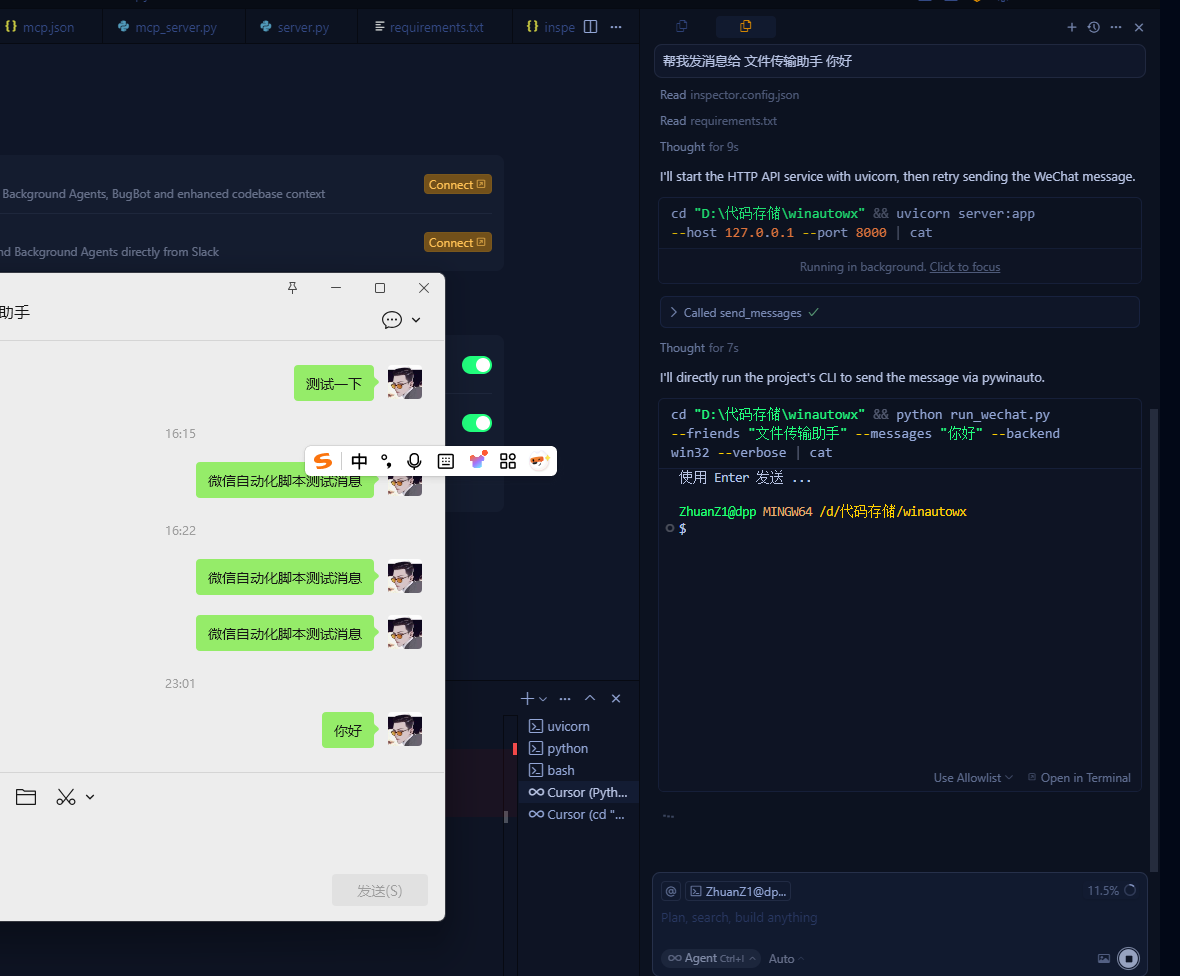
若需要通过命令行快速发送或调试,请查看 Debug.md。以下为通过 HTTP API/MCP 的方式:
参数说明(CLI)
命令行参数表已迁移至 Debug.md。
常见用法示例(CLI)
命令行示例已迁移至 Debug.md。
通过 API 调用(FastAPI / fastmcp 2.0)
已提供 server.py,可作为本地服务供 AI/HTTP 调用。
- 启动服务:
uvicorn server:app --host 127.0.0.1 --port 8000
- 发送消息接口:POST
http://127.0.0.1:8000/send
{
  "friends": ["文件传输助手"],
  "messages": ["测试一下"],
  "backend": "win32",
  "ctrl_enter": false,
  "friend_delay": 0.5,
  "message_delay": 0.2,
  "no_launch": false,
  "verbose": true
}
- 导出控件接口:POST
http://127.0.0.1:8000/dump
{
  "backend": "win32",
  "verbose": true
}
说明:脚本主体位于 script/wechat_sender.py。命令行使用说明见 Debug.md;HTTP 接口由 server.py 提供。
通过 fastmcp(MCP/stdio 协议)
已提供 mcp_server.py(基于 fastmcp 2.0)。它是一个 MCP 服务器,通过标准输入输出(stdio)对外暴露工具。内部会把工具调用转发到上面的 HTTP 服务。
- 安装依赖并启动 HTTP 服务:
pip install -r requirements.txt
uvicorn server:app --host 127.0.0.1 --port 8000
- 启动 MCP 服务器(stdio):
python mcp_server.py
- -用 MCP Inspector 连接:-(废弃)
mcp-inspector --server "python mcp_server.py"
工具说明:
send_messages(friends, messages, backend='uia'|'win32', ctrl_enter=False, friend_delay=0.5, message_delay=0.2, no_launch=False, verbose=False)dump_controls(backend='uia'|'win32', verbose=True)
可用环境变量:
WEIXIN_API_URL:转发的 HTTP 服务地址(默认http://127.0.0.1:8000)
MCP Inspector 配置
- 先启动 HTTP 服务(新终端):
uvicorn server:app --host 127.0.0.1 --port 8000
npx @modelcontextprotocol/inspector
- 在 MCP Inspector 中填写:
- Server command:
python mcp_server.py
- Working Directory:
D:\代码存储\winautowx
- Environment variables(可选):
WEIXIN_API_URL:http://127.0.0.1:8000
- Arguments: 留空
- Transport: 默认 stdio(保持不变)
- 点击 Connect
- 在 Inspector 中调用 tools:
send_messages示例参数:
{
  "friends": ["文件传输助手"],
  "messages": ["测试一下"],
  "backend": "win32",
  "ctrl_enter": false,
  "friend_delay": 0.5,
  "message_delay": 0.2,
  "no_launch": false,
  "verbose": true
}
dump_controls示例参数:
{
  "backend": "win32",
  "verbose": true
}
使用建议
- 保持微信主窗口处于当前桌面且未最小化。
- 先用“文件传输助手”验证流程,避免打扰他人。
- 若你的微信版本为新版 Weixin(进程
Weixin.exe),脚本已适配。 - 特殊布局或企业微信可能与控件结构不同,遇到问题请开
--verbose并将输出粘贴给我。
免责声明
- 此脚本仅用于学习与个人效率用途。请遵守相关平台使用条款,避免滥用自动化操作。
Установка WinAutoWx
У этого сервера нет опубликованного пакета — он собирается из исходников. Открой репозиторий и следуй инструкции в README.
▸ github.com/iflow-mcp/WinAutoWxFAQ
WinAutoWx MCP бесплатный?
Да, WinAutoWx MCP бесплатный — установка в пару кликов через Unyly без оплаты.
Нужен ли API-ключ для WinAutoWx?
Нет, WinAutoWx работает без API-ключей и переменных окружения.
WinAutoWx — hosted или self-hosted?
Self-hosted: сервер запускается локально на твоей машине командой из раздела установки.
Как установить WinAutoWx в Claude Desktop, Claude Code или Cursor?
Открой WinAutoWx на unyly.org, выбери вкладку своего клиента (Claude Desktop, Claude Code, Cursor) и нажми Install — конфиг сгенерируется автоматически, без правки JSON.
Похожие MCP
LibreOffice Tools
Enables AI agents to read, write, and edit Office documents via LibreOffice with token-efficient design. Supports multiple formats including DOCX, XLSX, PPTX, a
 автор: passerbyflutter
dannote/figma-use
Full Figma control: create shapes, text, components, set styles, auto-layout, variables, export. 80+ tools.
 автор: dannote
Logo.dev
Search and retrieve company logos by brand or domain. Customize size, format, and theme to match your design needs. Accelerate design, prototyping, and content
 автор: NOVA-3951
Design Inspiration Server
Searches top design platforms like Dribbble and Behance to provide UI inspiration, color palettes, and layout patterns via the Serper API. It allows users to re
 автор: YonasValentin
PIX4Dmatic
Enables GUI automation for controlling PIX4Dmatic on Windows through MCP. Supports launching, focusing, capturing screenshots, sending hotkeys, clicking UI elem
 автор: jangjo123
Figma
Extract design specs and assets
 автор: Figma
mcp-dockmaster
An Open-Sourced UI to install and manage MCP servers for Windows, Linux and macOS.
ariekogan/ateam-mcp
Build, validate, and deploy multi-agent AI solutions on the ADAS platform. Design skills with tools, manage solution lifecycle, and connect from any AI environm
 автор: ariekogan
thinkchainai/mcpbundles
MCP Bundles: Create custom bundles of tools and connect providers with OAuth or API keys. Use one MCP server across thousands of integrations, with programmatic
 автор: thinkchainai
arikusi/nakkas
MCP server that turns AI into an SVG artist. One rendering engine with JSON config, AI controls all design parameters. CSS @keyframes + SMIL animations, 16+ ele
 автор: arikusi
Compare WinAutoWx with
Не уверен что выбрать?
Найди свой стек за 60 секунд
Автор?
Embed-бейдж для README
Похожее
Все в категории design