
XRefKit
БесплатноНе проверенRead-only MCP server that serves inactive definitions from XRefKit repositories, including Markdown content, workflow catalog, knowledge catalog, skill metadata

Описание
Read-only MCP server that serves inactive definitions from XRefKit repositories, including Markdown content, workflow catalog, knowledge catalog, skill metadata, and distributable Python tools for client-side execution.
README
AI agents often stop halfway, guess missing context, or produce work that looks plausible but cannot be reviewed or handed off.
XRefKit is a portable Python package and repository model for AI-assisted work that must reproduce domain procedures and judgments.
It runs as its own control repository and helps AI agents:
- load the right knowledge before acting
- select reusable Skills
- record judgments and evidence
- preserve handoffs across humans, agents, and sessions
- close work only through explicit quality gates
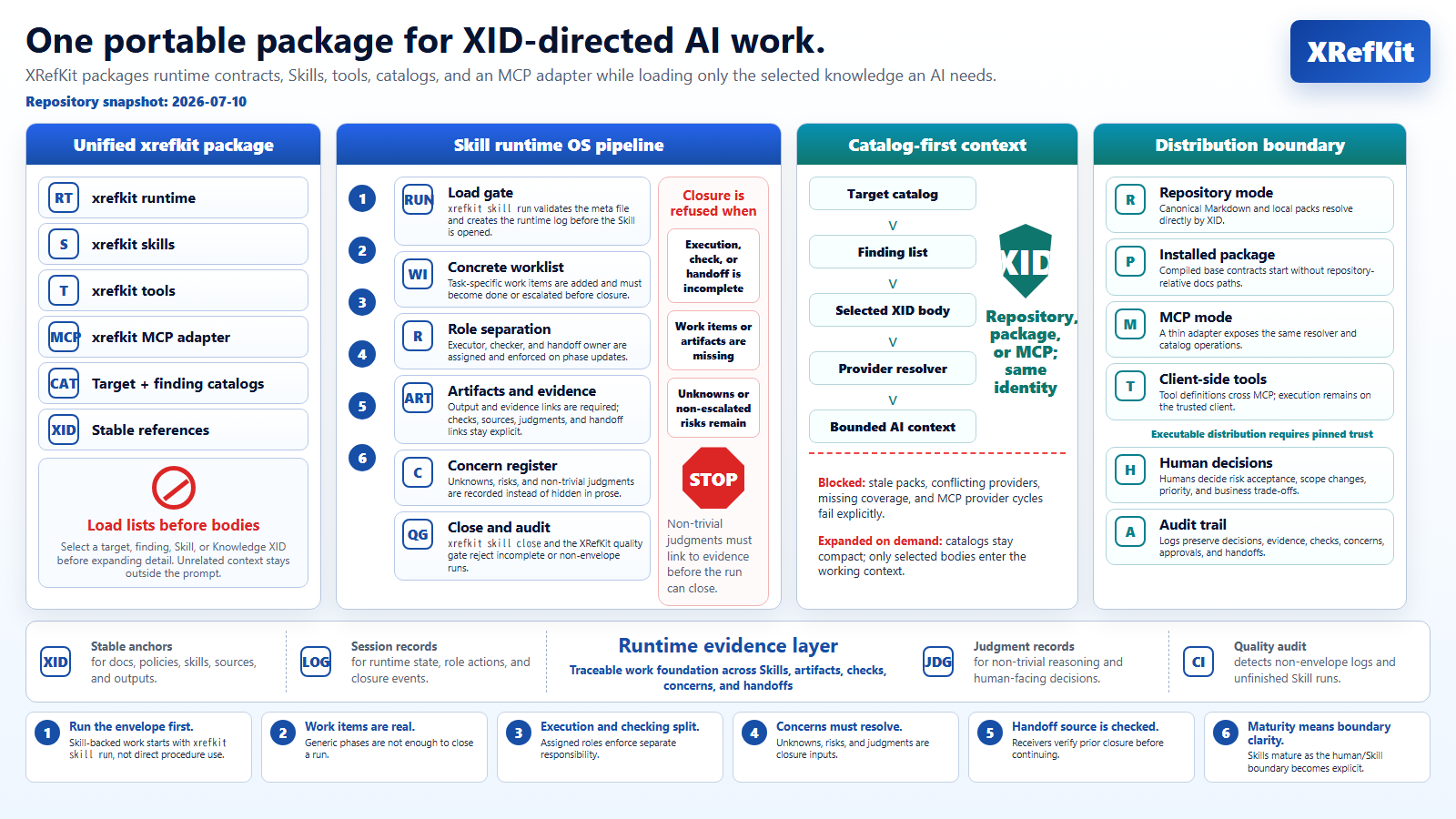
The package provides XID resolution, compact runtime contracts, Skill execution, catalog-first context loading, deterministic closure gates, client-side tools, and a thin MCP adapter over the same rules.
▶️ Download the 2-minute overview: Why XRefKit exists and how it helps AI teams use domain knowledge
Security and API Keys
XRefKit does not require Claude, OpenAI, GitHub, or other provider API keys to explore the repository.
This repository is a governance and knowledge-operations framework for AI-assisted work. It does not ask users to paste API keys into the repository, issue trackers, prompts, or configuration files.
If you use XRefKit with an external AI agent such as Claude Code, Codex, or GitHub Copilot, authenticate that agent through the official provider mechanism outside this repository.
Do not commit secrets, API keys, access tokens, .env files, or provider credentials to this repository.
XRefKit does not include repository-managed Claude settings, hooks, MCP server auto-approval, or provider endpoint redirection.
Before running any AI agent in this repository, review agent startup files and tool settings. XRefKit treats repository-controlled agent configuration as part of the trust boundary.
The Problem
Using AI for real work creates recurring operating problems:
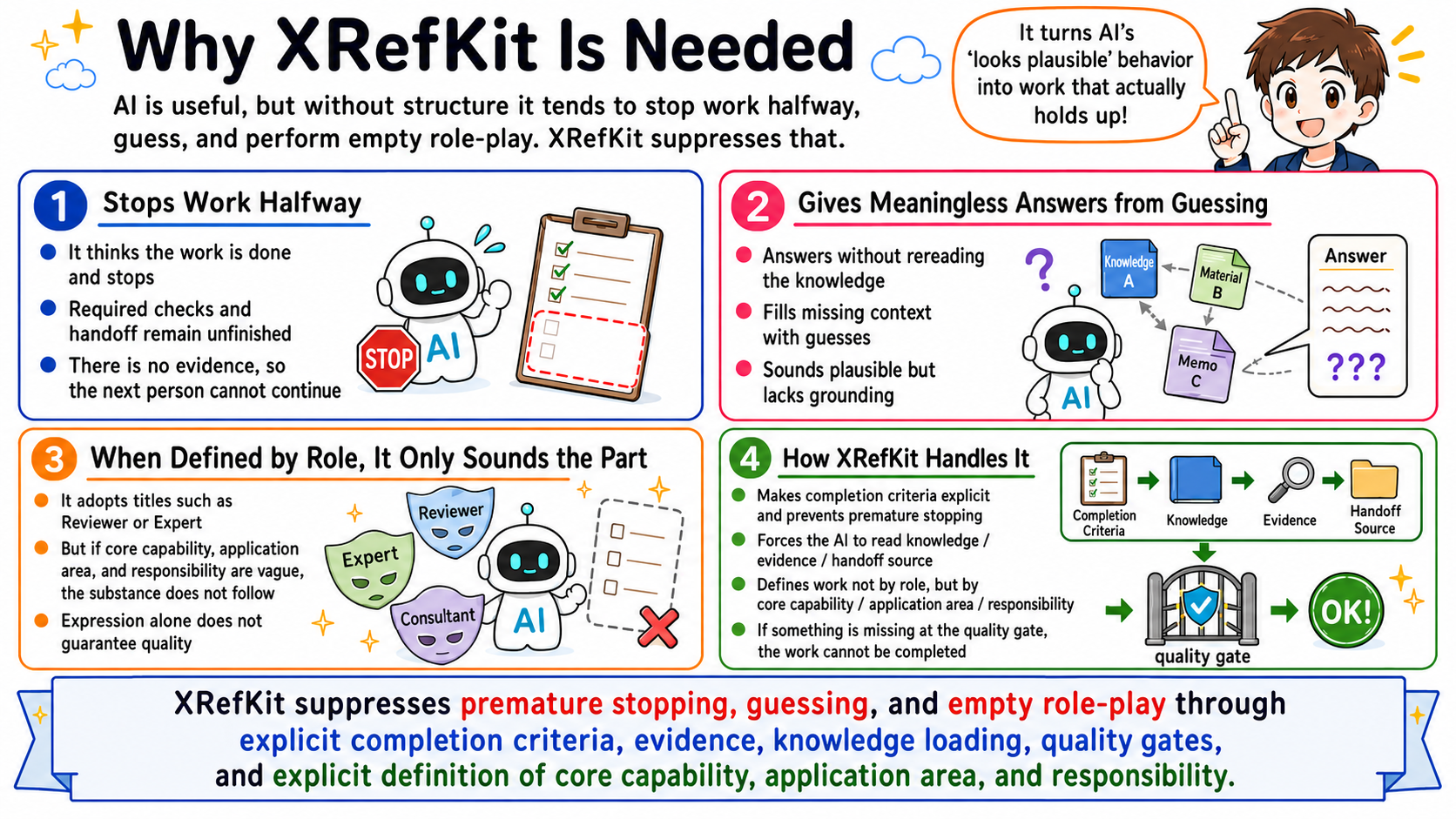
- the AI can act from incomplete context or unsupported guesses
- procedures, domain facts, and judgment criteria get mixed together in prompts
- execution, checking, and handoff collapse into one opaque step
- work becomes hard to continue across agents, humans, or sessions
- outputs may lack evidence, closure discipline, or auditability
What XRefKit Provides
XRefKit makes AI work explicit by separating:
- Skills: executable work units, each identified by a capability/tuning/responsibility triad and carrying its execution and check contract
- Knowledge: source-backed domain facts and local rules loaded only when needed
- Workflow protocol: the generic, deterministic control for Skill-backed and instruction-backed runs (phases, verification, closure)
- Semantic routing: selecting the right Skill for a goal from user intent and the Skill catalog
- Evidence: logs, judgments, concerns, and quality checks
- XIDs: stable references that survive file movement and restructuring so AI can load targeted context without treating the whole repository as one prompt
This separation prevents prompts, domain facts, execution steps, review criteria, and handoff records from collapsing into one opaque instruction block.
How It Works
- Original materials are kept in
sources/. - AI-readable knowledge is maintained in
knowledge/. - Work is defined in
skills/(executable procedure with a capability/tuning/responsibility identity) andknowledge/. - Agents are routed semantically to the right Skill and load only the relevant context.
- Evidence and quality gates make incomplete or unsupported work visible.
When an instruction has no matching Skill, open an instruction-backed workflow run explicitly. The run requires either user-supplied procedural completion conditions or an explicit opt-in to the repository defaults:
xrefkit workflow run --task "Perform the requested procedure" `
  --use-default-completion-conditions --json
verify and close determine procedural completion only. Output quality is
recorded separately after human acceptance with the existing feedback record.
Each work item also requires its own completion criterion; if that criterion is
not yet definable, record the item as unknown, blocked, or escalated with a
reason instead of inventing a criterion.
Quick Start
Install the package and initialize an instance:
python -m pip install -e .
xrefkit init
xrefkit --help
Start the integrated MCP server over stdio:
xrefkit mcp serve --repo . --transport stdio
The server writes structured correlation events to
work/mcp/xid_audit.jsonl by default. After xrefkit skill run returns a
run_id, the client calls MCP bind_skill_run and executes the returned
client_record_command against the local run_log. Subsequent MCP Knowledge
searches and XID resolutions then share the same run_id as the client Skill
Run. The client separately records actual model-context loading and judgment
application with xrefkit skill knowledge --action load|apply.
Skill Run Observation Dashboard
The local dashboard lets a human inspect Skill run status, closure and quality gates, evidence, handoffs, XID usage, missing information, and proposal-only boundary analysis.
Start it from the repository root:
python -m xrefkit dashboard serve --root .
Open http://127.0.0.1:8765/. To open the browser
automatically, add --open-browser. Use --port 8766 when the default port is
already in use, or --sessions-dir path\to\sessions when logs are stored
elsewhere.
The main tabs are:
- Overview / Attention / Closure: run status, blockers, phases, closure, and quality-gate state.
- Evidence / Handoff: outputs, checks, handoffs, unknowns, risks, and judgments needed for review and continuity.
- XID Usage: selected, resolved, loaded, used, available, and unused XIDs.
- Analysis: deterministic candidates for Knowledge correction, Skill correction, split, merge, or usage-gap investigation. Review the evidence, counterevidence, unknowns, and verification plan before changing canonical files. The dashboard never applies these proposals automatically.
- Missing Information: absent correlation, MCP, Knowledge, or feedback records.
Export the dashboard data and create a human-reviewable boundary report:
python -m xrefkit dashboard data --root . > work/reports/dashboard-observation.json
python -m xrefkit analysis boundary report `
  --input work/reports/dashboard-observation.json `
  --out work/reports/boundary-observation.md
The running dashboard also exposes JSON at
http://127.0.0.1:8765/api/runs and health at
http://127.0.0.1:8765/healthz. Stop a foreground
server with Ctrl+C. For the complete review loop and screen guide, see the
Skill Run Observation Dashboard Usage guide.
XRefKit is designed to be driven by an AI agent. The agent first resolves the startup contract XID, selects a Skill or source target from a compact catalog, and expands only the selected body.
Here, sources/ is the human drop point for original materials, existing Skill artifacts, rules, and examples that the AI will turn into repository-managed assets.
If you are migrating an existing Skill:
- Place the source Skill or related source materials in
sources/. - Ask the AI agent to migrate that Skill into the XRefKit repository model.
- Have the migration process separate procedure, source-backed knowledge, and runtime structure as needed.
- Review whether the migrated Skill is usable for the intended work.
If you are creating a new Skill:
- Place the source materials, rules, or task examples in
sources/. - Ask the AI agent to use the Skill authoring flow (
skill_flow_authoring) to create a new Skill. - Have the authoring process separate procedure, source-backed knowledge, and runtime structure as needed.
- Review whether the new Skill is usable for the intended work.
In both cases:
- Give the AI agent a concrete work request with the goal, expected output, and constraints.
- Inspect
work/records as operational memory, then refine the Skill, knowledge, guard conditions, routing rules, and quality gates based on what happened.
How to Explore This Repository
Point your AI agent at this repository and ask directly.
Startup instruction files for Claude, Codex, and GitHub Copilot are included.
These files are plain-text operating instructions. They do not contain API keys, provider credentials, hooks, MCP server definitions, or network redirection settings.
The agent can read the operating contract and explain the repository structure in context.
Repository Map
xrefkit/: installable runtime, resolver, Skill control, tools registry, and MCP adapterdocs/: human-facing docs and policyknowledge/: source-backed knowledge fragmentssources/: original materials for verificationskills/: Skill definitions and routing indextools/: XID-backed client-side command implementations and packaged assetswork/: operational memory for execution logs, judgments, handoffs, retrospectives, and improvement inputagent/: agent entry and operating contracthuman-docs/: human-facing Japanese and English docs, materials, assets, and video packagessite/: generated publication output, source manifest, and compatibility routes
Runtime and Context Model
- Base runtime obligations are authored structurally and compiled into package resources with source hashes and token budgets.
- Repository, installed-package, and MCP providers resolve the same XID identities; conflicts and stale base packs fail explicitly.
The installed base runtime pack is generation-published. Formal consumers must
read xrefkit/resources/base/current.json first and then load both files from
the referenced generations/<generation>/ directory. The top-level
contracts.json and model_body.md files are compatibility snapshots only;
they are not an authoritative source and must not be used for generation
consistency checks.
- Source structure is split into a target catalog and finding catalog. The AI loads lists before selected details.
xrefkit catalog maintain --apply-safepromotes only unambiguous candidate findings; conflicts remain in a review queue.- MCP exposes the shared resolver and catalogs. It does not own independent domain rules or execute client tools.
Entry Points
- Human documentation:
docs/000_index.md - Human-facing language trees:
human-docs/ja/000_index.md,human-docs/en/ - Agent entry:
agent/000_agent_entry.md
Установить XRefKit в Claude Desktop, Claude Code, Cursor
unyly install xrefkit-mcpСтавит в Claude Desktop, Claude Code, Cursor и VS Code — сам разбирается с npx, uvx и сборкой из исходников.
Впервые? Поставь CLI: curl -fsSL https://unyly.org/install | sh
Или настроить вручную
Выполни в терминале:
claude mcp add xrefkit-mcp -- uvx xrefkitFAQ
XRefKit MCP бесплатный?
Да, XRefKit MCP бесплатный — установка в пару кликов через Unyly без оплаты.
Нужен ли API-ключ для XRefKit?
Нет, XRefKit работает без API-ключей и переменных окружения.
XRefKit — hosted или self-hosted?
Доступен hosted-вариант: Unyly запускает сервер в облаке, локальная установка не обязательна.
Как установить XRefKit в Claude Desktop, Claude Code или Cursor?
Открой XRefKit на unyly.org, выбери вкладку своего клиента (Claude Desktop, Claude Code, Cursor) и нажми Install — конфиг сгенерируется автоматически, без правки JSON.
Похожие MCP
GitHub
PRs, issues, code search, CI status
 автор: GitHub
Filesystem
Secure file operations with configurable access controls.
Memory
Knowledge graph-based persistent memory system.
Template MCP Server
A CLI tool to create a new Model Context Protocol server project with TypeScript support, dual transport options, and an extensible structure
 автор: mcpdotdirect
Compare XRefKit with
Не уверен что выбрать?
Найди свой стек за 60 секунд
Автор?
Embed-бейдж для README
Похожее
Все в категории development