
yusong652/pfc-mcp
БесплатноНе проверенMCP server for [ITASCA PFC](https://www.itascacg.com/software/pfc) discrete element simulation — browse documentation, execute scripts, capture plots, and manag

Описание
MCP server for ITASCA PFC discrete element simulation — browse documentation, execute scripts, capture plots, and manage long-running tasks via a WebSocket bridge to the PFC GUI.
README

itasca-mcp
PyPI Downloads GitHub stars License: MIT Python 3.10+
itasca>model new ;now, with LLM.
itasca-mcp connects AI agents to ITASCA's numerical modeling software — PFC, FLAC, 3DEC, MPoint, and MassFlow — through the Model Context Protocol. Browse documentation, run simulations, and execute code, all through natural conversation.
itasca>model solve ;LLM solves.

Tools (10)
5 documentation tools — browse and search the selected engine's commands, Python API, and reference docs. No bridge required.
5 execution tools — interactive REPL, task submission, progress monitoring, interruption, and history. Requires bridge.
First-time Setup
Prerequisites
- An ITASCA engine installed — PFC, FLAC, 3DEC, MPoint, or MassFlow. 9.0+ recommended; PFC 6.0 / 7.0 and FLAC 7.0 are also supported.
- uv installed (for
uvx) - An AI agent — Claude Code, Codex CLI, Gemini CLI, or any MCP-capable client
Agentic Setup (Recommended)
Copy this to your AI agent and let it self-configure:
Fetch and follow this bootstrap guide end-to-end:
https://raw.githubusercontent.com/yusong652/itasca-mcp/main/docs/agentic/itasca-mcp-bootstrap.md
Manual Setup
1. Register the MCP server with your agent.
Most agents register it with a single command:
# Claude Code
claude mcp add itasca-mcp -- uvx itasca-mcp

# Codex / Codex-cli
codex mcp add itasca-mcp -- uvx itasca-mcp

# Gemini CLI
gemini mcp add itasca-mcp uvx itasca-mcp
Or fill in the MCP config file manually:
{
  "mcpServers": {
    "itasca-mcp": {
      "command": "uvx",
      "args": ["itasca-mcp"]
    }
  }
}
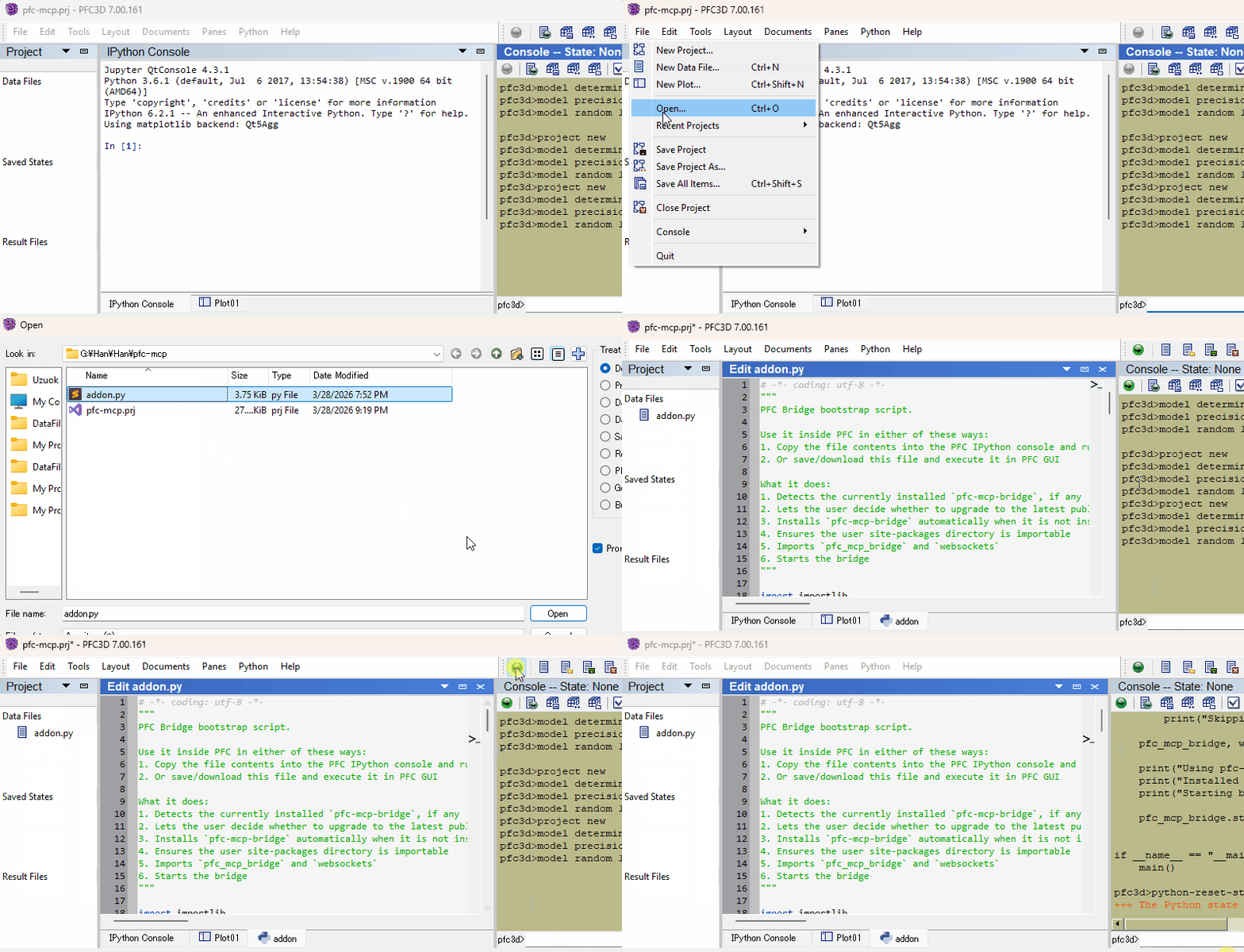
2. Start the bridge from inside the ITASCA engine:
Download addon.py, then use either of these two flows inside the engine GUI (PFC, FLAC, 3DEC, ...):
- Copy the file contents into the engine's IPython console and run them
- Or download the file and execute it in the engine GUI
Verify
Restart your AI agent and ask it to call itasca_execute_code to verify the connection.
Daily Startup
Once first-time setup is done, each new engine session only needs the bridge re-started — run this in the engine's IPython console and you're back online:
import itasca_mcp_bridge
itasca_mcp_bridge.start()
start() checks PyPI for a newer bridge release and self-upgrades before starting. The MCP client config persists.
Features
- Multi-engine corpus - command, Python API, and reference docs for PFC, FLAC, 3DEC, MPoint, and MassFlow, selected via the required
softwareparameter - Multi-version support - command docs across engine versions (PFC: 6.0/7.0/9.0, FLAC: 7.0/9.0) via the
versionparameter - Hierarchical documentation browsing - agents navigate the engine command tree to discover capabilities and boundaries, reducing hallucinated commands
- Enhanced plot documentation - plot items reference docs supplementing the official documentation
- Live REPL alongside running tasks - execute code while a simulation is running: check model state and intermediate results without stopping the task; also useful for quick iteration before writing a full script
- Task lifecycle management - submit long-running simulations, monitor progress, interrupt running tasks, and browse task history
- Multi-client compatible - works with Claude Code, Codex CLI, Gemini CLI, GitHub Copilot CLI, OpenCode, toyoura-nagisa, and other MCP clients
Troubleshooting
See Troubleshooting in the bootstrap guide.
Development
See Developer Guide: Install and Run from Source.
Contributing
PRs and issues are welcome! See the Developer Guide to get started.
License
MIT - see LICENSE.
Установка yusong652/pfc-mcp
У этого сервера нет опубликованного пакета — он собирается из исходников. Открой репозиторий и следуй инструкции в README.
▸ github.com/yusong652/pfc-mcpFAQ
yusong652/pfc-mcp MCP бесплатный?
Да, yusong652/pfc-mcp MCP бесплатный — установка в пару кликов через Unyly без оплаты.
Нужен ли API-ключ для yusong652/pfc-mcp?
Нет, yusong652/pfc-mcp работает без API-ключей и переменных окружения.
yusong652/pfc-mcp — hosted или self-hosted?
Self-hosted: сервер запускается локально на твоей машине командой из раздела установки.
Как установить yusong652/pfc-mcp в Claude Desktop, Claude Code или Cursor?
Открой yusong652/pfc-mcp на unyly.org, выбери вкладку своего клиента (Claude Desktop, Claude Code, Cursor) и нажми Install — конфиг сгенерируется автоматически, без правки JSON.
Похожие MCP
GitHub
PRs, issues, code search, CI status
 автор: GitHub
Filesystem
Secure file operations with configurable access controls.
Memory
Knowledge graph-based persistent memory system.
Template MCP Server
A CLI tool to create a new Model Context Protocol server project with TypeScript support, dual transport options, and an extensible structure
 автор: mcpdotdirect
Compare yusong652/pfc-mcp with
Не уверен что выбрать?
Найди свой стек за 60 секунд
Автор?
Embed-бейдж для README
Похожее
Все в категории development