
AAC
БесплатноНе проверенA TypeScript template for creating Model Context Protocol servers with stdio and SSE support.

Описание
A TypeScript template for creating Model Context Protocol servers with stdio and SSE support.
README
A TypeScript template repository for creating Model Context Protocol (MCP) servers with support for both stdio (Standard Input/Output) and SSE (Server-Sent Events) transports. This template provides a solid foundation for building MCP servers with a well-organized structure and essential features.
Features
- 🚀 Built with TypeScript for type safety and better developer experience
- 🔄 Supports both stdio and SSE transports
- 📦 Includes example prompts, resources, and tools
- ⚡ Uses FastMCP for rapid development
Prerequisites
- Node.js
- npm or yarn package manager
Getting Started
Create a repo from this template
Click Use this template > Create a new repository
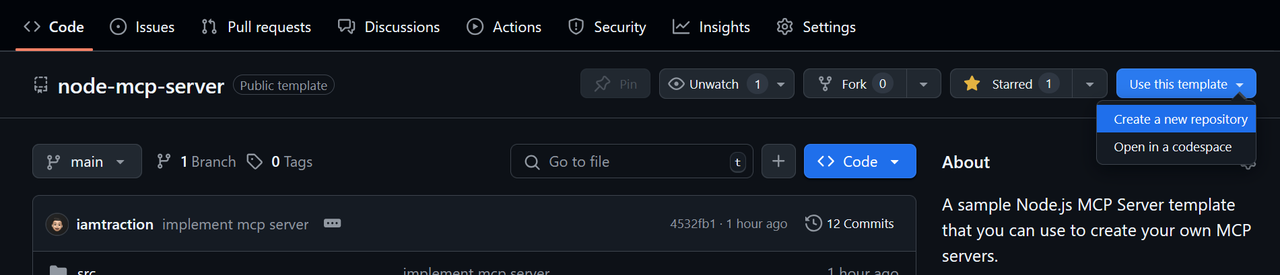
Clone your repository
git clone https://github.com/iamtraction/node-mcp-server.git
cd node-mcp-server
Install dependencies
npm installStart development server
npm run dev
Project Structure
src/
├── prompts/     # MCP prompts
├── resources/   # MCP resources
├── tools/       # MCP tools
└── server.ts    # Main server file
Available Scripts
npm run dev- Start development server with hot reloadnpm run build- Build the TypeScript codenpm run start- Start the production servernpm run watch- Watch for TypeScript changesnpm run lint- Run ESLint to check code quality and style
Adding New Features
Adding a Prompt
Create a new file in src/prompts/ and add it to server.ts. Learn more about MCP Prompts:
import myPrompt from "./prompts/my-prompt.js";
server.addPrompt(myPrompt);
Adding a Resource
Create a new file in src/resources/ and add it to server.ts. Learn more about MCP Resources:
import myResource from "./resources/my-resource.js";
server.addResource(myResource);
Adding a Tool
Create a new file in src/tools/ and add it to server.ts. Learn more about MCP Tools:
import myTool from "./tools/my-tool.js";
server.addTool(myTool);
Configuration
The server can be configured in server.ts. By default, it runs on port 3000 with SSE transport. You can modify the configuration in the server.start() options.:
server.start({
    transportType: "httpStream", // or "stdio"
    httpStream: {
        port: 3000,
    },
});
Learn more about Transports.
Using the MCP Server
stdio Server Setup
{
    "mcpServers": {
        "example-server": {
            "command": "node",
            "args": [ "dist/server.js" ]
         }
    }
}
SSE Server Setup
{
    "mcpServers": {
        "example-server": {
            "url": "https://example-server.com/sse"
         }
    }
}
Contributing
Contributions are welcome! Please feel free to submit a Pull Request.
Showcase
Have you built something cool with this template? Add it to the showcase!
To add your project to the showcase:
- Edit this README.md file
- Add your project to the list above using this format:
- [Your Project Name](link-to-your-project) - Brief description- Submit a pull request
License
This project is licensed under the MIT License - see the LICENSE file for details.
Acknowledgments
- Model Context Protocol - The protocol specification
- MCP TypeScript SDK - The official TypeScript SDK
- FastMCP - The underlying MCP framework
Установка AAC
У этого сервера нет опубликованного пакета — он собирается из исходников. Открой репозиторий и следуй инструкции в README.
▸ github.com/willwade/AAC-MCPFAQ
AAC MCP бесплатный?
Да, AAC MCP бесплатный — установка в пару кликов через Unyly без оплаты.
Нужен ли API-ключ для AAC?
Нет, AAC работает без API-ключей и переменных окружения.
AAC — hosted или self-hosted?
Self-hosted: сервер запускается локально на твоей машине командой из раздела установки.
Как установить AAC в Claude Desktop, Claude Code или Cursor?
Открой AAC на unyly.org, выбери вкладку своего клиента (Claude Desktop, Claude Code, Cursor) и нажми Install — конфиг сгенерируется автоматически, без правки JSON.
Похожие MCP
GitHub
PRs, issues, code search, CI status
 автор: GitHub
Filesystem
Secure file operations with configurable access controls.
Memory
Knowledge graph-based persistent memory system.
Template MCP Server
A CLI tool to create a new Model Context Protocol server project with TypeScript support, dual transport options, and an extensible structure
 автор: mcpdotdirect
Compare AAC with
Не уверен что выбрать?
Найди свой стек за 60 секунд
Автор?
Embed-бейдж для README
Похожее
Все в категории development