
Aai Gateway
БесплатноНе проверенUnified MCP and skill management gateway for AI agents, enabling tool discovery, installation, and sharing with 99% context token savings.

Описание
Unified MCP and skill management gateway for AI agents, enabling tool discovery, installation, and sharing with 99% context token savings.
README
AAI Gateway: Unified MCP & Skill Management, Shared Across AI Agents, 99% Context Token Savings
What Is It
AAI = Agent App Interface
AAI Gateway is the interaction gateway for Agent Apps.
What is an Agent App? An Agent App is a collection of capabilities that an Agent can use. For example:
- An MCP Server is an Agent App — it provides a set of tools
- A Skill package is an Agent App — it provides one or more skills
In AAI Gateway, they are abstracted as Agent Apps under unified management. Import once, and all AI Agents can use them immediately.
What Problems Does It Solve
Context Bloat
Traditional: 10 MCPs × 5 tools = 50 full schemas ≈ 7,500 tokens injected into every conversation.
AAI Gateway: each Agent App needs only fewer than 50 tokens for a summary, with details loaded on demand. 99% token savings.
Finding Tools Is Hard
Traditional: search GitHub → read READMEs → copy JSON configs → debug connections → restart Agent.
AAI Gateway: tell your Agent "use AAI to search for xxx" — auto-searches, installs, ready to use.
"Use AAI to search for a browser automation tool"
→ Search → finds Playwright MCP → Agent summarizes a one-line Agent App summary → install → ready to use, no restart needed
"Use AAI to search for a PPT creation skill"
→ Search → finds PPT Skill → uses skill description as Agent App summary → install → ready to use, no restart needed
Duplicate Config
Configure the same thing in Claude Code, Codex, and OpenCode separately? Import once through AAI Gateway, all Agents share instantly.
Quick Start (30 Seconds)
Claude Code:
claude mcp add --scope user --transport stdio aai-gateway -- npx -y aai-gateway
Codex:
codex mcp add aai-gateway -- npx -y aai-gateway
OpenCode — add to ~/.config/opencode/opencode.json:
{
  "mcp": {
    "aai-gateway": {
      "type": "local",
      "command": ["npx", "-y", "aai-gateway"],
      "enabled": true
    }
  }
}
openclaw plugins install openclaw-aai-gateway-plugin
Once installed, just tell your Agent what you want to do.
Built-in Tools
| Tool | Description |
|---|---|
search:discover |
Search and install new tools with natural language |
mcp:import |
Import an MCP Server as an Agent App |
skill:import |
Import a Skill package as an Agent App |
listAllAaiApps |
List all registered Agent Apps |
enableApp / disableApp |
Enable or disable an Agent App per Agent |
removeApp |
Remove an Agent App |
aai:exec |
Execute a specific tool within an Agent App |
Each imported Agent App generates an app_<app-id> tool that returns the full operation guide and tool list when called.
Preset Agent Apps (auto-discovered when locally installed)
| App ID | Name | Description |
|---|---|---|
claude |
Claude Code | AI coding assistant for code editing, analysis, and development |
codex |
Codex | OpenAI-powered AI coding assistant |
opencode |
OpenCode | AI development assistant for editing files and running commands |
Architecture
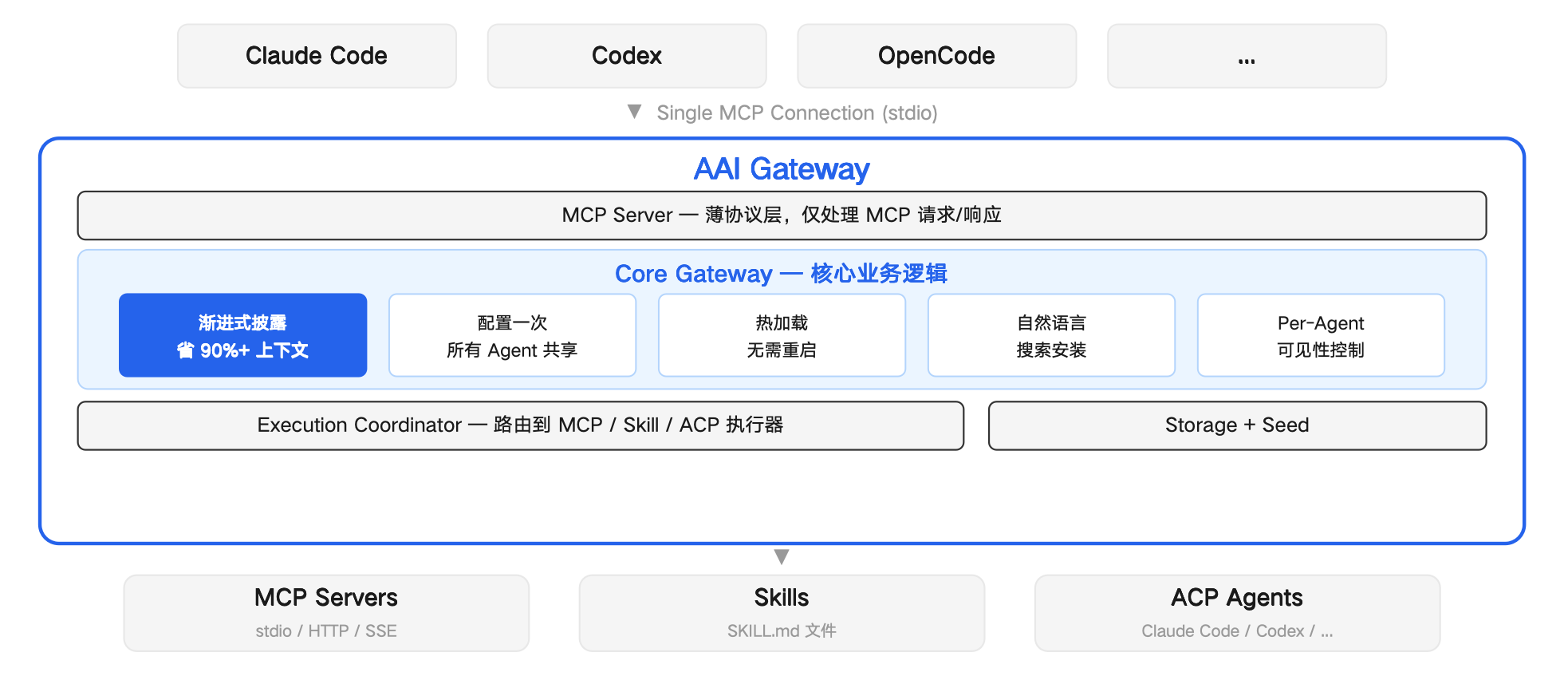
Developers: Get Your Agent App Auto-Discovered
Create an aai.json descriptor and submit it to src/discovery/descriptors/. When a user's local environment meets the discovery.checks conditions, the Agent will auto-discover your Agent App.
{
  "schemaVersion": "2.0",
  "version": "1.0.0",
  "app": {
    "name": { "default": "My App" }
  },
  "discovery": {
    "checks": [
      { "kind": "command", "command": "my-app" }
    ]
  },
  "access": {
    "protocol": "mcp",
    "config": {
      "command": "my-app-mcp",
      "args": ["--stdio"]
    }
  },
  "exposure": {
    "summary": "Use when the user wants to do X."
  }
}
discovery.checks supports three check types: command (command exists), file (file exists), path (directory exists).
Supported protocols: mcp, skill, acp-agent
Welcome to submit a PR to contribute new Agent App descriptors, or open an issue for feedback.
Установка Aai Gateway
У этого сервера нет опубликованного пакета — он собирается из исходников. Открой репозиторий и следуй инструкции в README.
▸ github.com/gybob/aai-gatewayFAQ
Aai Gateway MCP бесплатный?
Да, Aai Gateway MCP бесплатный — установка в пару кликов через Unyly без оплаты.
Нужен ли API-ключ для Aai Gateway?
Нет, Aai Gateway работает без API-ключей и переменных окружения.
Aai Gateway — hosted или self-hosted?
Self-hosted: сервер запускается локально на твоей машине командой из раздела установки.
Как установить Aai Gateway в Claude Desktop, Claude Code или Cursor?
Открой Aai Gateway на unyly.org, выбери вкладку своего клиента (Claude Desktop, Claude Code, Cursor) и нажми Install — конфиг сгенерируется автоматически, без правки JSON.
Похожие MCP
Fetch
Web content fetching and conversion for efficient LLM usage.
AWS KB Retrieval
Retrieval from AWS Knowledge Base using Bedrock Agent Runtime.
 автор: modelcontextprotocol
Spring AI MCP Server
Provides auto-configuration for setting up an MCP server in Spring Boot applications.
llm-analysis-assistant
A very streamlined mcp client that supports calling and monitoring stdio/sse/streamableHttp, and can also view request responses through the /logs page. It also
 автор: xuzexin-hz
Compare Aai Gateway with
Не уверен что выбрать?
Найди свой стек за 60 секунд
Автор?
Embed-бейдж для README
Похожее
Все в категории ai