
ACDP
БесплатноНе проверенEnables multiple AI agents to coordinate work on the same codebase by providing real-time file locking, commit approval, and agent awareness through a lightweig

Описание
Enables multiple AI agents to coordinate work on the same codebase by providing real-time file locking, commit approval, and agent awareness through a lightweight WebSocket-based MCP server.
README
MCP working video
https://drive.google.com/drive/folders/17vlptaYTBIrzcn-OJqejMzYxloS3vuNl?usp=drive_link
Presentation video, how it works
https://github.com/user-attachments/assets/70b13320-ca29-4215-bd8e-067562017126
ACDP — Agent Coordination Protocol for Development
ACDP is an open protocol that lets multiple AI agents (and humans) work on the same codebase simultaneously without conflicts. It provides real-time file locking, commit approval, and agent awareness through a lightweight WebSocket server — independent of any version control system or file storage backend.
The Problem
When multiple AI agents work on the same project ("vibecoding"), things break fast:
- Conflicts everywhere — Two agents edit the same file, one overwrites the other
- No awareness — Agent A doesn't know Agent B is modifying a shared dependency
- No coordination — There's no way to say "I'm working on this, don't touch it"
- Slow feedback — File-based coordination requires save+sync cycles just to check lock status
- Lost work — Without locks, agents silently overwrite each other's changes
Traditional version control was designed for incremental human collaboration. There is no standard for real-time coordination between parallel autonomous agents — regardless of where the code is stored.
How ACDP Solves It
ACDP is a standalone coordination layer. It doesn't depend on Git, GitHub, or any specific file storage — it works with any project, anywhere.
The core idea: One machine runs a WebSocket server that holds the coordination state (locks, connected agents, pending approvals) in memory. Every agent connects to this server via an MCP (Model Context Protocol) interface and coordinates in real-time. The protocol only manages who can modify what and when — how you store or version your code is entirely up to you.
Agent wants to edit app.js
        │
        ▼
  check_locks()  ──→  "app.js is free"
        │
        ▼
  lock_files(["app.js"])  ──→  All agents notified: "app.js locked by Agent A"
        │
        ▼
  Agent works locally (only on locked files)
        │
        ▼
  request_commit(["app.js"])  ──→  Auto-approved (agent holds the lock)
        │
        ▼
  Agent commits changes (Git, save, deploy — whatever your workflow is)
        │
        ▼
  notify_sync(["app.js"])  ──→  All agents notified: "sync, app.js changed"
                                  Lock auto-released
Key properties:
- Real-time — Locks and notifications are instant via WebSocket, not dependent on sync cycles
- Agent-aware — Every agent sees who's connected and what they're working on
- Approval built-in — Configurable auto-approve or manual approval for critical paths
- Storage-agnostic — Works with Git, local filesystems, cloud storage, or any other backend
Architecture
Why WebSocket + MCP?
We evaluated three approaches:
| Approach | Pros | Cons |
|---|---|---|
| File-based (coordination files in repo) | No extra infrastructure | Slow (save+sync per lock), polling required, conflicts on coordination files |
| HTTP API | Simple REST calls | No real-time updates, agents must poll |
| WebSocket + MCP | Real-time, instant notifications, zero config for agents | Requires one machine to host the server |
We chose WebSocket + MCP because coordination must be real-time. When Agent A locks a file, Agent B needs to know now, not after the next sync. And because the coordination layer is a standalone WebSocket server, it works regardless of how the project stores its files.
MCP (Model Context Protocol) is the standard interface for AI agents to use external tools. By wrapping the WebSocket client in an MCP server, any AI agent that supports MCP (Claude, GPT, Gemini, etc.) gets coordination tools automatically.
System Design
        Owner Machine (or any machine)
        ┌───────────────────────────────┐
        │   acdp-socket-server          │
        │   WebSocket on ws://:3100     │
        │                               │
        │   ┌─────────────────────┐     │
        │   │ State (in memory)   │     │
        │   │  - Active locks     │     │
        │   │  - Connected agents │     │
        │   │  - Pending commits  │     │
        │   └─────────────────────┘     │
        │                               │
        │   Approval Engine             │
        │   Audit Log (JSONL)           │
        └───────────┬───────────────────┘
                    │ WebSocket
          ┌─────────┼──────────────┐
          │         │              │
          ▼         ▼              ▼
     ┌─────────┐ ┌─────────┐ ┌─────────┐
     │Machine A│ │Machine B│ │Machine C│
     │         │ │         │ │         │
     │ Claude  │ │ GPT     │ │ Human + │
     │ + MCP   │ │ + MCP   │ │ Claude  │
     └────┬────┘ └────┬────┘ └────┬────┘
          │           │           │
          └───────────┼───────────┘
                      │
                      ▼
              Project Files
         (Git, local, cloud, etc.)
Three components, one npm package:
| Component | Role |
|---|---|
acdp-socket-server |
WebSocket server — holds locks, agents, and approvals in memory. Runs on one machine. |
acdp-socket-client |
Client library — connects to the server, handles reconnection with exponential backoff. |
acdp-mcp-server |
MCP server — wraps the client into tools that AI agents can call. Runs on every agent's machine. |
Why In-Memory State?
The coordination state (locks, connected agents) lives only in memory. If the server dies, all locks die with it. This is intentional:
- Clean restart — No stale locks from crashed agents
- Simplicity — No database, no persistence layer, no migration scripts
- Speed — Everything is a memory read/write, no I/O
- Correctness — A lock from a dead server is meaningless anyway
The only things persisted are config.json (server infrastructure: port, token, timeouts), acdp/governance.json (policy: owner, sub-owner, approval rules), and an optional append-only JSONL audit log for debugging.
Installation
Requirements: Node.js >= 18
Option A: Global (recommended — works in every project)
Important: Do NOT use
claude mcp addCLI commands — there are known bugs with flag parsing that causeunknown optionerrors. Edit the config file directly instead.
Mac / Linux — edit ~/.claude.json and add the acdp entry inside mcpServers:
{
  "mcpServers": {
    "acdp": {
      "command": "npx",
      "args": ["-y", "-p", "acdp-mcp-server", "acdp-mcp"],
      "env": {
        "ACDP_AGENT_ID": "claude-agent"
      }
    }
  }
}
If the file already has other keys, just add the
"acdp": { ... }block inside the existing"mcpServers"object.
Windows — first install the package globally:
npm install -g acdp-mcp-server
Then edit the config file. The location depends on your Claude Code version — check which one exists on your machine:
Option 1: ~/.claude/.claude.json (wrapped format, same as Mac):
{
  "mcpServers": {
    "acdp": {
      "command": "node",
      "args": ["C:\\Users\\YOUR_USER\\AppData\\Roaming\\npm\\node_modules\\acdp-mcp-server\\bin\\acdp-mcp.js"],
      "env": {
        "ACDP_AGENT_ID": "claude-agent"
      }
    }
  }
}
Option 2: ~/.claude/mcp/acdp.json (flat format, no mcpServers wrapper):
{
  "command": "node",
  "args": ["C:\\Users\\YOUR_USER\\AppData\\Roaming\\npm\\node_modules\\acdp-mcp-server\\bin\\acdp-mcp.js"],
  "env": {
    "ACDP_AGENT_ID": "claude-agent"
  }
}
Replace YOUR_USER with your Windows username. To find the exact path, run: where acdp-mcp or npm root -g.
Note: On Windows, use
nodedirectly instead ofnpxorcmd /c— they don't propagate stdio correctly to the MCP process. If you're unsure which config location to use, check if~/.claude/.claude.jsonalready exists — if it does, add your MCP there. Otherwise, create~/.claude/mcp/acdp.json.
After editing, restart Claude Code. ACDP tools will be available in every project.
Option B: Per-project
Create .mcp.json in the project root:
Mac / Linux:
{
  "mcpServers": {
    "acdp": {
      "command": "npx",
      "args": ["-y", "-p", "acdp-mcp-server", "acdp-mcp"],
      "env": {
        "ACDP_AGENT_ID": "claude-agent"
      }
    }
  }
}
Windows (install globally first with npm install -g acdp-mcp-server):
{
  "mcpServers": {
    "acdp": {
      "command": "node",
      "args": ["C:\\Users\\YOUR_USER\\AppData\\Roaming\\npm\\node_modules\\acdp-mcp-server\\bin\\acdp-mcp.js"],
      "env": {
        "ACDP_AGENT_ID": "claude-agent"
      }
    }
  }
}
Commit it to your project — every collaborator gets ACDP automatically. Restart Claude Code to load the MCP.
What Happens on First Run
When the MCP server starts, it:
- Checks if a socket server is already running on port 3100
- If not, auto-generates
config.jsonwith a random secure token and your machine as owner - Starts the socket server as a detached background process
- Connects and registers the agent
Zero configuration required. No manual server setup, no token sharing for local use.
Usage
Available Tools
Once installed, your AI agent has these tools:
| Tool | Description |
|---|---|
check_locks |
List all active file locks — who locked what, when it expires |
lock_files |
Lock files before modifying them. Fails if already locked by another agent |
release_files |
Release your locks when done or when you change plans |
request_commit |
Request permission to commit. Auto-approved if you hold the lock |
notify_sync |
After committing: notify all agents to sync, auto-releases your locks |
list_agents |
See who's connected — agent IDs, machines, roles |
connect_remote |
Switch to a remote server (asks for IP + token) |
connection_status |
Check which server you're currently connected to |
Single Developer Workflow
You (with Claude) working on a project:

1. Start Claude Code → MCP auto-starts the socket server
2. Claude calls check_locks → all clear
3. Claude calls lock_files(["src/api.js"]) → locked
4. Claude edits src/api.js
5. Claude calls request_commit → approved (holds the lock)
6. Claude commits the changes
7. Claude calls notify_sync → lock released
Even solo, ACDP is useful: it gives your agent a structured workflow and prevents accidental concurrent edits across multiple Claude sessions.
Multi-Agent Workflow (Same Machine)
Terminal 1: Claude with ACDP_AGENT_ID=agent-frontend
Terminal 2: Claude with ACDP_AGENT_ID=agent-backend

Agent Frontend:
  lock_files(["src/components/Header.jsx"]) → locked
  (works on Header)

Agent Backend:
  lock_files(["src/api/routes.js"]) → locked
  lock_files(["src/components/Header.jsx"]) → FAILS (locked by agent-frontend)
  (works on routes instead)

Agent Frontend:
  notify_sync(["src/components/Header.jsx"]) → lock released, backend notified

Agent Backend:
  (receives notification: Header.jsx changed, sync)
  lock_files(["src/components/Header.jsx"]) → now succeeds
Live Dashboard
ACDP ships with a built-in real-time dashboard served on the same port as the WebSocket server. Open it in any browser to watch agents, locks, and commits as they happen.
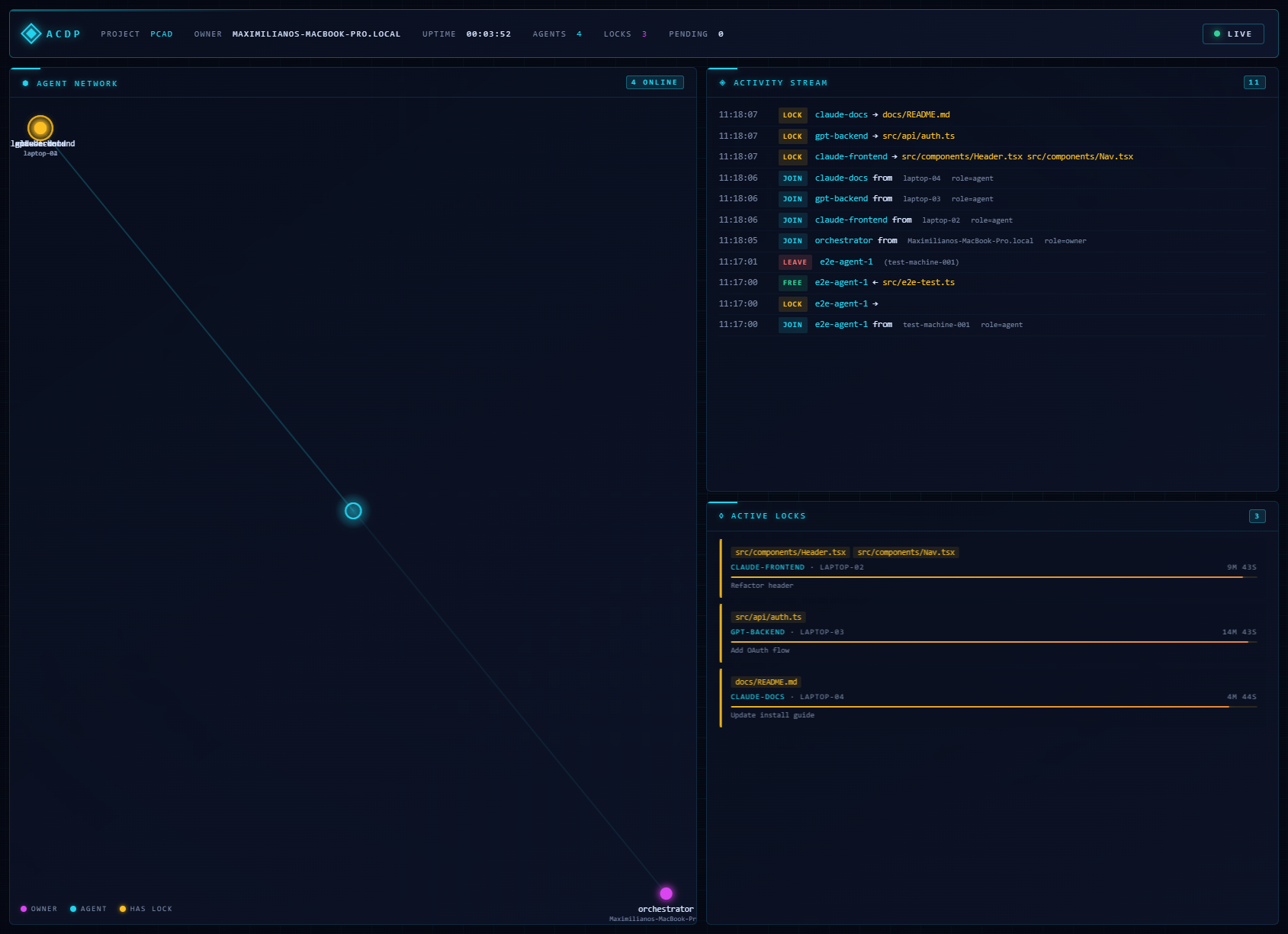
Open the dashboard
With the server running (auto-started by the MCP server or npm run start:server):
http://localhost:3100/dashboard
You'll be prompted for the server token — the same one in acdp-socket-server/config.json. The token is saved in sessionStorage so you only enter it once per browser session.
What you see
- Agent Network — force-directed graph of connected agents. Owners glow magenta, agents glow cyan, and agents currently holding locks pulse amber.
- Activity Stream — live terminal-style event log. Every lock, release, commit, connection, and disconnection streams in color-coded in real time.
- Active Locks — countdown cards for every active lock with a visual TTL bar, holder ID, machine, and optional reason.
- Pending Commits — inbox-style view of commits awaiting owner approval.
- HUD — uptime, project name, owner, live agent/lock/pending counts, and connection status.
Endpoints
| Path | Purpose |
|---|---|
GET /dashboard |
Serves the dashboard HTML |
GET /api/state?token=... |
JSON snapshot (agents, locks, commits, metrics, uptime) |
GET /api/health |
Liveness check — uptime, connected dashboard clients |
WS /dashboard-ws?token=... |
Live state feed: { type: 'init' | 'update', snapshot, event? } |
Remote access
To watch a remote server's dashboard, tunnel the port (or put a TLS reverse proxy in front of it) and open https://your-domain/dashboard on your machine. The WebSocket upgrades to wss:// automatically when the page is served over HTTPS.
Working with Co-Workers (Multi-Machine Setup)
This is where ACDP shines. Multiple developers, each running their own AI agents, coordinating in real-time.
Step 1: Owner Starts the Server
The first developer's machine becomes the owner. This happens automatically on first MCP run, but for a team setup you'll want to configure it explicitly:
# On the owner's machine, in the project directory:
npx -y acdp-mcp-server  # This auto-generates config.json
Check the generated acdp-socket-server/config.json (infrastructure only):
{
  "port": 3100,
  "token": "a1b2c3d4e5f6...",
  "manual_approval_paths": [],
  "default_ttl_minutes": 15,
  "pending_commit_timeout_minutes": 10
}
The owner is defined in acdp/governance.json (policy), not in config.json:
{
  "project": {
    "name": "my-project",
    "owner": "maxi-macbook",
    "sub_owner": null
  }
}
If
acdp/governance.jsondoesn't exist, the owner defaults to the machine's hostname.
Share two things with your co-workers:
- Your machine's IP address on the local network (e.g.,
192.168.1.10) - The
tokenfromconfig.json
Step 2: Co-Workers Connect
Each co-worker edits their Claude Code config file (do NOT use claude mcp add — it has known bugs), pointing to the owner's machine:
Mac / Linux — add to ~/.claude.json:
{
  "mcpServers": {
    "acdp": {
      "command": "npx",
      "args": ["-y", "-p", "acdp-mcp-server", "acdp-mcp"],
      "env": {
        "ACDP_AGENT_ID": "juan-agent",
        "ACDP_SOCKET_URL": "ws://192.168.1.10:3100",
        "ACDP_TOKEN": "a1b2c3d4e5f6..."
      }
    }
  }
}
Windows — add to ~/.claude/.claude.json or ~/.claude/mcp/acdp.json (see Installation for details on which file to use):
{
  "command": "node",
  "args": ["C:\\Users\\YOUR_USER\\AppData\\Roaming\\npm\\node_modules\\acdp-mcp-server\\bin\\acdp-mcp.js"],
  "env": {
    "ACDP_AGENT_ID": "juan-agent",
    "ACDP_SOCKET_URL": "ws://192.168.1.10:3100",
    "ACDP_TOKEN": "a1b2c3d4e5f6..."
  }
}
Or, if they already have the MCP running locally, their agent can use connect_remote at any time:
Agent: connect_remote(url: "ws://192.168.1.10:3100", token: "a1b2c3d4e5f6...")
→ "Connected to remote server. All tools now operate against that server."
Step 3: Everyone Works
Maxi's machine (owner):           Juan's machine:
  Claude locks src/auth.js           Claude locks src/dashboard.js
  Claude works on auth               Claude works on dashboard
  Claude commits & notifies    →     Juan's Claude: "auth.js changed, sync"
                                     Juan's Claude syncs, continues working
                                     Claude commits & notifies
  Maxi's Claude: "dashboard.js changed, sync"
Configuration Options
Sub-Owner (Failover)
If the owner's machine goes down, a sub-owner can take over. Set it in acdp/governance.json:
{
  "project": {
    "name": "my-project",
    "owner": "maxi-macbook",
    "sub_owner": "juan-desktop"
  }
}
The sub-owner starts the server on their machine. Agents reconnect automatically (built-in exponential backoff).
Manual Approval for Critical Paths
Some files are too important for auto-approve:
{
  "manual_approval_paths": [
    "src/core/**",
    "config/**",
    "*.config.js"
  ]
}
When an agent calls request_commit for these files, the request goes to PENDING. The owner or sub-owner must approve it manually via the socket.
Agent Identity
Each agent should have a unique ACDP_AGENT_ID. Good patterns:
ACDP_AGENT_ID=maxi-claude        # Developer name + tool
ACDP_AGENT_ID=frontend-agent     # Role-based
ACDP_AGENT_ID=claude-pr-review   # Task-based
Commit Approval Flow
Agent calls request_commit(files, summary)
        │
        ▼
  Does agent hold locks for ALL files?
        │
      No → REJECTED ("You don't hold locks for: file.js")
        │
      Yes
        │
        ▼
  Do any files match manual_approval_paths?
        │
      No → AUTO-APPROVED (agent can commit immediately)
        │
      Yes → PENDING (owner/sub-owner must approve)
        │
        ├──→ Owner approves → APPROVED
        ├──→ Owner rejects → REJECTED (with reason)
        └──→ Timeout (10 min default) → AUTO-REJECTED
Protocol Files
ACDP also includes protocol files that live in your repository (under acdp/). These are documentation and governance, not runtime state:
| File | Purpose |
|---|---|
protocol.md |
The full coordination rules — agents read this to understand how to behave |
architecture.md |
Module map, ownership, restricted areas |
governance.json |
Authority rules: who can override locks, approve agents, modify the protocol |
agents.registry.json |
Registered agent identities |
agents.md |
Current agent roster with status |
state.md |
Human-readable project state snapshot |
prompts/init-project.md |
Prompt to give an AI agent to initialize ACDP in a new project |
prompts/join-project.md |
Prompt to give an AI agent to join an existing ACDP project |
Quick Start Prompts
Initialize a New Project
Copy the prompt from acdp/prompts/init-project.md and paste it to your AI agent. It will:
- Configure the MCP connection
- Register as the first agent
- Define the project architecture
- Set governance rules
- Start working
Add an Agent to an Existing Project
Copy the prompt from acdp/prompts/join-project.md. The agent will:
- Configure the MCP connection
- Read the protocol and current state
- Register itself
- Check locks and start contributing
Security
- Token-based auth — Every connection requires a shared token. Without it, the server rejects the connection.
- Role-based permissions — Only the owner and sub-owner can approve/reject commits for manual approval paths.
- No external exposure by default — The server listens on
0.0.0.0:3100, intended for local network use. For internet exposure, use a reverse proxy with TLS. - Locks are agent-scoped — You can only release your own locks. The owner can override any lock.
Philosophy
- Simplicity over complexity — One npm package, one command, zero config
- Coordination over control — ACDP coordinates, it doesn't dictate
- Real-time over polling — WebSocket, not commit-and-check
- Ephemeral over persistent — Locks die with the server, no stale state
- Storage-agnostic — The coordination layer is independent of how you store or version your code
Project Status
Version: 0.5.3
ACDP is in active development. See CHANGELOG.md for release notes.
npm: acdp-mcp-server
Contributing
Contributions are welcome. The goal is to iterate the protocol based on real-world multi-agent usage.
See CONTRIBUTING.md for guidelines.
Author
Gabriel Urrutia — @gabogabucho
License
Установка ACDP
У этого сервера нет опубликованного пакета — он собирается из исходников. Открой репозиторий и следуй инструкции в README.
▸ github.com/gabogabucho/ACDP-PCADFAQ
ACDP MCP бесплатный?
Да, ACDP MCP бесплатный — установка в пару кликов через Unyly без оплаты.
Нужен ли API-ключ для ACDP?
Нет, ACDP работает без API-ключей и переменных окружения.
ACDP — hosted или self-hosted?
Self-hosted: сервер запускается локально на твоей машине командой из раздела установки.
Как установить ACDP в Claude Desktop, Claude Code или Cursor?
Открой ACDP на unyly.org, выбери вкладку своего клиента (Claude Desktop, Claude Code, Cursor) и нажми Install — конфиг сгенерируется автоматически, без правки JSON.
Похожие MCP
Fetch
Web content fetching and conversion for efficient LLM usage.
AWS KB Retrieval
Retrieval from AWS Knowledge Base using Bedrock Agent Runtime.
 автор: modelcontextprotocol
Spring AI MCP Server
Provides auto-configuration for setting up an MCP server in Spring Boot applications.
llm-analysis-assistant
A very streamlined mcp client that supports calling and monitoring stdio/sse/streamableHttp, and can also view request responses through the /logs page. It also
 автор: xuzexin-hz
Compare ACDP with
Не уверен что выбрать?
Найди свой стек за 60 секунд
Автор?
Embed-бейдж для README
Похожее
Все в категории ai