
ACE Step 1.5
БесплатноНе проверенACE-Step 1.5 music generation with MCP server for Claude Code integration

Описание
ACE-Step 1.5 music generation with MCP server for Claude Code integration
README
ACE-Step 1.5
Pushing the Boundaries of Open-Source Music Generation
Project | Hugging Face | ModelScope | Space Demo | Discord | Technical Report | Awesome ACE-Step

Table of Contents
- ✨ Features
- ⚡ Quick Start
- 🚀 Launch Scripts
- 📚 Documentation
- 📖 Tutorial
- 🏗️ Architecture
- 🦁 Model Zoo
- 🔬 Benchmark
📝 Abstract
🚀 We present ACE-Step v1.5, a highly efficient open-source music foundation model that brings commercial-grade generation to consumer hardware. On commonly used evaluation metrics, ACE-Step v1.5 achieves quality beyond most commercial music models while remaining extremely fast—under 2 seconds per full song on an A100 and under 10 seconds on an RTX 3090. The model runs locally with less than 4GB of VRAM, and supports lightweight personalization: users can train a LoRA from just a few songs to capture their own style.
🌉 At its core lies a novel hybrid architecture where the Language Model (LM) functions as an omni-capable planner: it transforms simple user queries into comprehensive song blueprints—scaling from short loops to 10-minute compositions—while synthesizing metadata, lyrics, and captions via Chain-of-Thought to guide the Diffusion Transformer (DiT). ⚡ Uniquely, this alignment is achieved through intrinsic reinforcement learning relying solely on the model's internal mechanisms, thereby eliminating the biases inherent in external reward models or human preferences. 🎚️
🔮 Beyond standard synthesis, ACE-Step v1.5 unifies precise stylistic control with versatile editing capabilities—such as cover generation, repainting, and vocal-to-BGM conversion—while maintaining strict adherence to prompts across 50+ languages. This paves the way for powerful tools that seamlessly integrate into the creative workflows of music artists, producers, and content creators. 🎸
✨ Features

⚡ Performance
- ✅ Ultra-Fast Generation — Under 2s per full song on A100, under 10s on RTX 3090 (0.5s to 10s on A100 depending on think mode & diffusion steps)
- ✅ Flexible Duration — Supports 10 seconds to 10 minutes (600s) audio generation
- ✅ Batch Generation — Generate up to 8 songs simultaneously
🎵 Generation Quality
- ✅ Commercial-Grade Output — Quality beyond most commercial music models (between Suno v4.5 and Suno v5)
- ✅ Rich Style Support — 1000+ instruments and styles with fine-grained timbre description
- ✅ Multi-Language Lyrics — Supports 50+ languages with lyrics prompt for structure & style control
🎛️ Versatility & Control
| Feature | Description |
|---|---|
| ✅ Reference Audio Input | Use reference audio to guide generation style |
| ✅ Cover Generation | Create covers from existing audio |
| ✅ Repaint & Edit | Selective local audio editing and regeneration |
| ✅ Track Separation | Separate audio into individual stems |
| ✅ Multi-Track Generation | Add layers like Suno Studio's "Add Layer" feature |
| ✅ Vocal2BGM | Auto-generate accompaniment for vocal tracks |
| ✅ Metadata Control | Control duration, BPM, key/scale, time signature |
| ✅ Simple Mode | Generate full songs from simple descriptions |
| ✅ Query Rewriting | Auto LM expansion of tags and lyrics |
| ✅ Audio Understanding | Extract BPM, key/scale, time signature & caption from audio |
| ✅ LRC Generation | Auto-generate lyric timestamps for generated music |
| ✅ LoRA Training | One-click annotation & training in Gradio. 8 songs, 1 hour on 3090 (12GB VRAM) |
| ✅ Quality Scoring | Automatic quality assessment for generated audio |
| ✅ MCP Server | Claude Code / Cursor tool integration via Model Context Protocol |
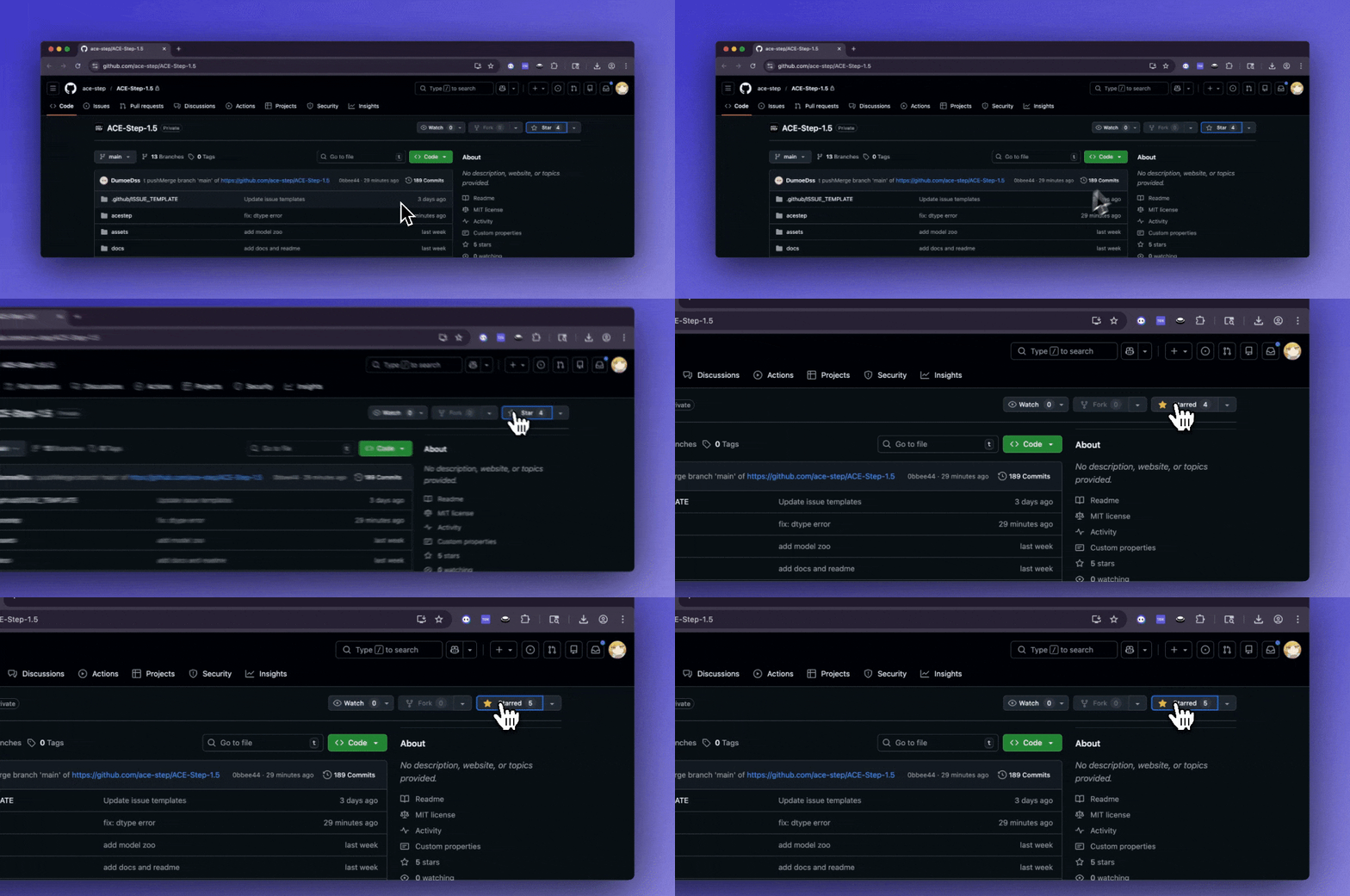
🔔 Staying ahead
Star ACE-Step on GitHub and be instantly notified of new releases
🤝 Partners




⚡ Quick Start
Requirements: Python 3.11-3.12, CUDA GPU recommended (also supports MPS / ROCm / Intel XPU / CPU)
Note: ROCm on Windows requires Python 3.12 (AMD officially provides Python 3.12 wheels only)
# 1. Install uv
curl -LsSf https://astral.sh/uv/install.sh | sh          # macOS / Linux
# powershell -ExecutionPolicy ByPass -c "irm https://astral.sh/uv/install.ps1 | iex"  # Windows

# 2. Clone & install
git clone https://github.com/ACE-Step/ACE-Step-1.5.git
cd ACE-Step-1.5
uv sync

# 3. Launch Gradio UI (models auto-download on first run)
uv run acestep

# Or launch REST API server
uv run acestep-api
Open http://localhost:7860 (Gradio) or http://localhost:8001 (API).
📦 Windows users: A portable package with pre-installed dependencies is available. See Installation Guide.
📦 MacOS users: A portable package with pre-installed dependencies is available. See Installation Guide.
📖 Full installation guide (AMD/ROCm, Intel GPU, CPU, environment variables, command-line options): English | 中文 | 日本語
💡 Which Model Should I Choose?
| Your GPU VRAM | Recommended LM Model | Backend | Notes |
|---|---|---|---|
| ≤6GB | None (DiT only) | — | LM disabled by default; INT8 quantization + full CPU offload |
| 6-8GB | acestep-5Hz-lm-0.6B |
pt |
Lightweight LM with PyTorch backend |
| 8-16GB | acestep-5Hz-lm-0.6B / 1.7B |
vllm |
0.6B for 8-12GB, 1.7B for 12-16GB |
| 16-24GB | acestep-5Hz-lm-1.7B |
vllm |
4B available on 20GB+; no offload needed on 20GB+ |
| ≥24GB | acestep-5Hz-lm-4B |
vllm |
Best quality, all models fit without offload |
The UI automatically selects the best configuration for your GPU. All settings (LM model, backend, offloading, quantization) are tier-aware and pre-configured.
🚀 Launch Scripts
Ready-to-use launch scripts for all platforms with auto environment detection, update checking, and dependency installation.
| Platform | Scripts | Backend |
|---|---|---|
| Windows | start_gradio_ui.bat, start_api_server.bat |
CUDA |
| Windows (ROCm) | start_gradio_ui_rocm.bat, start_api_server_rocm.bat |
AMD ROCm |
| Linux | start_gradio_ui.sh, start_api_server.sh |
CUDA |
| macOS | start_gradio_ui_macos.sh, start_api_server_macos.sh |
MLX (Apple Silicon) |
# Windows
start_gradio_ui.bat

# Linux
chmod +x start_gradio_ui.sh && ./start_gradio_ui.sh

# macOS (Apple Silicon)
chmod +x start_gradio_ui_macos.sh && ./start_gradio_ui_macos.sh
⚙️ Customizing Launch Settings
Recommended: Create a .env file to customize models, ports, and other settings. Your .env configuration will survive repository updates.
# Copy the example file
cp .env.example .env

# Edit with your preferred settings
# Examples in .env:
ACESTEP_CONFIG_PATH=acestep-v15-turbo
ACESTEP_LM_MODEL_PATH=acestep-5Hz-lm-1.7B
PORT=7860
LANGUAGE=en
📚 Documentation
Usage Guides
| Method | Description | Documentation |
|---|---|---|
| 🖥️ Gradio Web UI | Interactive web interface for music generation | Guide |
| 🎚️ Studio UI | Optional HTML frontend (DAW-like) | Guide |
| 🎛️ VST3 MVP Architecture | Proposed DAW plugin architecture and scope | Guide |
| 🐍 Python API | Programmatic access for integration | Guide |
| 🌐 REST API | HTTP-based async API for services | Guide |
| ⌨️ CLI | Interactive wizard and configuration | Guide |
| 🤖 MCP Server | Claude Code / Cursor tool integration | Guide |
Setup & Configuration
| Topic | Documentation |
|---|---|
| 📦 Installation (all platforms) | English | 中文 | 日本語 |
| 🎮 GPU Compatibility | English | 中文 | 日本語 |
| 🔧 GPU Troubleshooting | English |
| 🔬 Benchmark & Profiling | English | 中文 |
Multi-Language Docs
| Language | API | Gradio | Inference | Tutorial | LoRA Training | Install | Benchmark |
|---|---|---|---|---|---|---|---|
| 🇺🇸 English | Link | Link | Link | Link | Link | Link | Link |
| 🇨🇳 中文 | Link | Link | Link | Link | Link | Link | Link |
| 🇯🇵 日本語 | Link | Link | Link | Link | Link | Link | — |
| 🇰🇷 한국어 | Link | Link | Link | Link | Link | — | — |
📖 Tutorial
🎯 Must Read: Comprehensive guide to ACE-Step 1.5's design philosophy and usage methods.
| Language | Link |
|---|---|
| 🇺🇸 English | English Tutorial |
| 🇨🇳 中文 | 中文教程 |
| 🇯🇵 日本語 | 日本語チュートリアル |
This tutorial covers: mental models and design philosophy, model architecture and selection, input control (text and audio), inference hyperparameters, random factors and optimization strategies.
🔨 Train
📖 LoRA Training Tutorial — step-by-step guide covering data preparation, annotation, preprocessing, and training:
| Language | Link |
|---|---|
| 🇺🇸 English | LoRA Training Tutorial |
| 🇨🇳 中文 | LoRA 训练教程 |
| 🇯🇵 日本語 | LoRA トレーニングチュートリアル |
| 🇰🇷 한국어 | LoRA 학습 튜토리얼 |
See also the LoRA Training tab in Gradio UI for one-click training, or Gradio Guide - LoRA Training for UI reference.
🔧 Advanced Training with Side-Step — CLI-based training toolkit with corrected timestep sampling, LoKR adapters, VRAM optimization, gradient sensitivity analysis, and more. See the Side-Step documentation.
🏗️ Architecture

🦁 Model Zoo

DiT Models
| DiT Model | Pre-Training | SFT | RL | CFG | Step | Refer audio | Text2Music | Cover | Repaint | Extract | Lego | Complete | Quality | Diversity | Fine-Tunability | Hugging Face |
|---|---|---|---|---|---|---|---|---|---|---|---|---|---|---|---|---|
acestep-v15-base |
✅ | ❌ | ❌ | ✅ | 50 | ✅ | ✅ | ✅ | ✅ | ✅ | ✅ | ✅ | Medium | High | Easy | Link |
acestep-v15-sft |
✅ | ✅ | ❌ | ✅ | 50 | ✅ | ✅ | ✅ | ✅ | ❌ | ❌ | ❌ | High | Medium | Easy | Link |
acestep-v15-turbo |
✅ | ✅ | ❌ | ❌ | 8 | ✅ | ✅ | ✅ | ✅ | ❌ | ❌ | ❌ | Very High | Medium | Medium | Link |
acestep-v15-turbo-rl |
✅ | ✅ | ✅ | ❌ | 8 | ✅ | ✅ | ✅ | ✅ | ❌ | ❌ | ❌ | Very High | Medium | Medium | To be released |
LM Models
| LM Model | Pretrain from | Pre-Training | SFT | RL | CoT metas | Query rewrite | Audio Understanding | Composition Capability | Copy Melody | Hugging Face |
|---|---|---|---|---|---|---|---|---|---|---|
acestep-5Hz-lm-0.6B |
Qwen3-0.6B | ✅ | ✅ | ✅ | ✅ | ✅ | Medium | Medium | Weak | ✅ |
acestep-5Hz-lm-1.7B |
Qwen3-1.7B | ✅ | ✅ | ✅ | ✅ | ✅ | Medium | Medium | Medium | ✅ |
acestep-5Hz-lm-4B |
Qwen3-4B | ✅ | ✅ | ✅ | ✅ | ✅ | Strong | Strong | Strong | ✅ |
🔬 Benchmark
ACE-Step 1.5 includes profile_inference.py, a profiling & benchmarking tool that measures LLM, DiT, and VAE timing across devices and configurations.
python profile_inference.py                        # Single-run profile
python profile_inference.py --mode benchmark       # Configuration matrix
📖 Full guide (all modes, CLI options, output interpretation): English | 中文
📜 License & Disclaimer
This project is licensed under MIT
ACE-Step enables original music generation across diverse genres, with applications in creative production, education, and entertainment. While designed to support positive and artistic use cases, we acknowledge potential risks such as unintentional copyright infringement due to stylistic similarity, inappropriate blending of cultural elements, and misuse for generating harmful content. To ensure responsible use, we encourage users to verify the originality of generated works, clearly disclose AI involvement, and obtain appropriate permissions when adapting protected styles or materials. By using ACE-Step, you agree to uphold these principles and respect artistic integrity, cultural diversity, and legal compliance. The authors are not responsible for any misuse of the model, including but not limited to copyright violations, cultural insensitivity, or the generation of harmful content.
🔔 Important Notice
The only official website for the ACE-Step project is our GitHub Pages site.
We do not operate any other websites.
🚫 Fake domains include but are not limited to:
ac**p.com, a**p.org, a***c.org
⚠️ Please be cautious. Do not visit, trust, or make payments on any of those sites.
🌐 Community & Ecosystem
Check out Awesome ACE-Step — a curated list of community projects, alternative UIs, ComfyUI nodes, cloud deployments, training tools, and more built around ACE-Step.
🙏 Acknowledgements
This project is co-led by ACE Studio and StepFun.
📖 Citation
If you find this project useful for your research, please consider citing:
@misc{gong2026acestep,
	title={ACE-Step 1.5: Pushing the Boundaries of Open-Source Music Generation},
	author={Junmin Gong, Yulin Song, Wenxiao Zhao, Sen Wang, Shengyuan Xu, Jing Guo},
	howpublished={\url{https://github.com/ace-step/ACE-Step-1.5}},
	year={2026},
	note={GitHub repository}
}
Установка ACE Step 1.5
У этого сервера нет опубликованного пакета — он собирается из исходников. Открой репозиторий и следуй инструкции в README.
▸ github.com/PiMPStudios/ACE-Step-1.5FAQ
ACE Step 1.5 MCP бесплатный?
Да, ACE Step 1.5 MCP бесплатный — установка в пару кликов через Unyly без оплаты.
Нужен ли API-ключ для ACE Step 1.5?
Нет, ACE Step 1.5 работает без API-ключей и переменных окружения.
ACE Step 1.5 — hosted или self-hosted?
Self-hosted: сервер запускается локально на твоей машине командой из раздела установки.
Как установить ACE Step 1.5 в Claude Desktop, Claude Code или Cursor?
Открой ACE Step 1.5 на unyly.org, выбери вкладку своего клиента (Claude Desktop, Claude Code, Cursor) и нажми Install — конфиг сгенерируется автоматически, без правки JSON.
Похожие MCP
GitHub
PRs, issues, code search, CI status
 автор: GitHub
Filesystem
Secure file operations with configurable access controls.
Memory
Knowledge graph-based persistent memory system.
Template MCP Server
A CLI tool to create a new Model Context Protocol server project with TypeScript support, dual transport options, and an extensible structure
 автор: mcpdotdirect
Compare ACE Step 1.5 with
Не уверен что выбрать?
Найди свой стек за 60 секунд
Автор?
Embed-бейдж для README
Похожее
Все в категории development