
Agent Bridge For Unity
БесплатноНе проверенEnables AI agents to control the Unity Editor through MCP, allowing scene building, runtime scripting, visual QA, and more.

Описание
Enables AI agents to control the Unity Editor through MCP, allowing scene building, runtime scripting, visual QA, and more.
README
License: Apache 2.0 Unity 6+ .NET 10
Let AI actually operate the Unity Editor — build scenes, run Play Mode, capture screenshots, and iterate from visual feedback.
Works with Claude Code, Cursor, Windsurf, VS Code, or any MCP-compatible client.
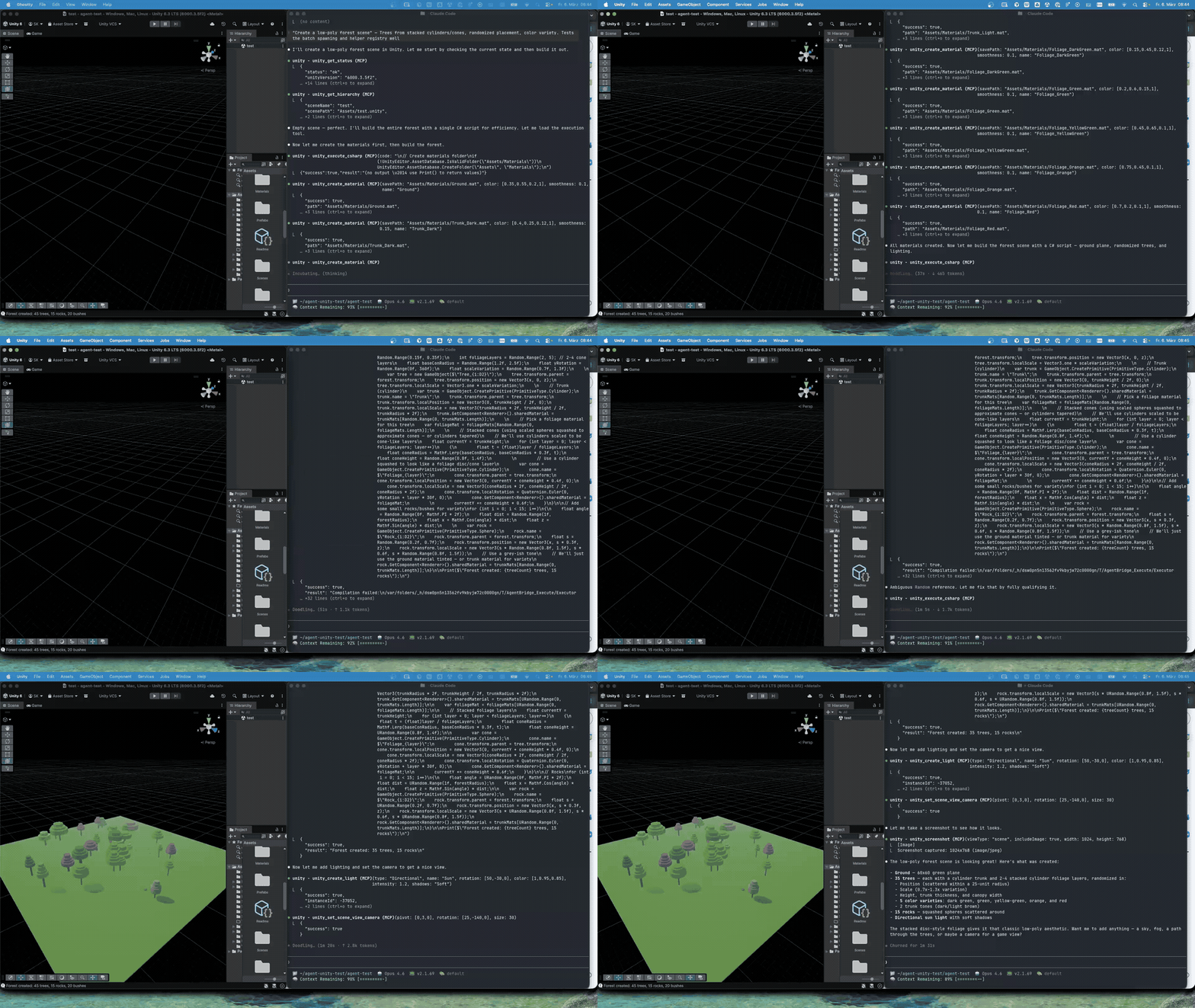
Not just code edits — the agent can create objects, adjust lighting, wait for compilation, enter Play Mode, take screenshots, compare against references, and keep refining until the scene is right.
What Can It Do?
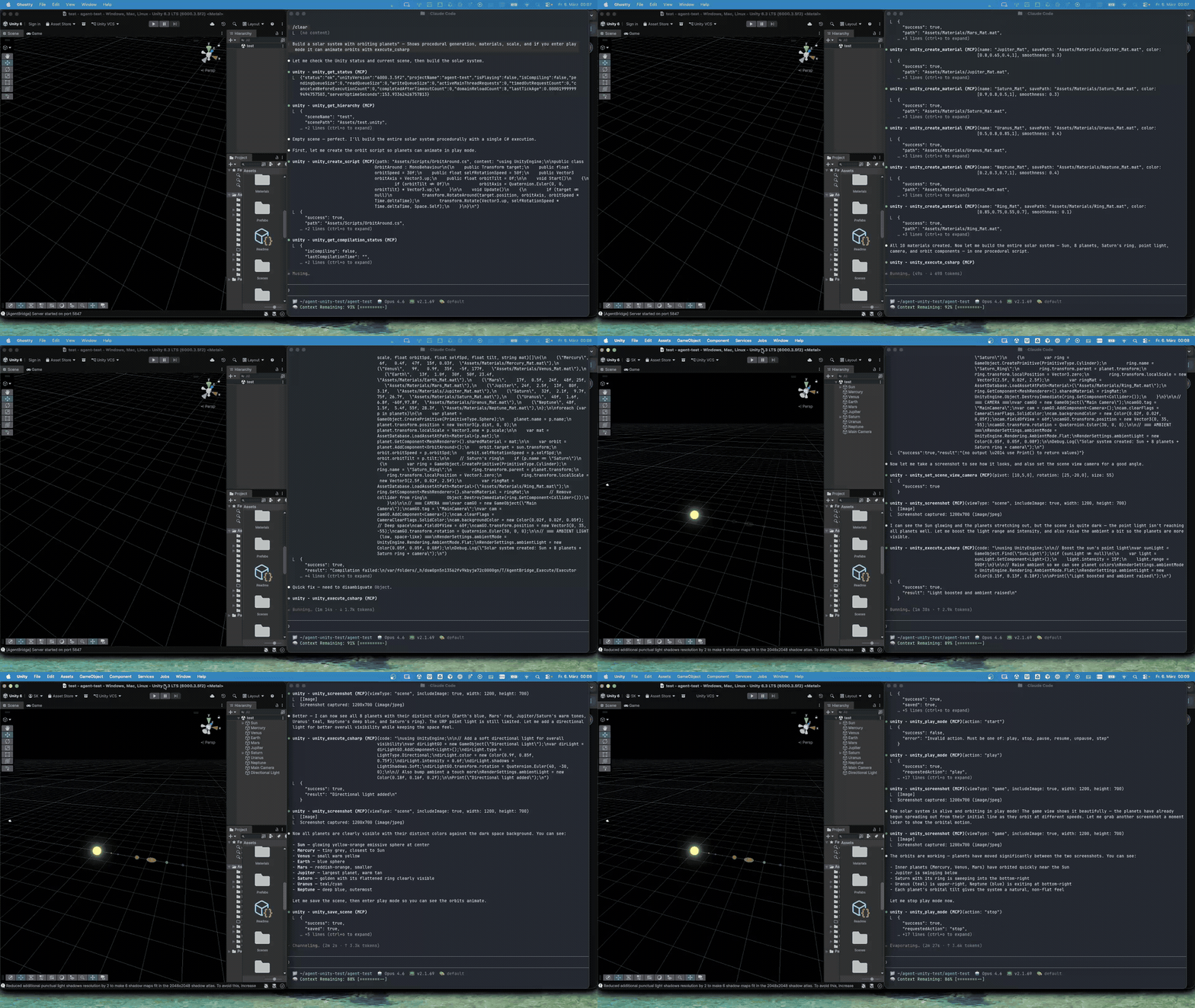
Runtime Scripting — Create C# scripts, wait for compilation, attach behaviors, enter Play Mode, and validate results.
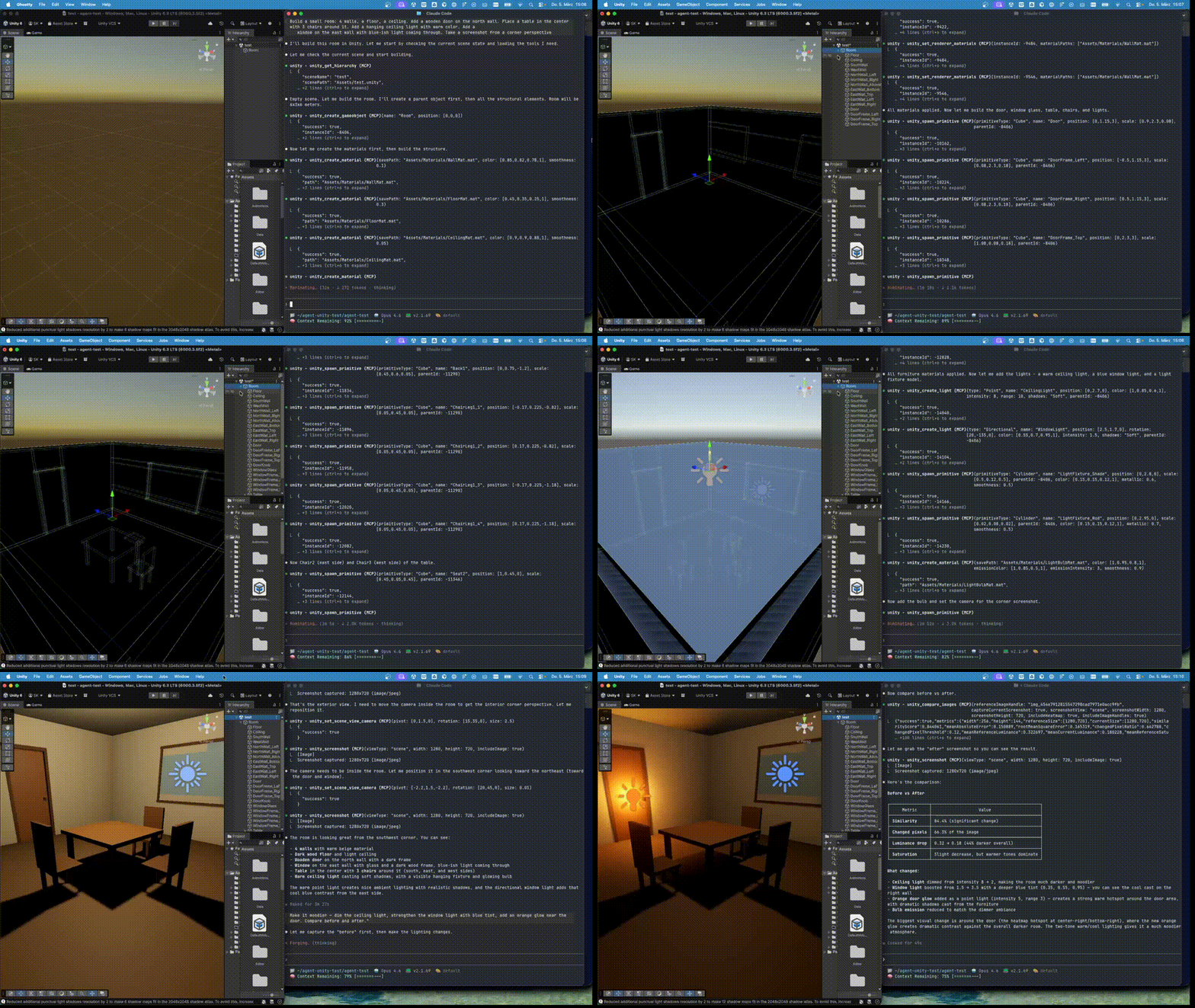
Visual QA — Adjust lighting and materials, capture screenshots, compare against references, refine iteratively.
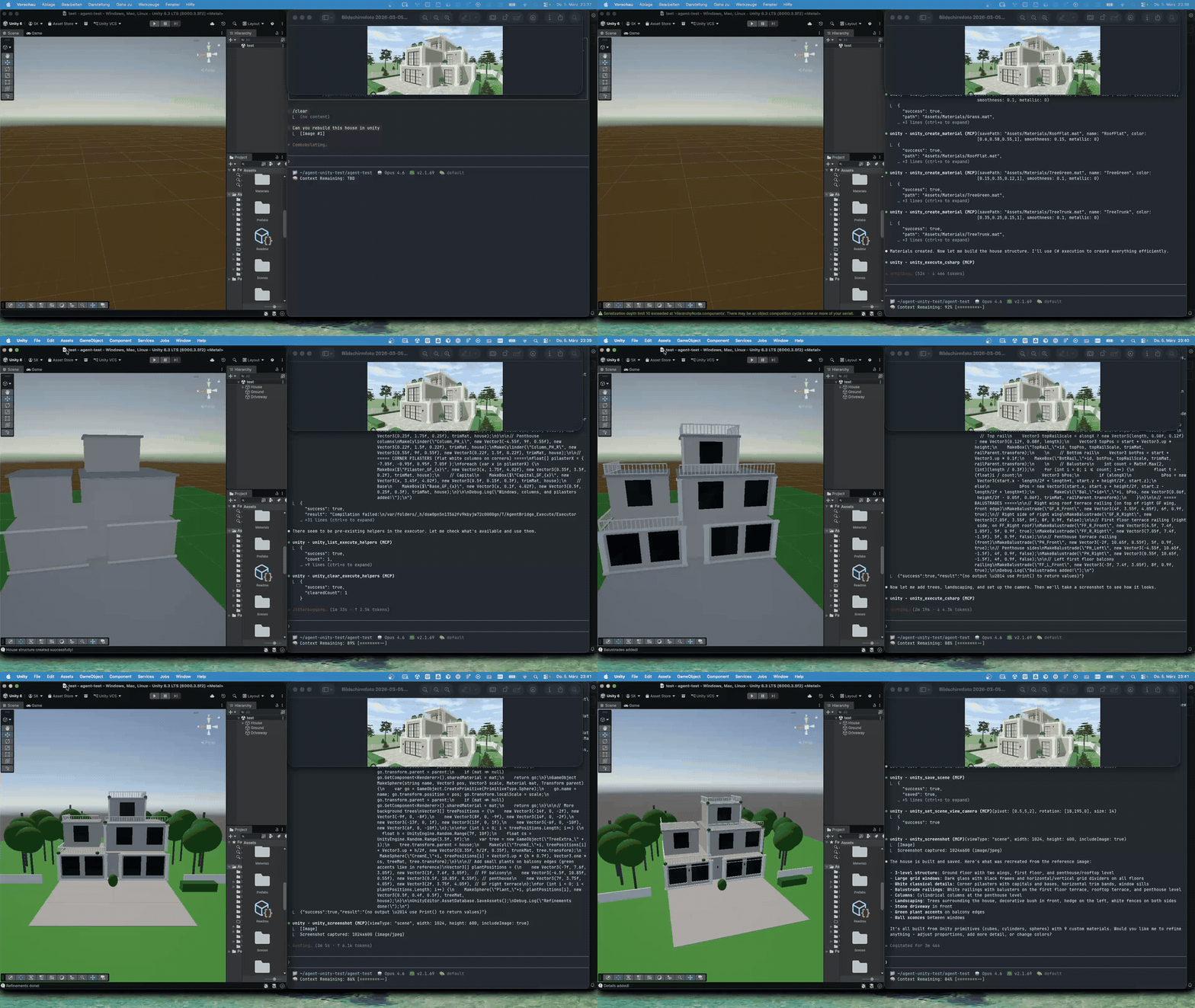
Scene Reconstruction — Reconstruct 3D structures from reference images using iterative visual validation.
Try prompts like:
Create a stylized forest with 30 trees, scattered rocks, and warm lighting.

Block out a 2D platformer level with floating platforms, a player spawn, and a goal area.

Set up horror lighting: dim blue ambient, flickering point light, red emergency light, volumetric fog.

Build an obstacle course with moving platforms, a rotating blade, and a jump pad.
Then add a player controller and a win condition.

Create a solar system with orbiting planets, add the scripts, enter Play Mode, and verify it works.
Quick Start
Prerequisites
- Unity 6 (6000.0+) with URP
- .NET 10 SDK
- An MCP-compatible client
1. Install the Package
Git URL (recommended) — In Unity: Window > Package Manager > + > Add package from git URL:
https://github.com/sebastiankurvers-dev/agent-bridge-for-unity.git
Other install methods
Local clone:
cd YourUnityProject/Packages
git clone https://github.com/sebastiankurvers-dev/agent-bridge-for-unity.git com.sebastiankurvers.agent-bridge
Local path reference — add to Packages/manifest.json:
{
  "dependencies": {
    "com.sebastiankurvers.agent-bridge": "file:/path/to/agent-bridge-for-unity"
  }
}
2. Verify the Bridge
The bridge starts automatically on port 5847 when Unity compiles. Check Window > Agent Bridge in Unity, or:
curl http://127.0.0.1:5847/health
3. Configure Your MCP Client
Create .mcp.json in your Unity project root:
{
  "mcpServers": {
    "unity": {
      "type": "stdio",
      "command": "dotnet",
      "args": ["run", "--project", "Packages/com.sebastiankurvers.agent-bridge/UnityMCP~/UnityMCP.csproj"],
      "env": {}
    }
  }
}
If using a local path install, replace with the absolute path to your
UnityMCP.csproj.
4. Start Using It
Open your MCP client from the Unity project directory. Tools are available immediately.
How It Works
┌─────────────────┐       ┌──────────────────────────────┐
│   MCP Client    │       │  UnityMCP (.NET 10 Server)   │
│  (Claude Code,  │─stdio─│  Receives tool calls,        │
│  Cursor, etc.)  │       │  forwards to Unity over HTTP │
└─────────────────┘       └──────────────┬───────────────┘
                                         │
                                    HTTP :5847
                                         │
                          ┌──────────────┴───────────────┐
                          │  UnityAgentBridge (Editor)    │
                          │  Dispatches to Unity main     │
                          │  thread, executes commands    │
                          └──────────────┬───────────────┘
                                         │
                                  Unity Editor API
| Layer | Location | Role |
|---|---|---|
| UnityMCP | UnityMCP~/ |
.NET 10 MCP server. Receives tool calls via stdio, forwards to Unity over HTTP. |
| UnityAgentBridge | Editor/UnityAgentBridge/ |
Unity Editor plugin. HTTP server on 127.0.0.1:5847, dispatches to main thread. |
The
~suffix onUnityMCP~/tells Unity to ignore the folder — it won't compile .NET 10 code as Unity scripts.
Tool Coverage
248 tools across scene building, terrain, particles, visual QA, automation, editor control, assets, and scripting. You don't need to learn them — your AI agent discovers and calls them as needed.
Full tool breakdown
| Category | Tools | Description |
|---|---|---|
| Scene Builder | 30 | Spawn prefabs, primitives, path-based placement, descriptors, transactions |
| Assets | 21 | Find, search, catalog, import settings, geometry metadata |
| GameObjects | 20 | Inspect, modify, delete, reparent, group, scatter, batch operations |
| Rendering | 19 | Camera settings, render pipeline, material preview, shader scoping |
| Scene | 18 | Save, load, hierarchy queries, scene profiling |
| UI Toolkit | 14 | UXML/USS creation, visual element queries, binding |
| Components | 12 | Add, remove, inspect, modify, patch serialized properties |
| Screenshots | 12 | Capture, compare with suggestions, multi-POV, frame sequences |
| Lighting | 9 | Lights, render settings, volumes, procedural skybox, reflection probes |
| Camera | 9 | Scene view control, orbit, focus, screenshot viewpoints |
| Animation | 8 | Animator controllers, states, transitions, FBX clips |
| Shaders | 7 | Create, inspect, keywords, property management |
| Scripts | 7 | Create, modify, read structure, type schemas |
| Terrain | 6 | Create, sculpt, paint texture layers, place trees |
| Replay | 5 | Record, execute, compare — full state verification |
| Checkpoints | 5 | Save/restore scene snapshots for rollback |
| Spatial Audit | 7 | Overlap detection, grounding audit, snap-to-ground, object identification at screen points |
| Physics | 5 | Rigidbody, colliders, physics settings, spatial queries |
| Audio | 5 | Sources, mixers, listeners, spatial audio |
| Play Mode | 5 | Enter/exit, wait, event polling |
| Primitives | 4 | Built-in primitives, procedural meshes, raw mesh API, compound shapes |
| Performance | 4 | Telemetry, baselines, profiling |
| Packages | 4 | List, add, remove, search Unity packages |
| Particles | 3 | Preset templates, get/configure particle systems |
| Tests | 2 | Run tests, get results |
| Console | 2 | Read and clear Unity console logs |
| Workflow Guide | 1 | Task-specific tool recommendations |
Compatibility
| Requirement | Supported |
|---|---|
| Unity | 6000.0+ (Unity 6) |
| Render Pipeline | URP |
| .NET SDK | 10.0+ |
| OS | Windows, macOS (Intel & Apple Silicon), Linux |
Security
The bridge listens on 127.0.0.1 only — not accessible from other machines.
No authentication required by default. For shared machines, set BRIDGE_AUTH_TOKEN:
export BRIDGE_AUTH_TOKEN="your-secret-token"
Additional security options
- C# execution: Enabled by default with sandbox restrictions. Disable with
BRIDGE_DISABLE_EXECUTE=1 - Body size limit: 10 MB default (
BRIDGE_MAX_REQUEST_BODY_BYTES) - Concurrency limit: 32 concurrent requests (
BRIDGE_MAX_CONCURRENT_REQUESTS) - Route allowlist:
BRIDGE_ALLOWLIST_FILE="/path/to/allowlist.json" - Audit logging:
BRIDGE_AUDIT_LOG="/path/to/audit.log"
Troubleshooting
| Problem | Fix |
|---|---|
| Bridge not starting | Check Window > Agent Bridge in Unity. Ensure port 5847 is free. |
| MCP server won't build | Verify .NET 10: dotnet --version. Try dotnet build UnityMCP~/UnityMCP.csproj |
| Tools not appearing | Ensure .mcp.json is in project root. Restart your MCP client. |
| Scene save dialogs | Intentional — the bridge auto-saves before write operations to prevent modal dialogs. |
Support
If this project saves you time, consider buying me a coffee.
Community
Contributing | Security Policy | Code of Conduct
License
Установка Agent Bridge For Unity
У этого сервера нет опубликованного пакета — он собирается из исходников. Открой репозиторий и следуй инструкции в README.
▸ github.com/sebastiankurvers-dev/agent-bridge-for-unityFAQ
Agent Bridge For Unity MCP бесплатный?
Да, Agent Bridge For Unity MCP бесплатный — установка в пару кликов через Unyly без оплаты.
Нужен ли API-ключ для Agent Bridge For Unity?
Нет, Agent Bridge For Unity работает без API-ключей и переменных окружения.
Agent Bridge For Unity — hosted или self-hosted?
Self-hosted: сервер запускается локально на твоей машине командой из раздела установки.
Как установить Agent Bridge For Unity в Claude Desktop, Claude Code или Cursor?
Открой Agent Bridge For Unity на unyly.org, выбери вкладку своего клиента (Claude Desktop, Claude Code, Cursor) и нажми Install — конфиг сгенерируется автоматически, без правки JSON.
Похожие MCP
Fetch
Web content fetching and conversion for efficient LLM usage.
AWS KB Retrieval
Retrieval from AWS Knowledge Base using Bedrock Agent Runtime.
 автор: modelcontextprotocol
Spring AI MCP Server
Provides auto-configuration for setting up an MCP server in Spring Boot applications.
llm-analysis-assistant
A very streamlined mcp client that supports calling and monitoring stdio/sse/streamableHttp, and can also view request responses through the /logs page. It also
 автор: xuzexin-hz
Compare Agent Bridge For Unity with
Не уверен что выбрать?
Найди свой стек за 60 секунд
Автор?
Embed-бейдж для README
Похожее
Все в категории ai