
Agent Safari
БесплатноНе проверенLocal-first Safari/WebKit MCP browser control for AI agents

Описание
Local-first Safari/WebKit MCP browser control for AI agents
README
Control and observe a real Safari/WebKit browser from AI agents via MCP.
agent-safari is a local-first macOS browser automation CLI, native WebKit window, local daemon, and MCP stdio server. It gives Claude, Hermes, Codex-style agents, and other MCP clients the browser tools they need for an observe → act → verify loop: compact snapshot refs, clicks/fills, screenshots, JavaScript evaluation, tabs, waits, and fetch/XHR network capture.
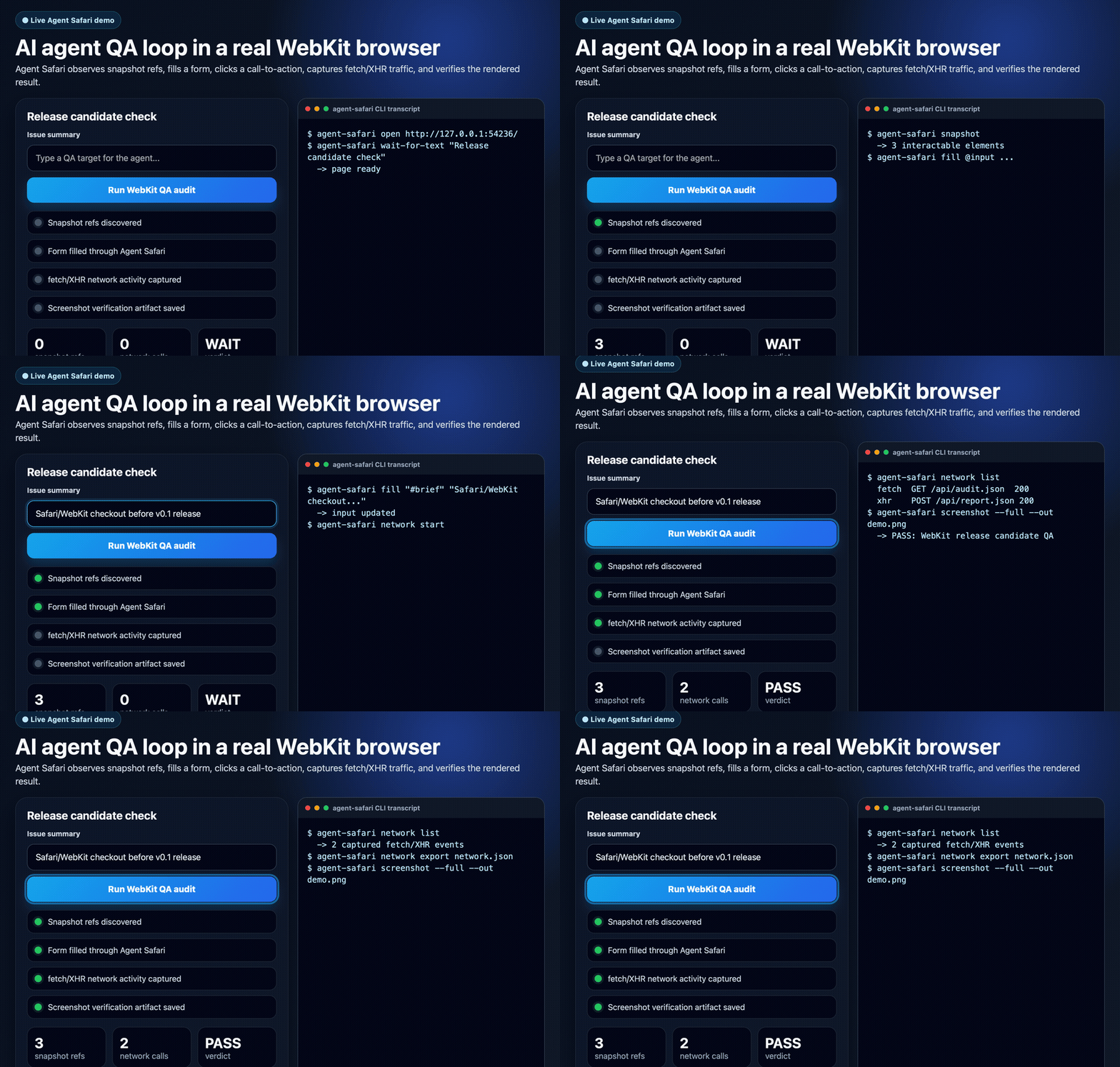
AI agent -> MCP wrapper -> agent-safari CLI -> local daemon -> real WKWebView window
          observe/status -> snapshot @e refs -> click/fill -> wait -> screenshot/evaluate/network inspect
If this is useful for your agentic browser workflows, a GitHub star helps the project reach more builders.
Why Agent Safari?
Most browser automation tools are built for deterministic test scripts. Agent Safari is built for AI agents that need to inspect a rendered page, choose an action, act through a simple tool interface, then verify the result.
Use it when you want to:
- Drive a local Safari/WebKit session from an MCP-capable agent.
- Test how a web app behaves in WebKit, not just Chromium.
- Give an agent clickable snapshot refs such as
@e1instead of forcing it to invent selectors. - Capture screenshots and fetch/XHR activity as verification evidence.
- Keep the browser local and human-observable instead of using a hosted browser service.
Highlights
- Native macOS WebKit/WKWebView browser window; no Chrome, Playwright, or remote browser service required.
- Visible browser chrome with editable address bar for human-observable automation.
- CLI-first control surface with one JSON response line per command.
- MCP wrapper for Hermes, Claude Desktop, Cursor, Windsurf, VS Code, and other MCP-compatible clients.
- Agent-friendly refs from
snapshot, e.g.@e1, reusable byclickandfill. - Viewport, full-page, and element screenshots.
- JavaScript
evaluate, text/HTML extraction, wait helpers, history, modeled tabs, profiles, and ephemeral mode. - Local fetch/XHR network capture instrumentation with redacted JSON export.
How it compares
| Capability | Agent Safari | Playwright | Generic browser MCP servers |
|---|---|---|---|
| Primary design target | AI-agent observe/act/verify loops | Test automation | Varies |
| Native Safari/WebKit GUI | Yes, WKWebView on macOS | WebKit automation, test-first | Rare/mixed |
| MCP-native control surface | Yes | No | Yes |
| Snapshot refs for agent actions | Yes, @e1 style refs |
No | Mixed |
| CLI JSON responses | Yes | No | Mixed |
| Screenshots | Viewport, full page, element | Yes | Mixed |
| Network capture | fetch/XHR instrumentation | Browser automation APIs | Mixed |
| Local human-observable window | Yes | Usually test runner oriented | Mixed |
Requirements
- macOS with a logged-in GUI session.
- Swift toolchain when building from source or installing via Homebrew.
- Python 3 when using the MCP wrapper.
- Optional: macOS Accessibility permission for strict/native click verification.
Headless SSH-only sessions are not enough because the daemon owns a real WebKit window.
Install
Homebrew, recommended for most macOS users
brew tap handlecusion/agent-safari
brew install agent-safari
This installs the native CLI and the MCP wrapper files from the public Homebrew tap:
To connect the installed MCP wrapper to local AI agents, run the consent-first setup helper:
agent-safari-mcp-setup
It detects Claude Desktop, Cursor, Windsurf, VS Code, and Hermes Agent config locations, shows the MCP config it will add, and asks before writing each file. For a preview only:
agent-safari-mcp-setup --dry-run
GitHub Release binary
Download the latest macOS ARM64 release zip, unpack it, and run the included installer:
curl -L -o /tmp/agent-safari-v0.0.6-macOS-ARM64.zip \
  https://github.com/handlecusion/agent-safari/releases/download/v0.0.6/agent-safari-v0.0.6-macOS-ARM64.zip
unzip /tmp/agent-safari-v0.0.6-macOS-ARM64.zip -d /tmp
/tmp/agent-safari-v0.0.6-macOS-ARM64/install.sh
The installer copies agent-safari and agent-safari-mcp-setup into ${PREFIX:-$HOME/.local}/bin.
It also installs the MCP wrapper under ${PREFIX:-$HOME/.local}/share/agent-safari/mcp/.
Make sure the bin directory is on your PATH.
Latest releases:
Build from source, recommended for contributors
git clone https://github.com/handlecusion/agent-safari.git
cd agent-safari
scripts/install_cli.sh
By default this builds debug and creates:
~/.local/bin/agent-safari -> <repo>/.build/debug/agent-safari
For a local release build:
AGENT_SAFARI_BUILD_CONFIGURATION=release scripts/install_cli.sh
If ~/.local/bin is not on your PATH, the installer prints the shell line to add.
npm status
The npm package wrapper is implemented in npm/agent-safari, but the public npm package is not published yet. Until it is published, use Homebrew, GitHub Releases, or source build.
Quick start: CLI
Start the local WebKit daemon:
agent-safari daemon --socket /tmp/agent-safari.sock
In another terminal, drive the browser:
agent-safari open 'https://example.com' --socket /tmp/agent-safari.sock
agent-safari snapshot --socket /tmp/agent-safari.sock
agent-safari click '@e1' --native --socket /tmp/agent-safari.sock
agent-safari screenshot --full --out /tmp/agent-safari-full.png --socket /tmp/agent-safari.sock
The daemon opens a native WebKit window. CLI commands print one JSON response line. Successful responses have "ok": true and a result object.
By default the window is shown without stealing keyboard focus from your current app. If you want the browser to come to the front and become focused at startup, add --focus-window.
For development, rebuild, reinstall, stop any existing daemon, and start a fresh daemon in one command:
scripts/dev_restart.sh
scripts/dev_restart.sh 'https://www.google.com'
By default this uses /tmp/agent-safari.sock, writes logs to .tmp/agent-safari-daemon.log, and stores the daemon PID at .tmp/agent-safari-daemon.pid. Override the socket with AGENT_SAFARI_SOCKET=/tmp/custom.sock scripts/dev_restart.sh.
Quick start: MCP
The MCP server is a Python stdio wrapper around the Swift CLI:
MCP client -> mcp/agent_safari_mcp.py -> agent-safari -> Unix socket daemon -> WKWebView
The daemon must be running before MCP tools can control the browser.
Homebrew and source installs also provide agent-safari-mcp-setup, a consent-first helper that detects local MCP-capable agents and registers this server only after approval:
agent-safari-mcp-setup --dry-run
agent-safari-mcp-setup
Supported auto-config targets are Claude Desktop, Cursor, Windsurf, VS Code, and Hermes Agent. The helper writes the standard mcpServers JSON shape for JSON-based clients and mcp_servers YAML for Hermes.
Typical MCP host config:
{
  "mcpServers": {
    "agent-safari": {
      "command": "python3",
      "args": ["/path/to/agent-safari/mcp/agent_safari_mcp.py"],
      "env": {
        "AGENT_SAFARI_BIN": "/path/to/agent-safari/.build/debug/agent-safari",
        "AGENT_SAFARI_SOCKET": "/tmp/agent-safari.sock"
      }
    }
  }
}
Hermes registration example:
hermes mcp add agent-safari \
  --command "$PWD/.venv-mcp/bin/python" \
  --args "$PWD/mcp/agent_safari_mcp.py" \
  --env AGENT_SAFARI_BIN="$PWD/.build/debug/agent-safari" \
  --env AGENT_SAFARI_SOCKET=/tmp/agent-safari.sock

hermes mcp test agent-safari
After changing MCP config in an active Hermes session, reload MCP servers with /reload-mcp or start a fresh session.
Installation status
| Method | Status | Notes |
|---|---|---|
| Homebrew | Public | brew tap handlecusion/agent-safari && brew install agent-safari |
| GitHub Release | Public | macOS ARM64 zip is available on GitHub Releases |
| Source build | Public | scripts/install_cli.sh |
| MCP wrapper | Public | Python wrapper included in mcp/; agent-safari-mcp-setup can register it with detected agents after consent |
| npm | Prepared, unpublished | wrapper exists, registry package is not published yet |
For detailed install and troubleshooting steps, see docs/INSTALL.md.
Documentation
- Product vision:
docs/PRODUCT_VISION.md - Product spec:
docs/PRODUCT_SPEC.md - Phased development plan:
docs/DEVELOPMENT_PHASES.md - Detailed installation:
docs/INSTALL.md - CLI usage:
docs/CLI_USAGE.md - MCP wrapper usage:
docs/MCP_WRAPPER.md - Agent loop:
docs/AGENT_LOOP.md - Real demo scenario:
docs/DEMO_SCENARIO.md - Profile persistence:
docs/PROFILE_PERSISTENCE.md - CI/CD:
docs/CI_CD.md - Packaging and distribution:
docs/PACKAGING.md - Roadmap and phases:
docs/DEVELOPMENT_PHASES.md - Contributing:
CONTRIBUTING.md
Examples
- Claude Desktop MCP setup:
examples/claude-desktop.md - Hermes Agent MCP setup:
examples/hermes.md - Agentic browser QA loop:
examples/browser-qa.md
CLI command reference
All client commands accept --socket <path>. Default socket path is /tmp/agent-safari.sock.
agent-safari daemon [--focus-window] [--profile <name>] [--ephemeral] [--socket /tmp/agent-safari.sock]
agent-safari status [--socket /tmp/agent-safari.sock]
agent-safari observe [--socket /tmp/agent-safari.sock]
agent-safari open <url> [--socket /tmp/agent-safari.sock]
agent-safari navigate <url> [--socket /tmp/agent-safari.sock]  # backward-compatible alias
agent-safari text [--socket /tmp/agent-safari.sock]
agent-safari html [--socket /tmp/agent-safari.sock]
agent-safari snapshot [--socket /tmp/agent-safari.sock]
agent-safari evaluate <javascript> [--socket /tmp/agent-safari.sock]
agent-safari screenshot --out <path> [--socket /tmp/agent-safari.sock]
agent-safari screenshot --full --out <path> [--socket /tmp/agent-safari.sock]
agent-safari screenshot-element <selector-or-ref> --out <path> [--socket /tmp/agent-safari.sock]
agent-safari screenshot --element <selector-or-ref> --out <path> [--socket /tmp/agent-safari.sock]
agent-safari screenshot-full <path> [--socket /tmp/agent-safari.sock]  # backward-compatible alias
agent-safari click <selector-or-ref> [--native] [--socket /tmp/agent-safari.sock]
agent-safari fill <selector-or-ref> <value> [--socket /tmp/agent-safari.sock]
agent-safari key <key> [--socket /tmp/agent-safari.sock]
agent-safari type <text> [--socket /tmp/agent-safari.sock]
agent-safari wait <ms> [--socket /tmp/agent-safari.sock]
agent-safari wait-for-selector <selector> [--timeout <ms>] [--socket /tmp/agent-safari.sock]
agent-safari wait-for-text <text> [--timeout <ms>] [--socket /tmp/agent-safari.sock]
agent-safari wait-for-idle [--timeout <ms>] [--socket /tmp/agent-safari.sock]
agent-safari network start [--socket /tmp/agent-safari.sock]
agent-safari network list [--socket /tmp/agent-safari.sock]
agent-safari network stop [--socket /tmp/agent-safari.sock]
agent-safari network export <path> [--body-preview-bytes <n>] [--max-entries <n>] [--socket /tmp/agent-safari.sock]
agent-safari network-start [--socket /tmp/agent-safari.sock]  # backward-compatible alias
agent-safari network-list [--socket /tmp/agent-safari.sock]
agent-safari network-stop [--socket /tmp/agent-safari.sock]
agent-safari session [--socket /tmp/agent-safari.sock]
agent-safari tabs [--socket /tmp/agent-safari.sock]
agent-safari tab-new [url] [--socket /tmp/agent-safari.sock]
agent-safari tab-switch <id> [--socket /tmp/agent-safari.sock]
agent-safari tab-close <id> [--socket /tmp/agent-safari.sock]
Agentic refs workflow
snapshot returns visible/interactable elements with stable refs like @e1, @e2, ... . You can pass those refs back to click and fill.
Example:
agent-safari open 'https://example.com' --socket /tmp/agent-safari.sock
agent-safari snapshot --socket /tmp/agent-safari.sock
agent-safari click '@e1' --native --socket /tmp/agent-safari.sock
agent-safari fill '@e2' '[email protected]' --socket /tmp/agent-safari.sock
agent-safari type ' extra text' --socket /tmp/agent-safari.sock
CSS selectors still work:
agent-safari click 'button[type="submit"]' --socket /tmp/agent-safari.sock
agent-safari fill 'input[name="email"]' '[email protected]' --socket /tmp/agent-safari.sock
Native click semantics are explicit in the JSON result:
- default
click <selector>uses DOMelement.click()and returnsmethod: "dom",nativeVerified: false,fallbackUsed: false. click <selector> --nativefirst posts native macOS mouse events. If the DOM click probe observes the event, it returnsmethod: "native",nativeVerified: true,fallbackUsed: false.click <selector> --nativemay fall back to DOM click if the native event cannot be verified. That returnsmethod: "dom-fallback",nativeVerified: false,fallbackUsed: true, plusnativeErrorandnativeErrorCode.click <selector> --native --no-fallbackdisables fallback and fails if native delivery cannot be verified. This is useful for release smoke and permission checks.
If native verification is flaky, check that the daemon is running in a logged-in macOS GUI session, the WebKit window can become foreground, and the app/terminal has macOS Accessibility permission when strict native input is required.
Wait commands
Wait commands help coordinate navigation, DOM changes, and asynchronous page work:
agent-safari wait 500 --socket /tmp/agent-safari.sock
agent-safari wait-for-selector '#results' --timeout 10000 --socket /tmp/agent-safari.sock
agent-safari wait-for-text 'Loaded' --timeout 10000 --socket /tmp/agent-safari.sock
agent-safari wait-for-idle --timeout 10000 --socket /tmp/agent-safari.sock
wait-for-selector, wait-for-text, and wait-for-idle default to a 10 second timeout. wait-for-idle waits for document.readyState == "complete", no active WebKit load, and no pending fetch/XHR requests tracked by the optional network instrumentation.
Screenshots
Viewport screenshot:
agent-safari screenshot --out /tmp/viewport.png --socket /tmp/agent-safari.sock
Full-page screenshot:
agent-safari screenshot --full --out /tmp/full-page.png --socket /tmp/agent-safari.sock
screenshot-full uses single-rect capture for modest pages and tiled scroll/stitching for large vertical pages.
Network capture
Network capture is an MVP implemented by injected JavaScript instrumentation for fetch and XMLHttpRequest.
agent-safari network start --socket /tmp/agent-safari.sock
agent-safari open 'http://127.0.0.1:9876/index.html' --socket /tmp/agent-safari.sock
agent-safari network list --socket /tmp/agent-safari.sock
agent-safari network stop --socket /tmp/agent-safari.sock
Limitations:
- Captures fetch/XHR metadata.
- Does not capture parser-driven resources such as images/CSS as a full browser network tab would.
- Does not yet implement proxy-grade HAR export, WebSocket frame capture, or service-worker-level capture.
MCP tools
The MCP wrapper exposes browser status, observe, navigate, text, html, snapshot, evaluate, screenshot, click, fill, keyboard/text insertion, waits, network capture, history, viewport, session, and modeled tab tools. See docs/MCP_WRAPPER.md for the full tool contract and local checks.
Example MCP control loop:
navigate(url="https://example.com")
snapshot()
click(selector="@e1", native=True)
fill(selector="@e2", value="[email protected]")
wait_for_idle(timeout_ms=10000)
screenshot_full(path="/tmp/agent-safari-full.png")
evaluate(script="document.title")
Operational documentation
- CLI usage:
docs/CLI_USAGE.md - MCP wrapper usage:
docs/MCP_WRAPPER.md - CI/CD:
docs/CI_CD.md - Packaging and distribution:
docs/PACKAGING.md - Roadmap and phases:
docs/DEVELOPMENT_PHASES.md - Contributing:
CONTRIBUTING.md - Examples:
examples/
CI/CD
The repository has four GitHub Actions lanes:
CI: runs on pushes and pull requests, covering Swift tests, release compilation, Python/shell syntax, npm package smoke, Homebrew formula rendering, audit tests, and public-release hygiene.macOS Smoke: manual and weekly real-daemon smoke lane for WKWebView automation, screenshots, DOM refs, network capture, and MCP wrapper bridging.Release: tag/manual CD lane that builds the release binary, packages a zip with checksums, packages npm, uploads workflow artifacts, and publishes a GitHub Release.Publish Packages: release-published lane that publishes npm whenNPM_TOKENexists and updates a Homebrew tap whenHOMEBREW_TAP_REPO/HOMEBREW_TAP_TOKENexist.
See docs/CI_CD.md and docs/PACKAGING.md for release commands and recommended branch protection settings.
Smoke checks
The repository includes smoke scripts that exercise the operational path.
CLI smoke:
cd agent-safari
scripts/smoke_cli.sh
MCP wrapper smoke against an already running daemon:
cd agent-safari
AGENT_SAFARI_BIN="$PWD/.build/debug/agent-safari" \
AGENT_SAFARI_SOCKET=/tmp/agent-safari.sock \
python3 scripts/smoke_mcp_wrapper.py
smoke_cli.sh builds the Swift package, starts a daemon on a temporary socket, opens a generated local HTML page via the normalized open alias, exercises snapshot refs, fill, click, evaluate, normalized network start/list/stop, and screenshot --full --out, then cleans up.
smoke_mcp_wrapper.py imports _run_cli from mcp/agent_safari_mcp.py, validates the --tools-json MCP contract, and calls CLI-backed MCP wrapper operations against an already running daemon. It verifies status first, then exercises normalized network start, network list, and network stop around the existing open/evaluate/screenshot path. It uses AGENT_SAFARI_BIN and AGENT_SAFARI_SOCKET when set, and exits successfully with a skip message if no daemon is reachable.
Real-world GUI smoke:
cd agent-safari
python3 scripts/smoke_real_world.py
smoke_real_world.py runs five WebKit scenarios against generated local fixtures: snapshot refs/forms, full-page and element screenshots, fetch/XHR plus resource-timing network export, tab/session behavior, and native-click/type/viewport behavior. It prints report=<artifact-dir>/REPORT.md and artifacts=<artifact-dir> on success. The artifact directory contains REPORT.md, data/scenario-results.json, captures/*.png, and daemon.log. The runner validates PNG files with stdlib header checks, records screenshot byte size and dimensions, asserts the long full-page capture is taller than the viewport capture, and records native-click delivery metadata (method, nativeVerified, fallbackUsed, nativeError, and nativeErrorCode when present).
Useful release-smoke options:
python3 scripts/smoke_real_world.py --out-dir .tmp/release-smoke
python3 scripts/smoke_real_world.py --socket /tmp/agent-safari-release-smoke.sock
python3 scripts/smoke_real_world.py --skip-build
python3 scripts/smoke_real_world.py --strict-native-probe
AGENT_SAFARI_STRICT_NATIVE=1 python3 scripts/smoke_real_world.py
The full release gate is documented in docs/RELEASE_CHECKLIST.md.
Useful environment variables
AGENT_SAFARI_BIN: path to the builtagent-safaribinary for wrapper/smoke scripts.AGENT_SAFARI_SOCKET: Unix socket path for daemon and client commands.AGENT_SAFARI_SMOKE_DIR: optional directory for real-world smoke artifacts.AGENT_SAFARI_STRICT_NATIVE: set to1to make native-click fallback a hard failure inscripts/smoke_real_world.py.--strict-native-probe: run a focused--native --no-fallbackprobe and record whether the current GUI environment verifies native delivery or remains environment-gated.
Current limitations
- The current daemon controls a modeled WKWebView tab set inside a single native WebKit window.
- Profile persistence mode is daemon-level;
--profileis metadata for future named stores, while--ephemeralselects a non-persistent WebKit data store. - The MCP wrapper exposes wait commands, history commands, viewport, session, and tab commands, but it remains a thin CLI wrapper rather than a separate browser runtime.
- Passkey/WebAuthn automation is out of scope for the current roadmap.
keydispatches synthetic DOM keyboard events;typeis a DOM-level text insertion helper, not full native keyboard automation.- Network capture is fetch/XHR instrumentation, not full proxy/CDP-style HAR capture.
Notes
- Start only one daemon per socket path.
- Use a short socket path under
/tmp; Unix socket paths have platform length limits. - Full-page screenshots are written as PNG files at the path you provide.
- The WebKit daemon must run in a macOS GUI session; headless SSH-only sessions will not be sufficient.
Установка Agent Safari
У этого сервера нет опубликованного пакета — он собирается из исходников. Открой репозиторий и следуй инструкции в README.
▸ github.com/handlecusion/agent-safariFAQ
Agent Safari MCP бесплатный?
Да, Agent Safari MCP бесплатный — установка в пару кликов через Unyly без оплаты.
Нужен ли API-ключ для Agent Safari?
Нет, Agent Safari работает без API-ключей и переменных окружения.
Agent Safari — hosted или self-hosted?
Self-hosted: сервер запускается локально на твоей машине командой из раздела установки.
Как установить Agent Safari в Claude Desktop, Claude Code или Cursor?
Открой Agent Safari на unyly.org, выбери вкладку своего клиента (Claude Desktop, Claude Code, Cursor) и нажми Install — конфиг сгенерируется автоматически, без правки JSON.
Похожие MCP
Playwright
Browser automation, scraping, screenshots
 автор: Microsoft
Puppeteer
Browser automation and web scraping.
 автор: modelcontextprotocol
opentabs-dev/opentabs
Plugin-based MCP server + Chrome extension that gives AI agents access to web applications through the user's authenticated browser session. 100+ plugins with a
 автор: opentabs-dev
robhunter/agentdeals
1,500+ developer infrastructure deals, free tiers, and startup programs across 54 categories. Search deals, compare vendors, plan stacks, and track pricing chan
 автор: robhunter
hlydecker/ucsc-genome-mcp
MCP server to interact with the UCSC Genome Browser API, letting you find genomes, chromosomes, and more.
 автор: hlydecker
34892002/bilibili-mcp-js
A MCP server that supports searching for Bilibili content. Provides LangChain integration examples and test scripts.
 автор: 34892002
achiya-automation/safari-mcp
Native Safari browser automation for AI agents with 80+ tools. No Chrome dependency, optimized for Apple Silicon with 60% less CPU overhead.
 автор: achiya-automation
agent-infra/mcp-server-browser
Browser automation capabilities using Puppeteer, both support local and remote browser connection.
 автор: bytedance
aparajithn/agent-scraper-mcp
Web scraping MCP server for AI agents. 6 tools: clean content extraction, structured scraping with CSS selectors, full-page screenshots via Playwright, link ext
 автор: aparajithn
apireno/DOMShell
Browse the web using filesystem commands (ls, cd, grep, click). 38 MCP tools map Chrome's Accessibility Tree to a virtual filesystem via a Chrome Extension.
 автор: apireno
Compare Agent Safari with
Не уверен что выбрать?
Найди свой стек за 60 секунд
Автор?
Embed-бейдж для README
Похожее
Все в категории browse