
Agent Vitals
БесплатноНе проверенLocal-first observability for AI agent stacks. Provides MCP tools for agents to check health, shadow configs, and burnout metrics proactively.

Описание
Local-first observability for AI agent stacks. Provides MCP tools for agents to check health, shadow configs, and burnout metrics proactively.
README
Give your AI agent a memory of its own infrastructure.


13 MCP tools · 20 CLI commands
·
wires pi · Claude Code · Cursor · OpenCode · Codex CLI
·
~6000 LOC · 295 tests · GPL v3 · no daemon · no cloud
Quick start
uv tool install agent-vitals
av install    # detects hosts, wires MCP + priming skill
That's it. 30 seconds, no daemon, no cloud, no accounts.
After install, restart your agent host so it picks up the new MCP server. Then the next time it runs, it'll call vitals_summary before risky operations — automatically.
- Shadow & stale detection — cron, systemd, MCP, skills. Shows everything; filters to broken references only.
- Burnout tracking — per-agent completion rates, trends, stuck-session heuristics.
- Doom-loop detection — exact + soft loops in Bash and Edit. Excludes polling; compares edits by content.
- Unused-tool finder — per-server + per-tool usage. GitHub-measured 8–12KB overhead per unused tool, per turn.
- Token cost + Effective Tokens — model-aware pricing, ET metric, downgrade suggestions.
- SSH polling detector — finds repeated SSH commands to the same host.
- Overlap detection — duplicate/similar tool names across MCP servers.
- Session compaction — keep last N events, backup first, dry-run preview.
- Coaching — generates optimized system prompts from your actual session data.
- Trace suite — recorded session forensics for Claude Code and pi.
av trace list/summary/replay/diff/errors/profile/grep/export/watch/suggest. No payloads, no secrets. - Pre-action hooks — PATH wrappers around
crontab/systemctlthat gate mutations until vitals is fresh.
What your agent sees
When your agent (pi, Claude Code, OpenCode, Cursor, Codex) calls vitals_summary, it gets:
  ▄▀ vitals — local agent stack health

  shadow: 13 autonomous thing(s) configured (mcp: 8, systemd: 5)
  subagent burnout (7d): 5 runs, 100% completion ✓
  claude code (7d): 170 sessions, 45,626 events, ⚠ 36 stuck
    - biggest stuck-looking session: 7,118 events
That's not a CLI you read. That's a tool your agent calls from inside its own loop — before it does anything risky.
How it works
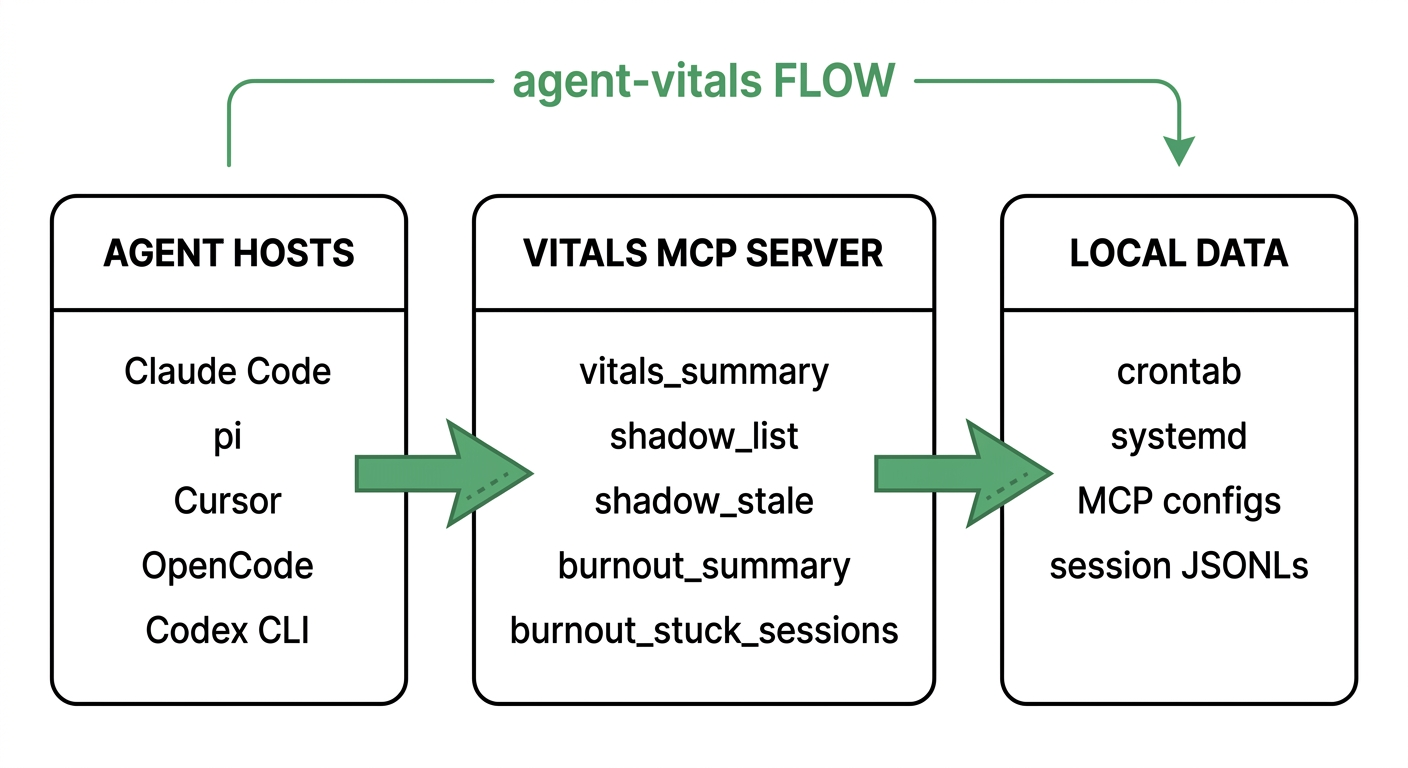
Three moves. No daemon. No cloud.
- Install —
uv tool install agent-vitals && av install. Registers the MCP server and priming skill for your agent host. - Observe — the agent calls
vitals_summarybefore risky operations. Hooks gatecrontab/systemctluntil vitals is fresh. - Optimize — run
av cost,av loops,av coachto extract patterns and shrink the model's workload.
Before / after
| ▍ Without vitals | ▍ With vitals |
|---|---|
… and |
|
(blind vibes) |
|
The diff is vibes vs. data.
Install
uv tool install agent-vitals
av install  # detects every agent host on your box and wires them up
            # restart your agent host so it picks up the new MCP server
That's the whole setup. 30 seconds.
Pre-action hooks (v0.3.0)
Priming asks the agent to call vitals. Hooks refuse the operation when it hasn't.
av hooks install     # one-time setup (~3 seconds)
av hooks status      # check freshness
av hooks disable     # temporarily turn off (rename to *.disabled)
av hooks uninstall   # full removal
After av hooks install, the one-liner above is appended to your ~/.bashrc / ~/.zshrc. Open a new terminal and crontab -e or systemctl --user enable foo will be refused at the OS level unless an agent (or av doctor) refreshed the vitals stamp in the last 60 seconds.
  ⚡ vitals hook: refused `crontab -e`

  reason:   vitals stamp is 5m12s old — exceeds 60s window.
  stamp:    5m12s ago

  refresh:  call any vitals tool or run `av doctor`
  bypass:   VITALS_BYPASS=1 crontab -e
What's gated: crontab -e/-r/-i/<file>/- and systemctl --user {enable,disable,start,stop,restart,reload,mask,unmask,daemon-reload,...}.
What's NOT gated: crontab -l (reads), systemctl status / list-* / is-active / show / cat (reads), and power management (reboot, poweroff, suspend) — a stale stamp must never block a reboot.
Bypass for emergencies: VITALS_BYPASS=1 crontab -e skips the check.
What av install does
  $ av install
                    detected 3 agent host(s)
  ┏━━━━━━━━━━━━━┳━━━━━━━━━━━━━━━━━━━━━━━━━━━━━━━━━━┳━━━━━━━━━━┓
  ┃ host        ┃ config                           ┃ status   ┃
  ┡━━━━━━━━━━━━━╇━━━━━━━━━━━━━━━━━━━━━━━━━━━━━━━━━━╇━━━━━━━━━━┩
  │ pi          │ ~/.pi/agent/mcp.json │ detected │
  │ Claude Code │ ~/.claude/.mcp.json  │ detected │
  │ Codex CLI   │ ~/.codex/config.toml │ detected │
  └─────────────┴──────────────────────────────────┴────────━━┘

  installing:

  ┏━━━━━━━━━━━━━┳━━━━━━━━━━━━━━━━━━━━┳━━━━━━━━━━━━━━━━━━━┓
  ┃ host        ┃ mcp config         ┃ skill/rule        ┃
  ┡━━━━━━━━━━━━━╇━━━━━━━━━━━━━━━━━━━━╇━━━━━━━━━━━━━━━━━━━┩
  │ pi          │ added              │ installed         ┃
  │ Claude Code │ added              │ already installed ┃
  │ Codex CLI   │ added              │ installed         ┃
  └─────────────┴────────────────────┴────────────────━━━┛

  ✓ done. Restart your agent host.
| Host | MCP config | Priming |
|---|---|---|
| pi | ~/.pi/agent/mcp.json |
~/.claude/skills/vitals/SKILL.md |
| Claude Code | ~/.claude/.mcp.json |
~/.claude/skills/vitals/SKILL.md |
| Cursor | ~/.cursor/mcp.json |
~/.cursor/rules/vitals.md |
| OpenCode | ~/.config/opencode/mcp.json |
~/.config/opencode/AGENTS.md |
| Codex CLI | ~/.codex/config.toml |
~/.codex/AGENTS.md |
[!NOTE] Idempotent. Re-run
av installany time — existing entries are skipped, never duplicated. TOML configs (Codex CLI) get TOML sections; JSON configs get JSON entries.
The five tools
| Tool | Returns | When the agent should reach for it |
|---|---|---|
vitals_summary() |
plain English | always first — health check, before tasks, when stuck |
shadow_list() |
JSON array | before infra changes — see everything running on the user's behalf |
shadow_stale() |
JSON array | before claiming "your crontab is fine" or scheduling new cron work |
burnout_summary(days=7) |
JSON object | after long tasks, to compare to baseline |
burnout_stuck_sessions(days=7, limit=10) |
JSON array | when suspecting a loop, to see if other sessions are stuck too |
av loops |
text report | after a session is "taking forever" or cost spikes — detects exact + soft doom loops |
av unused |
text report | after installing a new MCP server, or weekly — reports unused servers + per-tool usage |
av cost |
text report | monthly budget review — uses observed model pricing + Effective Tokens + model downgrade suggestions |
av tokens |
text report | identify token-heavy tools — which tools burn the most tokens per call |
av tokens --suggest |
text report | get concrete optimization suggestions based on usage patterns |
av ssh |
text report | detect SSH polling loops — repeated SSH commands to same host |
av overlap |
text report | detect overlapping MCP tools across servers — possible redundancy |
av compact |
text report | compact large session files to reduce context bloat |
av compact --dry-run |
text report | preview compaction savings without modifying files |
av coach |
text report | generate optimized system prompts + playbooks from real session data |
All tools are local-only, read-only, safe to call repeatedly. None of them modify state.
The trigger table
The table av install installs into your priming skill — so the agent knows when to reach for each tool without you asking:
| Trigger | Tool |
|---|---|
| Starting any non-trivial task | vitals_summary |
| About to schedule cron / timer / systemd work | shadow_stale |
| After a long task completes | burnout_summary |
| Suspect you're in a loop | vitals_summary + burnout_stuck_sessions |
| User asks "is X working?" | shadow_list or vitals_summary |
| About to claim "all cron is fine" | shadow_stale (verify first) |
| About to recommend an MCP install | shadow_list (check duplicates) |
| User asks "what's broken?" | vitals_summary → shadow_stale + burnout_stuck_sessions |
| Agent failed, need to debug why | av trace diff <last-good> <current> |
| User asks "what did the agent just do?" | av trace replay <session> |
| Agent session has errors | av trace errors <session> |
| Need tool performance breakdown | av trace profile <session> |
| Looking for specific tool usage | av trace grep <session> <pattern> |
| Agent gave bad advice, need to know why | av trace suggest <session> |
v0.3.0 changes this.
av hooks installdeploys PATH-level wrappers aroundcrontabandsystemctl --userthat refuse any mutation when the vitals stamp is older than 60 seconds. Read operations (crontab -l,systemctl status, etc.) are never gated. See Pre-action hooks below.
Anti-patterns this exists to prevent
[!IMPORTANT] These are the failure modes that made us build vitals. If you see an agent doing any of these, it's a sign the priming didn't reach them — or they need v0.3.0 hooks.
- ❌ "Your crontab is fine" — without calling
shadow_stalefirst - ❌ Scheduling cron / systemd work — without verifying the target binary exists
- ❌ Starting a 4-hour task — while 6 other sessions are stuck on the same box
- ❌ Pretending a task completed — without checking
burnout_summary - ❌ Recommending an MCP install — without
shadow_listto check for duplicates - ❌ Debugging slowness — without first checking
vitals_summary
What it scans
| Source | Path | What it finds |
|---|---|---|
| Crontab | crontab -l |
flags targets that no longer exist |
| systemd user timers | systemctl --user list-timers |
systemd-v255 quirk-resistant (computes next - now itself) |
| MCP configs | ~/.pi/agent/mcp.json, ~/.claude/.mcp.json, ~/.cursor/mcp.json, ~/.config/opencode/mcp.json |
one entry per host registration |
| Codex CLI | ~/.codex/config.toml |
TOML-aware, appends [mcp_servers.vitals] |
| Skill frontmatter | ~/.claude/skills/*/SKILL.md |
surfaces skills with schedule: / cron: / interval: triggers |
| pi subagent history | ~/.pi/agent/run-history.jsonl |
per-agent completion + trend |
| Claude Code sessions | ~/.claude/projects/*/*.jsonl |
session counts + stuck-loop heuristic |
| pi sessions | ~/.pi/agent/sessions/*.jsonl |
parsed by trace module for replay/diff |
| Claude sessions | ~/.claude/projects/*/*.jsonl |
parsed by trace module for replay/diff |
av                # one-shot health summary
av doctor         # summary + actionable recommendations
av shadow         # what's configured on your box
av shadow --watch # live refresh every 2s
av burnout        # completion metrics, last 7 days
av burnout --days 30
av detect         # list detected agent hosts
av install        # interactive installer — pick components, pick hosts
av init           # deprecated alias for `av install`
av drift          # find inconsistencies across hosts (MCP, skills, hooks)
av sessions       # list session files with age + size
av snapshot       # tar.gz of agent state (mcp configs, skills, hooks)
av mcp            # start the MCP server (stdio)

# Efficiency suite (v0.6.0+)
av loops          # detect exact + soft doom loops in sessions
av loops -n 50     # show up to 50 findings
av unused         # find unused MCP servers + per-tool usage
av cost           # token spend with model-aware pricing + Effective Tokens
av tokens         # identify token-heavy tools
av tokens --suggest  # get optimization suggestions
av ssh            # detect SSH polling loops
av overlap        # detect overlapping MCP tools
av compact        # compact large session files
av compact --dry-run  # preview compaction without changes
av coach          # generate optimized system prompts from session data

# Trace (v0.7.0)
av trace list                  # list sessions with event counts and source type
av trace summary <session>     # turns, tools, errors, wall duration
av trace replay <session>      # step-by-step replay (no payloads)
av trace diff <a> <b>          # structural diff between two sessions
av trace errors <session>      # show only error events
av trace profile <session>     # per-tool breakdown: calls, errors, avg duration
av trace grep <session> <pat>  # filter events by tool name or type
av trace export <session>      # export normalized events to JSON
av trace suggest <session>     # actionable suggestions from session data
av trace watch <session>       # tail a session JSONL live (Ctrl-C to stop)
uv              ──  one-tool install / build / publish
typer           ──  CLI
rich            ──  terminal rendering
pyyaml          ──  SKILL.md frontmatter parsing
mcp (FastMCP)   ──  MCP server, stdio transport
pytest          ──  295 tests across 12 modules
~6000 lines of Python + 295 tests + priming SKILL.md. GPL v3 licensed.
Roadmap
- v0.1.0 —
shadow+burnoutCLI commands - v0.2.0 — MCP server +
av installfor 5 host types - v0.7.0 — trace suite:
av trace list/summary/replay/diff/errors/profile/grep/export/watch/suggest. Content-agnostic adapters for Claude Code and pi JSONLs. MCP tools exposed. - v0.7.0 —
shadow live(running agent processes, ps-tree view) - v0.8.0 — cross-session "agent déjà vu" detector (you researched this codebase 3 weeks ago)
Contributing
Issues and PRs welcome. Two things to know:
- Scanners in
src/agent_vitals/scanners.pyare independent and fail gracefully. Add a new source by writing onescan_*()function and adding it toscan_all(). - MCP tool docstrings are the product. The docstring on
vitals_summaryis the instruction the agent reads. Write it as a directive to the agent ("always call this first when…"), not API docs.
When you open a PR, paste the output of av shadow on your box so we can see what surfaces in your environment.
License
GPL v3. See LICENSE.
─────────────────────────────────────────────
vitals v0.7.0 · 2026
Установка Agent Vitals
У этого сервера нет опубликованного пакета — он собирается из исходников. Открой репозиторий и следуй инструкции в README.
▸ github.com/anirudhprashant/agent-vitalsFAQ
Agent Vitals MCP бесплатный?
Да, Agent Vitals MCP бесплатный — установка в пару кликов через Unyly без оплаты.
Нужен ли API-ключ для Agent Vitals?
Нет, Agent Vitals работает без API-ключей и переменных окружения.
Agent Vitals — hosted или self-hosted?
Self-hosted: сервер запускается локально на твоей машине командой из раздела установки.
Как установить Agent Vitals в Claude Desktop, Claude Code или Cursor?
Открой Agent Vitals на unyly.org, выбери вкладку своего клиента (Claude Desktop, Claude Code, Cursor) и нажми Install — конфиг сгенерируется автоматически, без правки JSON.
Похожие MCP
Fetch
Web content fetching and conversion for efficient LLM usage.
AWS KB Retrieval
Retrieval from AWS Knowledge Base using Bedrock Agent Runtime.
 автор: modelcontextprotocol
Spring AI MCP Server
Provides auto-configuration for setting up an MCP server in Spring Boot applications.
llm-analysis-assistant
A very streamlined mcp client that supports calling and monitoring stdio/sse/streamableHttp, and can also view request responses through the /logs page. It also
 автор: xuzexin-hz
Compare Agent Vitals with
Не уверен что выбрать?
Найди свой стек за 60 секунд
Автор?
Embed-бейдж для README
Похожее
Все в категории ai