
Agentic Ops Builder
БесплатноНе проверенEnables natural-language Q&A, human-approved actions, and dashboard generation over a data ontology via MCP.

Описание
Enables natural-language Q&A, human-approved actions, and dashboard generation over a data ontology via MCP.
README
An LLM agent that connects to a data ontology over MCP, answers natural-language questions with real queried data, proposes human-approved actions, and generates operational dashboards on demand — a self-built, Palantir-AIP-style operational tool.
Lineage: this project evolves my earlier AI website-builder agent
from "LLM generates a website"into "LLM operates over an enterprise ontology with governance": same agent-loop DNA, but every capability is now typed, whitelisted, previewed, human-approved, and audited. It pairs with disaster-response-hq (Project 1), whose FastAPI ontology this agent can consume directly.
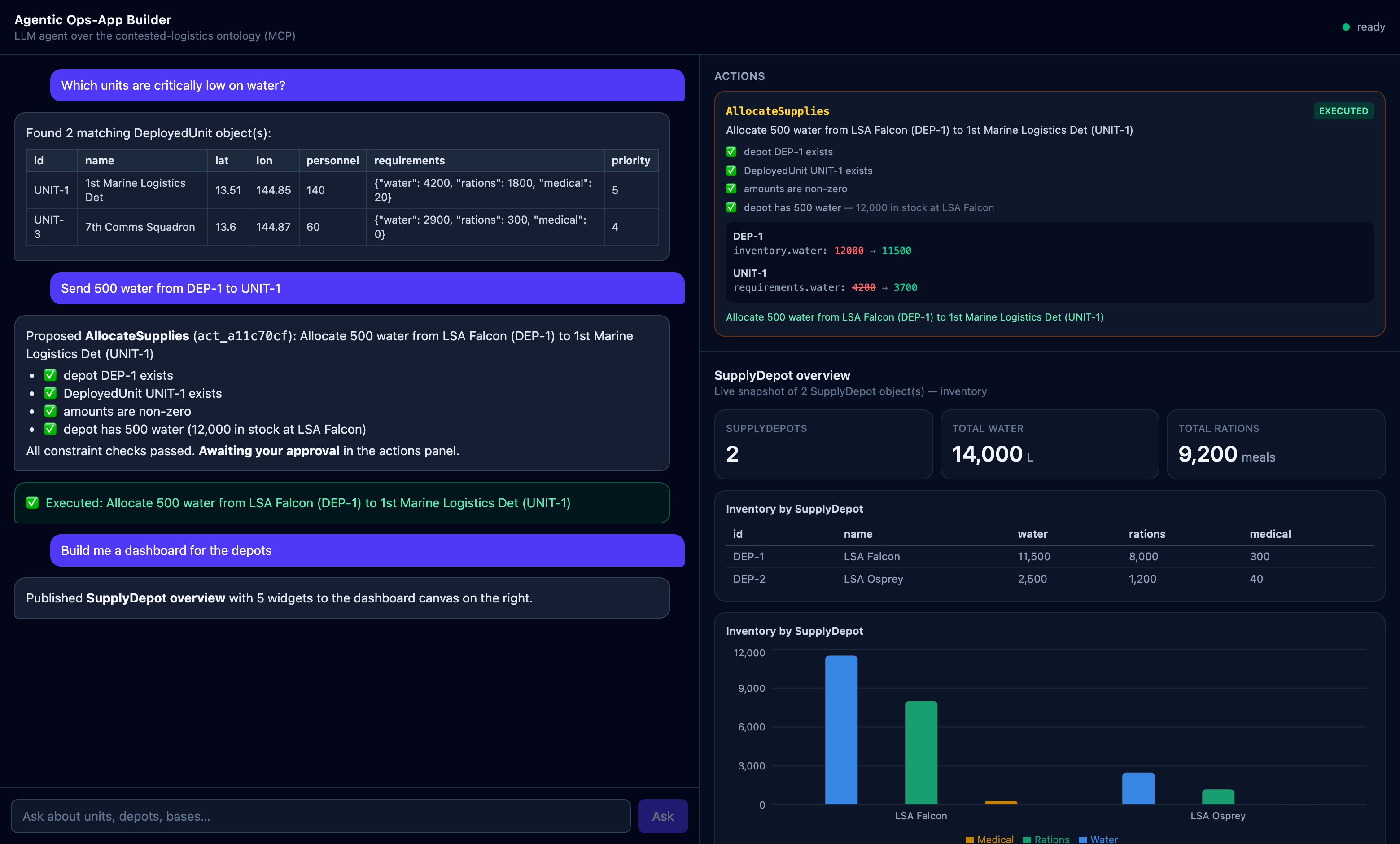
The 3-prompt demo
Run everything (offline, no API key needed):
.venv/bin/python scripts/demo.py
Or type these into the web app:
| # | Prompt | What you'll see |
|---|---|---|
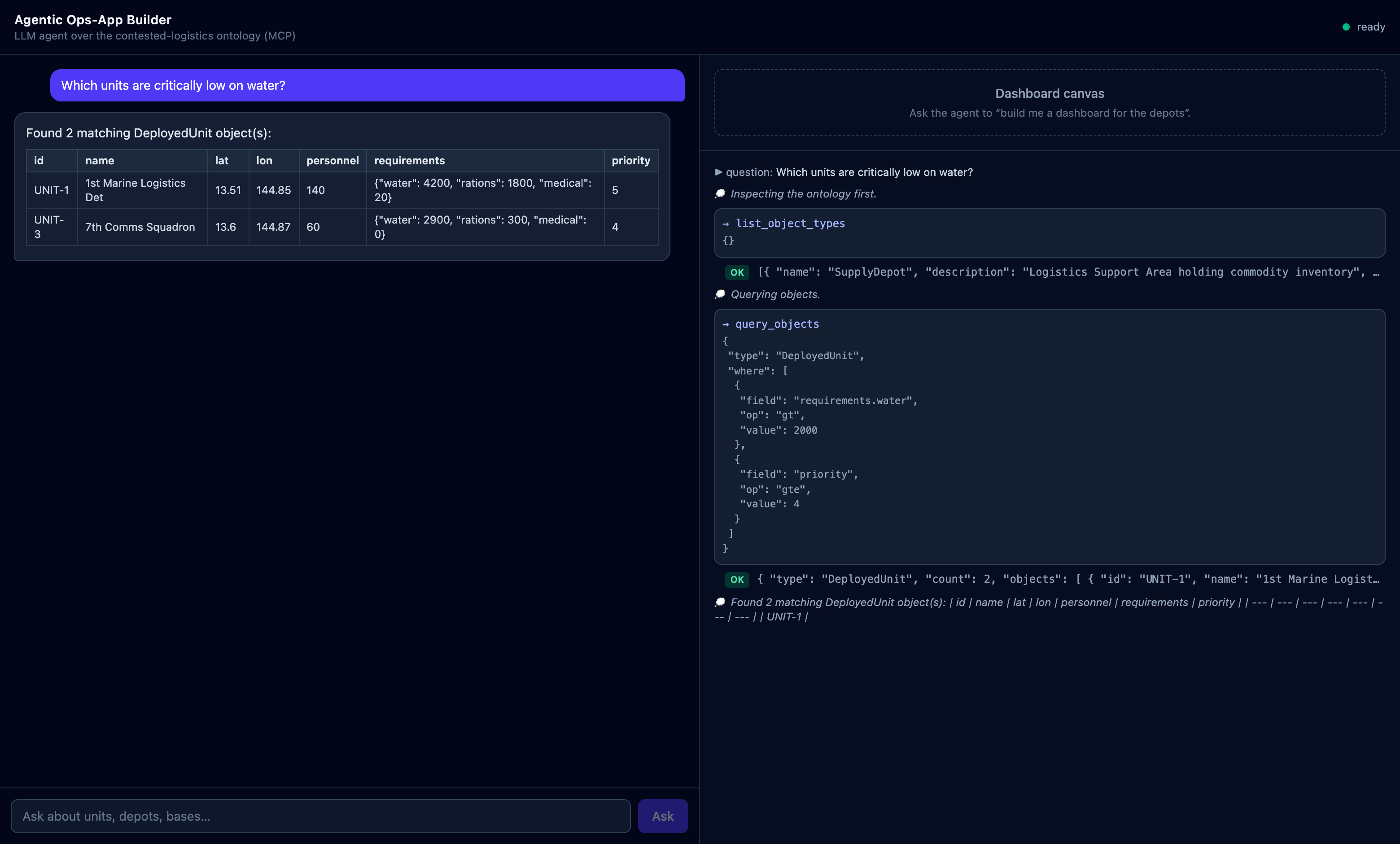
| 1 | Which units are critically low on water? |
The agent grounds itself in the ontology schema, runs a filtered query, and answers with a table — every tool call streaming live in the right panel. |
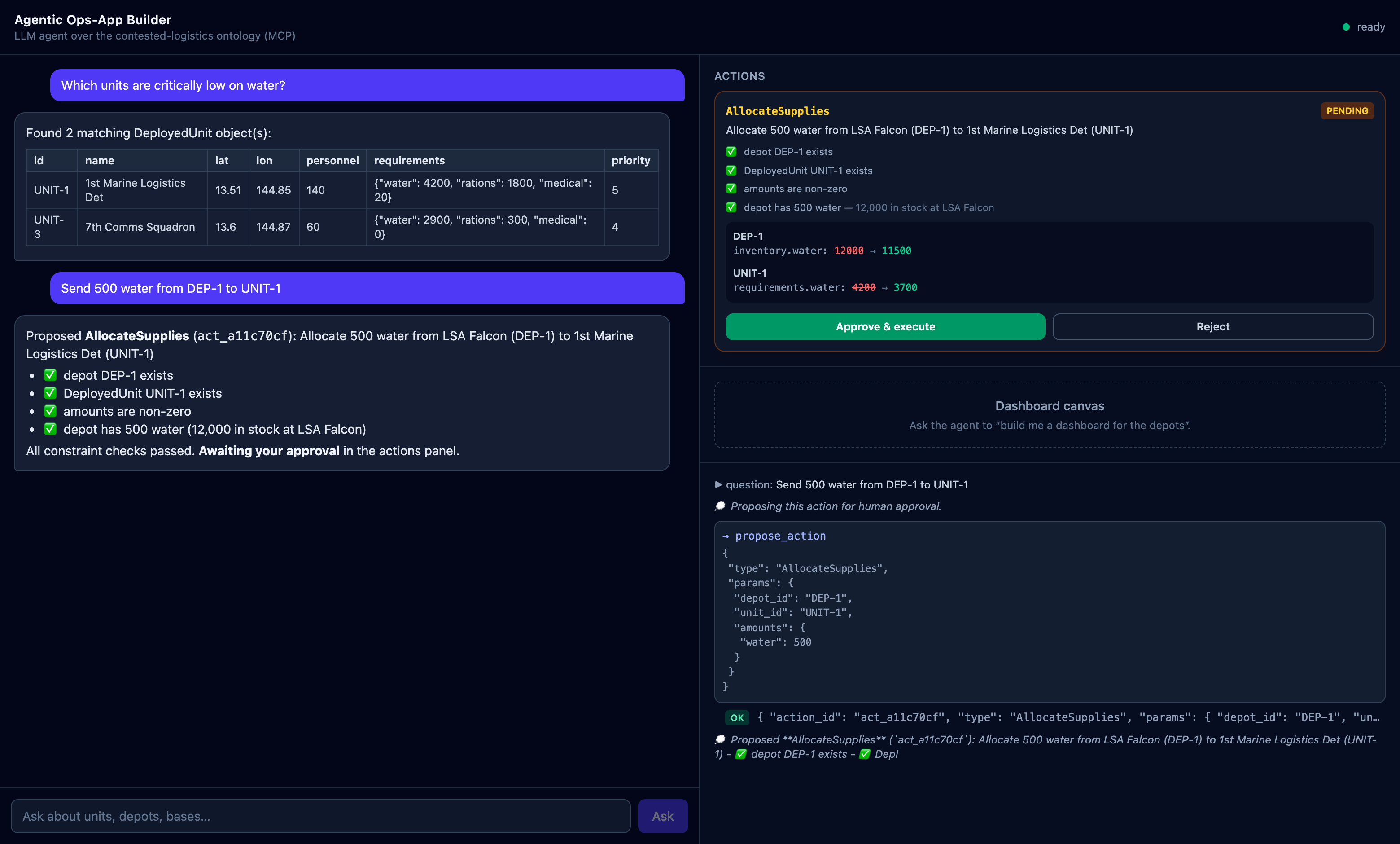
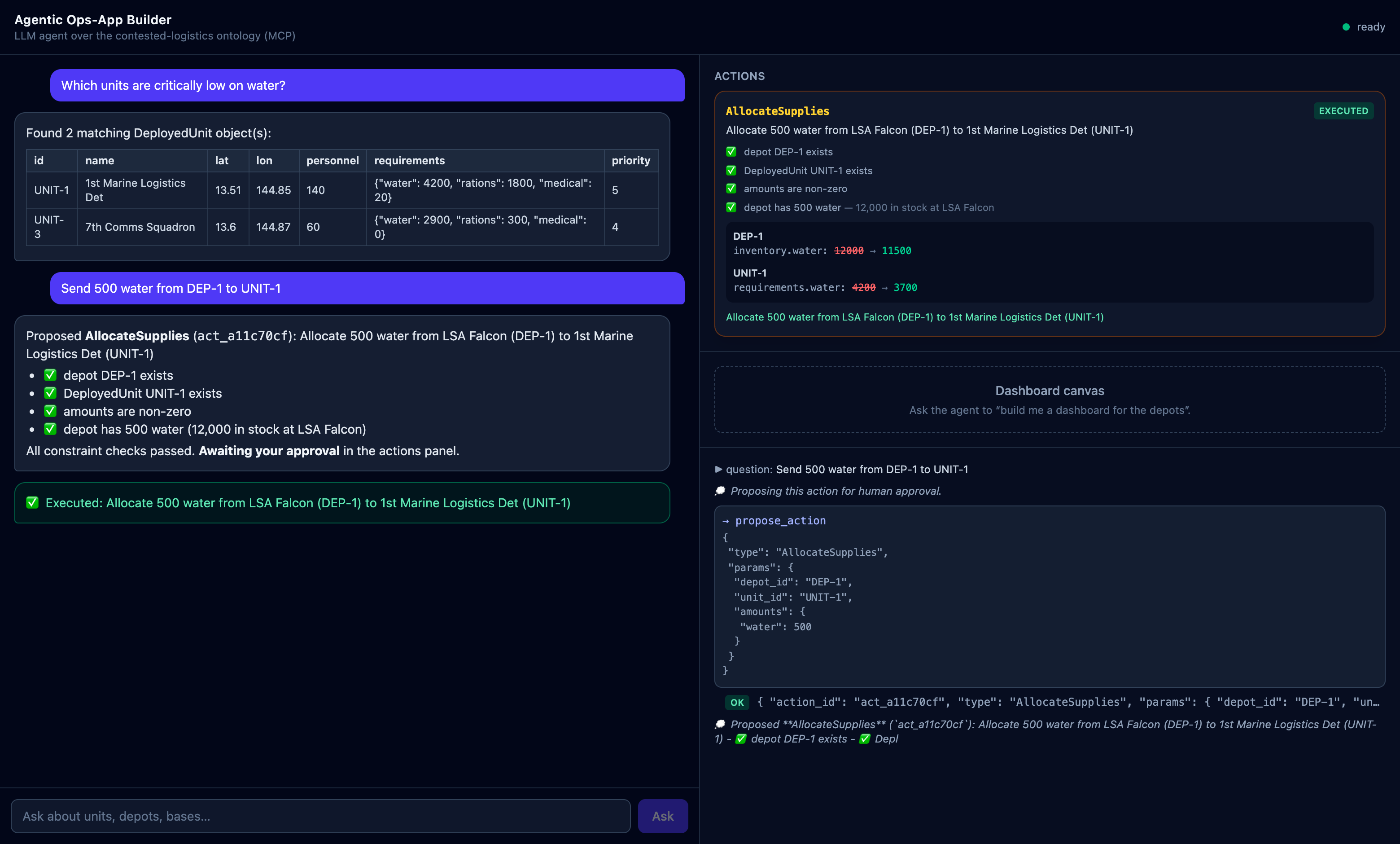
| 2 | Send 500 water from DEP-1 to UNIT-1 |
The agent proposes; a preview card shows before/after state + constraint checks. Nothing changes until you click Approve & execute. Then re-ask depot inventory to see the state change, and GET /audit for the trail. |
| 3 | Build me a dashboard for the depots |
The agent queries live data and publishes a JSON dashboard spec; the canvas renders stat tiles, a table, and a bar chart. |
 |
 |
 |
|
What is MCP, and how this mirrors Palantir AIP
MCP (Model Context Protocol) is an open protocol that gives an LLM a typed, discoverable, bounded tool surface over external systems. A server exposes tools (name + description + JSON Schema); any client — an agent, an IDE, a chat app — connects, lists them, and calls them. The protocol boundary is the governance boundary: the model can only do what the server exposes.
This project is a miniature of Palantir's AIP architecture:
| This project | Palantir AIP / Foundry equivalent |
|---|---|
Ontology backends (StubOntology, HttpOntology → Project 1's FastAPI) — typed objects (SupplyDepot, DeployedUnit, ForwardOperatingBase) |
The Foundry Ontology: semantic objects over raw data, one hub consumed by every downstream surface |
MCP read tools (list_object_types, query_objects) |
Ontology APIs / object queries that AIP agents use for grounding |
propose_action → preview with constraint checks → human approval → execute_action |
AIP Action Types with submission criteria + human-approval workflows — writes are governed, validated operations, never raw table edits |
| Operator-key-gated approval + single-use tokens + agent tool whitelist | AIP's separation of agent capability from human authority |
| Append-only audit log of every proposal/approval/execution/denial | AIP evaluation & audit trails |
publish_dashboard JSON spec → fixed React renderer |
Workshop-style operational apps built over ontology data (declarative config, not arbitrary code) |
| The agent loop (Claude + MCP tools + event stream) | AIP Agent Studio agents with tool access + streamed reasoning |
How human-in-the-loop works
 user ──ask──▶ Agent (LLM)                 MCP server                FastAPI (operator)
                │  propose_action(...) ──▶ validate params
                │                          run constraint checks
                │                          build before/after PREVIEW   (no mutation)
                │ ◀── proposal + action_id ─┘
 UI shows preview card ──── human clicks Approve ──▶ approve_action(operator_key)
                                                     └─ mints SINGLE-USE token
                                                   execute_action(token)
                                                     ├─ re-validates vs CURRENT state
                                                     ├─ applies the change
                                                     └─ audit log: proposed→approved→executed
Three enforcement layers keep the agent proposal-only:
- Whitelist —
approve_action/reject_action/execute_actionare stripped from the LLM's tool list; the agent loop rejects any call to a tool it wasn't given. - Capability gating — approval requires an
OPERATOR_KEYthat exists only in the orchestration server's process (injected into the MCP subprocess env). No LLM context ever contains it, so an agent cannot mint approval tokens even in principle. - Token mechanics — tokens are single-use (
secrets.compare_digest, burned on first use) and execution re-validates every constraint against current state, so a stale approval can't overdraw a depot.
The same philosophy governs dashboards: the agent emits a strictly
validated JSON spec (extra="forbid", 3 widget types, bounded sizes) that
fixed React components interpret — never HTML, JSX, or executable code.
Architecture
 React 18 + Vite + TS + Tailwind          FastAPI (port 8100)              MCP server (stdio subprocess)
 ┌──────────────┬───────────────┐   WS    ┌──────────────────────┐  MCP    ┌─────────────────────────┐
 │ Chat panel   │ Actions cards │ ◀─────▶ │ /ws  agent events    │ ◀─────▶ │ 9 tools over ontology   │
 │ (markdown)   │ Live trace    │  HTTP   │ /actions/{id}/approve│  stdio  │ ┌─ StubOntology (dflt)  │
 │              │ Dashboard     │ ◀─────▶ │ /actions/{id}/reject │         │ └─ HttpOntology ──▶ Project 1
 │              │ canvas        │         │ /audit  /health      │         │    (disaster-response-hq)
 └──────────────┴───────────────┘         │ OpsAgent loop + LLM  │         └─────────────────────────┘
                                          │ (Claude ⟷ MockLLM)  │
                                          └──────────────────────┘
Run it
# Backend
python3.11 -m venv .venv && .venv/bin/pip install -e ".[dev]"
.venv/bin/python -m pytest                  # 60 tests, fully offline
.venv/bin/python scripts/demo.py            # scripted 3-prompt demo (mock LLM)
.venv/bin/python scripts/smoke_mcp.py       # raw MCP stdio smoke run

# CLI
.venv/bin/python -m ops_agent.cli --llm mock "Which units are critically low on water?"

# Web app: API on :8100, frontend on :5174
LLM_MODE=mock .venv/bin/python -m uvicorn ops_agent.server:app --port 8100
cd frontend && npm install && npm run dev   # open http://localhost:5174
npm test                                    # 8 Vitest component tests

# Real LLM (claude-opus-4-8; key read from env, never hardcoded)
export ANTHROPIC_API_KEY=sk-ant-...
.venv/bin/python -m ops_agent.cli "Which units are critically low on water?"

# Against Project 1's live ontology instead of the stub
ONTOLOGY_BACKEND=http ONTOLOGY_API_URL=http://localhost:8000 ...
LLM modes — LLM_MODE=auto (default: live if ANTHROPIC_API_KEY is set,
else mock) / mock / live. The MockLLM behaves like a tool-calling model
(grounding query → filtered query → answer; action parsing; dashboard
building) so every flow — including tests and the demo — runs offline and
deterministically.
Milestones
- M1 MCP server: read-only ontology tools over a swappable backend + tests
- M2 Agent loop: LLM tool-calling over MCP, whitelist, audit events, CLI
- M3 FastAPI WebSocket streaming + React chat/trace UI
- M4 propose → human approve (operator-key + single-use token) → execute → audit
- M5 dashboard spec generation (safe JSON) + React renderer (recharts)
- M6 demo script, screenshots, this README
Установка Agentic Ops Builder
У этого сервера нет опубликованного пакета — он собирается из исходников. Открой репозиторий и следуй инструкции в README.
▸ github.com/aryanpatel27/agentic-ops-builderFAQ
Agentic Ops Builder MCP бесплатный?
Да, Agentic Ops Builder MCP бесплатный — установка в пару кликов через Unyly без оплаты.
Нужен ли API-ключ для Agentic Ops Builder?
Нет, Agentic Ops Builder работает без API-ключей и переменных окружения.
Agentic Ops Builder — hosted или self-hosted?
Self-hosted: сервер запускается локально на твоей машине командой из раздела установки.
Как установить Agentic Ops Builder в Claude Desktop, Claude Code или Cursor?
Открой Agentic Ops Builder на unyly.org, выбери вкладку своего клиента (Claude Desktop, Claude Code, Cursor) и нажми Install — конфиг сгенерируется автоматически, без правки JSON.
Похожие MCP
GitHub
PRs, issues, code search, CI status
 автор: GitHub
Filesystem
Secure file operations with configurable access controls.
Memory
Knowledge graph-based persistent memory system.
Template MCP Server
A CLI tool to create a new Model Context Protocol server project with TypeScript support, dual transport options, and an extensible structure
 автор: mcpdotdirect
Compare Agentic Ops Builder with
Не уверен что выбрать?
Найди свой стек за 60 секунд
Автор?
Embed-бейдж для README
Похожее
Все в категории development