
Agentinbox Cli
БесплатноПоддерживаетсяSelf-hosted Gmail broker for AI agents: one place for credentials, MCP tools, real-time webhooks, guardrails, and a web console.

Описание
Self-hosted Gmail broker for AI agents: one place for credentials, MCP tools, real-time webhooks, guardrails, and a web console.
README
A self-hosted MCP broker for AI agents (formerly agentinbox, see Upgrading from agentinbox). One small server holds all your credentials (Notion, WHOOP, T3 Code, any MCP server, Gmail and Google Calendar) and gives each agent a single MCP endpoint with only the tools it's allowed. Risky actions (deleting, sending, publishing, payments) can wait for your one-tap approval, and every call is audited.
npx xaq-cli
Open the link it prints and pick what to connect first: Notion, another MCP server, or Gmail and Calendar. Pre-made connections (Notion, T3 Code, WHOOP, Brightspace) are extensions: the console installs the one you pick from the official registry, then connects it. Only Gmail and Calendar need a Google Cloud project; everything else is a few clicks. The console then connects your first agent. Requires Node.js 22.13 or newer (code extensions such as WHOOP need 22.23.2, 24.18.1 or 26.5.1 or newer on those lines).
From the terminal on the same machine: install an extension first, npx xaq-cli ext add notion (or t3code,
whoop, brightspace), then npx xaq-cli connections add notion (t3code --url http://<your T3 server>:3773, or
any MCP server URL),
and npx xaq-cli import --from hermes (also claude-code, cursor, codex) to move an agent's existing MCP
servers behind the broker. Details: Connections.
For Gmail, Google Calendar is supported too (optional). It needs the Calendar API enabled in your Google Cloud project, the
Calendar scopes on the consent screen, Calendar added to each account, and calendar.read (and, to make changes,
calendar.write) on the agent's grant. The console's setup covers all of it; existing installs use Overview → "Add
Google Calendar". Details: docs/calendar.md.
Agents can attach files to drafts, replies, forwards and new mail: bytes they have, a file from a directory you allow
on xaq's machine (off by default: Settings → Attachments from files, or npx xaq-cli settings attachment-dirs add <dir>),
another message's attachment, or a Google Drive file (with the agent granted the account's Google Workspace connection, and Drive enabled for the account). Gmail's 25 MB per message
applies. Details: Attachments.
Extensions
Integrations are extensions: npx xaq-cli ext add notion installs one from the official
xaq-extensions registry, pinned to a commit and an integrity hash, and
ext list, ext update (shows the change, asks first; nothing updates on its own) and ext remove manage them, as
does the console's Extensions page. A GitHub URL, another git URL or a local directory works too, as a third-party
extension, after a warning: a code extension runs on your machine with network access. Node's permission model
limits its files, child processes and workers, not its network. Details: Extensions.
Live check
There is no test account, so smoke google-workspace checks Gmail attachments and the Google Workspace extension
on the real one, end to end. Run it on xaq's machine while xaq is running:
npx xaq-cli smoke google-workspace --scratch
It prints its plan and asks first. It starts by removing what earlier runs left behind, and lists anything it can't
remove for you to check. Existing files and mail are only read; it prints their names and the email's subject,
never their content, and it never fetches an attachment that would be saved to disk. Every write goes into one new Drive folder, xaq-smoke-<UTC timestamp>, and the only
mail is one draft to the account itself, which is never sent. A temporary agent makes the calls through /mcp, so
risky ones go through approval, and the command approves its own. At the end the draft is deleted, the folder goes
to the Drive trash, and the agent and the temporary settings are removed, also after a failure, Ctrl-C, SIGTERM or
SIGHUP. You get a
PASS/FAIL table and a "Left behind" list, which should say nothing. Details:
Live check.
Upgrading from agentinbox
xaq is the new name of agentinbox (the npm package agentinbox-cli is now xaq-cli). An existing install keeps
working as it is; to move it to the new names, run one command per service, on the machine it runs on:
npx xaq-cli service install                             # the daemon
npx xaq-cli listen service install                      # each listener (add --profile <name> for other profiles)
npx xaq-cli skill install --target <claude|codex|…> --url <your server>   # each agent's skill, if you installed it
Each service install finds the agentinbox service (launchd com.unlaboredlabs.agentinbox…, systemd
agentinbox.service / agentinbox-listen-<profile>.service), stops it and waits until it is gone, then installs and
starts the xaq one (launchd sh.xaq.daemon / sh.xaq.listen.<profile>, systemd xaq.service /
xaq-listen-<profile>.service). The two never run at the same time, and if the new one doesn't start, the old one
is put back exactly as it was. Running it again is a normal reinstall. Mail that arrives meanwhile waits on the daemon
and is delivered once the listener is back: nothing is lost or delivered twice.
Kept:
- the data directory:
~/.agentinbox(or the--datadirectory the old service used) stays in use, with itsmaster.key,agentinbox.dband settings. Nothing is moved;~/.xaqis only for new installs. - every agent key (
aib_…), Gmail and Calendar connection, grant, webhook and Pub/Sub setup; - the listener's profiles, keys, logs and event cursor (
~/.config/agentinbox,~/.local/state/agentinbox,~/.local/share/agentinboxstay in use until the matching…/xaqdirectory holds xaq's own files); - the names your agents already use: a profile set up with agentinbox keeps its MCP server name
agentinbox(agentinbox-<profile>), so Hermes routes confined to["mcp-agentinbox"], cron jobs limited to["agentinbox"], the Hermes route/webhooks/agentinbox…and Claude Code'smcp__agentinboxkeep working; AGENTINBOX_*environment variables: still read when theXAQ_*one isn't set, and--execcommands still getAGENTINBOX_EVENT_FILEand the other ids next to the newXAQ_*ones.
Another, unrelated program is also called xaq and may have its own ~/.config/xaq (or ~/.xaq). xaq counts such
a directory as its own only when it holds xaq's files (profiles/, listen/, app/; in ~/.xaq its database or
master.key), checked without reading anything. Otherwise an existing agentinbox directory is used; and where there
is none, xaq only adds its own files next to the other program's and never changes, renames or deletes anything it
didn't create.
Changes:
- the command is
xaq(npx xaq-cli …);agentinbox(from theagentinbox-clipackage, now a shim) andnpx agentinbox-cli …still work: they run xaq after saying so; - the service names above, and the services write
XAQ_*variables; - new profiles and setups use
xaq/xaq-<profile>for the MCP server and Hermes route, and the skill is installed asxaq(replacing theagentinboxone); - the console, logs and messages say xaq.
More
- Reference: features, configuration, running as a service or behind a proxy, security model, webhooks, data and backups, development
- Waking local agents with xaq listen, e.g.
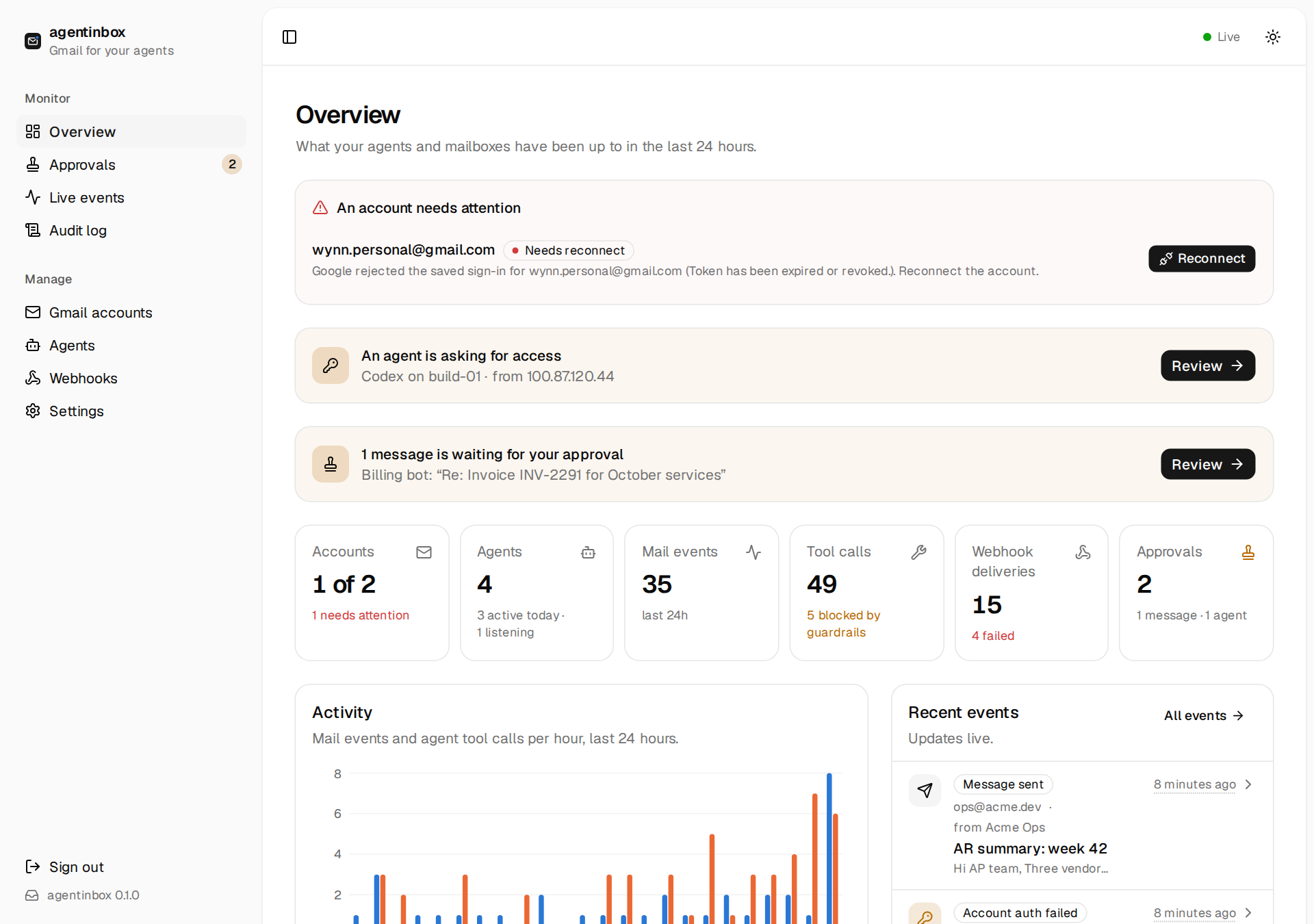
npx xaq-cli listen --recipe claude-code - Screenshots
License
Установить Agentinbox Cli в Claude Desktop, Claude Code, Cursor
unyly install agentinbox-cliСтавит в Claude Desktop, Claude Code, Cursor и VS Code — сам разбирается с npx, uvx и сборкой из исходников.
Впервые? Поставь CLI: curl -fsSL https://unyly.org/install | sh
Или настроить вручную
Выполни в терминале:
claude mcp add agentinbox-cli -- npx -y agentinbox-cliПошаговые гайды: как установить Agentinbox Cli
FAQ
Agentinbox Cli MCP бесплатный?
Да, Agentinbox Cli MCP бесплатный — установка в пару кликов через Unyly без оплаты.
Нужен ли API-ключ для Agentinbox Cli?
Нет, Agentinbox Cli работает без API-ключей и переменных окружения.
Agentinbox Cli — hosted или self-hosted?
Self-hosted: сервер запускается локально на твоей машине командой из раздела установки.
Как установить Agentinbox Cli в Claude Desktop, Claude Code или Cursor?
Открой Agentinbox Cli на unyly.org, выбери вкладку своего клиента (Claude Desktop, Claude Code, Cursor) и нажми Install — конфиг сгенерируется автоматически, без правки JSON.
Похожие MCP
Gmail
Read, send and search emails from Claude
 автор: Google
Slack
Send, search and summarize Slack messages
 автор: Slack
Runbear
No-code MCP client for team chat platforms, such as Slack, Microsoft Teams, and Discord.
Discord Server
A community discord server dedicated to MCP by [Frank Fiegel](https://github.com/punkpeye)
Klavis AI
Open Source MCP Infra. Hosted MCP servers and MCP clients on Slack and Discord.
Work90210/APIFold
Turn any REST API into a hosted MCP server, with ready-made public servers for GitHub, Stripe, Slack, OpenAI, Notion and more.
 автор: Work90210
arikusi/deepseek-mcp-server
DeepSeek AI chat and reasoning with multi-turn sessions, function calling, thinking mode and cost tracking.
 автор: arikusi
hashgraph-online/hashnet-mcp-js
Discover, register and chat with AI agents on the Hashgraph network via the Registry Broker.
 автор: hashgraph-online
profullstack/mcp-server
Developer utilities: SEO optimization, document conversion, domain lookup, email validation, QR codes, weather data, social media posting and security scanning.
 автор: profullstack
WayStation-ai/mcp
Connect MCP hosts to apps such as Notion, Slack, Monday and Airtable.
 автор: waystation-ai
Compare Agentinbox Cli with
Не уверен что выбрать?
Найди свой стек за 60 секунд
Автор?
Embed-бейдж для README
Похожее
Все в категории communication