
Ai Orders Agent
БесплатноНе проверенEnables querying and filtering a read-only dataset of AI-related court orders with full-text search, facets, and record retrieval via MCP, OpenAPI, or REST endp

Описание
Enables querying and filtering a read-only dataset of AI-related court orders with full-text search, facets, and record retrieval via MCP, OpenAPI, or REST endpoints.
README
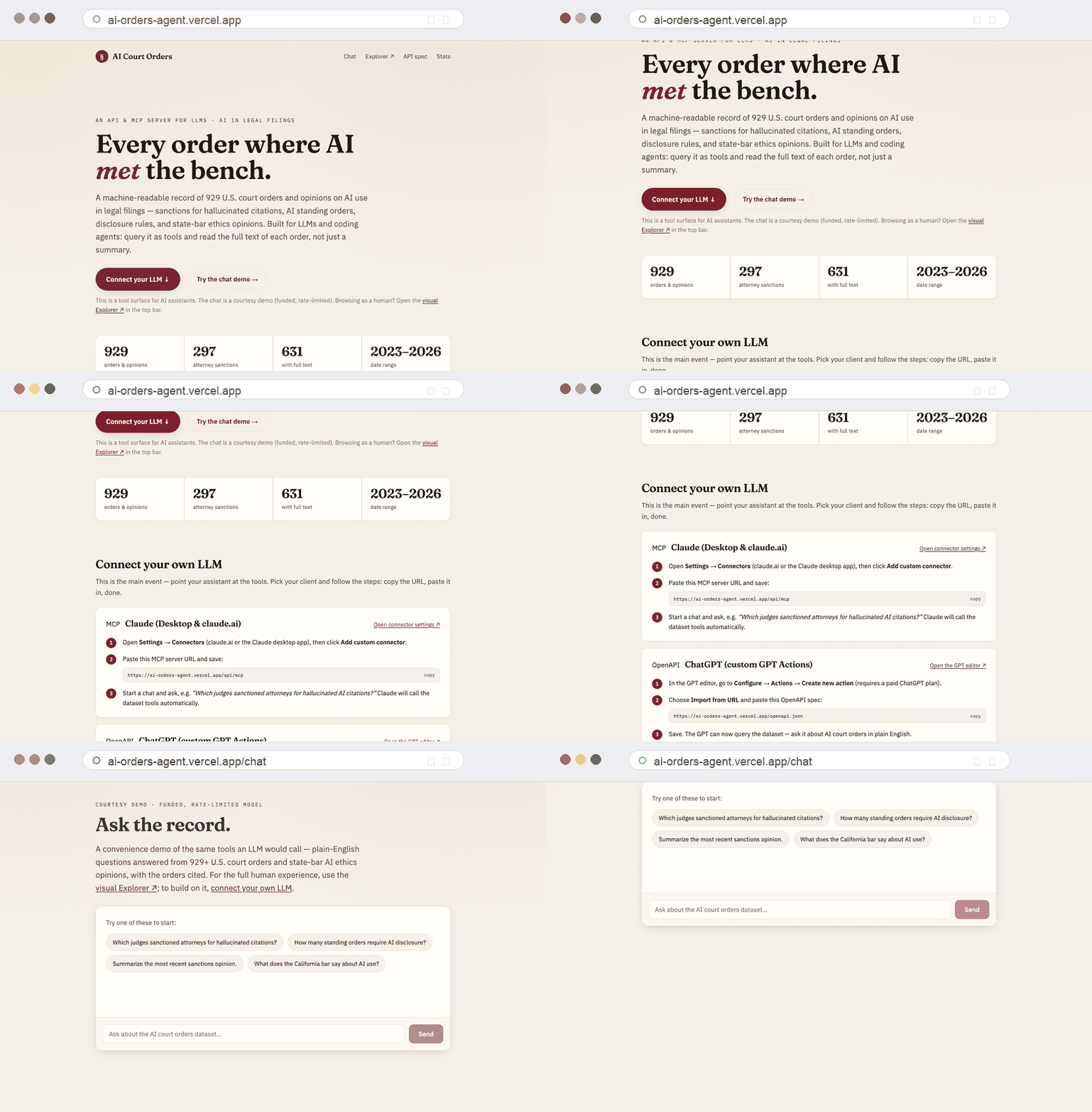
*The live deployment at ai-orders-agent.vercel.app.*
Agent-facing service for the AI Court Orders dataset — one Vercel project that exposes the same queries four ways:
- Chat (
/chat) — a hosted chat UI; ask in plain English, no setup. A funded, rate-limited LLM (OpenRouter DeepSeek by default) answers by calling the dataset tools (see Chat below). - MCP (
/api/mcp) — add as a custom connector in Claude Desktop / claude.ai, or any MCP client. - OpenAPI (
/openapi.json) — import into a ChatGPT GPT (Actions) or any function-calling LLM. - REST/JSON (
/api/*) — call directly from code or the browser.
It is read-only and stateless: it live-fetches the dataset the AI-orders-explorer repo publishes (that repo owns the data pipeline, the human web explorer, and the Claude-Code skill — this one is purely the agent surface) and caches it in memory.
Data source
Set ORDERS_DATA_BASE to where the dataset (explorer_data.json and
bar_opinions.json) is published. Defaults to the live published copy at
https://legalhack.io/data (943 records). See .env.example.
Endpoints
GET /api/search?q=&<filters>&limit=&full=&count= |
full-text search + filters |
GET /api/list?<filters> |
filter without a text query |
GET /api/record/{id} · GET /api/pdf/{id} |
one record · its PDF/links |
GET /api/facets?field=&limit=&all=&<filters> |
distinct values + counts (honors all search/list filters) |
GET /api/stats · GET /api/bar?state= |
summary · state-bar opinions |
GET /api/mcp · GET /openapi.json |
MCP endpoint · OpenAPI spec |
GET /chat · POST /api/chat |
hosted chat UI · streaming chat backend |
Filters (search/list/facets): judge (title-insensitive), court (alias-aware: sdny/S.D.N.Y./full name),
state, type, consequence, ai_type, applies_to (multi-value), source, jurisdiction,
tag, requires, date_from, date_to, has_pdf, has_link.
requires=<key> matches records whose reqs[key] is set — disclose (~128), certify_if_ai (~106),
verify, prohibited, certify_all, proprietary — answering "which courts require AI disclosure / a
certification?". Because facets honors every filter, facets?field=court&consequence=sanctions_attorney
ranks courts by attorney-sanction count and facets?field=court&requires=disclose ranks them by disclosure
requirements. The compact projection includes summary.
Chat
/chat is a streaming chat UI. The backend (POST /api/chat) runs a bounded
tool-calling loop: an LLM answers questions by calling the same dataset
operations the MCP/REST surfaces use (tool definitions are shared via
lib/tools.ts, so the surfaces never drift). It is read-only — the tools only
search and read the public dataset.
Provider. Default is OpenRouter (CHAT_PROVIDER=openrouter) on a cheap
DeepSeek model. Set CHAT_PROVIDER=anthropic or openai to switch; each reads
its own server-only key. Keys never reach the browser.
Rate limiting. The funded path is protected by three independent limits —
per-IP burst, per-IP daily cap, and a global daily kill-switch — backed by
Upstash Redis. Set UPSTASH_REDIS_REST_URL and
UPSTASH_REDIS_REST_TOKEN for the public deploy. Without Upstash, limiting
falls back to a best-effort in-memory limiter that is not durable across Vercel
invocations — fine for local dev, not safe for a public funded endpoint.
See .env.example for all chat/rate-limit variables.
Run / deploy
npm install
npm run dev        # http://localhost:3000  (try /chat, /api/stats, /openapi.json, /api/mcp)
npm test           # query-logic parity tests
vercel deploy      # or push to a Vercel-connected GitHub repo
Connect it
- Claude (Desktop or claude.ai): add a custom connector pointing at
https://<your-deploy>/api/mcp. - ChatGPT: create a GPT → Actions → import
https://<your-deploy>/openapi.json. - Other LLMs / code: call the REST endpoints, or use the OpenAPI spec for function-calling.
Query behavior (court aliasing, title-insensitive judge match, multi-value
applies_to, facet placeholder handling) mirrors the explorer's orders CLI.
License
MIT — see LICENSE.
Установка Ai Orders Agent
У этого сервера нет опубликованного пакета — он собирается из исходников. Открой репозиторий и следуй инструкции в README.
▸ github.com/legalrealist/ai-orders-agentFAQ
Ai Orders Agent MCP бесплатный?
Да, Ai Orders Agent MCP бесплатный — установка в пару кликов через Unyly без оплаты.
Нужен ли API-ключ для Ai Orders Agent?
Нет, Ai Orders Agent работает без API-ключей и переменных окружения.
Ai Orders Agent — hosted или self-hosted?
Доступен hosted-вариант: Unyly запускает сервер в облаке, локальная установка не обязательна.
Как установить Ai Orders Agent в Claude Desktop, Claude Code или Cursor?
Открой Ai Orders Agent на unyly.org, выбери вкладку своего клиента (Claude Desktop, Claude Code, Cursor) и нажми Install — конфиг сгенерируется автоматически, без правки JSON.
Похожие MCP
Fetch
Web content fetching and conversion for efficient LLM usage.
AWS KB Retrieval
Retrieval from AWS Knowledge Base using Bedrock Agent Runtime.
 автор: modelcontextprotocol
Spring AI MCP Server
Provides auto-configuration for setting up an MCP server in Spring Boot applications.
llm-analysis-assistant
A very streamlined mcp client that supports calling and monitoring stdio/sse/streamableHttp, and can also view request responses through the /logs page. It also
 автор: xuzexin-hz
Compare Ai Orders Agent with
Не уверен что выбрать?
Найди свой стек за 60 секунд
Автор?
Embed-бейдж для README
Похожее
Все в категории ai