
AI Session Bridge
БесплатноНе проверенProvides cross-tool access to AI conversation history from VS Code Copilot, Cursor, and Rovodev sessions by scanning workspace storage directories and parsing d

Описание
Provides cross-tool access to AI conversation history from VS Code Copilot, Cursor, and Rovodev sessions by scanning workspace storage directories and parsing different session formats to enable conversation continuity and search across previous sessions.
README
Cross-tool AI conversation history reader. Enables any AI coding agent to access conversation history from other AI tools in the same workspace.
Python License: MIT Tests codecov
Overview
AI Session Bridge is an MCP (Model Context Protocol) server and CLI that allows AI coding assistants to read conversation history from multiple tools. Instead of starting fresh every time you switch between VS Code Copilot, Cursor, or Rovodev, your AI agents can now access the full context of what you've been working on.
┌─────────────────────────────────────────────────────────────────────┐
│                         Your Workspace                               │
│  /Users/you/dev/my-project                                          │
└─────────────────────────────────────────────────────────────────────┘
                                    │
            ┌───────────────┬───────┼───────┬───────────────┐
            ▼               ▼       ▼       ▼
    ┌───────────┐   ┌───────────┐  ┌───────────┐
    │ Copilot   │   │ Cursor    │  │ Rovodev   │
    │ Sessions  │   │ Sessions  │  │ Sessions  │
    └─────┬─────┘   └─────┬─────┘  └─────┬─────┘
          └───────────────┴───────┬───────┴───────
                                  ▼
                  ┌───────────────────────────┐
                  │   ai-session-bridge       │
                  │   MCP Server + CLI        │
                  │                           │
                  │  Tools:                   │
                  │  - list_sessions          │
                  │  - get_session            │
                  │  - search_sessions        │
                  │  - get_recent_context     │
                  └───────────────────────────┘
Features
- 📚 Unified Session Reading: Read conversations from VS Code Copilot, Cursor, and Rovodev
- 🔍 Full-Text Search: Fast search across all conversations using SQLite FTS5
- 🚀 MCP Server: Expose session history via Model Context Protocol
- 💻 CLI Tool: List, search, and export sessions from the command line
- 🔒 Security: Automatic filtering of API keys, secrets, and sensitive data
- ⚡ Performance: Smart caching and indexing for instant access
- 🎯 Workspace-Aware: Automatically matches sessions to your current workspace
Screenshots
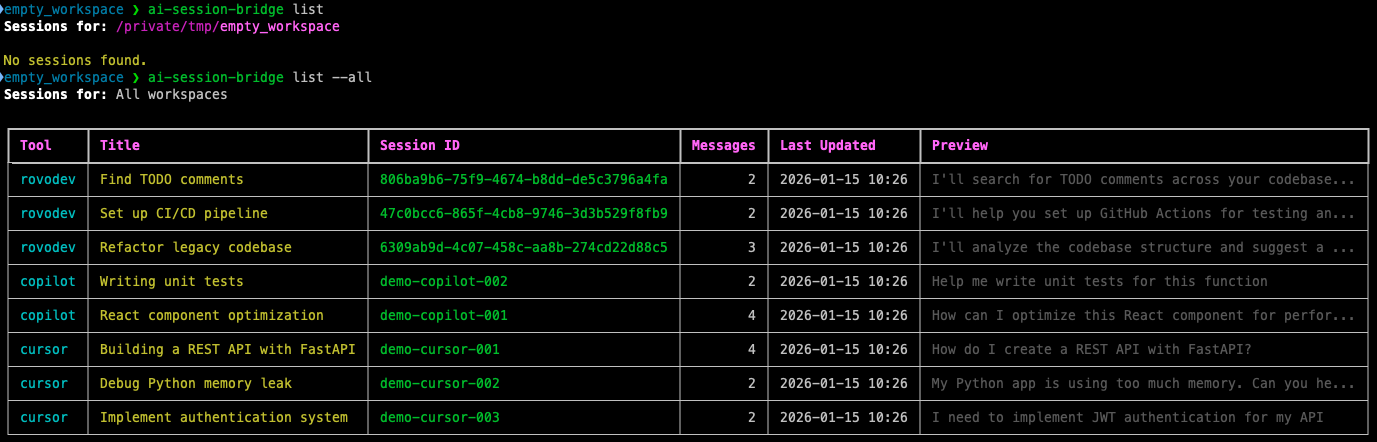
List Sessions Across All Tools
View all your AI conversations in a clean, organized table format:
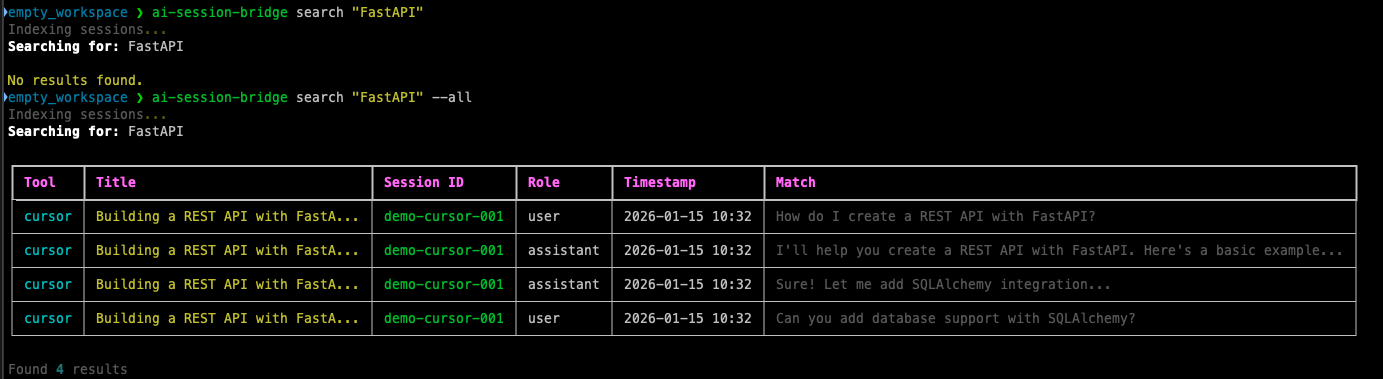
Workspace-Aware Search
Search respects your current workspace - find exactly what you need:
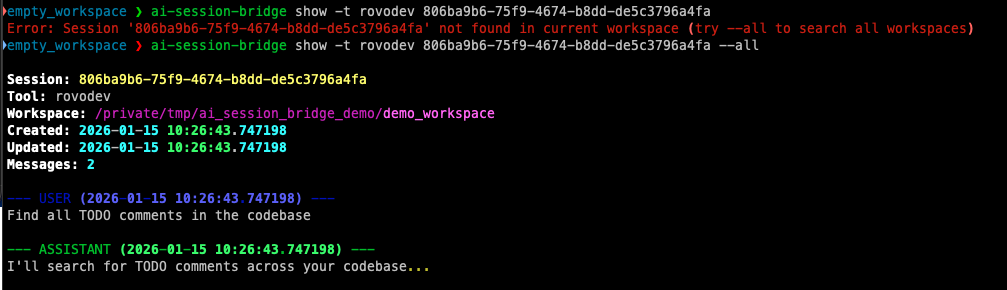
Session Details
View full conversation history with proper formatting:
Installation
Production Use (Recommended)
Using pipx (isolated, globally available):
git clone https://github.com/frknyldz/ai-session-bridge
cd ai-session-bridge
pipx install .
This installs ai-session-bridge globally while keeping it isolated from your system Python.
From PyPI (when published):
pipx install ai-session-bridge
Development Setup
Quick Setup (automated):
git clone https://github.com/frknyldz/ai-session-bridge
cd ai-session-bridge
./setup.sh
The setup script will:
- ✅ Create a virtual environment
- ✅ Install all dependencies (editable mode)
- ✅ Set up pre-commit hooks
- ✅ Create config directories
- ✅ Test the installation
- ✅ Show both venv and pipx installation options
Manual Setup:
git clone https://github.com/frknyldz/ai-session-bridge
cd ai-session-bridge
python3 -m venv venv
source venv/bin/activate
pip install -e ".[dev]"
Quick Start
CLI Usage
# List recent sessions
ai-session-bridge list

# List sessions with filters
ai-session-bridge list --tool copilot --limit 5

# Show full conversation
ai-session-bridge show <session-id> --tool copilot

# Search across all sessions
ai-session-bridge search "bug fix"

# Clear cache
ai-session-bridge cache clear
MCP Server
Add to your AI tool's MCP configuration:
If you installed with pipx (recommended):
VS Code Copilot (settings.json):
{
  "servers": {
    "ai-session-bridge": {
      "command": "/Users/YOUR_USERNAME/.local/bin/ai-session-bridge",
      "args": ["serve"]
    }
  }
}
Cursor/Rovodev (~/.config/mcp/mcp.json):
{
  "mcpServers": {
    "ai-session-bridge": {
      "command": "/Users/YOUR_USERNAME/.local/bin/ai-session-bridge",
      "args": ["serve"]
    }
  }
}
If you're using venv (development):
Use the full path to your venv binary:
{
  "mcpServers": {
    "ai-session-bridge": {
      "command": "/absolute/path/to/ai-session-bridge/venv/bin/ai-session-bridge",
      "args": ["serve"]
    }
  }
}
Tip: Run
./setup.shand it will show you the exact path to use!
After PyPI Release:
Use uvx to automatically download and run:
{
  "mcpServers": {
    "ai-session-bridge": {
      "command": "uvx",
      "args": ["ai-session-bridge", "serve"]
    }
  }
}
MCP Tools
Once configured, your AI assistant will have access to these tools:
list_sessions
List all AI sessions for the current workspace.
{
  "workspace_path": "/path/to/workspace",
  "tool_filter": ["copilot", "rovodev"],
  "limit": 10
}
get_session
Get the complete conversation from a specific session.
{
  "session_id": "abc123",
  "tool": "copilot",
  "workspace_path": "/path/to/workspace"
}
search_sessions
Search for keywords across all sessions.
{
  "query": "authentication bug",
  "workspace_path": "/path/to/workspace",
  "limit": 20
}
get_recent_context
Get summarized context from recent sessions (useful for "continue where I left off").
{
  "workspace_path": "/path/to/workspace",
  "max_sessions": 3,
  "max_messages": 20
}
Configuration
Create ~/.config/ai-session-bridge/config.yaml:
# Scope: which sessions to include
scope:
  mode: current_workspace  # current_workspace, all_workspaces, specified
  workspaces: []  # Only used if mode is "specified"

# Which tools to read from
tools:
  copilot: true
  cursor: true
  rovodev: true

# Cache settings
cache:
  enabled: true
  max_age_days: 30

# Search index
search:
  enabled: true
  use_fts: true  # Use SQLite FTS5 for fast search

# Security: filter sensitive content
filtering:
  enabled: true
  patterns:
    - "(?i)(api[_-]?key|apikey)[\"']?\\s*[:=]\\s*[\"']?[a-zA-Z0-9_-]{20,}"
    - "(?i)(secret|password|token)[\"']?\\s*[:=]\\s*[\"']?[^\\s\"']{8,}"
  replacement: "[REDACTED]"

# MCP server settings
mcp:
  max_context_messages: 50
  max_context_sessions: 5
Supported Tools
| Tool | Location | Format | Status |
|---|---|---|---|
| VS Code Copilot | ~/Library/Application Support/Code/User/workspaceStorage/{hash}/chatSessions/*.json |
copilot_v3 |
✅ Supported |
| Cursor | ~/Library/Application Support/Cursor/User/globalStorage/state.vscdb (new)~/Library/Application Support/Cursor/User/workspaceStorage/{hash}/state.vscdb (old) |
SQLite | ✅ Supported |
| Rovodev | ~/.rovodev/sessions/{uuid}/ |
rovodev_v1 |
✅ Supported |
How It Works
Session Discovery
- VS Code Copilot: Scans workspace directories and reads
workspace.jsonfiles to match workspace paths - Cursor: Reads from global SQLite database (
state.vscdb) containing Composer conversations - Rovodev: Reads workspace_path from metadata.json in each session file
Caching & Performance
- Session Cache: Stores metadata to avoid re-parsing unchanged files
- Search Index: SQLite FTS5 for instant full-text search
- Lazy Loading: Only loads full session content when needed
Security
Automatically filters:
- API keys and tokens
- Passwords and secrets
- Private keys
- AWS credentials
- GitHub/Slack tokens
Examples
Example 1: Continue Previous Work
User: "Continue where we left off"
AI uses get_recent_context to fetch the last few sessions and their messages, understanding what was being worked on.
Example 2: Find Related Discussions
User: "Did we discuss authentication in any previous conversations?"
AI uses search_sessions with query "authentication" to find relevant messages across all tools.
Example 3: Review Past Solution
User: "Show me the session where we fixed the database connection issue"
AI uses search_sessions to find the session, then get_session to retrieve the full conversation.
Development
# Clone repository
git clone https://github.com/frknyldz/ai-session-bridge
cd ai-session-bridge

# Install development dependencies
pip install -e ".[dev]"

# Install pre-commit hooks
pre-commit install

# Run tests
pytest

# Run linting
ruff check .

# Auto-fix linting issues
ruff check --fix .

# Format code
ruff format .
See CONTRIBUTING.md for detailed development guidelines.
Roadmap
- Session tagging and categorization
- Auto-summary using LLM
- Web UI for browsing sessions
- Session sync across machines
- Support for more AI tools (Continue, Windsurf, etc.)
- Export to various formats (PDF, HTML)
Contributing
Contributions are welcome! Please feel free to submit a Pull Request.
License
MIT License - see LICENSE for details.
Author
Furkan Yıldız
Acknowledgments
- Inspired by the need for better context continuity across AI tools
- Built on the Model Context Protocol
Установка AI Session Bridge
У этого сервера нет опубликованного пакета — он собирается из исходников. Открой репозиторий и следуй инструкции в README.
▸ github.com/frknyldz/ai-session-bridgeFAQ
AI Session Bridge MCP бесплатный?
Да, AI Session Bridge MCP бесплатный — установка в пару кликов через Unyly без оплаты.
Нужен ли API-ключ для AI Session Bridge?
Нет, AI Session Bridge работает без API-ключей и переменных окружения.
AI Session Bridge — hosted или self-hosted?
Self-hosted: сервер запускается локально на твоей машине командой из раздела установки.
Как установить AI Session Bridge в Claude Desktop, Claude Code или Cursor?
Открой AI Session Bridge на unyly.org, выбери вкладку своего клиента (Claude Desktop, Claude Code, Cursor) и нажми Install — конфиг сгенерируется автоматически, без правки JSON.
Похожие MCP
GitHub
PRs, issues, code search, CI status
 автор: GitHub
Filesystem
Secure file operations with configurable access controls.
Memory
Knowledge graph-based persistent memory system.
Template MCP Server
A CLI tool to create a new Model Context Protocol server project with TypeScript support, dual transport options, and an extensible structure
 автор: mcpdotdirect
Compare AI Session Bridge with
Не уверен что выбрать?
Найди свой стек за 60 секунд
Автор?
Embed-бейдж для README
Похожее
Все в категории development