
Ai Spend Agent
БесплатноНе проверенYour AI spend in one view, in 90 seconds — local-first CLI for OpenAI, Anthropic, Cursor, Copilot + Claude Code/Codex session logs, with a ranked savings cut li

Описание
Your AI spend in one view, in 90 seconds — local-first CLI for OpenAI, Anthropic, Cursor, Copilot + Claude Code/Codex session logs, with a ranked savings cut list, and flags the tools your agent loads but never uses (dead context).
README
CI npm version MIT license node >=22
You don't know what AI cost you this month — and your provider won't tell you until the meter does.
npx aibill # short form — same CLI as `npx ai-spend-agent`
Half of what your AI agent loads, you pay for and never use. One run on a normal month surfaced $253 in agent spend — ~$61/mo of it pure waste: wrong-model calls, uncached repeats, oversized context loaded every turn. Numbers are illustrative; run the command to see yours, in 90 seconds, local-first, no signup.
If you use Claude Code or Codex, that one command reads the session logs already on your machine and shows your real usage — total dollars estimated at API-equivalent rates, where it goes by project, a ranked "where to cut" list, and a plan check (subscription vs pay-per-token — the math no provider shows you). Zero keys, zero signup, nothing leaves your laptop. Connect a provider's billing to turn those estimates into verified numbers.
No agent logs? You get a full demo on sample data instead. When you're ready, connect verified billing with an org admin/owner key (a few minutes, OpenAI / Anthropic self-serve).

Illustrative sample output — demo data, not real or verified spend. Regenerated
from the real CLI by scripts/record-demo.sh so it can't drift from the product.
Get started in 60 seconds
- Run it — nothing to install, configure, or sign up for:
npx ai-spend-agent - Read your number. If Claude Code or Codex logs exist on this machine, that's your real usage estimated at API-equivalent rates — by project, by model, with a ranked cut list and the plan check.
- (Optional, ~2 min) Connect verified billing with an org admin key:
ai-spend-agent connect openai/connect anthropic. Numbers move from estimated to verified. - Share the receipt:
ai-spend-agent report-cardwrites a redacted SVG- caption — no client, project, or user names ever leave redacted.
Who this is for
- You run a startup or freelance on AI tools and can't answer "what is AI actually costing me per month?" — because the answer is split across four dashboards and two subscriptions that have no dashboard at all.
- You live in Claude Code / Codex and just got moved onto metered credits (Copilot June 1, Claude agent credits June 15). Your burn rate is invisible until the meter stops you — unless you read your own logs.
- You lead a small team and need to know which project, model, or person the spend goes to before you set budgets — without buying a $500/mo enterprise FinOps seat.
- You run an agency and want per-client AI cost attribution (the
--group-by clientdimension exists for exactly this).
Why
AI billing changed in June 2026: Copilot moved to metered AI Credits (June 1), Claude plans split agent usage into separate credit pools (June 15). Most of that spend has no official API to monitor it — but it's sitting in logs on your machine, and your API spend is one admin key away. This tool puts all of it in one view and tells you what to cut.
What you get
- Headline number: total tracked spend across every source it can see.
- Where to cut: ranked, dollar-specific actions (move X calls to a cheaper model, batch offline work for the flat 50% discount, cache repeats, trim oversized context) with estimated $/mo savings.
- Dead context: the skills, subagents, and MCP servers your agent loads but never actually calls — counted from your real transcripts, with the utilization %. Where the token weight is measurable (skills/agents), it adds an honest, cache-aware $/mo; MCP servers are counted (schemas aren't readable from config) until you connect to size them.
- Plan check with real plan detection: your projected monthly usage at API
rates vs your actual subscription — the tool reads the plan your coding
agents already know locally (Claude Max tier, ChatGPT plan; read-only,
whitelisted fields, no account access) and tells you your value multiple
("you're on Max 5x: ~10× the plan price in usage") plus when usage runs past
your tier. Override with
--plan <id>if detection can't see your setup. - Drill-down:
--group-by source|model|client|project|agent|user|workspace|apiKey. - Shareable AI Receipt:
report-cardwrites a redacted SVG (no client/ project/user names) + a paste-ready caption. - Honest confidence labels: every number is tagged verified / estimated / detected_unverified / missing so you know how much to trust it.
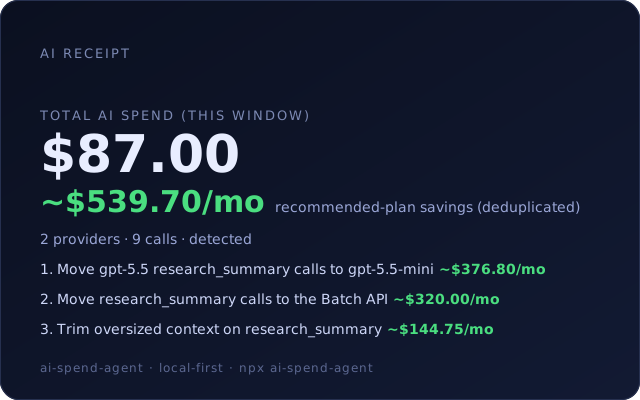
The shareable AI Receipt (report-card) — redacted SVG, demo data shown.
Estimated vs verified
Every number carries a confidence label so you never mistake an estimate for a bill:
| Label | What it means |
|---|---|
verified |
Real billing from a provider's cost API / export — the bill itself. |
estimated |
Priced from your local logs / token usage at published API rates. Your actual invoice can differ (discounts, subscriptions, rounding). |
detected_unverified |
A local signal was detected but not reconciled against billing. |
missing |
Usage exists but there's no cost basis to price it. |
Numbers read from your local Claude Code / Codex logs are always
estimated at API-equivalent rates — never verified. To get verified
numbers, connect a provider's billing with an admin/owner key (below); the tool
then reconciles your estimates against your real bills.
Data sources
| Source | What | Status |
|---|---|---|
| Claude Code logs (local) | Real session usage, priced at published API rates | ✅ Reads your machine's transcripts |
| Codex logs (local) | Real session usage, priced at published API rates | ✅ Reads your machine's rollouts |
| OpenAI Costs/Usage API | Admin-gated billing, per project/key | ✅ Implemented + mocked against live-shaped responses; admin-key reports welcome |
| Anthropic Cost Report + Claude Code Analytics | Admin-gated billing/usage, per workspace | ✅ Implemented + mocked against live-shaped responses; admin-key reports welcome |
| Cursor Admin API | Team spend (Business plan, team admin) | 🧪 Beta — built to the published API spec; live reports welcome |
| GitHub Copilot org APIs | Metrics + seats (org/billing admin) | 🧪 Beta — built to the published API spec; live reports welcome |
Connect verified billing
Provider cost APIs are admin/owner-gated, so connecting is a deliberate step:
ai-spend-agent connect openai          # ~2 min with an org-owner Admin key
ai-spend-agent connect anthropic       # ~2 min with an Admin key
ai-spend-agent connect cursor          # Cursor team-admin key (Business plan)
ai-spend-agent connect github-copilot  # GitHub billing-admin token
Credentials are referenced from your local environment (--auth-reference env:NAME) — the tool never stores or prints a raw key.
Commands
| Command | What it does |
|---|---|
| (no command) | Zero-key instant readout: your local agent logs if present, sample demo otherwise |
quickstart [--sample] |
Same readout; --sample forces demo data |
connect <provider> |
Connect a provider's cost data (admin-gated) |
sync-provider |
Pull verified cost via a local env: reference |
watch [--interval N] [--cycles N] |
Re-run on an interval, report deltas + anomalies (cron-friendly) |
report [--out <name>] |
Generate local Markdown + HTML reports |
report-card [--sample] |
Your AI Receipt — redacted shareable SVG + caption |
scan [--path <dir>] |
Scan a local workspace for AI usage signals |
doctor |
Check local runtime and safety posture |
Run ai-spend-agent --help for the full list.
Use it inside Cursor / Claude Desktop (MCP)
The same engine ships as a Model Context Protocol server, so your AI editor can read your spend directly. See docs/MCP.md.
Privacy & trust
- Local-first. Analysis happens on your machine; nothing is uploaded. No telemetry, ever.
- No raw secrets. Keys are referenced from your environment and redacted from all output and persisted state.
- Estimates labeled as estimates. Log-derived numbers use published API
rates and are always tagged
estimated. OpenAI and Anthropic cost-report numbers areverified; Copilot seat-price reconciliation and the beta Cursor connector are honestly taggedestimateduntil reconciled against a real invoice.
Open-core
The CLI and MCP server are MIT-licensed and free, forever. A hosted tier is in development for what local-first can't do: continuous monitoring while your laptop is off, burn-rate alerts before you hit Claude/Copilot/Cursor credit caps, history and trends, and white-label client reports. It syncs only derived aggregates — never raw keys or line items.
Join the hosted beta waitlist →
Run from source
git clone https://github.com/futurastudio/ai-spend-agent
cd ai-spend-agent
npm install
npm run build
node packages/cli/dist/index.js
Requires Node.js >= 22.
License
MIT © Futura Studio LLC
Установить Ai Spend Agent в Claude Desktop, Claude Code, Cursor
unyly install ai-spend-agentСтавит в Claude Desktop, Claude Code, Cursor и VS Code — сам разбирается с npx, uvx и сборкой из исходников.
Впервые? Поставь CLI: curl -fsSL https://unyly.org/install | sh
Или настроить вручную
Выполни в терминале:
claude mcp add ai-spend-agent -- npx -y ai-spend-agentFAQ
Ai Spend Agent MCP бесплатный?
Да, Ai Spend Agent MCP бесплатный — установка в пару кликов через Unyly без оплаты.
Нужен ли API-ключ для Ai Spend Agent?
Нет, Ai Spend Agent работает без API-ключей и переменных окружения.
Ai Spend Agent — hosted или self-hosted?
Self-hosted: сервер запускается локально на твоей машине командой из раздела установки.
Как установить Ai Spend Agent в Claude Desktop, Claude Code или Cursor?
Открой Ai Spend Agent на unyly.org, выбери вкладку своего клиента (Claude Desktop, Claude Code, Cursor) и нажми Install — конфиг сгенерируется автоматически, без правки JSON.
Похожие MCP
GitHub
PRs, issues, code search, CI status
 автор: GitHub
Filesystem
Secure file operations with configurable access controls.
Memory
Knowledge graph-based persistent memory system.
Template MCP Server
A CLI tool to create a new Model Context Protocol server project with TypeScript support, dual transport options, and an extensible structure
 автор: mcpdotdirect
Compare Ai Spend Agent with
Не уверен что выбрать?
Найди свой стек за 60 секунд
Автор?
Embed-бейдж для README
Похожее
Все в категории development