
AllBrain
БесплатноНе проверенA multi-agent workflow orchestration server with a global SQLite event store, supporting DAG-based task execution, conflict resolution, and intent extraction.

Описание
A multi-agent workflow orchestration server with a global SQLite event store, supporting DAG-based task execution, conflict resolution, and intent extraction.
README
One brain. Many agents. One shared memory.






Without AllBrain vs with AllBrain
| Scenario | Without AllBrain | With AllBrain |
|---|---|---|
| Agent A saves a plan | Written to local chat history, immediately lost when session ends | Appended to shared event store via save_event() |
| Agent B starts the same project | Fresh context — no knowledge of Agent A's work | resume_project() returns full event history |
| Two agents write conflicting changes | Silent overwrite, no one knows | detect_conflicts() surfaces both versions |
| Handoff between agents | Manual copy-paste of context | list_events() with agent filter shows handoff trail |
| Debugging state drift | "It worked in my session" | Deterministic replay from raw events, exactly reproducible |
The problem
Your AI coding agents don't talk to each other. Agent A saves a plan, Agent B starts fresh, Agent C has no idea what happened. Each agent works in isolation, repeating mistakes and missing context.
AllBrain gives every agent a shared workbench. Each tool call is recorded in an append-only event store. When the next agent arrives, it sees everything that happened before — events, sessions, conflicts, decisions — and picks up cleanly.
What AllBrain gives you
- Shared memory —
save_event,list_events,resume_projectacross any MCP client - Agent attribution — every event is tagged with the agent that wrote it
- Conflict detection — automatic surface of conflicting state updates
- Decision pipelines — counterfactual reasoning, scenario planning, foresight
- Deterministic replay — rebuild project state from raw events
- 50 tools in full profile across 18 domain modules (start with 3, enable more as needed)
30-second demo
# Agent A: save a plan
uv run allbrain start --project . --agent agent-a
# In Agent A's client, call:
#   save_event(type="task_planned", payload={"task": "implement auth"})
# Agent B: see what Agent A did
uv run allbrain start --project . --agent agent-b
# In Agent B's client, call:
#   list_events()
#   resume_project()
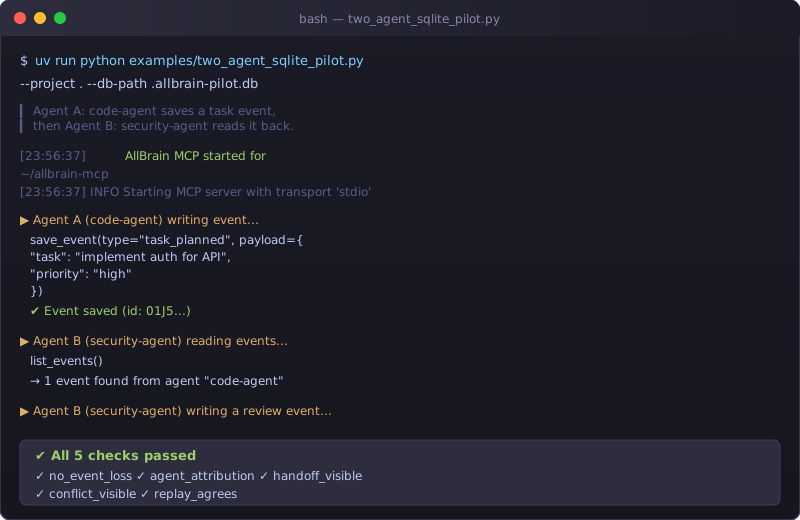
See examples/two_agent_sqlite_pilot.py for a full two-agent workflow with conflict detection and replay verification.
Install for one client
The PyPI distribution is allbrain-agent-runtime. The canonical CLI command is
allbrain; allbrain-mcp and allbrain-agent-runtime remain compatibility
aliases for existing installations and scripts.
uvx allbrain-agent-runtime install --codex
This configures Codex to start AllBrain automatically. Replace --codex with the client name:
| Client | Flag |
|---|---|
| Codex | --codex |
| Claude Code | --claude |
| OpenCode | --opencode |
| Cursor | --cursor |
| VS Code | --vscode |
| Zed | --zed |
| Gemini CLI | --gemini |
| Kiro | --kiro |
| Windsurf | --windsurf |
| Antigravity | --antigravity |
| Claude Desktop | --claude-desktop |
Use --all to configure every supported client at once.
Verify it works
uvx allbrain-agent-runtime install --codex --verify
The --verify flag starts the server, saves a test event, reads it back, and confirms shared memory is working.
Tool profiles
Start with --tool-profile minimal (3 tools) and expand when needed:
| Profile | Tools | Use when |
|---|---|---|
minimal |
save_event, list_events, resume_project | Getting started |
memory |
minimal + retrieve_memory | Need recall |
collaboration |
memory + task/conflict/resolution tools | Multi-agent handoff |
reasoning |
memory + decision pipeline tools | Planning and analysis |
core |
save_event, list_events, retrieve_memory, git_info, create_task, get_task_graph, orchestrate_project, run_decision_pipeline, create_snapshot, resume_project | Essential workflow |
full |
50 tools | Everything |
uv run allbrain start --project . --agent my-agent --tool-profile memory
Glama MCP Portal
Glama MCP evaluates this server with the balanced core tool profile
(--tool-profile core in glama.json). Its 10 public tools cover shared
memory, task orchestration, snapshots, Git context, and decision workflows
without exposing the entire development surface.
Yerel geliştirme veya tüm yetenekleri kullanmak için full profili kullanın:
uv run allbrain start --project . --agent claude-code --tool-profile full
Alternatif olarak .mcp.json (varsayılan full ile gelir) kullanılabilir.
From source
git clone https://github.com/Mustafa-Ali-Ertugrul/allbrain-mcp.git
cd allbrain-mcp
uv sync
./scripts/install-mcp.sh --all --isolate --verify
Or run the guided onboarding wizard:
uv run allbrain onboard
It walks you through client selection, install, verification, and your first event step by step.
See the full setup guide for manual config, troubleshooting, and shared-vs-isolated databases.
First memory save
Once AllBrain is installed and the client is restarted, call:
save_event(type="task_started", payload={"task": "implement auth", "agent": "codex"})
Then verify it was recorded:
list_events()
Switch to another client, call list_events() again — the same event appears.
Tool count and supported clients
Note: Glama evaluates the balanced 10-tool
coreprofile. The full profile remains available for local development.
- 50 tools in the full MCP profile across 18 domain tool modules
- Default profile (
full) registers all tools minimalprofile: 3 tools (save_event,list_events,resume_project)coreprofile: 10 tools (essential workflow + reasoning)
Data lifecycle and security
AllBrain stores events, sessions, and audit logs in local SQLite. Data never leaves your machine. Credential-like values are redacted before storage.
- Data lifecycle — what is stored, retention, cleanup, restore
- Uninstall guide — remove AllBrain from clients and delete data
Advanced docs
- Full setup guide — all clients, shared vs isolated databases, troubleshooting
- Custom agent integration — use AllBrain from any MCP client
- Python SDK — typed async client (experimental)
- Architecture — event sourcing, reducers, stream ordering
- Storage backends — SQLite vs PostgreSQL vs queue adapters
- Multi-agent pilot — two-agent workflow walkthrough
- Upgrade guide — migrations, rollback, breaking changes
- Community examples — real user setups, terminal output, workflows
Status
- 2567 tests collected
- stdio MCP handshake verified
- Python 3.12+ (CI at 3.13)
- Coverage: 80.72% (enforced threshold 80%)
Установка AllBrain
У этого сервера нет опубликованного пакета — он собирается из исходников. Открой репозиторий и следуй инструкции в README.
▸ github.com/Mustafa-Ali-Ertugrul/allbrain-mcpFAQ
AllBrain MCP бесплатный?
Да, AllBrain MCP бесплатный — установка в пару кликов через Unyly без оплаты.
Нужен ли API-ключ для AllBrain?
Нет, AllBrain работает без API-ключей и переменных окружения.
AllBrain — hosted или self-hosted?
Self-hosted: сервер запускается локально на твоей машине командой из раздела установки.
Как установить AllBrain в Claude Desktop, Claude Code или Cursor?
Открой AllBrain на unyly.org, выбери вкладку своего клиента (Claude Desktop, Claude Code, Cursor) и нажми Install — конфиг сгенерируется автоматически, без правки JSON.
Похожие MCP
wenb1n-dev/SmartDB_MCP
A universal database MCP server supporting simultaneous connections to multiple databases. It provides tools for database operations, health analysis, SQL optim
 автор: wenb1n-dev
Postgres Server
This server enables interaction with PostgreSQL databases through the Model Context Protocol, optimized for the AWS Bedrock AgentCore Runtime. It provides tools
 автор: madhurprash
Postgres
Query your database in natural language
 автор: Anthropic
PostgreSQL
Read-only database access with schema inspection.
автор: modelcontextprotocolCompare AllBrain with
Не уверен что выбрать?
Найди свой стек за 60 секунд
Автор?
Embed-бейдж для README
Похожее
Все в категории data